• 开源镜像
  • 开源沙龙
  • 媛宝
  • 猿帅
  • 注册
  • 登录
  • 息壤开源生活方式平台
  • 加入我们

开源日报

  • 开源日报第428期:《幻灯片 fusuma》

    17 5 月, 2019
    开源日报 每天推荐一个 GitHub 优质开源项目和一篇精选英文科技或编程文章原文,坚持阅读《开源日报》,保持每日学习的好习惯。
    今日推荐开源项目:《幻灯片 fusuma》
    今日推荐英文原文:《When to loop? When to recurse?》

    今日推荐开源项目:《幻灯片 fusuma》传送门:GitHub链接
    推荐理由:简单方便的使用 Markdown 创造幻灯片。你只需要写好想要作为幻灯片展示的 Markdown 并按照顺序整理好目录结构,再写好需要的 CSS 文件之后,这个项目就能够让你简单的使用浏览器展示它们,或者是把它整体导出为一个 pdf 文件。不管怎么说,它都能让你在需要把 Markdown 作为幻灯片展示的时候省下不少功夫。
    今日推荐英文原文:《When to loop? When to recurse?》作者:Faith Chikwekwe
    原文链接:https://medium.com/@faith.chikwekwe/when-to-loop-when-to-recurse-b786ad8977de
    推荐理由:递归可以做循环能做的工作,也能做循环不能做的工作,只有在需要的时候,才应该使用递归——最起码给别人看代码的时候,循环看起来比较好懂。

    When to loop? When to recurse?


    Well known Google joke featuring recursion

    Cracking the Coding Interview states that “All recursive algorithms can [also] be implemented iteratively…” in its section on approaching technical interview problems using recursion.

    Solving a Python problem iteratively might include using a for or while loop. These are some of the most common tools used for incremental problem solving in any coding language. Loops are great because a lot of the time, their implementation is intuitive and straightforward.

    However, there are times when iterative solutions can turn into barely readable nightmares.

    Trying to write highly nested and complicated code on a whiteboard with an interviewer’s inquisitive gaze inspecting your work can be a surefire way to trip yourself up in a technical interview.

    While switching from looping to recursion will not always make your code better, it is a great tool to have in your toolbox.

    For a while, I was afraid of learning recursion. Upon learning that problems with a recursive solution inevitably have an iterative one as well, I was fixated on trying to solve every technical problem with loops.

    However, as my technical interview skills grew, I encountered many LeetCode and HackerRank problems that cried out for recursion with their complexity. It was time to broaden the tools at my disposal.

    What are Loops?


    Diagram of a for loop and a while loop.

    A loop is used to perform a repetitive block of code as many times as necessary for the program.
    for name in name_list: # we go over every name in the list
      name = name.title() # we change every name 
    counter += 1 # each time, we add 1 more to the counter
    
    For loops, like the one in the example above iterate over a sequence. We generally use for loops when we know how many times we need to execute a block of code. In the above example, we only need to do lines 2 and 3 for the number of names in name_list.

    We might also need to loop for an undetermined number of times or until a certain condition is met. This might be a good time to use a while loop.
    def length(self):
        """Return the length of this linked list by traversing its nodes."""
        node_count = 0 # initial count is zero
        current = self.head # start at the head
    
        # Loop through all nodes 
        while current is not None:
            current = current.next
            # add one to the counter each time
            node_count += 1
        # return the total length
    return node_count
    
    One way to return the length of a non-iterable Linked List might involve using a while loop to traverse all nodes like in the example above.

    Okay, so what is Recursion?


    Image from https://medium.com/@williambdale/recursion-the-pros-and-cons-76d32d75973a

    A big difference between recursion and iteration is the way that they end. While a loop executes the block of code, checking each time to see if it is at the end of the sequence, there is no such sequential end for recursive code.

    Like the horrifying Winnie the Pooh comic above, a recursive function could go on forever without a condition to put it out of its misery.
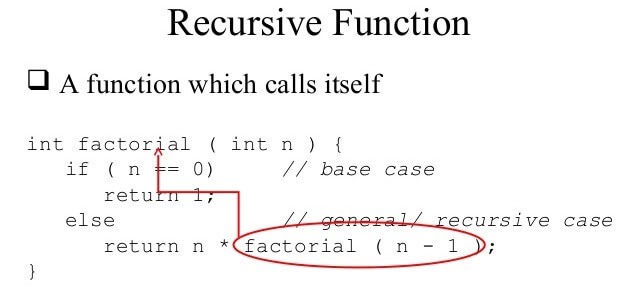
    Showing the base case and the recursive call in a recursive function on the factorial example. Image from https://www.slideshare.net/alhazmy13/data-structures-part5-recursion

    A recursive function like the one above consists of two parts: the recursive call and the base case.

    The base case (or bases cases sometimes) is the condition that checks to see if we have gotten the information that we need out of our function. Every recursive function should have at least one base case, though there may be multiple.

    In the factorial example above, we have reached the end of our necessary recursive calls when we get to the number 0.

    The recursive call as you may have suspected is when the function calls itself adding to the recursive call stack.

    Stacks are LIFO (Last In First Out) objects meaning that the last item that was added to the top of the stack is the first one to be removed from the stack later on.


    Diagram from https://medium.com/@charlie.b.ohara/recursion-revealed-f8543e4dad1c

    When Should I Use Recursion?

    Recursion is made for solving problems that can be broken down into smaller, repetitive problems. It is especially good for working on things that have many possible branches, and are too complex for an iterative approach.

    One good example of this would be searching through a file system. When you start at the root folder, and then you could search through all the files and folders within that one. After that you would enter each folder and search through each folder inside of that.
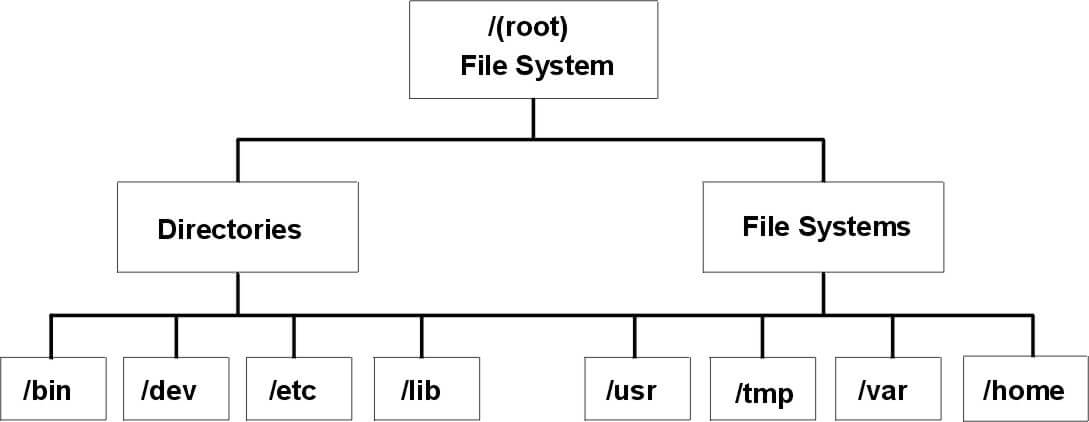

    Recursion works well for this type of structure, because you can search multiple branching paths without having to include many different checks and conditions for every possibility.

    For those of your who are familiar with data structures, you might notice that the image above of the file system looks a lot like a tree structure.

    Trees and graphs are another time when recursion is the best and easiest way to do traversal.

    Should I Always Use Recursion?

    Recursion seems really useful! Maybe I should use it all the time?

    Well, like anything recursion is best in doses. Recursion is a useful tool, but it can increase memory usage.

    So let’s go back to the factorial call stack image from above. Every time we add a new call to the stack, we are increasing the amount of memory that we are using. If we are analyzing the algorithm using Big O notation, then we might note that this increases our space complexity.

    There are times when we might want to pay this cost in order to get a short, useful algorithm, like when we are traversing a tree. But there are other times, when there may be better, more efficient ways of solving this problem.

    For many small projects, the call stack won’t hamper you program very much. However, once your program starts making many recursive calls, then you might want to consider the potential impact of your large call stack.

    Stack of Books. Photo by John-Mark Smith on Unsplash

    Another thing to consider is that understanding and reading your code might sometimes be easier to do in an iterative solution.

    Using recursion is great because it takes many of the incremental sub problems out of your hands.

    But when you are try to fully understand the sub problems that you are solving and how they are being solved, it might be worth implementing an iterative solution. If this is not a feasible route, then at the very least diagram the recursive process undertaken by your code to deepen your knowledge.
    下载开源日报APP:https://opensourcedaily.org/2579/
    加入我们:https://opensourcedaily.org/about/join/
    关注我们:https://opensourcedaily.org/about/love/

  • 开源日报第427期:《俄罗斯方块 react-tetris》

    16 5 月, 2019
    开源日报 每天推荐一个 GitHub 优质开源项目和一篇精选英文科技或编程文章原文,坚持阅读《开源日报》,保持每日学习的好习惯。
    今日推荐开源项目:《俄罗斯方块 react-tetris》
    今日推荐英文原文:《Microsoft Failed Developers — and Now It Has a Plan to Win Them Back》

    今日推荐开源项目:《俄罗斯方块 react-tetris》传送门:GitHub链接
    推荐理由:相信大家或多或少小时候都玩过俄罗斯方块吧,把各种方块堆起来凑一行来消除从而得分的简单游戏,最起码小时候是这样想的。现在的俄罗斯方块已经有了各种各样的玩法——甚至可以玩吃鸡(Tetris99),还有包括 T-spin 这样以前几乎没怎么想过的高端技巧……扯远了,这个项目是一个 React 实现的俄罗斯方块游戏,在移动端和 PC 都能运行。借此机会用俄罗斯方块来作为打发碎片时间的休闲方式虽然很不错,但是要想磨练出技巧还是需要一定的功夫的,不要玩着玩着把工作给忘了才好。
    今日推荐英文原文:《Microsoft Failed Developers — and Now It Has a Plan to Win Them Back》作者:Owen Williams
    原文链接:https://onezero.medium.com/microsoft-failed-developers-and-now-it-has-a-plan-to-win-them-back-ecdafde5b20
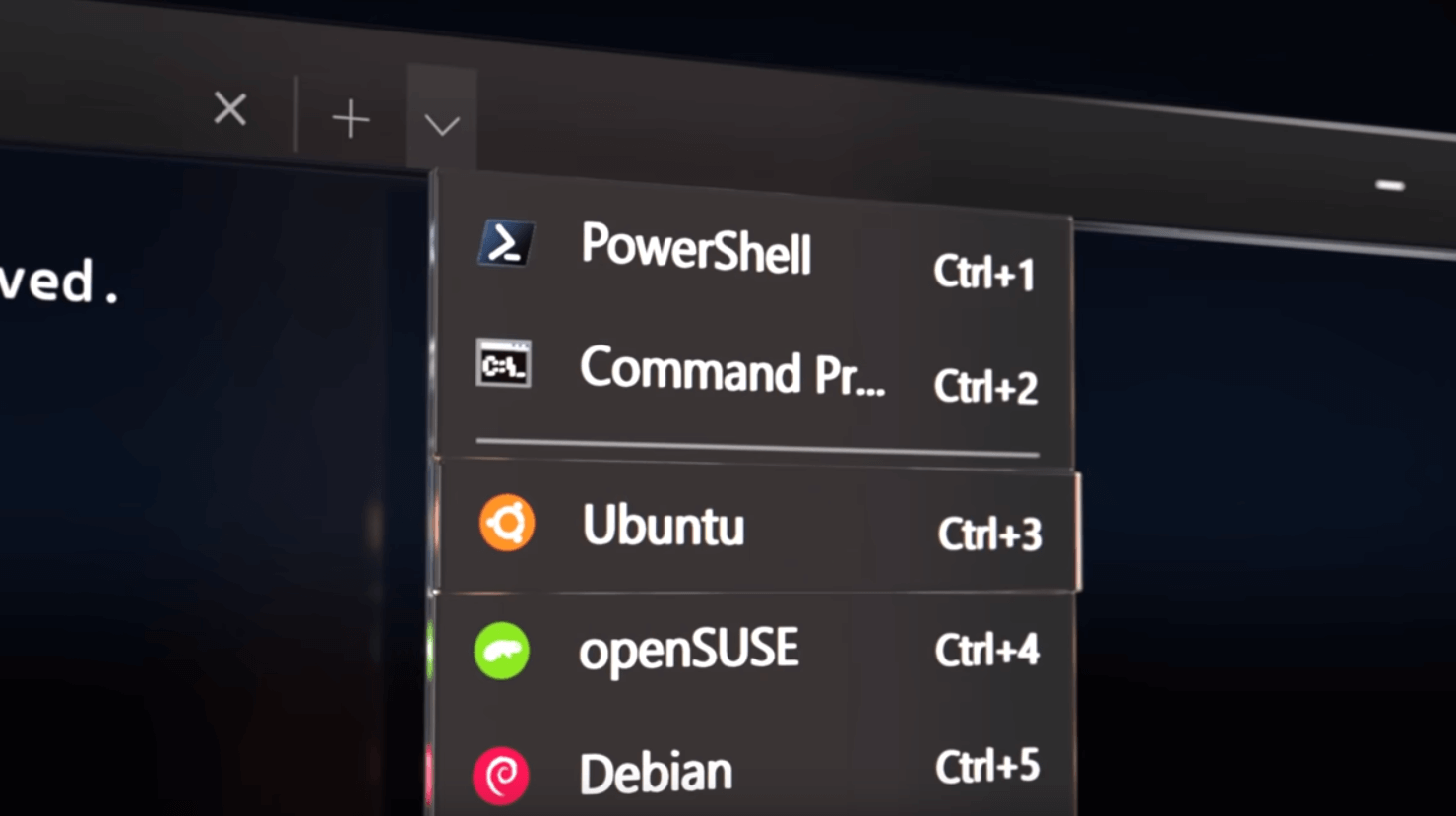
    推荐理由:微软决定将 Linux 混入自家的 Windows 中来让更多程序员使用自家系统。

    Microsoft Failed Developers — and Now It Has a Plan to Win Them Back

    you walked into any coffee shop in San Francisco five years ago, you would’ve been hard-pressed to find a single Windows laptop in a sea of glowing Apple logos. The MacBook was the default for startup culture — not just because of its sleek looks, but because the device was so great at web development.

    Over the last few years, Microsoft has tried to flip the narrative and win coders back. Last week, its master plan culminated in a major announcement: Microsoft will include Linux as part of the Windows 10 operating system, starting this summer.

    Hell has officially frozen over. This would have seemed impossible just a few years ago — but this is the new Microsoft. Years of hard work to redefine its business may finally pay off as developers are finally able to access a slate of modern tools to do their work on Windows.

    The seeds for all of this were planted some time ago. Microsoft has technically included a form of Linux in Windows since 2016, when it announced a technology called “Bash on Windows” that makes it possible to run Linux apps, like the popular Node.js server, as if they were on a full Linux computer.

    Bash wasn’t quite a full experience, though. It technically “virtualized” software that wasn’t running natively — with quirks that simply wouldn’t appear if you ran the same programs on a Mac.

    That should be solved when Microsoft brings the Linux kernel to Windows later this year. Developers will now be able to easily switch from their Mac or Linux computer, because rather than virtualizing the software through a handcrafted layer, Linux will fully exist within Windows. And that might be the key for Microsoft to worm its way back into those coffee shops.

    How Microsoft missed a generation of the web

    The problems for Microsoft began when it completely missed a shift in the way people build web apps. Over the last decade, developers around the world have turned to new web development languages like Node.js and Ruby on Rails. As that shift happened, it became increasingly difficult to be a web developer on a PC.

    The people behind new coding languages — like David Heinemeier Hansson, who created the popular Ruby on Rails technology — exclusively used Apple’s OS X, which made it difficult, or outright impossible, to develop for those languages on Windows. The issues snowballed as developers moved from Microsoft-created, paid technologies like the SQL Server to free tools like MySQL, which run natively on Linux or macOS. Windows users were, in essence, iced out.

    As the world shifted to open-source software, a revolution arrived in the form of hundreds of millions of free, easy-to-install pieces of code available through tools like the npm package manager. Npm allows JavaScript developers to search a huge library for specific functions — like “sort numbers by date” — and find a drop-in solution that’s already made, solving problems without requiring anyone to write a new line of code.

    Linux options within Windows. Credit: Microsoft

    Package managers, which are now used by over 90% of JavaScript developers according to some estimates, drastically reduce the amount of time and money it takes for developers to implement an idea in code. Alongside the rise of the package managers, front-end development frameworks — like Angular, React, Vue, and others — exploded in popularity, which led to more problems for Windows users.

    The tools needed to build and run Node-based web apps, for example, were sometimes only partially functional on Windows, if they worked at all. To get npm and Node running correctly was a complicated task that drove developers to near insanity. None of the people who created the most relevant development tools did so on a Windows machine.

    Complicating this further, while anyone can easily install Windows on a Mac via Boot Camp, Apple doesn’t allow OS X to be installed on any third-party hardware. That meant Windows-based developers were forced to either install open-source Linux operating systems on their machines or use slow, “virtual” servers on top of their existing computer to get work done.

    Turning the tide

    While Windows still dominated market share at big companies — and probably your office — it was widely considered a terrible platform for this new wave of web development, and startups refused to use it.

    Microsoft, looking for new ways to make money after Windows 10 became a free update, focused heavily on cloud hosting and enterprise with a service called Azure, which allows developers to host servers, or even just their own code, in Microsoft data centers around the world.

    The company made another appeal to developers when it revealed an open-source development tool, Visual Studio Code, in 2015. Not only was it incredibly fast and infinitely customizable, it was also entirely free. The tool was embraced by surprised developers, and is now the most popular coding app in the world, with more than 50% of coders using it.
    Microsoft has, in the space of just a few years, completely redefined itself as a company that cares about developers.
    Microsoft truly opened the floodgates in 2016. It released Bash on Windows, that first crack at Linux, it open-sourced the .NET programming language, and it announced that it had acquired the popular cross-platform coding framework Xamarin for millions of dollars. Later, Microsoft gobbled up GitHub, the most popular open-source platform, abandoned efforts to build its own browser engine in favor of Chrome, and even open-sourced the Windows calculator. Hey, why not?

    All of this is to say that Microsoft has, in the space of just a few years, completely redefined itself as a company that cares about developers. The announcement that it will ship Linux in Windows is the coup de grace, because it’s the component that will bring the entire thing together.

    Native Linux on Windows makes it so straightforward for developers to consider switching for the first time that thousands will probably try it again (after writing the operating system off a decade ago). Given that Microsoft has already captured the attention of millions of developers who use tools like Visual Studio Code, it won’t have to do much work to convince them.

    The timing couldn’t be more perfect: Apple has recently paid zero attention to fostering its developer ecosystem on macOS, focusing instead on getting people to build iOS apps.

    Combined with the ongoing MacBook keyboard disaster, developers are looking beyond the Mac for the first time when they need to buy a new laptop. Windows machines finally look like a viable, even superior option for once.

    It’s somewhat ironic that Microsoft may win developers back to Windows by integrating another operating system, Linux, but it’s a smart move: Choice is good. If you’re still skeptical, that’s fair enough given the company’s past. But you can’t deny that Microsoft has, year after year, shown that it’s willing to shed its skin to build something new.

    I’m a web developer, too, so when my MacBook Pro keyboard broke, I switched from macOS to Windows. It was much more difficult to make the move back then, and friends in the industry were skeptical it would work out. I’m still using my PC, and two years in, as Linux finally arrives, I can finally say that my workflow is better here than it would be anywhere else.
    下载开源日报APP:https://opensourcedaily.org/2579/
    加入我们:https://opensourcedaily.org/about/join/
    关注我们:https://opensourcedaily.org/about/love/
  • 开源日报第426期:《更快捷 PowerToys》

    15 5 月, 2019
    开源日报 每天推荐一个 GitHub 优质开源项目和一篇精选英文科技或编程文章原文,坚持阅读《开源日报》,保持每日学习的好习惯。
    今日推荐开源项目:《更快捷 PowerToys》
    今日推荐英文原文:《Three Easy Ways to Improve Web Performance》

    今日推荐开源项目:《更快捷 PowerToys》传送门:GitHub链接
    推荐理由:即将在 Window 上推出的功能增强程序,帮助用户更快捷的使用这个系统。简单的说就是加入了诸如 Windows 键弹出快捷方式一览这样能够简化操作的功能,第一个预览版将在今年夏天发布,可以期待一下加入快捷操作之后能够为日常工作带来的便利了。
    今日推荐英文原文:《Three Easy Ways to Improve Web Performance》作者:Rachel Lum
    原文链接:https://medium.com/@lumrachele/three-easy-ways-to-improve-web-performance-f9ca7e5caf32
    推荐理由:如何在 Web 页面的加载上提高用户体验

    Three Easy Ways to Improve Web Performance


    JavaScript Download and Execution Cost

    I attended a meetup a couple of weeks ago and learned about some of the incredible Google Dev Tools available for use via Google Chrome extensions, the command line, or Node modules. So far I have used Google Lighthouse, which runs audits on a web page and generates a report in performance, accessibility, PWA, and more. It also provides specific details as to what factors played into a particular score, as well as clear suggestions with documentation for how the score could be improved.

    Prior to one of my interviews, I ran Google Lighthouse on the company’s website to check out their performance (I heard that doing this has the potential to score you extra brownie points). Turns out they scored a 27 out of a possible 100 in website performance, which brings them into the red zone. Big OOF!

    The main culprits:
    • Main-thread work
    • JavaScript execution time
    • Enormous network payloads
    “JavaScript gets parsed and compiled on the main thread. When the main thread is busy, the page can’t respond to user input. […] JavaScript is also executed on the main thread. ”
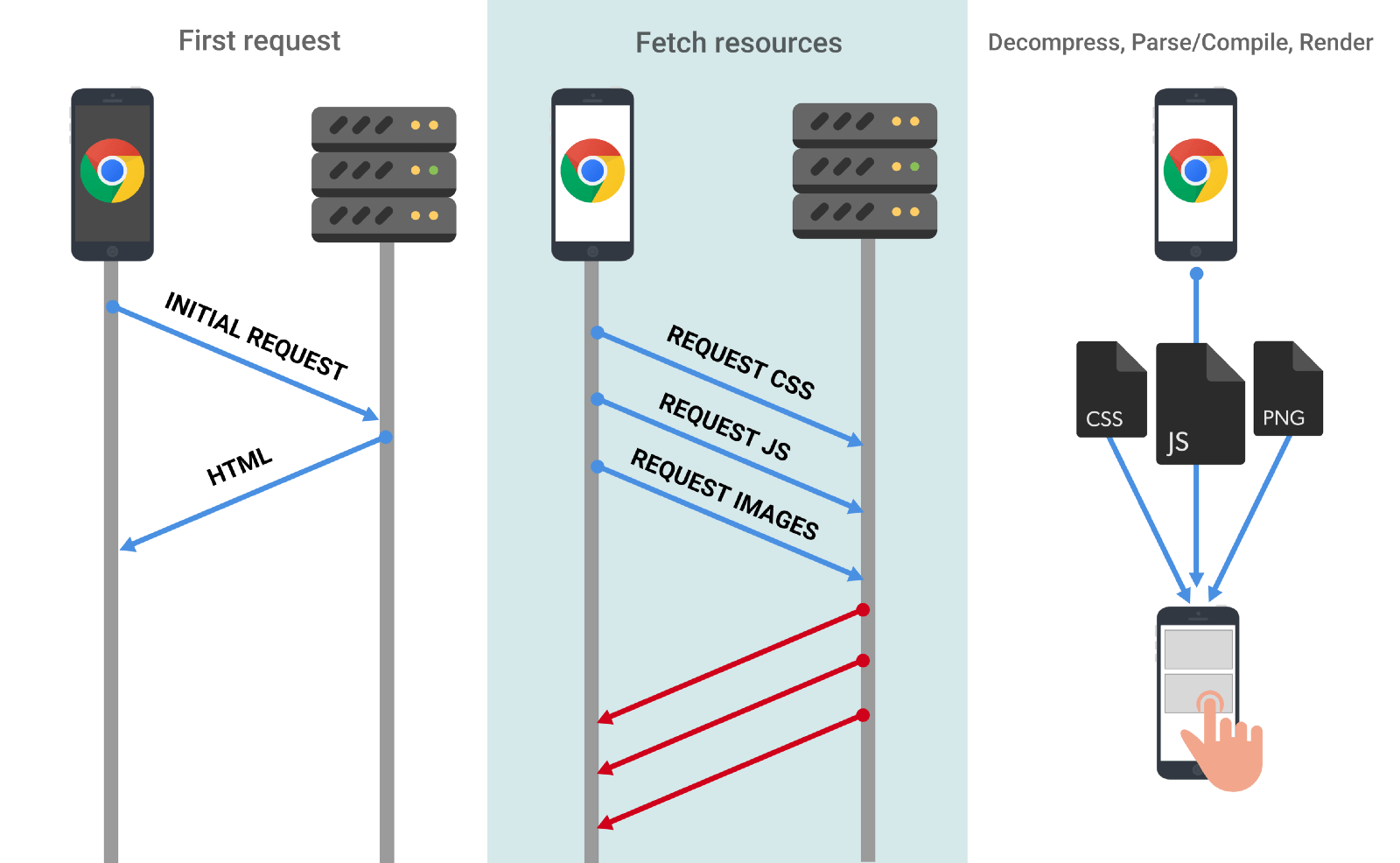
    According to the Google Lighthouse report, the main-thread work added an additional whopping 10.2 seconds to the load time. This time includes parsing, compiling, and executing JavaScript. Additionally, the site carried a network payload of 4327 KB — definitely not optimal. The larger the amount of JavaScript, the longer the download times, the bigger the network cost, and unfortunately, the more unpleasant the user experience.

    So in what ways can we reduce the size and time of main-thread work?

    Code Splitting


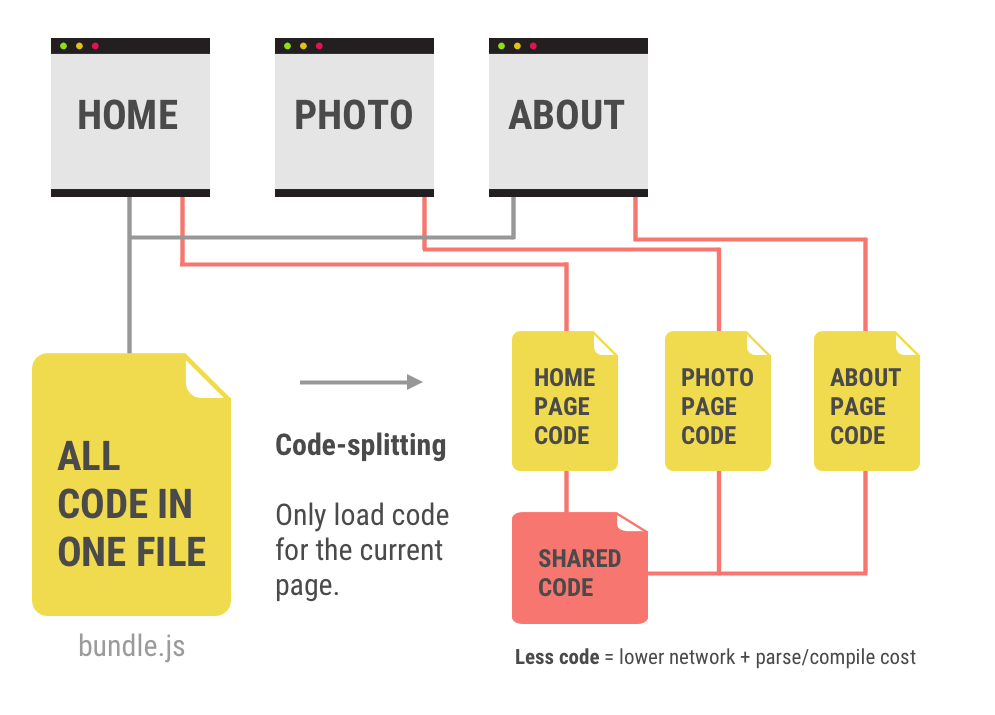
    If you try to eat a whole sandwich all at once, it will probably take you longer to eat than if you take one small bite at a time and digest each bite in sequence. Similarly, if you deliver all of your JavaScript in one massive heap, it is going to take a long time for the compiler to first read all of that code, and then process all of that code in the execution environment to render the web page. Code-splitting is a simple way to deliver JavaScript in smaller packages such that it can speed up the parsing and compiling time, then ship each package to the execution environment. With smaller chunks of JavaScript, you can reduce load time and improve web performance.

    Three different ways of code-splitting:
    • Vendor splitting is separating anything in your code that you can consider a “dependency” or a third party source into a separate folder, conventionally “/vendor”. If there are any changes made to your app code or vendor code, they can be handled separately without disrupting the other.
    • Entry point splitting is recommended for applications that are not distinctly set up with server side routing and client side routing. This means splitting code upon the initial build of a dependency by tools like webpack.
    • Dynamic splitting is recommended for single page applications wherever dynamic “import()” statements are used.
    It may seem like an ordeal to reconstruct your entire code base to implement code-splitting, but the good news is that there are plenty of tools available for automatic code splitting (Preact CLI, PWA Starter Kit, etc.). But if you are working on a smaller feature, project, or just starting out, know that manual code-splitting is supported by React, Vue, and Angular.

    PRPL

    • Push critical resources for the initial URL route.
    • Render initial route.
    • Pre-cache remaining routes.
    • Lazy-load and create remaining routes on demand.
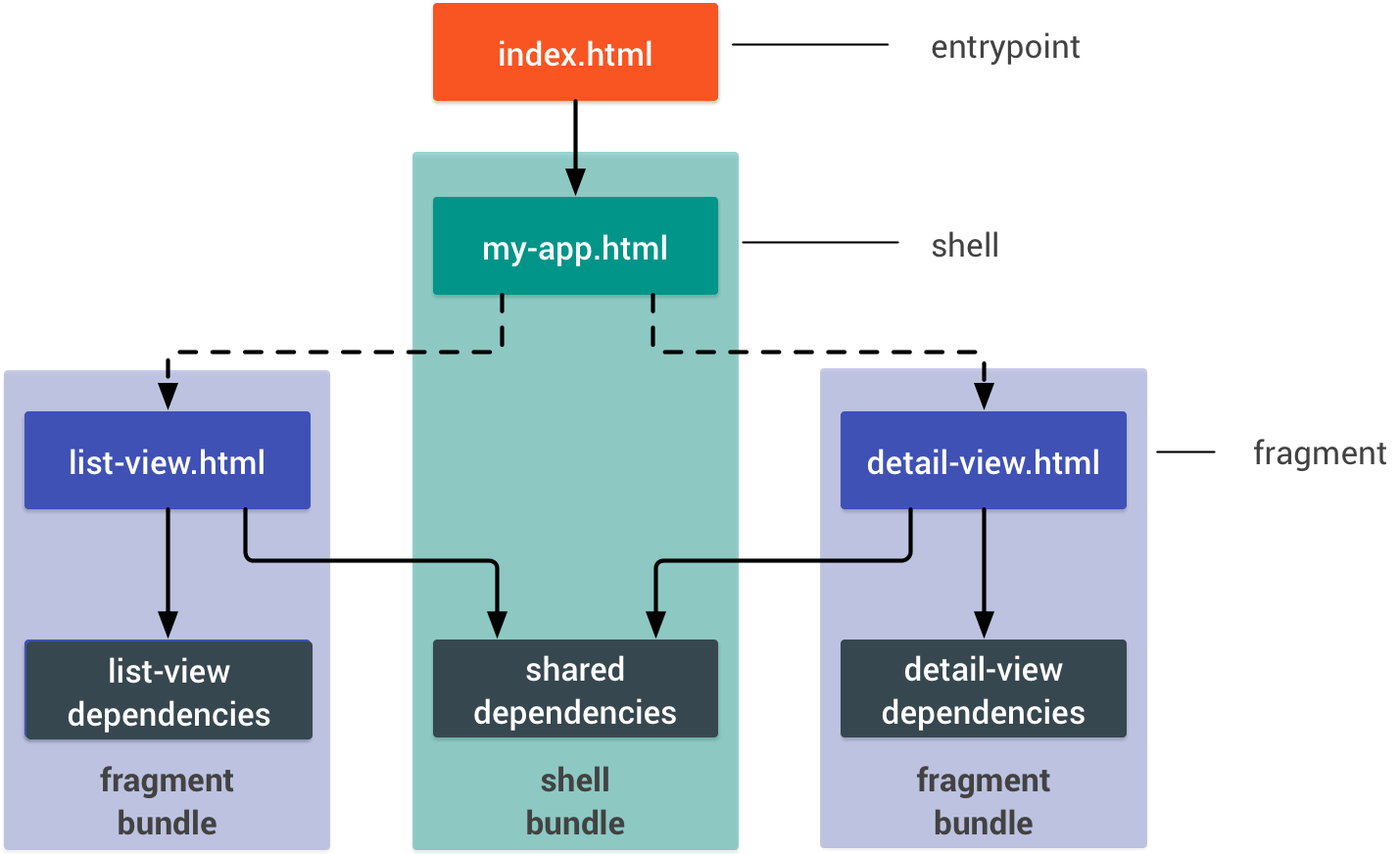
    It is good practice to construct your code’s architecture such that you first send the minimal amount of code needed to display the page. Essentially, first send the skeleton, and deliver the muscles, organs, and clothes later (I’m sorry, it’s late, these similes come as they are). This will significantly improve your time to interactivity. Developers devised the PRPL pattern, namely for progressive web apps, for keeping load time and memory usage to a minimum for the mobile web.

    The Google documentation explains PRPL effectively and efficiently, but to give you a quick rundown, PRPL is best used with the following app structure:
    • the entry point: index.html — should be considerably small to minimize RAM usage
    • the shell: top level app-logic, routing, main UI, static dependencies
    • fragments: anything not immediately visible at DOM Content Loaded. This is where lazy-loading comes into play.
    You could also customize your unbundled build process and make use of HTTP/2 Push or link rel=”preload” to indicate which code snippets are essential to the skeleton framework. Where those features are not supported, you can bundle your build process into shell and fragment bundles.

    Other ways of reducing payload include minifying JS, HTML, and CSS by using compressors, using text compression such as GZIP, and choosing optimal image file types and compression levels.

    Lazy Loading


    Upon scrolling into the viewport, a placeholder image is first shown and quickly replaced with the actual image

    Lazy loading is simply what it sounds like — it will be ready to load, but at a later time when you need it. A quick way to save data and processing time is by deferring any resources until they come into the viewport. For images, you can use event handlers such as “scroll” or “resize”, but on more modern browsers, the intersection observer API is available for use.

    In both cases, you are specifying some kind of indicator to let the code know when a resource is in the viewport. You can declare a “lazy” image url, and the actual image url, simply by giving your image tag a class of “lazy”; for background images for divs, use classes “.lazy-background” and “.lazy-background.visible”. As expected, these lazy loading libraries exist to help accelerate the implementation of lazy loading, so you do not have to thoroughly investigate what goes on behind the scenes. Don’t you love how developers help make developers’ lives easier?

    Conclusion

    The PRPL pattern is the golden standard especially for mobile development to minimize network payload and efficiently organize your code architecture. It pretty much implies that one should apply code-splitting and lazy loading for best practice. Code-splitting is wonderful for breaking up your code into manageable pieces for the execution environment to handle, thus decluttering the main-thread work. Lazy loading can save memory and reduce load time by calling upon fragments of resources, especially media file types, only when they are needed. With these three simple implementations, you can significantly reduce your time to interactivity, and therefore create a much better user experience.
    • Only send the code that your users need.
    • Minify your code.
    • Compress your code.
    • Remove unused code.
    • Cache your code to reduce network trips.
    • — developers.google.com

    下载开源日报APP:https://opensourcedaily.org/2579/
    加入我们:https://opensourcedaily.org/about/join/
    关注我们:https://opensourcedaily.org/about/love/

  • 开源日报第425期:《简单漂亮 cssfx》

    14 5 月, 2019
    开源日报 每天推荐一个 GitHub 优质开源项目和一篇精选英文科技或编程文章原文,坚持阅读《开源日报》,保持每日学习的好习惯。
    今日推荐开源项目:《简单漂亮 cssfx》
    今日推荐英文原文:《How Popular is JavaScript in 2019?》

    今日推荐开源项目:《简单漂亮 cssfx》传送门:GitHub链接
    推荐理由:一组简单漂亮的 CSS 样式集合,不需要其他样式库的支持,你可以很简单的在网页上就预览到它们的效果——和复制它们。实际上作为一个测试自己 CSS 实力的方式这样很不错,把自己能够做出的好用的样式一一摆出来,兴许能够看到新的样式组合的可能性,之后要复用这些样式也会很方便。
    今日推荐英文原文:《How Popular is JavaScript in 2019?》作者:Eric Elliott
    原文链接:https://medium.com/javascript-scene/how-popular-is-javascript-in-2019-823712f7c4b1
    推荐理由:不得不承认,JS 的确很流行

    How Popular is JavaScript in 2019?

    When people ask me what language they should learn, I tell them to start with JavaScript. Why? JavaScript is the standard programming language of the web, and the software you write with JavaScript will be usable by everybody.
    Software ate the world, the web ate software, and JavaScript ate the web.
    This is enough for me. I want to write software that anyone can use, and virtually everyone who has an internet connected device with a screen can use apps written in JavaScript.

    There are lots of ways to rank programming languages. A handful of indexes dominate Google for the search term “programming languge index”. Pick your favorite. Those indexes rank JavaScript #7, #3, and #1, respectively.

    No matter where it falls in your favorite ranking, JavaScript is a top contender in real-world usage. I frequently argue that it’s the most used programming language in the world. What I mean by that is that more programmers write JavaScript than any other programming language in the world. If you piled all the source code written in the last decade into piles, JavaScript would be the biggest pile.

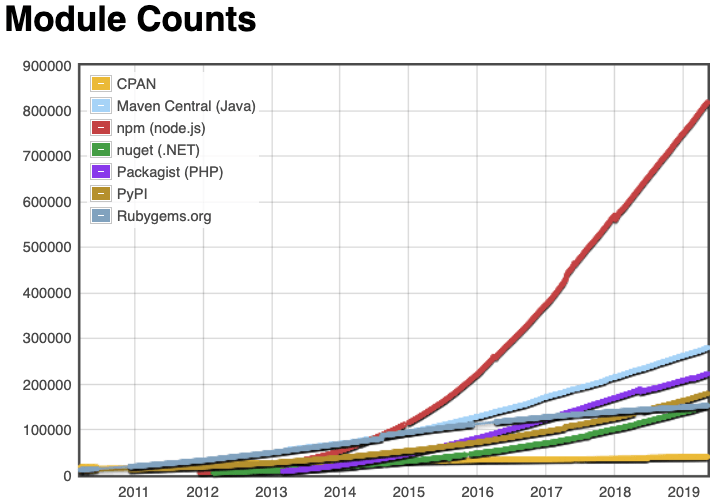
    This is reflected in the number of packages available in programming languages package repositories. JavaScript’s standard package manager has more packages than Java and PHP combined:

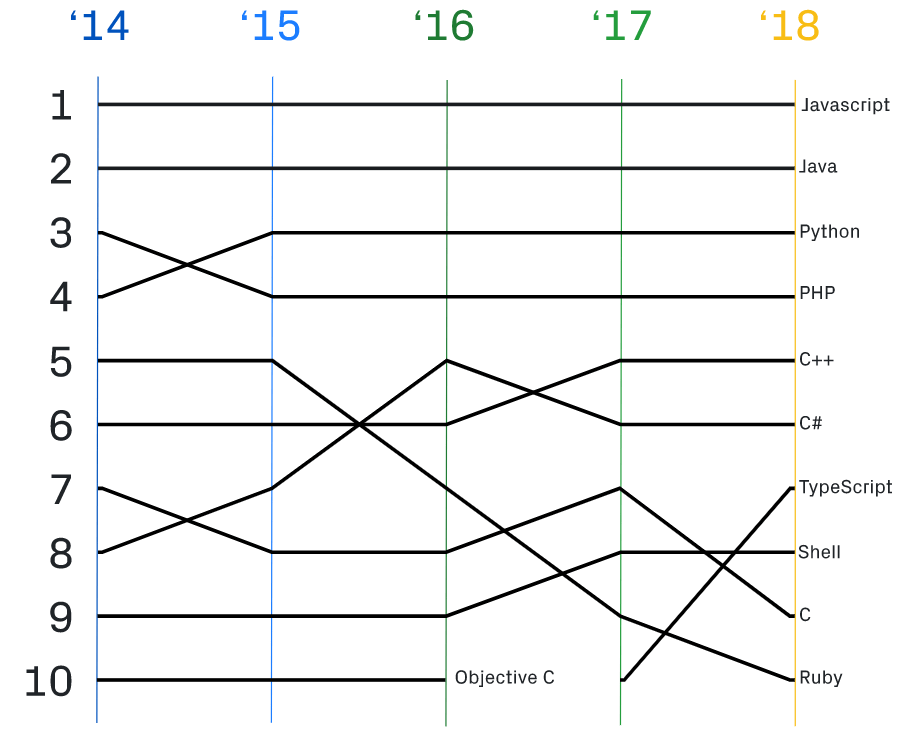
    This trend is also reflected on GitHub:

    GitHub Top Languages Over Time

    But don’t these other languages have better standard libraries? Wouldn’t that cause a lot more packages to be needed for JavaScript? Sure. Absolutely. I’ll give you that. And that might account for a few thousand packages. But we’re not talking about a few thousand. There are over 800,000 packages on npm, most of them available for open source use in your applications. Clearly, there’s a lot more to this dominance than the quality of the standard library.

    Let’s corroborate this with some more data. As I mentioned, JavaScript is the standard programming language of the web, and the web is the most used computing platform ever built.

    There are over 1.6 billion web sites in the world, and JavaScript is used on 95% of them (1.52 billion web sites with JavaScript). By virtue of this fact, virtually every computing device in use today runs JavaScript, including iPhones, Android phones, Apple Mac OS, Microsoft Windows, Linux, smart TVs, etc.

    There are about 800 million Windows 10 devices installed in the world, and roughly 800,000 apps in the Windows Store. That’s radically under-counting the number of apps that work on Windows, though. Windows app distribution was dominated by direct downloads a long time before the concept of official app stores became popular, and Windows 10 will happily run apps written for previous versions of windows. It’s possible Windows will run as many as 35 million apps — written in a variety of languages, dominated by C, C++, Visual Basic .NET, and C#.

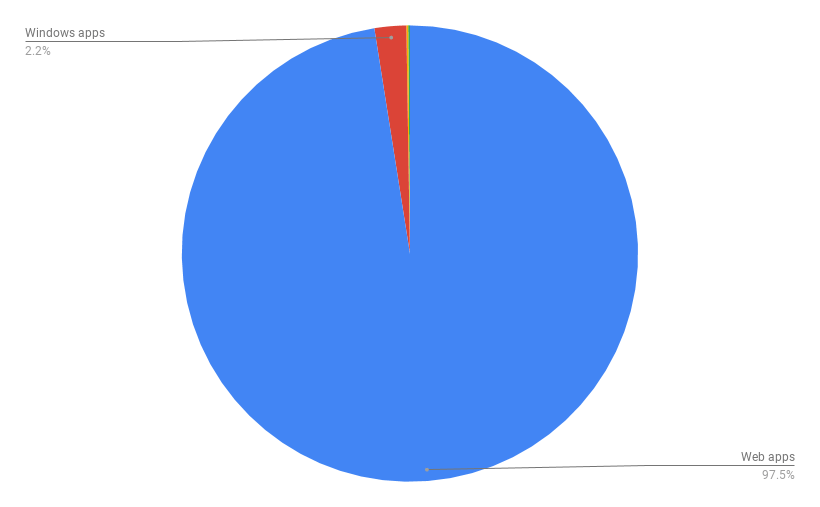
    Web vs Windows, iOS, Android by raw app numbers. The missing ones are too small to see relative to websites.

    Java is another top contender for the most used programming language by virtue of the fact that it’s the native language for the most popular mobile computing platform in the world, Android. Want to write a native app for an Android phone? It will almost certainly be written in Java and be installed from the Android store.

    There are 2.3 billion mobile devices running Android and apps written for Android. But there are only 2.1 million apps in the Android store.

    Want to write a native app for iOS? There are about 1.8 million apps in the Apple store, most of which are written in Objective C or Swift. That’s two languages competing for dominance on the 2nd most popular mobile computing platform in the world.

    Server-side languages are certainly popular, including Java, Python, PHP, Ruby, and Scala, but Node.js is also very popular on the server side, and it uses JavaScript.

    There are roughly 7 billion IoT devices in the world. The top platforms are AWS IoT (C, JavaScript) and Google Cloud IoT (JavaScript, C, C++, Go). Common languages for device programming for IoT include C, C++, JavaScript, and Java. In spite of the sheer number of mass market manufactured IoT devices there are, there are orders of magnitude fewer software developers programming for IoT devices than there are programming for the web platform, and orders of magnitude less code being written for them.

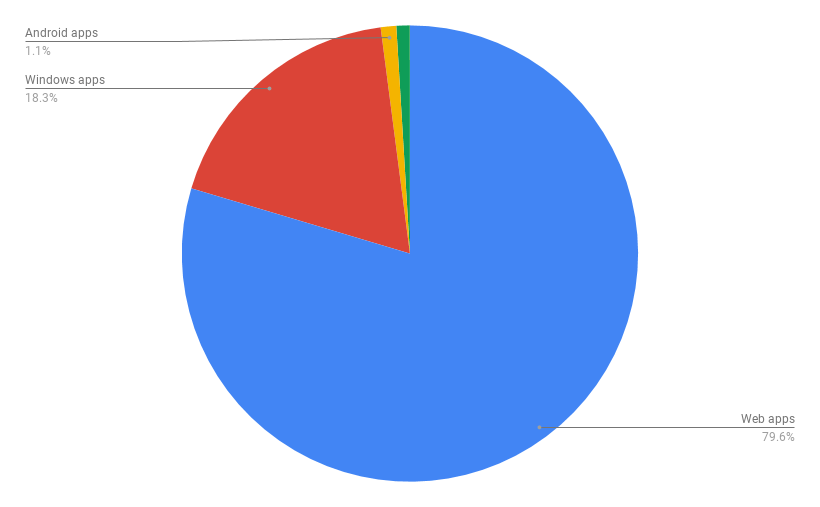
    All that said, for the first decade or so of the web, JavaScript was used for little more than mouse hover animations and little calculations to make static websites feel more interactive. Let’s assume 90% of all websites using JavaScript use it in a trivial way. That still leaves 150 million substantial JavaScript applications:

    Web vs everything else, assuming 90% of web sites don’t qualify as “apps”.

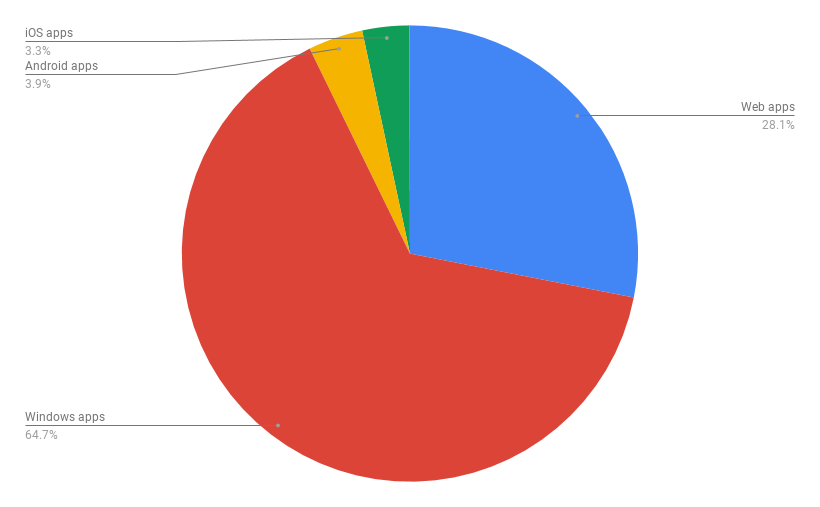
    Even if we decimate the web numbers again, the web platform would still be bigger than Android and iOS combined:

    Cut out 90% of websites with JS, then do it again for good measure, and it’s still bigger than Android + iOS combined.

    But this is getting a little ridiculous now, because the most popular apps today are things like Facebook Messenger, WhatsApp, Snapchat, Instagram, Netflix, Hulu, Spotify, Uber, and games that compile for multiple platforms (e.g., Fortnite), rather than a lot of native Windows apps. Interesting trend: Most of these have web versions, and some can’t be found in the Microsoft Store.

    My favorite apps for Android are Progressive Web Apps like Twitter (written in JavaScript), because they’re light and fast, and I don’t have to wait for them to install to start using them.

    And this is my favorite thing about JavaScript, because that Twitter PWA works on my Android Phone, on my iPad, on my desktop browser, and I never have to install it anywhere. On my mobile devices, it looks and acts just like a native app, and even when I’m offline, I can browse tweets already downloaded and cached.

    If you want your apps to be usable by the most people, JavaScript is a great choice.

    Eric Elliott is a distributed systems expert and author of the books, “Composing Software” and “Programming JavaScript Applications”. As co-founder of DevAnywhere.io, he teaches developers the skills they need to work remotely and embrace work/life balance. He builds and advises development teams for crypto projects, and has contributed to software experiences for Adobe Systems, Zumba Fitness, The Wall Street Journal, ESPN, BBC, and top recording artists including Usher, Frank Ocean, Metallica, and many more.
    下载开源日报APP:https://opensourcedaily.org/2579/
    加入我们:https://opensourcedaily.org/about/join/
    关注我们:https://opensourcedaily.org/about/love/
←上一页
1 … 152 153 154 155 156 … 262
下一页→

Proudly powered by WordPress