• 开源镜像
  • 开源沙龙
  • 媛宝
  • 猿帅
  • 注册
  • 登录
  • 息壤开源生活方式平台
  • 加入我们

开源日报

  • 开源日报第468期:《让他们自己动手 lmbtfy》

    26 6 月, 2019
    开源日报 每天推荐一个 GitHub 优质开源项目和一篇精选英文科技或编程文章原文,坚持阅读《开源日报》,保持每日学习的好习惯。
    今日推荐开源项目:《让他们自己动手 lmbtfy》
    今日推荐英文原文:《3 Coding Stages: Writing. Avoiding. Deleting.》

    今日推荐开源项目:《让他们自己动手 lmbtfy》传送门:GitHub链接
    推荐理由:总有些人喜欢瞎问“xxx是什么”这样的问题而不会选择自己去百度或者 google 上搜一下,更何况这些问题绝大多数搜一下都会有个像模像样的结果,所以如果你遇上了这样的人,就可以考虑一下使用这个项目了。你只需要把它的问题输入搜索框,然后把链接丢给他就好了——既然你都真的帮他百度了,他也不好说你什么不是吗?
    如果你想试试,可以按一下这个。http://t.cn/AipXfMKh
    今日推荐英文原文:《3 Coding Stages: Writing. Avoiding. Deleting.》作者:Huseyin Polat Yuruk
    原文链接:https://medium.com/better-programming/3-coding-stages-writing-avoiding-deleting-598d21518023
    推荐理由:写代码只不过是刚刚开始而已

    3 Coding Stages: Writing. Avoiding. Deleting.

    Writing code is just the tip of the iceberg

    Iceberg

    This is how I see all the hidden facts that we developers usually forget or tend to ignore when we are excited about writing code or implementing something new. In the form of an iceberg…

    The iceberg looks small and beautiful from the outside, so people tend to forget its actual size and what hides beneath the peak. What people see from the outside is actually just the tip.

    Writing code is the same thing.

    When you start writing code, you are too focused on what you have to write, and you don’t focus on how much it may cost you down the road. Or, you ignore it.

    As the years pass, all your experience and the mistakes you make teach you that what you used to ignore is actually the most important thing you must consider.

    So what are those important facts that, as a developer, you usually forget?

    Every line of code you write is:
    • code that has to be read and understood by other programmers
    • code that has to be tested and debugged
    • code that will increase defects in your software
    • code that probably will introduce new bugs in the future
    In the beginning, you just see the code. You think, what can go wrong? But actually, it’s just the tip of the iceberg.

    In a developer’s programming life, it takes some time to develop the ability to see the whole of the iceberg. To see that, you have to pass through the three coding stages in your programming life.

    Let’s speed up time and check each of the stages together.

    1. Writing code as much as possible

    Remember this time? You had just started your programming career as a junior developer. You were hungry, foolish. You were always on the lookout to write some more code lines and for problems to solve. You said yes to every possibility that required you to write code. You were too excited. You spent hours and days on it. You forget about sleeping.

    Being too excited and writing code as much as you can in that stage is good. This is how it should be. This is how we learn to program. This is how we practice being a better developer. In the meantime, while we are writing that bunch of code, we make a lot of mistakes too. And that is totally fine. They are just small mistakes. Nothing can stop you from writing code.

    After some time, maybe four to five years, you start learning the new programming facts that you didn’t know before. You face the reality beyond the code. You have just seen the tip of the iceberg with writing code, and now you are curious to see what is under the sea.

    This is the stage where you see that every code has to be read, understood, tested, debugged. You’ve just understood how important future maintenance is for your software to last longer.

    2. Learning when not to write code

    After you experienced a few programming horror stories, you found yourself thinking about how you can avoid writing unnecessary code, because you knew how much it can cost you.

    In this stage, you were learning when not to write code to avoid being a victim of another horror story. You were still excited about writing code, but you were wise enough to know that less code is better. Simplicity is your ultimate guide here. You understood that it’s harder to read code than to write it. That’s why you started focusing on more readable, understandable, and simpler code.

    In this stage, you followed a few simple rules that transformed you into a better programmer.
    • Writing less code.
    • Keeping your codebase small
    • Saying yes to what is essential and saying no to rest of it
    Knowing when not to code is possibly the most important skill a programmer can learn. — The Art Of Readable Code

    3. Deleting code as much as possible

    One of my most productive days was throwing away 1000 lines of code. — Ken Thompson
    In this stage of coding, you understand exactly what Ken Thompson was trying to say with the above sentence.

    You know that the more code you have, the more places there are for bugs to appear. It takes longer checkouts or compiles. It takes longer for a new employee to understand your system. There’s more stuff to move around if you have to refactor.

    Furthermore, more code often means less flexibility and functionality. You understand it based on your own experience. You know when not to code, but, at the same time, you know that by deleting the unnecessary codes or refactoring complex solutions with simpler, more elegant ones, you can decrease defects in your software.

    In this stage, you discovered all parts of the iceberg. You know what is under the sea. The next time you see a new iceberg, you will be more careful, and you will not make the same mistake as the Titanic did.

    The key idea of this piece is not that writing code is your enemy. You are a programmer. Writing code is your passion and it will always be. It will cover a big part of your life. I just want you to understand what is behind all of that code writing, and that with each line of code you have written, you accept the burden that comes along.
    Don’t surround yourself with unnecessary codes.

    下载开源日报APP:https://opensourcedaily.org/2579/
    加入我们:https://opensourcedaily.org/about/join/
    关注我们:https://opensourcedaily.org/about/love/

  • 开源日报第467期:《3RS 3rs-of-software-architecture》

    25 6 月, 2019
    开源日报 每天推荐一个 GitHub 优质开源项目和一篇精选英文科技或编程文章原文,坚持阅读《开源日报》,保持每日学习的好习惯。
    今日推荐开源项目:《3RS 3rs-of-software-architecture》
    今日推荐英文原文:《Letter of Recommendation: Bug Fixes》

    今日推荐开源项目:《3RS 3rs-of-software-architecture》传送门:GitHub链接
    推荐理由:3RS,即 readable,reusable,refactorable 三个方面,通过调查软件架构的这三样属性来评价一个架构。一般来说架构这玩意应该是最开始设计的,改的越晚改起来就越花功夫,而这个项目通过一个常见的 JS+React+Redux 的项目作为例子,介绍了对这三方面进行提升的方法准则,在需要长久发展的项目上这三个属性会显得很重要,在一开始就设计好合适的架构可以避免更多麻烦——虽然重构可能会迟到,但是它一定不会缺席就是了。
    今日推荐英文原文:《Letter of Recommendation: Bug Fixes》作者:New York Times Magazine
    原文链接:https://medium.com/new-york-times-magazine/letter-of-recommendation-bug-fixes-a1450ee0ab1a
    推荐理由:软件的 commit 记录上记载着它的发展历程

    Letter of Recommendation: Bug Fixes

    I work in the software business, which means that I live in a world ruled by computer code. A lot of that code is proprietary and secret. You can see what it does, but you can’t see how it works unless you work at the company that makes it.

    We can, however, see some of it. A lot of the world now runs on “open source” code. That means it’s free and reusable, under the terms of its license. The Firefox web browser and the largest parts of Chrome and Safari are open source; whole operating systems, including essential parts of MacOS, are open source; the server software that powers our digital cloud, driving data to our phones, enveloping us in wonderful and terrible ways — much of that’s open source, too. If you’re reading this online, you’re almost certainly using open-source code right now.

    The gates of the open-source palace are always open. You can enter by way of websites like GitHub (which is built on top of version-control software called Git, which was created by Linus Torvalds, the same person who created Linux). GitHub serves more than 100 million different code repositories. It’s owned by Microsoft, which is another sign of how things have changed: Microsoft used to write memos about how to ruin free software.

    In 2019 you can track every change anyone makes to a codebase, whether they’re fixing one typo or changing 5,000 files. You can see who made the change, and read a description of the change. If something suddenly doesn’t work, you can backtrack to an earlier version and figure out why.

    The secret history of the 21st century is written in code “commits” — which is what coders call changes like bug fixes and feature updates. I like to read commits like a newspaper, especially for software I use. I do this partly because I want to know what I can do today that I couldn’t yesterday. Little things add up; perhaps there’s a new way to use the cursor keys to add minutes back to my days, or a search function that could help me better organize my email.
    I read the change logs, and I think: Humans can do things.
    In every commit, you can see how the code is growing, changing and reacting to the world: “Make image scaling work without ImageMagick support in eww” (from the Emacs text editor). “Disables autofill/ autocomplete/ spellcheck in the hex input field” (from a pixel editor that runs in the browser, called Make8BitArt.com). “Fix the bell sound when Alt+key is pressed. (#1006)” (from Microsoft’s command-line terminal app).

    I wouldn’t expect a nonprogrammer to understand the above, but you can intuit some of what’s going on: that we don’t need ImageMagick to scale images anymore, because the text editor can scale images on its own; that it’s bad form to spell-check hex values, which specify colors; that the bell is doing something peculiar if someone holds down the alt key; and so forth.

    But there’s also something larger, more gladdening, about reading bug fixes.

    My text editor, Emacs, is a free software project with a history going back more than 40 years; the codebase itself starts in the 1980s, and as I write this there are 136,586 different commits that get you from then to now. More than 600 contributors have worked on it. I find those numbers magical: A huge, complex system that edits all kinds of files started from nothing and then, with nearly 140,000 documented human actions, arrived at its current state. It has leaders but no owner, and it will move along the path in which people take it. It’s the ship of Theseus in code form. I’ve probably used Emacs every day for more than two decades. It has changed me, too. It will outlive me.

    Open source is a movement, and even the charitably inclined would call it an extreme brofest. So there’s drama. People fight it out in comments, over everything from semicolons to codes of conduct. But in the end, the software works or it doesn’t. Politics, our personal health, our careers or lives in general — these do not provide a narrative of unalloyed progress. But software, dammit, can and does. It’s a pleasure to watch the code change and improve, and it’s also fascinating to see big companies, paid programmers and volunteers learning to work together (the Defense Department is way into open source) to make those changes and improvements. I read the change logs, and I think: Humans can do things.

    Technologists, being who they are, often suggest that we Git-ify everything: congressional legislation, newspaper articles and so forth. Sometimes I wish the “real” news worked like GitHub. But how could it? There’s no central code repository, no one source, for American culture. Most people aren’t living their lives thinking, If only this were more like software. When you love technology, this is a hard lesson to learn.

    I like knowing how things are made. That’s the great lesson of software, to me: With open code and version control, the foundational document and the human process are one. We’re usually told to turn away from the sausage-making. With laws, TV shows, chicken nuggets or corporate mergers, it’s better not to know. Not in software, in which nothing is ever finished. Watching the commits, you can see the story taking shape. Or possibly shape the story yourself.
    下载开源日报APP:https://opensourcedaily.org/2579/
    加入我们:https://opensourcedaily.org/about/join/
    关注我们:https://opensourcedaily.org/about/love/
  • 开源日报第466期:《干净整洁 clean-code-js》

    24 6 月, 2019
    开源日报 每天推荐一个 GitHub 优质开源项目和一篇精选英文科技或编程文章原文,坚持阅读《开源日报》,保持每日学习的好习惯。
    今日推荐开源项目:《干净整洁 clean-code-js》
    今日推荐英文原文:《Why AI is here to stay》

    今日推荐开源项目:《干净整洁 clean-code-js》传送门:GitHub链接
    推荐理由:写出干净整洁的代码会让别人和以后的自己节省不少麻烦,因为他们不需要在重新读懂代码上花掉太多时间。这个项目是写出干净 JS 代码的一些规则和示例,尽管这些示例可能随着发展不断改变,但是保持一个不错的代码可读性总是没有坏处的,而遵守它们所多花费的时间比起整个项目来说实在是不太多。

    今日推荐英文原文:《Why AI is here to stay》作者:Cassie Kozyrkov
    原文链接:https://medium.com/@kozyrkov/why-ai-is-here-to-stay-9c75b1868b9b
    推荐理由:人类拿出了一堆例子,并通过它们教 AI 做事情

    Why AI is here to stay

    A revolution in communication between people and computers

    If you’ve ever attended an AI conference, I bet you passed under the placid gaze of a chrome-plated humanoid, lovingly selected from an ocean of creepy robot stock images that marketing teams can’t resist pasting on every billboard these days.

    Clearly, I’m personally guilty of using octarine-blue sci-fi art to lure weary travelers to my blog. It certainly works, which is why it’s a pity that those images have next to nothing to do with AI.
    Robots are very exciting but mostly useless. Today’s AI is mostly boring but very useful.
    You’d think we’d all be more ashamed of ourselves, but don’t worry, AI is too useful to go away, no matter how much we all cry wolf. Here’s why.
    AI gives programmers an alternative way to tell computers what to do.
    Marketing folk run around trying to get your attention with sci-fi gimmicks, but the reason you’ll stick around long enough to buy into AI is entirely different. The real story is about communication with machines.

    AI gives programmers an alternative way to tell computers what to do. To understand why this new way to talk to machines is so useful and why it’s a technological revolution, let’s forget machines for a moment and talk about people. I’ll lay the cards flat on the table so there’s no more purple mystery about what AI is for.

    How people talk to one another

    We express our wishes to other people in two ways. One is with explicit instructions, the other is with examples.

    If you wanted to learn how to predict my Starbucks order, you could follow me around on my travels and you’d probably notice that the quad espresso I order in US airports becomes a latte in Taipei, Mumbai, and Nairobi. What’s up with that? Given a few more examples, you’d probably figure out the rule yourself. That’s what AI does — turns examples into instructions. There’s no way you’d figure it out if you only saw me order Starbucks only once or twice (not enough data) or if you only observed 50 counts of me ordering my usual cappuccino at the place on my street (irrelevant data, since that place is not Starbucks). Same goes for AI.

    Of course, I could also have just told you my Starbucks rule explicitly since I can express it easily: “If they have half-and-half, order 4 shots of espresso in a tall cup, then fill ‘er up with half-and-half. (Don’t judge me!) If they don’t, order a tall latte with an extra shot.”

    The point here is that if I’m teaching a human travel companion, it’s awfully nice to have access to both modes of communication. When explicit instructions are easy to come up with and express, I can program a friend the way people have been talking to computers for decades: if this, do that.

    But what if I don’t even know why I order a cappuccino on some New York days and flat white on others? I can’t give you the formula because even I don’t know it. But I can ask you to watch me and see if you can figure out the pattern. Maybe there is one, maybe there isn’t, but it’s awesome that you could at least try work it out. Without ML/AI, a computer can’t try to find a pattern. It’s explicit instructions or bust.
    AI is about human self-expression.
    Maybe you’d realize that some places have a smell that does it. You might not know why that works (perhaps the smell triggers a feeling related to drinking cappuccinos with my father after the theatre, but you don’t have access to those information) but you’ll realize that you’re able to predict what I’ll do accurately. Eventually, you’ll feel confident enough to say, “Flat white this time? Yeah, I got this.” I’d be standing there with my jaw dropped because I don’t know how you know that. After a while I won’t worry about it, I’ll just trust you. And as long as my preferences don’t change, you’ll keep getting it right, even if neither of us knows why.
    My ability to give you my explicit instructions is traditional programming. My ability to ask you to learn from relevant examples is the essence of machine learning and AI.
    So here’s why AI is not a fad: in real life, there’s no way I’m giving up my ability to fall back on teaching with examples if I’m not clever enough to come up with the instructions. Absolutely not! I’m pretty sure I use examples more than instructions to communicate with other humans when I stumble around the real world.

    AI means I can communicate with computers that second way — via examples — not only by instructions, are you seriously asking me to suddenly gag my own mouth? Remember, in the old days we had to rely primarily on instructions only because we couldn’t do it the other way, in part because processing all those examples would strain the meager CPUs of last century’s poor desktops.

    But now that humanity has unlocked its ability to express itself to machines via examples, why would we suddenly give that option up entirely? A second way of talking to computers is too important to drop like yesterday’s shoulderpads.

    What we should drop is our expectation that there’s a one-size-fits-all way of communicating with computers about every problem. Say what you mean and say it the way that works best. Sometimes you want to give instructions and sometimes you want to feed in a bunch of examples instead.
    Some tasks are so complicated that you can’t hold their instructions in your memory.
    Because AI allows you to automate the ineffable, it’s our only option for those situations where you can’t fathom the instructions. Where you’re not smart enough to work out what those patterns mean yourself or where the instructions are so complicated that you forgot the first line by the time you got to the seven thousandth one.

    Want to memorize all this? Me neither. Computers don’t mind, though.

    Computers don’t mind memorizing long boring example sets or instruction manuals. They can churn through those examples even though that’s a task you wouldn’t want to touch with a bargepole. Some tasks are so complicated that you can’t hold their instructions in your memory. When all the low hanging fruit tasks are automated with straightforward explicit instructions, progress will demand working on the complicated ones. In that zone, it’ll be AI or nothing.

    If those tasks are very complicated, you’ll probably not be able to automate them flawlessly, but with AI you still might do better than nothing. (Don’t forget to build safety nets.) If you do get flawless performance, my first instinct is to wonder whether your task might be so simple that you really should have solved it the traditional way instead. Don’t convert between dollars and cents with AI… seriously, what are you doing?! It’s where the task is too hard the old way that you might turn to AI. That’s also why the first step in AI is to start with the task and double-check that you can’t solve it without AI first.
    下载开源日报APP:https://opensourcedaily.org/2579/
    加入我们:https://opensourcedaily.org/about/join/
    关注我们:https://opensourcedaily.org/about/love/

  • 开源日报第465期:《我的回合,抽卡 gh-card》

    23 6 月, 2019
    开源日报 每天推荐一个 GitHub 优质开源项目和一篇精选英文科技或编程文章原文,坚持阅读《开源日报》,保持每日学习的好习惯。
    今日推荐开源项目:《我的回合,抽卡 gh-card》
    今日推荐英文原文:《How to Get Software Engineering Interviews With No Experience》

    今日推荐开源项目:《我的回合,抽卡 gh-card》传送门:GitHub链接
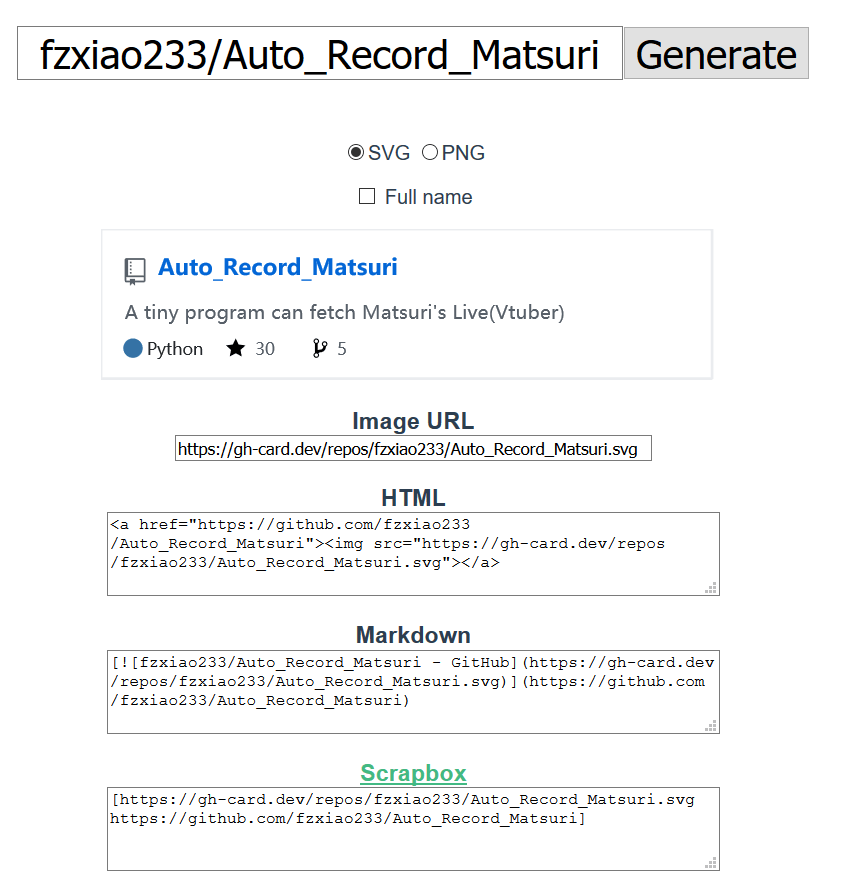
    推荐理由:GitHub 的个人页面里那些仓库卡片是一个不错的展示项目的方式,这个项目能生成一个指定项目的卡片:HTML,Markdown 或者干脆是一张图片。想要在博客文章中插入一个 GitHub 项目的时候会比直接使用文字描述美观不少,而如果想要将自己参与过的许多项目都排列在自己的页面上的话,这个一键生成的功能也能节省很多时间。

    今日推荐英文原文:《How to Get Software Engineering Interviews With No Experience》作者:SeattleDataGuy
    原文链接:https://medium.com/better-programming/how-to-get-software-engineering-interviews-with-no-experience-6e62739e2d37
    推荐理由:有工作经验更好找工作这是当然的,那么第一份工作要怎么起步呢?

    How to Get Software Engineering Interviews With No Experience


    Getting your first tech job, whether as a software engineer or data scientist feels impossible.

    All the job descriptions you read for entry-level positions seem to require at least 2–3 years of experience. How in the world are you supposed to get experience for an entry-level position?

    Especially if you don’t have an internship or a background in software engineering.

    Many of us have been there. We have been nine months into sending out hundreds of resumes, going to dozens of meet-ups and feeling as if we are no closer to even getting an interview, much less a job.

    Yet, our friends seem to all land jobs right out of the gate at some big tech company with a six-figure salary.

    How?

    The truth is, you never know what will work to get you your first job in tech. Each of us have different skills when it comes to getting jobs. Some of us are good at developing our own apps from start to finish, some are good at writing tutorials, others excel at making YouTube videos and still others are socialites who do really well at meet-ups.

    A combination of your skill sets, timing, and hard work will all help you get your first job in tech. Even if it takes a year (which we have seen), don’t get discouraged. We have seen people with a non-technical background use a few blog posts to get noticed by large tech firms. It may have taken nine months, but they got the job!

    So whether you are just starting the hunt for your first tech job or are already several months in, we hope this post gives you a few ideas on how to get noticed and also motivates you to keep going!

    Don’t Only Focus on the FAANG


    One of the hard parts about trying to get a job in a tech role is that most of the jobs seem to be at a FAANG company. All of which seem to be looking for either interns or candidates with at least 3 years of experience.

    This is why it is important to remember there are other companies besides the FAANGs. For instance, hospitals, insurance providers, banks, and manufacturers are also great places to get your feet wet in tech. Along with start-ups (so long as you are paid) and other corporations. Yes, many of us want the prestige and clout of working at a FAANG. That way we can brag to our family and friends about our job, we get it you work for Amazon. But it’s ok to work for other companies.

    In addition, most of the tech companies will start sending you interview requests once you have 2–3 years of experience. So bide your time, make sure you are keeping up with your data structures, and technical interview chops and just be ready for when the time comes.

    You never know you might like working for a different company. Think about it. Companies like Ikea, Ford, and FedEx are not what we consider “tech” companies. However, all of these companies have very complex business processes that require intelligent engineers to fix. You will often be developing the frameworks at these companies from the ground up at some of these corporations. You might not have the clout or get to work with all the cool shiny new tools, but you can still learn to be a good engineer. There are always trade-offs, but also there is always a lot to learn.

    Create a Project/Website/App


    If you have an app or website idea, like maybe a game or a SaaS product, then why not consider developing it? Putting together a website and deploying it online to allow other people to see can show that you can do more than just talk through interview problems. At the end of the day, showing practical skills will benefit you.

    We don’t mean a plain old static website. We really mean developing a website.

    Take some time and think about a basic social media website that requires setting up a database, user accounts, authentication, cookies, and content delivery. There are a lot of different aspects that you need to master to be able to deploy what might seem like simple features.

    Take it one piece at a time. Don’t try to design it overnight. Really think through the process. This is also often a good way of studying for design interviews. You suddenly need to think much deeper than just the pizza program you developed in C++ in your college 142 course.

    Think about all the high-level aspects, as well as the low-level design features. It both helps you study for interviews and gives you something fun to do.

    If you have a lot of smaller projects, then create a portfolio on Github. Some companies want to see your past work. This is much easier to do before you get hired because once you are, you will often be too busy to work on side projects and you most likely won’t be able to share the code you work on.

    Start a Blog

    Start a blog. Whether on WordPress, Medium, or your own Django website that you are hosting on AWS. Whatever content delivery system you decide to use is less important. The key is creating content.

    This won’t always show off all your technical skills, but it can add another talking point. It shows you have interest and passion!

    You can also use blog posts as a great way to practice for interviews. Choose topics that align with subjects that are standard in tech interviews. Here are three possible topics!
    1. Breaking down how a data structure or algorithm works
    2. Walking through how to design Twitter or Uber
    3. Talking through a Leetcode problem
    This can help you in the future when you need to show off some of your skill sets beyond just engineering.

    Attend Meetups Even If You’re An Introvert


    We recommend, no matter your personality, you go to the occasional meetup (even if you have a job). The people that benefit most from meetups do tend to be extroverts, but that doesn’t mean introverts can’t benefit at all. There are many pros to going to meetups including finding future jobs, meeting future partners for start-ups, or just learning about what other companies are doing.

    You do need to attempt to converse with the other people though (shocker).

    Don’t just go to the meetup, stand alone in the corner, and claim there is no point in going to meet-ups.

    If you didn’t make an effort to talk to a few people, then that is on you. Now don’t think everyone is going to offer you a job. In fact, there are probably a lot of people also there looking for work. Instead, just go, talk, meet new people and if an opportunity arises where you are talking to a hiring manager, then make sure to get an email.

    That being said, we have seen people get their first job by first writing a blog post or two and then going to meet-ups and using the blog as a talking point. This can also be said about the projects and apps you have developed. So don’t feel like meetups don’t work if you haven’t given them a fair shot.

    Reach Out to Friends or Family

    There are plenty of companies that work with referrals. From personal experience, getting contacted by Amazon is much easier when you have someone refer you vs. just throwing your resume into their application system.

    Don’t feel bad asking for referrals. Now, notice we say, friends and family. As someone who has been asked by total strangers for referrals, we really find it awkward referring people we don’t know.

    Instead, look for people who know you, your work ethic, and your personality. They will be much more inclined to help you out. That being said, they will only be able to help you out with getting the interview. For instance, with Amazon, they don’t care who referred you. They care if you can pass the interview or not. So make sure you study.

    Do Everything at Once

    We have used the example of Disney’s marketing strategy before in our tips for getting your first consulting client. The concept of blending all of these actions into one strategy is where you will see the largest impact. You want to blog about your portfolio and projects so that when you go to a meetup you can share it and land an interview.

    We can’t guarantee the interview, but we have seen people with no tech backgrounds get interviews by doing everything! For example, we once gave a talk at a meetup where a data scientist who had been searching for a job for a while came up afterwards and asked us to get coffee. We eventually found out that their background was in English not Programming. Considering we had a blog, we asked them to write some posts for us which we compensated them for. A few months later they reached out to us and told us how they went to another meet-up and shared the blog post with a hiring manager. The manager then gave them an interview which eventually led to a job. Notice, this person had to go through several steps. They went to two different meetups where they engaged with us as well as the hiring manager and wrote blog posts. The power of multiple small actions built up to the result they wanted!

    Keep Applying And Meeting People

    It can become difficult to continue to apply for jobs when it feels like no one is responding to you. But, you need to not give up. Always be looking for jobs at different companies, look for roles everywhere because you never know what will stick. It might be a hospital, it might be Amazon. However, if you aren’t applying, then you will never get interviewed.

    Don’t Lose Hope!

    We do hope these tips help you get your first job in tech, no matter the role. Most importantly, don’t lose hope. Keep track of where you apply, the Meetups you go to, the people you meet and make sure you reach out to them. At the end of the day do not lose hope and keep up a positive attitude as you reach out to the people you have met.

    Don’t lose hope!

    Getting your first tech job is difficult.

    It can be disheartening.

    It can be stressful.

    But never lose hope!0*
    下载开源日报APP:https://opensourcedaily.org/2579/
    加入我们:https://opensourcedaily.org/about/join/
    关注我们:https://opensourcedaily.org/about/love/

←上一页
1 … 142 143 144 145 146 … 262
下一页→

Proudly powered by WordPress