• 开源镜像
  • 开源沙龙
  • 媛宝
  • 猿帅
  • 注册
  • 登录
  • 息壤开源生活方式平台
  • 加入我们

开源日报

  • 开源日报第472期:《简单调查 dbg-macro》

    30 6 月, 2019
    开源日报 每天推荐一个 GitHub 优质开源项目和一篇精选英文科技或编程文章原文,坚持阅读《开源日报》,保持每日学习的好习惯。
    今日推荐开源项目:《简单调查 dbg-macro》
    今日推荐英文原文:《You Don’t Have to Be Brilliant to Learn How to Code》

    今日推荐开源项目:《简单调查 dbg-macro》传送门:GitHub链接
    推荐理由:如果你想要调试你的代码,而又懒得使用调试器——因为你只需要确认几个参数或者别的什么,犯不着大动干戈的。这个类似于 print 的调试型项目就能帮助你调试 C++ 代码,它会将代码的位置,参数等数据打印出来以供参考。虽然这种调试方法简单方便,但是如果需要解决同时确认很多东西或者寻找出错位置这些复杂活计的话,还是找个调试器来干更快。
    今日推荐英文原文:《You Don’t Have to Be Brilliant to Learn How to Code》作者:Felix Cabrera
    原文链接:https://medium.com/better-programming/you-dont-have-to-be-brilliant-to-learn-how-to-code-4e5c7b5a73af
    推荐理由:尽管猫依然不太学得来,但是学写代码实际上并不难

    You Don’t Have to Be Brilliant to Learn How to Code


    You don’t have to be a genius …

    Wait? What? I thought you had to know how to calculate the second derivative, then calculate the momentum, then use a few formulas, and then you’d have code.

    Not quite. It may be simpler than that.

    Felix, you mean anyone can learn how to code?

    Yes, and I will explain why …

    I know I may exaggerate a little bit at the beginning, but really, I believe that anyone can learn how to code.

    Also, to all of the admirers of the Math and Physics disciplines, no worries. I wasn’t mocking you. I‘m just making the point that learning how to code is more straightforward than it seems.

    I like Math and Physics, and I admire all the value physicians and Mathematicians have added to our society.

    (Gauss, anyone?)

    Likewise, I am not making fun of animals by using the picture at the beginning of this article. Again, it’s to make the point that anyone can code.

    Now, with that out of the way, let’s address this misconception …

    It’s a topic that I want to discuss, as I have talked to people who have not started learning how to code because they think you have to have unique qualities to learn.

    Through the years, learning how to code myself and working as a computer science tutor and teacher, I have worked alongside various students and gone through the learning process myself. I have helped complete beginners, as well as more experienced students in the computer programming discipline.

    Consequently, I’ve had the excellent opportunity to help and mentor students through their learning journeys when it comes to writing code. Also, in my personal experience, I’ve had the chance to go through the process of learning how to code as a complete beginner myself.

    I have concluded that you don’t have to be super smart to learn how to code. Sure, it does help to learn the concepts, but having other qualities can help you learn how to code as well.

    So today, I’m going to elaborate on these qualities. I’ll also share some things I’ve learned through my coding journey that may help you get over a slump you may be stuck in while learning how to code and keep going in this incredible journey.

    Also, if you feel intimidated by the act of writing computer code because it looks like just a bunch of numbers and cryptic codes in the screen, I hope this article may positively impact you and change your perspective when it comes to learning how to code.

    Without further ado, let’s get started.

    Consistency and Perseverance Are Essential

    As the years have gone by, I have found that being consistent and perseverant can help you in the process of learning how to write code and develop computer programs. For instance, when you encounter a bug in your code, which you probably will at some point during your journey.

    I believe that perseverance helps a lot to increase the chances of being successful in learning how to code. It’s crucial not to give up when you encounter an error that you can’t fix. Sure, it may take hours, days, or even weeks to fix it, but if you give up, you’ll never figure out what’s wrong with your code.

    Perseverance can be even more important when the code you are working has a deadline you have to comply to, regardless if you are handing the code as part of a school assignment or a task at your job. For example, when working on a software application that’s just not working for some reason, perseverance is key.

    You debug deeper and deeper, but you just can’t find the error. Is it that the frontend is not connecting to the backend properly? Or if you are writing a computer program for an academic assignment, is it a semicolon you are missing?

    Thus, being perseverant in dissecting the code until you find the solution is essential to learning how to code and writing computer programs in general, in my opinion.

    Now, where does consistency have a role in this process?

    Well, I believe that consistency helps a lot right from the start of the learning process. From my personal experience when I was learning computer programming-related concepts, practicing consistently is vital for mastering programming concepts, such as variables, decision structures (if-else statements and such), loops and other fundamental ideas. You get the most out of these concepts, in my experience, by combining them and applying them consistently to solve a problem or even developing a software application.

    As a result, the more you rinse and repeat the process of applying these concepts, the faster you learn and dominate the concepts when learning how to code. That’s what happened to me in my coding journey as a beginner.

    The Desire and Curiosity to Learn Can Do Wonders

    Alongside consistency and perseverance, the desire and the curiosity to learn is also essential in learning how to code. As I’ve seen through the years, the desire to learn can help students push through when encountering bugs in their code.
    Curiosity is the spark and desire is the fire
    The desire and willingness to learn can help students keep learning other programming languages, especially when they’re very different from each other. Furthermore, the desire to keep learning how to code can help students stay open-minded to learning a new way to write code to solve the same problem.

    Self-Awareness Can Help, a Lot

    How can being self-aware help when learning how to code? Well, let me explain what I mean.

    When I began learning how to write computer programs years ago, I began to notice that there were ways for me to learn effectively, like combining two things, understanding the theory behind the concepts and applying them by solving problems. As I understood the idea, I went right ahead and start doing practice problems and writing the code for the solution. Thus, I divided my learning time into two sessions, which helped me a lot.

    I also noticed that if I didn’t repeat this process of dividing into theory and practice sessions, I would forget the programming-related concepts I invested time and energy learning. Furthermore, the more time I had between sessions, the higher the chances were for me to forget the concepts.

    In hindsight, if I didn’t notice this about myself and how I learned most effectively, I believe that it would take even more time for me to learn how to code.

    Hence, self-awareness has helped me a lot.

    Conclusion

    Throughout the years, I have learned that anyone can learn how to code if you have the desire to learn, practice consistently, and persevere. Intelligence can help you learn how to code, but for the long term, you need to persevere and practice consistently. Also, the desire and motivation to learn can really help you push forward when learning new programming related concepts and ideas.

    However, these are my observations, experiences, and opinions; I understand everyone is different.

    I hope this helps you think about the process of learning differently. If you are intimidated about learning how to write computer code, then I say to you, don’t do it. You can only do it if you really want to.
    下载开源日报APP:https://opensourcedaily.org/2579/
    加入我们:https://opensourcedaily.org/about/join/
    关注我们:https://opensourcedaily.org/about/love/

  • 开源日报第471期:《老规矩 markdownlint》

    29 6 月, 2019
    开源日报 每天推荐一个 GitHub 优质开源项目和一篇精选英文科技或编程文章原文,坚持阅读《开源日报》,保持每日学习的好习惯。
    今日推荐开源项目:《老规矩 markdownlint》
    今日推荐英文原文:《What is a Linux user?》

    今日推荐开源项目:《老规矩 markdownlint》传送门:GitHub链接
    推荐理由:Markdown 这玩意好用啊,简单方便写出来还好看。但是它很简单的同时也让写出来的东西的长相变得很多样化了,为了美观方便易读,就有必要遵守一些老规矩。这个项目就是基于 Node.js 的格式检查器,能够检查 Markdown 文件是否遵守了项目中提到的那些规则——可以试着在书写时就遵守这些规则,让写出来的文件读起来更方便。
    今日推荐英文原文:《What is a Linux user?》作者:Anderson Silva
    原文链接:https://opensource.com/article/19/6/what-linux-user
    推荐理由:如何定义一个 Linux 用户

    What is a Linux user?

    The definition of who is a “Linux user” has grown to be a bigger tent, and it’s a great change.

    In only two years, the Linux kernel will be 30 years old. Think about that! Where were you in 1991? Were you even born? I was 13! Between 1991 and 1993 a few Linux distributions were created, and at least three of them—Slackware, Debian, and Red Hat–provided the backbone the Linux movement was built on.

    Getting a copy of a Linux distribution and installing and configuring it on a desktop or server was very different back then than today. It was hard! It was frustrating! It was an accomplishment if you got it running! We had to fight with incompatible hardware, configuration jumpers on devices, BIOS issues, and many other things. Even if the hardware was compatible, many times, you still had to compile the kernel, modules, and drivers to get them to work on your system.

    If you were around during those days, you are probably nodding your head. Some readers might even call them the “good old days,” because choosing to use Linux meant you had to learn about operating systems, computer architecture, system administration, networking, and even programming, just to keep the OS functioning. I am not one of them though: Linux being a regular part of everyone’s technology experience is one of the most amazing changes in our industry!

    Almost 30 years later, Linux has gone far beyond the desktop and server. You will find Linux in automobiles, airplanes, appliances, smartphones… virtually everywhere! You can even purchase laptops, desktops, and servers with Linux preinstalled. If you consider cloud computing, where corporations and even individuals can deploy Linux virtual machines with the click of a button, it’s clear how widespread the availability of Linux has become.

    With all that in mind, my question for you is: How do you define a “Linux user” today?

    If you buy your parent or grandparent a Linux laptop from System76 or Dell, log them into their social media and email, and tell them to click “update system” every so often, they are now a Linux user. If you did the same with a Windows or MacOS machine, they would be Windows or MacOS users. It’s incredible to me that, unlike the ’90s, Linux is now a place for anyone and everyone to compute.

    In many ways, this is due to the web browser becoming the “killer app” on the desktop computer. Now, many users don’t care what operating system they are using as long as they can get to their app or service.

    How many people do you know who use their phone, desktop, or laptop regularly but can’t manage files, directories, and drivers on their systems? How many can’t install a binary that isn’t attached to an “app store” of some sort? How about compiling an application from scratch?! For me, it’s almost no one. That’s the beauty of open source software maturing along with an ecosystem that cares about accessibility.

    Today’s Linux user is not required to know, study, or even look up information as the Linux user of the ’90s or early 2000s did, and that’s not a bad thing. The old imagery of Linux being exclusively for bearded men is long gone, and I say good riddance.

    There will always be room for a Linux user who is interested, curious, fascinated about computers, operating systems, and the idea of creating, using, and collaborating on free software. There is just as much room for creative open source contributors on Windows and MacOS these days as well. Today, being a Linux user is being anyone with a Linux system. And that’s a wonderful thing.

    The change to what it means to be a Linux user

    When I started with Linux, being a user meant knowing how to the operating system functioned in every way, shape, and form. Linux has matured in a way that allows the definition of “Linux users” to encompass a much broader world of possibility and the people who inhabit it. It may be obvious to say, but it is important to say clearly: anyone who uses Linux is an equal Linux user.
    下载开源日报APP:https://opensourcedaily.org/2579/
    加入我们:https://opensourcedaily.org/about/join/
    关注我们:https://opensourcedaily.org/about/love/

  • 开源日报第470期:《熟能生巧 most-frequent-technology-english-words》

    28 6 月, 2019
    开源日报 每天推荐一个 GitHub 优质开源项目和一篇精选英文科技或编程文章原文,坚持阅读《开源日报》,保持每日学习的好习惯。
    今日推荐开源项目:《熟能生巧 most-frequent-technology-english-words》
    今日推荐英文原文:《A Beginner’s Guide to Using CDNs》

    今日推荐开源项目:《熟能生巧 most-frequent-technology-english-words》传送门:GitHub链接
    推荐理由:就像玩多了俄罗斯方块的人完全不会忘记 tetris 怎么拼一样,见得多的单词自然会印在大脑里。在程序员的领域自然也有很多常用技术词汇,而如果能掌握它们中的大部分,最起码在这个领域里阅读英文文档的压力会减轻些。这个项目就收集了很多技术词汇以供学习,对自己的英语还不够自信的话可以尝试学习这些词汇。
    今日推荐英文原文:《A Beginner’s Guide to Using CDNs》作者:Jason Skowronski
    原文链接:https://medium.com/better-programming/a-beginner-s-guide-to-using-cdns-3193cb8bd12e
    推荐理由:介绍了能够提高网站加载速度的 CDN,即内容分发网络。

    A Beginner’s Guide to Using CDNs

    Websites have become larger and more complex over the past few years, and users expect them to load instantaneously, even on mobile devices. The smallest performance drops can have big effects; just a 100ms decrease in page load time can drop conversions by 7%. With competitors just a click away, organizations wishing to attract and retain customers need to make web performance a priority. One relatively simple method of doing this is by using content delivery networks (CDNs).

    In this article, we’ll explain how CDNs help improve web performance. We’ll explain what they are, how they work, and how to implement them in your websites.

    What Is a CDN?

    A CDN is a distributed network and storage service that hosts web content in different geographical regions around the world. This content can include HTML pages, scripts, style sheets, multimedia files, and more. This lets you serve content from the CDN instead of your own servers, reducing the amount of traffic handled by your servers.

    CDNs can also act as a proxy between you and your users, offering services such as load balancing, firewalls, automatic HTTPS, and even redundancy in case your origin servers go offline (e.g., Cloudflare Always Online).

    Why Should I Use a CDN?

    CDNs offload traffic from your servers, reducing your overall load. They are also optimized for speed and in many cases offer faster performance, which can improve your SEO rankings. Since CDNs host data in centers located around the world, they literally move your content closer to your users. This can greatly reduce latency for some users and avoid downtime caused by data center outages or broken routes.

    How Do CDNs Work?

    A CDN consists of multiple data centers around the world called points of presence (PoPs). Each PoP is capable of hosting and serving content to users. CDNs route users to specific PoPs based on a number of factors including distance, PoP availability, and connection speed.

    A PoP acts as a proxy between your users and your origin server. When a user requests a resource from your website such as an image or script, they are directed to the PoP. The PoP will then deliver the resource to the user if it has it cached.

    But how do you get the content to your PoP? Using one of two methods: pushing or pulling. Pushing requires you to send your content to the CDN beforehand. This gives you greater control over what content gets served by the CDN, but if a user requests content that you haven’t yet pushed, they may experience errors.

    Pulling is a much more automatic method, where the CDN automatically retrieves content that it hasn’t already cached. When a user requests content that isn’t already cached, the CDN pulls the most recent version of the content from your origin server. After a certain amount of time, the cached content expires and the CDN refreshes it from the origin the next time it’s requested.

    How Do I Choose a CDN?

    While CDNs work the same way fundamentally, they differ in a number of factors, including:

    Price

    Most CDNs charge based on the amount of bandwidth used. Some may also charge based on the number of cache hits (files served from cache), cache misses (retrievals from the origin), and refreshes. Others charge a fixed fee and allow a certain amount of bandwidth over a period of time. When comparing CDNs, you should estimate your bandwidth needs and anticipated growth to find the best deal.

    Availability and Reliability

    CDNs strive for 100% uptime, but perfect uptime is never guaranteed. Consider your availability needs and how each CDN supports them. Also, compare CDNs based on their PoP uptime rather than their overall uptime, especially in the regions you expect to serve. If possible, verify that your CDN offers fallback options such as routing around downed PoPs.

    PoP Locations (Regions Served)

    Depending on where your users are located, certain PoPs can serve your users more effectively. Choose a CDN that manages PoPs close to your users, or else you’ll miss out on many of the performance benefits that CDNs offer.

    How Do I Add a CDN to My Website?

    The process of adding a CDN to your website depends on where and how your website is hosted. We’ll cover some of the more common methods below.

    Web Hosting Provider

    If your website is hosted by a provider such as inMotion Hosting, HostGator, or 1&1, your provider may offer a CDN as a built-in or extra service. For example, Bluehost provides Cloudflare for free and enables it by default for all plans. You can still use a CDN if your host doesn’t explicitly support it, but it may fall under one of the following processes.

    Content Management System (CMS)

    A content management system (CMS) like WordPress and Squarespace often supports CDNs through the use of plugins. For WordPress, Jetpack provides support for its own CDN automatically. Others such as W3TC, WP Super Cache, and WP Fastest Cache let you choose which CDN to direct users to.

    Self-Hosted

    Websites that you host yourself offer the greatest flexibility in choosing a CDN. However, they also require more setup. As an example, let’s enable Google Cloud CDN for a website hosted on the Google Cloud Platform (GCP).

    This example assumes you have a GCP account, a domain registered with a registrar, and a website hosted in Compute Engine, App Engine, or another GCP service. If you don’t already have a GCP account, create one and log into the Google Cloud Console.

    Step 1: Configure Your DNS Records

    Traditionally, the way to route your users to a CDN was to change the resource URLs in your website to point to URLs provided by the CDN. Most modern CDNs avoid this by managing your DNS records for you, letting you redirect users without requiring changes to your website.

    To configure Cloud DNS, view the Cloud DNS quickstart document and follow the instructions for creating a managed public zone. Don’t create a new record or a CNAME record yet, since we don’t yet have an IP address to point the DNS record to. In the screenshot below, we created a new zone called mydomain-example for the domain subdomain.mydomain.com.

    Creating a DNS zone in Cloud DNS. © 2019 Google, LLC. All rights reserved.

    After creating the zone, update your registrar’s domain settings to point to the Cloud DNS name servers. This will let you manage your domain records through Cloud DNS instead of through your registrar. For more information, visit the Cloud DNS documentation page on updating your domain’s name servers or refer to your registrar’s documentation.

    Step 2: Enable Cloud CDN

    With DNS configured, we now need to enable the CDN itself. With Cloud CDN, a load balancer must be selected as the origin. If you don’t already have a load balancer, you can follow these how-to guides to create one. For a standard HTTP/S website, follow this guide for specific instructions.

    With your load balancer created, follow these instructions to enable Cloud CDN for an existing backend service. Once your new origin is created, select it from the origin list. You will need the IP address displayed in the Frontend table to configure Cloud DNS, so make sure you copy it or keep this window open. The following screenshot shows an example Cloud CDN origin:

    Viewing origin details in Cloud CDN. © 2019 Google, LLC. All rights reserved.

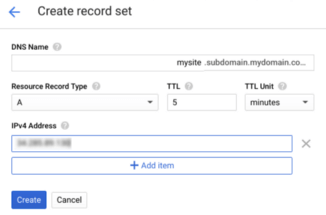
    After retrieving your frontend IP address, return to Cloud DNS and select your zone. Create a new A record to point the domain to your origin’s IP address. You can find instructions on the Cloud DNS quickstart documentation page under creating a new record. This is shown in the screenshot below. Optionally, you can also create a CNAME record to redirect users from a subdomain, such as www.yourdomain.com.

    Creating a new DNS record set in Cloud DNS. © 2019 Google, LLC. All rights reserved.

    Step 3: Configure your web server

    To ensure your content is properly cached, make sure your web server responds to requests with the correct HTTP headers. Cloud CDN only caches responses that meet certain requirements, some of which are specific to Cloud CDN. You will need to view your web server’s documentation to learn how to set these headers. Apache and Nginx provide guides with best practices for configuring caching.

    Step 4: Upload Content to the CDN

    For most website operators you don’t need to do anything to upload content. That’s because the CDN will automatically cache resources from your server as people access your site. This is also known as the “pull method.” Alternatively, Google does allow you to push specific content you want to host by manually uploading it.

    How Does a CDN Impact Performance?

    To demonstrate the performance benefits of CDNs, we ran a performance test on a website hosted on the Google Cloud Platform. The website is a static single page website created with Bootstrap and the Full Width Pics template, and consists of seven high-resolution images, courtesy of NASA/JPL-Caltech. The server is a Google Compute Engine instance located in the us-east1-b region running Nginx 1.10.3.

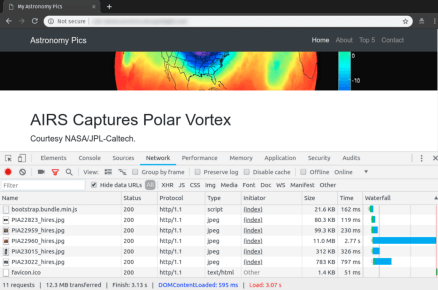
    We configured the instance to allow direct incoming HTTP traffic. We also set up Google Cloud CDN for the instance. You can see a screenshot of the web page and networking timing of the site below using a waterfall chart.

    A waterfall chart of the test site using Chrome DevTools. © 2019 Google, LLC. All rights reserved.

    We then ran a performance test using SolarWinds ® Pingdom ®. Pingdom provides a page speed test that measures the time needed to fetch and render each element of a web page. We created two separate checks to test the origin server and CDN separately, then compared the results to see which method was faster. To maximize latency, we ran both checks from the Pingdom Eastern Asia location.

    Origin Results

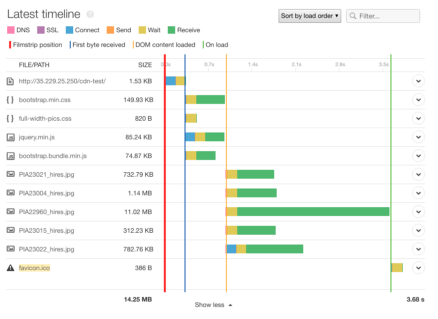
    Running a speed test on the origin server resulted in a page load time of 3.68 seconds. The time to download the first byte from the server (shown as a blue line) was 318 milliseconds, meaning users had to wait one-third of a second before their device even began receiving content. Rendering the page (indicated by the orange line) took an additional 679ms, meaning users had to wait almost a full second to see anything on their screen. By the time the page finished rendering (green line), users had been waiting more than 3.5 seconds.

    Most of this delay was due to downloading the high-resolution images, but a significant amount of time was spent connecting to the server and waiting for content to begin transferring.

    Page load timeline when connecting to our test origin server.

    CDN Results

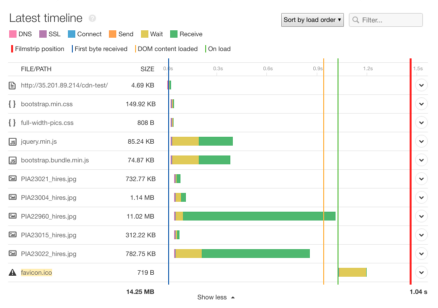
    With a CDN, we immediately saw a substantial improvement in load time. The entire page loaded in just 1.04 seconds, more than two seconds faster than the origin server. The most significant change is in the time to first byte (blue line), which dropped to just seven ms. This means our users began receiving content almost immediately after connecting to the CDN.

    Page load timeline when connecting to Google Cloud CDN.

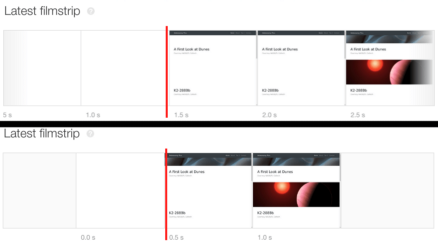
    While there wasn’t a significant improvement in the DOM content load time (orange line), the connection and wait times dropped significantly. We also saw content begin to appear on the page as early as 0.5 seconds into the page load time. We can confirm this by looking at the film strip, which shows screenshots of the page at various points in the loading process. This is compared to the 1.5 seconds it took for the origin server to begin rendering content.

    Comparing the page rendering time with a CDN (bottom) and without a CDN (top).

    Conclusion

    CDNs offer a significant performance boost without much effort on the part of organizations. The biggest challenge is finding out which CDN provider to choose. If you’re not sure which provider will benefit you the most, we benchmarked four of the most popular providers (Cloudflare, Fastly, AWS CloudFront, and Google CDN). While performance plays a major role in each provider’s viability, we also encourage you to factor in additional features, security, and integrations offered by the CDN.

    After setting up your CDN, you can check the performance difference using SolarWinds Pingdom. In addition to running one-time tests, you can use Pingdom to schedule periodic checks to ensure your website is always performing at its best. In addition, you can use Pingdom to constantly monitor your website’s availability and usability.
    下载开源日报APP:https://opensourcedaily.org/2579/
    加入我们:https://opensourcedaily.org/about/join/
    关注我们:https://opensourcedaily.org/about/love/
  • 开源日报第469期:《当局者迷旁观者清 code-review-tips》

    27 6 月, 2019
    开源日报 每天推荐一个 GitHub 优质开源项目和一篇精选英文科技或编程文章原文,坚持阅读《开源日报》,保持每日学习的好习惯。
    今日推荐开源项目:《当局者迷旁观者清 code-review-tips》
    今日推荐英文原文:《You don’t have to be an Expert to contribute to Open Source》

    今日推荐开源项目:《当局者迷旁观者清 code-review-tips》传送门:GitHub链接
    推荐理由:当你写完一段代码并让它顺利的跑了起来:完美无缺,神来之笔;当你睡了一觉再回来看它:我昨天为什么写了这么个蠢玩意?这可能说的有点夸张了,但是很明显在你为团队项目写好一个模块或者别的什么之后,找一个同伴帮你看一下比你自己看来的更好——他没有这段代码的任何记忆,所以能重新检查每一个应该注意的点。这个项目是在代码审查中需要注意的点,包括可读性以及处理异常输入等,不仅是审查,自己写代码的时候也应该注意这些点。
    今日推荐英文原文:《You don’t have to be an Expert to contribute to Open Source》作者:Albiona Hoti
    原文链接:https://medium.com/@albionahh/you-dont-have-to-be-an-expert-to-contribute-to-open-source-21976c753a22
    推荐理由:如何在不需要太高技术力的情况下为开源项目做贡献

    You don’t have to be an Expert to contribute to Open Source

    We think that to contribute to Open Source you have to know everything related to that technology, as the programming language, frameworks etc. But that’s not true, here is why!

    Voice is an AudioBook player, which is open source and is developed with Kotlin for Android.

    As a user of Voice AudioBook player, I wanted to be able to skip silence so I could finish the book faster. So I searched for issues in Voice apps repository, and I saw there was a feature request for skipping silence, so I started to work on it. Disclaimer: I have no Kotlin programming experience.

    The article will contain:
    1. Skip Silence Feature description
    2. Copying and adapting ‘Jump to’ and ‘sleep’ feature
    3. Adding the skip silence feature
    4. Current and Updated implementation
    5. Final changes — Adding Migrations
    6. Takeaways

    Skip Silence Feature description

    Before you start to implement something, you have to find a similar functionality with the one you are thinking to work on, otherwise, it might be a project with a lot of modules and to really understand how everything works it might take you a lot of time.

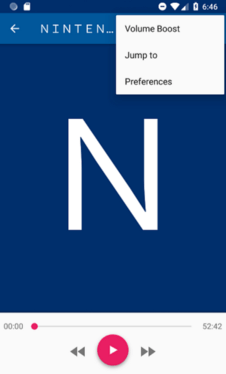
    The current

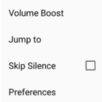
    The final result

    For my case, the most similar functionality was ‘Jump to’ that displaces you to a specific part of the book.

    So I searched for that feature on the source code. I decided to add the skip silence feature as part of the menu because:
    1. There were other functionalities and I wanted to have the skip silence feature too.
    2. A menu you could manipulate with the listening part of audiobook.
    This is how our final change will look like!

    Copying and adapting ‘Jump to’ feature

    I found the ‘Jump to’ in book_play.xml file which was an Item view:
    <item
        android:id="@+id/action_time_change"
     android:title="@string/action_time_change"
        app:showAsAction="never"
    />
    
    So I added an Item to skip silence:
    <item
        android:id="@+id/action_skip_silence"
        android:title="@string/skip_silence"
        android:checkable="true"
        app:showAsAction="never"
    />
    
    From there, searching the source code with the id of the ‘Jump to’ view send me in BookPlayController.kt file, where there was the code of that action as:
    R.id.action_time_change -> {
    launchJumpToPositionDialog()
      true
    }
    
    So I continued to add the changes for the skipping audio silence:

    I added the function below to BookPlayController.kt that gets triggered when clicking the skip silence menu item.
    R.id.action_skip_silence -> {
      toggleSkipSilenceState()
      true // goes for setOnMenuItemClickListener
    }
    
    Following the ‘Jump to’ functionality, send me to the function:
    launchJumpToPositionDialog()
    
    which was displaying a fragment and it wasn’t something I wanted to do.I just had to Skip Silence ?

    Sadly this is all where skip silence led us to.

    Copying and adapting ‘sleep’ feature

    There was another item called Sleep-Timer and followed it’s id same as the earlier item, and it sends me to this action:
    R.id.action_sleep -> {
      presenter.toggleSleepTimer()
      true
    }
    
    Investigated about the presenter and found out it was a presenter of bookplaycontroller.kt

    Wondering what is this presenter? Didn’t care that much, found out it was a presenter of BookPlayController.kt so I looked over the BookPlayPresenter.kt — There I found this function:
    override fun toggleSleepTimer() {
      if (sleepTimer.sleepTimerActive()) sleepTimer.setActive(false)
      else {
        view.openSleepTimeDialog()
      }
    }
    
    Hm, but sleepTimer was a class which had the functionality of sleeptTimer… Searching in BookPlayPresenter.kt I found the action below:
    override fun seekTo(position: Int, file: File?) {
      val book = bookRepository.bookById(bookId)
          ?: return
      playerController.changePosition(position, file ?: book.content.currentFile)
    }
    
    The method changePosition directly manipulates with the audiobook player and my functionality would do the same.

    Investigating into it:
    fun changePosition(time: Int, file: File) {
      fire(
        intent(ACTION_CHANGE).apply {
          putExtra(CHANGE_TIME, time)
          putExtra(CHANGE_FILE, file.absolutePath)
        }
      )
    }
    
    So I replicated the above functionalities by adding the skipSilence method in playBookPresenter.kt
    override fun toggleSkipSilence() {
      val skipSilence = bookRepository.bookById(bookId)?.content?.skipSilence
          ?: return
      playerController.setSkipSilence(!skipSilence)
    }
    
    And added the setSkipSilence() function as shown below:
    fun setSkipSilence(skip: Boolean) {
      fire(
          intent(ACTION_SKIP_SILENCE).apply {
            putExtra(SKIP_SILENCE, skip)
          }
      )
    }
    
    Same as ACTION_CHANGE I looked at how I can create the ACTION_SKIP_SILENCE variables and there they were as companion objects:
    const val ACTION_SPEED = "de.ph1b.audiobook.ACTION_SPEED"
    const val ACTION_SKIP_SILENCE ="de.ph1b.audiobook.ACTION_SKIP_SILENCE"
    
    I followed where the ACTION_SPEED variable was used and addressed me in PlayBackService.kt where all actions functionalities were written, for example, the ACTION_PLAY_PAUSE :
    PlayerController.ACTION_PLAY_PAUSE -> {
      if (playStateManager.playState == PlayState.PLAYING) {
        player.pause(true)
      } else player.play()
    }
    
    The player called another function into it player.play() and the play() function was written in MediaPlayer.kt file.

    So same how this method was created I started to add another method for ACTION_SKIP_SILENCE as below:
    PlayerController.ACTION_SKIP_SILENCE -> {
      val skipSilences = intent.getBooleanExtra(PlayerController.SKIP_SILENCE, false)
      player.setSkipSilences(skipSilences)
    }
    
    Where I created the function setSkipSilences in theMediaPlayer.kt file:
    fun setSkipSilences(skip: Boolean) {
      bookContent?.let {
        val copy = it.copy(skipSilence = skip)
        _bookContent.onNext(copy)
        player.setPlaybackParameters(it.playbackSpeed, skip)
      }
    }
    
    — setPlayBackParameters() was a method which had been created and it accepted only the playbackSpeed parameter. (During the time I was searching this project I found this method which started to play the audiobook and I thought this was the place I have to add a skip silence functionality)

    Adding the skip silence functionality

    The actual version of ExoPlayer that was being used in this project was 2.7.2 which didn’t have the capability of skipping silence, so I searched for skipping silence ExoPlayer in google and found this issue — “Skip silence” feature— which was implemented in version 2.8.0 of ExoPlayer. So I switch to the new version.

    Current implementation

    The current implementation of ExoPlayer had only the speed feature.
    fun SimpleExoPlayer.setPlaybackSpeed(speed: Float) {                                                      if (playbackParameters?.speed != speed) {                                      
        playbackParameters = PlaybackParameters(speed, 1F)
      }
    }
    

    Updated implementation

    With the updated one, you can now see the skipSilence argument.
    fun SimpleExoPlayer.setPlaybackParameters(speed: Float, skipSilence: Boolean){
    if (playbackParameters?.speed != speed ||     
        playbackParameters?.skipSilence != skipSilence) {                                          playbackParameters = PlaybackParameters(speed, 1F, skipSilence)                                        }                               
    }
    
    And I continued all the changes to connect the initial changes with the final one.

    Final changes — Adding Migrations

    Every book can have skip silence turned on or off, which required changes in the persistence layer which included adding the property in the files -> BookFactory, BookContent, and BookStorage.

    Add a new migration on PersistanceModule to add the new property to all the previous books by default being false:
    class Migration44to45 : IncrementalMigration(44) {                                   
      override fun migrate(db: SupportSQLiteDatabase) {                                     
        db.execSQL("ALTER TABLE tableBooks ADD skipSilence INTEGER")                                     
      }                                
    }
    

    Takeaways

    1. To implement new functionality in already existing software is not difficult as long as you can find a similar functionality that will guide you through the structure of the project.
    2. Even if you are learning a new technology, this is the path I recommend when learning a new technology, because trying to read through all the books, and all the knowledge will lead you into Analysis Paralysis or how I like to call it Learning Paralysis.
    3. Honestly, not all projects are nearly as good structured and architected as Voice Audiobook Player is which is developed by Paul Woitaschek, if you listen to audiobooks, I encourage you to give it a try.
    4. Last but not least, version 4.0 is released on 26th of December and you can use the skip silence feature ?

    下载开源日报APP:https://opensourcedaily.org/2579/
    加入我们:https://opensourcedaily.org/about/join/
    关注我们:https://opensourcedaily.org/about/love/
←上一页
1 … 141 142 143 144 145 … 262
下一页→

Proudly powered by WordPress