开源日报 每天推荐一个 GitHub 优质开源项目和一篇精选英文科技或编程文章原文,坚持阅读《开源日报》,保持每日学习的好习惯。
今日推荐开源项目:《特别鸣谢 all-contributors-bot》
今日推荐英文原文:《A Comprehensive Guide to Becoming a Self-Taught Programmer》
今日推荐开源项目:《特别鸣谢 all-contributors-bot》传送门:
GitHub链接
推荐理由:不管是修正代码还是完善文档,人们通过各种各样的方式对一个开源项目做出贡献。而有的时候要想收集所有贡献者名单并感谢他们是一件比较困难的事情,特别是在大规模的项目中。这个机器人会自动的收集那些贡献者的信息——只要他们记得在 issue 中提到这一点,这样你就不需要亲自一个个的寻找这些信息。不管贡献大小和重要程度,人们花费自己的时间来帮助建设一个开源项目,这自然是值得感谢的。
今日推荐英文原文:《A Comprehensive Guide to Becoming a Self-Taught Programmer》作者:Aditya Patange
原文链接:
https://medium.com/better-programming/a-comprehensive-walkthrough-to-becoming-a-self-taught-programmer-and-computer-scientist-part-i-288541b19940
推荐理由:通过自学在编程的道路上走得更远——不得不承认,大部分时候学习编程都是在自学
A Comprehensive Guide to Becoming a Self-Taught Programmer
As promised in my previous post(
https://medium.com/@AdityaPatange/learning-to-program-is-a-great-way-to-improve-yourself-and-grow-your-career-heres-why-5cc8276453fa), I’m here to kick-start your journey towards becoming a highly-skilled, sought-after programmer. I’ll also help you achieve career success, augment your existing skillset, and make money — irrespective of which discipline you’re from.

I’m the guy with a plan.
This guide is for everyone and as long as you can read English and know basic middle-school mathematics, you’re good to go. So sit back, grab a cup of coffee, and pay attention!
Every part of this guide has been meticulously curated for you — I have personally gone through every resource I recommend here. The logical order of the contents, resources, and suggestions have been put together with the sole motive of making you a skilled programmer in the shortest time possible without compromising on quality.
How to Use This Guide
You are most likely to fall into one of the five categories below:
1. You already know to code and want to become a better software developer.
Great, in that case, you already have your basics covered and must work on developing a holistic way of thinking about building Software. Pay special attention to Part I and Part II, as they will fill gaps in your existing knowledge.
2. You’re in a STEM field, but don’t know much about programming.
Your analytical skills are already above par, so don’t spend a lot of time on Part I apart from the readings. Pay special attention to Part II and Part III because you need to focus on writing code.
Don’t join the bandwagon of people who see buzzwords like AI, Machine Learning, Blockchain and jump straight to these technologies without understanding fundamentals. That’s stupid, because, after a point, you will get overwhelmed and give up or learn it all wrong.
3. You’re from a non-STEM field and want to learn to code.
In your case, the initial hurdle would be to train your mind to think more logically and analytically. Devote the bulk of your time to Part I. The challenge is being able to transfer your existing mental framework(s) to a completely new domain. The shift takes time and cannot be rushed, so be patient and stick through. Once this happens, you will be in a conducive mental state to devote more time and effort to speed up your progress in later stages. You might progress faster than your STEM counterparts, as your divergent thinking skills are more advanced, making you inherently more creative and intuitive when coming up with solutions.
4. You’re going for further studies abroad.
Clearly, this is the segment that will benefit the most from this guide. Within this post, I will teach you how to incorporate method in your ways of working, so that you can get things done efficiently. Subsequently, your goal will be to rewire your approach towards learning by unlearning the practises you followed to succeed in the Indian Education System.
The competition you will face abroad, especially in the U.S, is cutthroat, and your peers will already have a head start as compared to you. Work on leveling the playing field before you go there. Use the knowledge in this guide to build some interesting projects, write research article(s) and become a well-rounded professional.
If you want to get into academia, read the books I recommend in Part I and take some courses I recommend in Part III. To create new knowledge, you need to understand existing knowledge as intuitively possible. If you’re seeking job opportunities abroad, this guide will still help you develop industry skills to bag the best opportunities that present themselves to you. Remember, there are people who complete their Master’s Degree in good universities abroad and still don’t get placed, because they were still plugged into the traditional ways of thinking or lacked relevant skills to adapt to the fast-paced environment there.
5. You’re an engineering student relying on the Indian Education System to prepare you for the real world.
Honestly, I hate to do this, but it’s necessary for me to pop your bubble right here. The Indian Education System is not designed to prepare you for the industry. Getting your B.E/B.Tech degree means nothing to employers if you cannot bring value to the table.
There are tons of engineers out there, who spend their entire 4 years doing nothing but “improving their pointer (C.G.P.A)” and still don’t get the job of their choice, or worse, remain unemployed because they never considered it important enough to build industry relevant skills.
All of a sudden, when the placement season in their college starts, the realisation that they need to change their flawed assumptions hits them like a truck. At that point, it’s almost too late to adapt. The tension around getting placed becomes a nightmare. If you’re one of those people, wake up because you still have a lot of time. You’re smart enough to score great grades, so you are definitely smart enough to pick up relevant skills in order to make yourself valuable.
Either way, you have nothing to worry about because you’re at the right place. I have hacked up this curriculum so that you can bring yourself right back on track and acquire the necessary skills.
How Is This Guide Different From the Tons of Articles on the Web?
The information here is an amalgamation of nearly eight years of programming experience, nuggets of wisdom from some of the finest books, online courses from world-class universities, and the awesome programming community out there. I have trodden the path myself, sifted through all the conflicting information on the Internet, hit dead-ends, and backtracked repeatedly. By following this guide to the T, you will not only save valuable time but enjoy the entire process much more. This curriculum is designed to ease the entire process for you.
A lot of you would question why I have included computer science (CS) in the title. What has programming got to do with computer science anyway? Let me put an end to this discussion once and for all. Knowing computer science makes you a better programmer — plain and simple. Even without CS, you might be a good programmer, but what you can do is severely limited because CS wields you with a powerful toolbox to tackle problems. If you think otherwise, chances are that you will keep hitting brick walls and waste time — like I did when I first started off.
To become a skilled programmer, work with this guide and the resources provided diligently for a solid six months to one year, and your efforts will be rewarded.
Enough said, let’s dive right in!
The Real Deal: A Step-Wise Roadmap to Becoming a Competent Programmer
I have divided the entire guide into four parts to delineate the entire path. It’s important to spend some time on each part before moving on to the next because your skills build on one another. This is no “Learn Programming in 21 days” kind of guide. You have to put in the effort and the hours. I am just here to guide you. Revisit this post periodically to refresh your knowledge and not lose track of the big picture, so bookmark it. There is no fixed amount of time you can dedicate to a particular part, so feel free to move back and forth as you progress. As I have said before, every skill you learn builds up on each other.
What exactly is Computer Programming?
(You can skip this if you’re already a coder)
To put it in a single sentence, programming is the science of making a computer do a task by giving it precise instructions to carry it out.
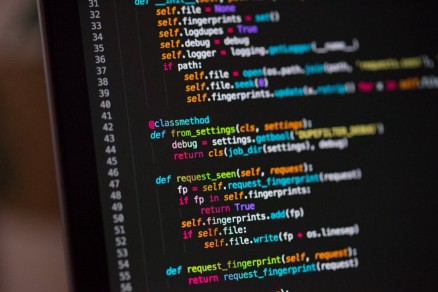
This is how Python code looks like. You will learn Python in Part I.
Computers are far more powerful than humans because they can process billions of instructions in a few milliseconds and, at the same time, store large amounts of data to process. Humans cannot do this. In the time you’d require to multiply two 5 digit numbers, a computer will multiply billions of much larger numbers and do it with 100% accuracy.
So now, the key question is: how can you leverage this power of computation? Simple, you feed the computer with instructions on how to multiply two numbers and it will do it for you. Say you want to multiply two numbers, this is how you’d instruct the computer to do it.
To multiply 2 numbers, you explicitly tell the Computer: Step 1: Take a number A. Step 2: Take a number B. Step 3: Let C be the product of A and B. Step 4: Display the value of C to the user.
We computer scientists call this an algorithm. It’s just a sequence of steps for solving the problem. Don’t stress on the jargon for now.
Programming Languages
As humans, we cannot state this entire sequence of steps in 0s and 1s, which is why we use programming languages.
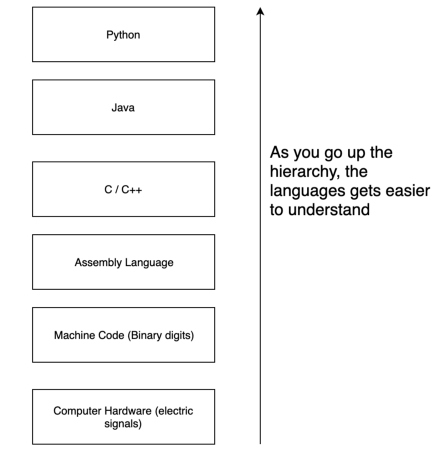
It is the bridge between machine level descriptions and plain English. As shown in the diagram, the high-level languages are easier to understand, whereas low-level languages, like Assembly, can get cryptic at times. You write code in the programming language of your choice. Behind the scenes, this code is converted (in simple terms) into lower level descriptions so that the computer can run the instructions on the underlying hardware.
That said, let’s begin with Part I.
For every part, I have provided a link to the resource document, so don’t forget to check that out!
Part I: Develop a Programmer’s Mindset

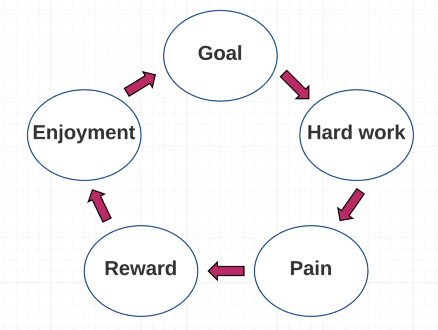
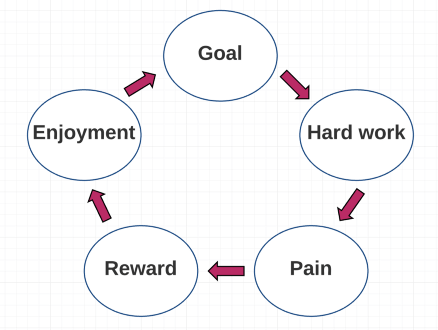
The right mindset is about creating positive feedback loops. Jordan Peterson talks about this in detail in his book “12 Rules for Life”.
The first and most important step is to start thinking like a programmer. If you’re coming from my previous post, this is the part where you learn to think algorithmically. The motive behind this section is to train parts of your brain to think logically. If you come from other disciplines or your analytical skills are weak, spending time on the material in this section will help you see problems in a new light and make you better at breaking them down into smaller problems.
Most beginner programmers are not aware of the subtle shifts in their cognitive abilities as they begin coding. Explicitly working on this and being aware of it is advantageous, because you learn the art of deconstructing problems without thinking of technical details. Explicitly state your reasoning in English, generalise the steps, and form patterns to tackle further problems.
If you have some experience with coding, you’ll be familiar with this situation. Think of all the times you’ve seen a problem and thought — “Oh, this is easy, I can use nested loops” or “I can use an array to solve this problem”, only to discover later that you were headed in the wrong direction. This happened because you jumped into the technical details too early without representing your problem correctly.
Keeping that in mind, the first step would be to approach mathematics a bit differently.
1. Relearn/Revisit Basic Mathematics
To excel in mathematics in school and college, we’re taught to plug in numbers and memorise equations without any deeper intuition behind the formulas. This isn’t very helpful when you want to write programs. Learn why you’re applying a certain step when solving math problems. Understand what the step does and how it transforms the problem into a simpler one. For every problem you come across, deliberately think of ways in which you can solve the problem using a basic set of “tools” you already know. Knowing which tools to use and how to use them comes with practise and by identifying repetitive patterns.
Here is a very simple example to demonstrate this: Say the problem is to multiply two with itself 10 times. We know that this is represented as 2¹⁰. A new tool or operator called exponentiation was used to make the problem simpler. Now, you can apply all the properties that apply to exponents. By changing the representation of the problem and by using the right tool, you gave yourself more power, pun intended.
If you are already good at mathematics, you can avoid wasting time here and jump straight to learning the basics of discrete mathematics. The approach stays the same. If not, do the heavy lifting here and practise discrete mathematics in Part III.
Check the resources section for a detailed description of the resources you can refer to.
2. Learn Python
I recommend learning Python because it’s simple and akin to writing pseudocode or statements in English. The language does require you to specify many technical details when expressing solutions. Get yourself familiar with just enough programming concepts to transfer the mathematical definition of a problem into its programming equivalent.
Focus very specifically on learning to implement variables, integers, and floating point arithmetic, loops, conditionals, strings, lists, dictionaries, and functions. The courses I recommend will teach you these concepts perfectly. All you need to do is practise.
Note: The reason why I didn’t recommend C or C++ at this stage is because the language will punish you for not knowing technical specifications well enough. Sometimes, simple C++ errors can be huge and overwhelming — which is really scary for a beginner.
3. The art of using Google search
This may seem hilarious, but part of being a good software developer is knowing how to compose an effective search query. The problem you’re facing has already been solved by someone else. Most of the times, you don’t need to reinvent the wheel. All you need to learn to do is look up similar problems that have been solved, examine their solutions, and use them to solve your own problem.
4. Read heavily.
Devote 30 mins of your day to reading the content I have prescribed in the resources document at the end of this section. Read each part carefully, write notes, discuss the ideas you learnt with your friends, and think deeply. As you read, filter what matters and discard what doesn’t. If there is something you don’t understand, watch a YouTube video or read up on the Internet. I have tried to organise the content in a way that you won’t come across too much irrelevant information, but that is going to happen anyway.
5. Shift to a UNIX system (optional)
Now, this might not be favourable to a lot of people who use Windows for work purposes, because Windows is easy to use. If you want to become a software developer, I’d highly recommend shifting to Linux or Mac. Personally, shifting to Linux pushed me into an uncomfortable zone and I was no longer afraid of breaking things. If you need Windows for work, set up a virtual machine or dual-boot and develop on that. I leave this to you as it’s purely a personal choice.
Summary
Throughout this stage, I want you to do quality work by thinking really deeply about your problems. You must be able to express and brainstorm the thought process behind coming up with a solution. This not only improves your analytical skills but also makes you a better communicator. At this stage, it’s fine if you’re slow at writing code or struggle to express the programming equivalent of the solution. What matters is your ability to break a problem down, use a set of tools to solve it, come up with a solution, and communicate it.
Part I Resources(
https://www.evernote.com/l/AiyEMUeeBdhP6p6Dxw7rIWPPNbra-h2xy7Q)
Part II: Think, Plan and Execute Like a Programmer
Now that you know how to solve problems, reason about the solution, and communicate your ideas fluently, it’s time for you to put these skills into to practise, like a programmer does.
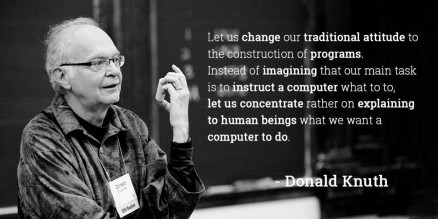
Donald Knuth: Hands down, one of the greatest Computer Scientists the field has ever seen.
In this part, there are three things you need to learn. Firstly, you will learn C++ as a second language, which is closer to machine-level descriptions as compared to Python. Python is closer to the spectrum of plain English, whereas C++ is closer to the end of the spectrum of 0s and 1s. Learning C++ will make you familiar with more programming constructs like pointers. Secondly, you will improve your coding speed by practising intensively, reading documentation, and further fine-tuning your debugging skills. Finally, you will learn recursion, which is the magic programmers and computer scientists use to harness the power of computation.
1. Learn C++ and start writing simple programs
You’ve already learnt Python in the previous part. Python is a programmer-friendly language, as it hides a lot of low-level details from the programmer for ease-of-use. However, if you want to progress, it’s absolutely necessary to learn the fundamentals of programming in C++.
What to focus on: Writing code in C++ will make you feel more programmer-like, because you’re going more towards machine-level descriptions. Learn the difference between syntax and semantics. Spend time learning static and dynamic typing, memory management, and pointers. Learn to implement conditionals, loops, functions, data-types, and stuff you learnt in Python all over again in C++. If all this seems like Greek and Latin, don’t worry. The resources section will make everything clear to you.
Handling errors: Whenever you get an error, don’t get discouraged. Even the most experienced programmers have errors and bugs in their programs. All you have to do is read the error, do a quick Google search, and fix the issue in your code. While you do this, understand where you made a mistake, correct your understanding and proceed. Sometimes you may have to read a bit of documentation. Check the next section.
2. Reading documentation should be second nature for you
Just like doing a Google search, a programmer’s skill is decided by how well he can understand documentation and write useful programs. As you learn to read documentation, you will also learn to comment your code, write readable code, and write documentation for the code you write.
Why should you learn this? A lot of people struggle with learning new technologies and look for ready-made courses to learn from. While this is fine in the initial stages, as your knowledge deepens, you won’t find ready-made tutorials to spoon feed yourself with. You will have to read through documentation and pick up what you need. Again, learn to filter out information and take exactly what you need to get the job done.
3. Practise. Repeat. Practise.
Now you just have to keep practising. Head over to Hackerrank and solve all the easy problems in the warmup and implementation section there. If there is a problem you cannot solve, read the discussions, read the editorial, and see how you can solve it yourself. If there is something you don’t understand, use Google.
If you have done the readings in the previous part, you shouldn’t have a problem here. If you’re struggling, I’d suggest you go back and revisit those sections. You must become good at writing code, so don’t skip this part. The idea is to be fluent in expressing your plain-English solutions into their programming equivalents. Once you’re not bogged down by language specifics, you can proceed. Take all the programs you wrote in Python and code them up in C++.
You may come across the hype around competitive programming, I’d recommend you to stay away from it at this stage because it will do more harm than good. Once you finish Part III, you can experiment with it and, if done right, it can enhance your problem-solving skills tremendously.
4. Understand recursion well
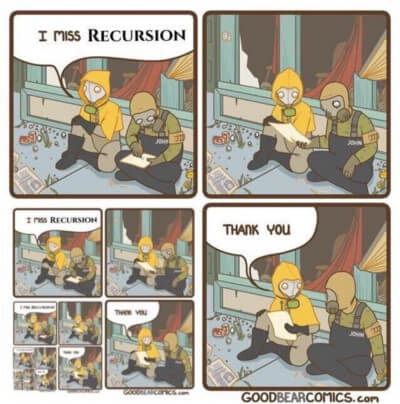
This will help you understand recursion better. Haha.
The heart of a computer scientist lies in the ability to understand recursion. To recurse means to express something in terms of itself. Everything you can do using loops can be done recursively and in very elegant ways. Try to understand this intuitively and watch the videos I have provided in the resources. If you’re a software developer who doesn’t understand recursion well enough, I’d recommend doing it right away.
Summary
So far, you know a low-level and high-level language and can sufficiently appreciate the differences in the “control” that you have over your programs. By now, you should be able to write simple programs using Python and C++ and appreciate the difference between both languages.
From here, many people go into the rut of learning more languages which is nothing but a useless exercise by itself. One of the most common questions I get asked by beginners is “How many languages do you know?”, which brings me to realise how misguided beginners generally are as they relate programming prowess to knowing more languages. Programming is not about knowing a lot of languages. The language you use is just a way for you to express and solve your problem effectively. At this stage, you are a “programmer”, but that’s not enough. You now need to learn Computer Science to take your skillset to the next level.
Part II Resources(
https://www.evernote.com/l/AizOpIHf1kJPmIPy1VOM33YInoimkpDNk1s)
Part III: Your Tryst With Computer Science
A solid understanding of the resources in this stage will make you better than most programmers in your peer group. You may even become better than most 2nd/3rd year engineering students in India. Your progress from here depends on your thirst for the material in this section. So focus.

To add some of my philosophical touch, delving into Computer Science is like opening Pandora’s box.
Most of the topics in this section are covered in the 2nd year of an undergrad Computer Engineering course. I have approached them a bit differently to best suit the objectives of this guide.
How does this differ from a regular undergraduate curriculum? Regular undergraduate curriculums are heavily loaded with theory. The courses I have suggested in the resources section have a good mix of theory and practise. While this may be a good thing for aspiring engineers, for the layperson out there, it’s not very useful. You lose track of where theory ends and practise starts. I’ll point out exactly what you need to learn theory-wise so that you can go straight ahead and practise. Theory is just a tool to help you write better code at this stage, so don’t get bogged down by it too heavily.
Fun Fact: In my 2nd semester of engineering, we had a subject called DBMS (Database Management Systems). I was surprised to find people who’d draw the best ER diagrams for their database designs, but when it came to actually designing a database for practical applications, they’d fail miserably. They were so focused on getting the details of the diagram right, they’d forget the very reason why they were doing it in the first place. I don’t blame them, because they were never taught that the diagram is there for them to build better databases, not improve their sketching skills.
1. Discrete Mathematics
You’ve already been using discrete mathematics unknowingly. Discrete mathematics is a combination of areas in applied mathematics that were repeatedly used in computer science. The experts in the field decided to club it all together and put a name to it — which we now call discrete mathematics.

Don’t worry girls, she wrote the first program
When learning discrete mathematics, follow the same principle I outlined in Part I. Think in terms of mathematical structures and the procedures used to manipulate them. Discrete mathematics simply increases the number of tools at your disposal for tackling problems. If you have overcome your fear of mathematics, you will thoroughly enjoy the course I have linked in the resources section.
2. Data Structures and Algorithms
This is the backbone of your entire journey. In fact, you’ve already been using data structures and algorithms all this time — again unknowingly. Now we’ll formalise it and study this more in detail.
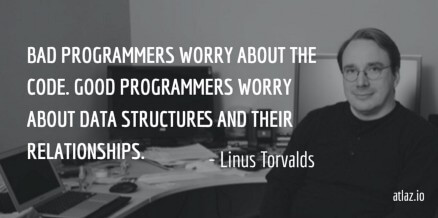
Linus Torvalds built the Linux Kernel — something without which Android wouldn’t have been what it is today
As an experienced programmer, you will be using data structures and algorithms everywhere. Understanding it well enough will extend your mathematical skills and tools to build effective computational structures for tackling common problems. You will also learn different algorithm design techniques, which are like blueprints for solving some themes in computer science.
Many tutorials will tell you to start learning algorithms and data structures straight up. The reason why I didn’t do this is because you’d get into Einstellung, which is having a fixed-mentality and approach to problems. Trust me, that cripples your thinking because you don’t think outside the box. By the end of this, you will be a great problem solver and coder.
3. Best Practises
Writing software is not just about haphazardly putting together code to get things done. In most professional environments, you won’t be the only programmer working on a code base. It is important for you to follow certain guidelines and conventions to make programming the code base easier for everyone on the team. This makes it easier to understand code written by someone else and subsequently makes it easier for others to understand your code. If you are a junior software developer, focus on this section.
What can you do? Spend time understanding and putting the DRY (Don’t Repeat Yourself) Principle in practise. Don’t write repetitive code, as this slows you down and makes you more prone to mistakes. Write useful comments and documentation wherever you can. When I started off, I thought this was a stupid thing to do till, one day, I opened an old project and realised that all of my code was unintelligible. As a programmer, you don’t need to memorise much. You memorise what is important and look up what’s needed.
4. Version Control (Git)
This is something I started doing early and it helps tremendously in keeping code organised. You track your changes and know exactly what changes you need to implement certain features. You also learn how to prevent and fix bugs quickly. I see a lot of young engineers who don’t even know what Git is, and that’s extremely sad. They’ll spend their entire career using version control — if you’re one of them, head straight to the resources below.
5. Object-Oriented Programming
An introduction to a completely new way of programming. So far, we’ve been doing procedural programming. Now we shift to object-oriented programming, which is a new paradigm altogether. An introduction to data encapsulation and abstraction will further help you appreciate the way this guide has been designed. In OOP, everything is an Object and the idea is to clearly separate your interface and implementation. You will learn Classes and Inheritance too. In the end, you’ll start designing Object-Oriented solutions and learn how to build clever black-boxes to solve problems. Learning Java is a good way to get started with this new programming paradigm. Python supports OOP too, so try exploring that!
6. Practise Hard
Practise every skill/concept/algorithm in this section by writing code snippets. Rewrite old code with the new knowledge you have acquired. Keep writing small programs and learn something new from it at every stage.
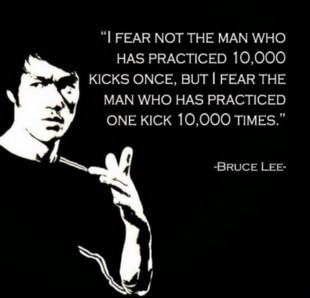
Bruce Lee: The super-human human. R.I.P legend
Keep learning as you progress. I have built calculators, library management systems, numerical computation scripts in so many different ways, and every single time, I learnt something different. You will eventually come to realise that there is no golden bullet to fix everything. Life is full of trade-offs. That is the beauty of imperfection.
Summary
You know more than enough to build game-changing software. You must internalise everything up till here to go to the next step. From here, more theory won’t do you any good. You should solely invest time in practising and building useful projects. Programming is an applied science — follow the 80/20 rule, which means spending 80% of time practising and 20% of time reading theory.
Part III Resources(
https://www.evernote.com/l/AiwMbWape4BMF6lnhDumgLslMgtDvffqzBo)
Part IV: It’s Time for You to Build Some Cool Stuff
If you’ve followed the guide till here to the T, you’re well equipped to go ahead and build some great projects that you can put on your CV, show-off to your friends, or even generate revenue from your work. In this stage, I want to teach you how to learn things along the way. Every new project you take up or are assigned to will demand learning something new. It’s important that you approach this with the right attitude.
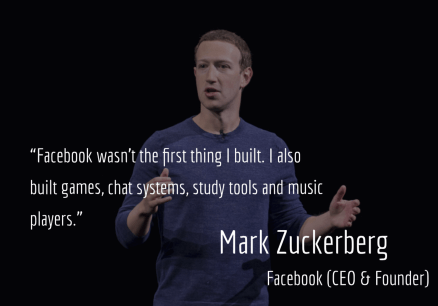
I have always been inspired by Mark Zuckerberg for his undying attitude towards nullifying failure
There are some guidelines you can follow whenever you take up any project. I developed this rubric for myself and realised it would be handy for you folks taking up new projects.
- Identify the problem you’re working on and be very specific about the details. Be clear about your goals and objectives.
- Look up existing or similar projects and identify where they excel and where they lack. See where your idea fits in, how the project aligns with the goals and objectives you have in mind and make a note of everything.
- Make a list of all the skills you need to learn to do the project and the extent to which you need to develop the skill to get the project done. Know your strengths and weaknesses.
- Create a plan to learn the necessary skills. Identify the right people to help you and necessary tutorials to get started. Focus exclusively on developing the skill to get your project done. It’s easy to get carried away into going in-depth. Remember, you’re learning the skill to complete the project and not write a Ph.D. thesis on it. Unless that’s your goal.
- Get started with the project, update your goals and objectives, and be very clear about your strengths and weaknesses. Break the project down into doable sub-tasks and assign an objectivity metric for each. This means you need to know when to stop chasing perfection and focus on the big picture.
- Execute impatiently. Repeat till all your objectives are fulfilled.
Read this for tips and tricks on how to become a better learner.(
https://qr.ae/TWtGTY)
Given your existing knowledge, you can learn to build websites, mobile applications, games, small scripts, Chrome plugins, desktop apps, and data analysis software. I’ll provide more information on this in the next post. Once you have some completed projects under your belt, you will be a good enough developer to freelance and make money on the side, which is a great source of income if you’re a student. If you’re from another field, this gives you a solid enough base to be able to augment your current work with technology. What you can with your current set of skills is endless, even an entire blog-post cannot do justice to that.
Ideally, I’d love to OpenSource my projects for you to learn from. However, at this moment, I am at a crossroads in terms of deciding what projects I want to transform into full-fledged products/ventures. The thing is, as you keep learning more, the possibilities with what you can do with your past projects is also endless.
Part IV Resources(
https://www.evernote.com/l/AiyFNI9SqyFPZYxAeHTRlDcmuqsxS6vx4h8)
Conclusion
After spending considerable time on the material in this guide, you will have learnt enough to know how to proceed further. With the knowledge you’ve picked up from here, your foundation is strong enough to leverage technology to do your bidding. If you’ve made it this far, give yourself a pat on the back!
I’m sure a lot of you want to learn more about other domains in computer science. From here you can learn about core-CS areas like databases, operating systems, distributed systems, computer networks, and theoretical CS. In a coming post, I’ll talk at length on design patterns, software architecture, deep learning, artificial intelligence, debugging tips, what to do when you hit a brick wall, and more tips for new programmers.
One thumb rule to keep in mind throughout your programming journey is to maintain the right attitude. You will run into problems with your code, come across bugs that seem unfixable, deal with technological changes that will stunt the development of your project, struggle with acquiring skills that seem beyond your grasp and a lot more. You will also come across people who are very difficult to work with. Remember, it’s all a part and parcel of life. Don’t get discouraged. Even the best of us run into dead-ends. Avoid analysis paralysis and take action on whatever problem you have — keep adapting till you succeed.
Ranveer Allahbadia (BeerBiceps on YouTube) has put out a fantastic video(
https://www.facebook.com/beerbiceps/videos/200171990881677/) on having a “Warrior Mentality”. Personally, this has helped me stay unfazed by difficulties in life, cultivate gratitude, and stay grounded in the toughest of situations.
Part I to IV: All Resources(
https://www.evernote.com/l/AixA04GX2kRIibxSshACY9KmkWMa7kkY_NA)
Personal Note
I was 14 when I first learnt how to code. I did it for fun because I loved making computers do what I wanted. Just like many other kids in this country, I was put into the IIT-JEE rat race. The general consensus by educational “experts” at that time was to “study for JEE and your life will be set.” Like every naive kid at that age, I bought into the propaganda and quit coding. During the next six months, I came to terms with the nonsense that was fed to me and tons of other kids in this country. I quickly backtracked and began focusing on doing what I love instead of blindly following the rat-race. Fortunately, I am blessed with parents who supported me wholeheartedly in this, even though it took some effort from my end to convince them. I had to show them that my intention was to work hard, be accountable for my actions, and crush my goals. I wanted to do things my way. As a matter of fact, I barely studied for my 12th boards, because I knew how meaningless it was. At that age, it was about trusting my gut and doing what I believed in. You have to give yourself time to grow, make mistakes and not fear the outcome of what will happen.
Here’s how I saw it: if I listen to all the propaganda fed to me and I fail, I cannot blame anyone for it. Instead, I’d rather do things my way and even if I fail, at the end of the day, I’d know for sure that my failure was the result of my own actions — I consciously took action and can correct myself. I am 100% accountable for my own actions. There are times where I’ve bunked lectures for an entire week and worked 24/7 for the entire week building my skills — only to be guilt-tripped by professors who honestly had the best intentions in mind but weren’t aware of the effort I was putting in.
Look, I’d definitely follow the system if it got me the desired results, but it doesn’t and deep inside, everyone knows that. I repeatedly asked myself: do I want to be mediocre or par-excellence? Is that the life I’d want to live a few years down the line? Will doing this make me happy in the long run? I couldn’t escape the system nor could I beat it, because it’s too complex a machinery to do so. The only way to deal with it was to work my way around it. Today, when I look back and look closely at the current scenario, I would 100% not do anything differently.
To the younger lot reading this: I’m not asking you to completely ditch your studies. You have to graduate and get a degree, but understand that there are things apart from that certificate that matter more in life. So spend some time cultivating them.
下载开源日报APP:
https://opensourcedaily.org/2579/
加入我们:
https://opensourcedaily.org/about/join/
关注我们:
https://opensourcedaily.org/about/love/