• 开源镜像
  • 开源沙龙
  • 媛宝
  • 猿帅
  • 注册
  • 登录
  • 息壤开源生活方式平台
  • 加入我们

开源日报

  • 开源日报第484期:《简洁 Awesome-Clean-Code-Resources》

    12 7 月, 2019
    开源日报 每天推荐一个 GitHub 优质开源项目和一篇精选英文科技或编程文章原文,坚持阅读《开源日报》,保持每日学习的好习惯。
    今日推荐开源项目:《简洁 Awesome-Clean-Code-Resources》
    今日推荐英文原文:《Beautiful Code Principles》

    今日推荐开源项目:《干净 Awesome-Clean-Code-Resources》传送门:GitHub链接
    推荐理由:这个项目是一些关于如何写出干净代码——看起来很简洁,读起来也很简洁的代码的资料。包括细分到各种语言中的小技巧以及在这之上的书籍——描述那些不管是哪种语言要想写出干净代码都会有的共同点。了解这些小技巧有助于适应团队合作,举个最简单的例子,帮助其他人看懂你的代码。
    今日推荐英文原文:《Beautiful Code Principles》作者:Pavle Pesic
    原文链接:https://medium.com/flawless-app-stories/beautiful-code-principles-39420873eff8
    推荐理由:书写良好代码的一些原则

    Beautiful Code Principles

    Writing beautiful code is often underestimated, especially by inexperienced developers. The main reasons are that writing beautiful code takes more time, and you won’t see its benefits right away.

    What is beautiful code?

    Beautiful code is clean, well-organized, and simple to upgrade. It is easy to read, understand, and navigate. To create and maintain such code, I follow eight simple principles.

    1. Have coding standards

    Coding standards are a set of coding rules. There is no universal coding standard, every product team might have its own written and unwritten rules. Among important ones, I would mention guidelines for
    • naming variables & naming methods,
    • how to group methods & how to group classes,
    • the order of writing methods,
    • how to import dependencies,
    • how to store data, so you would have a uniform code in every class.
    You know to have good coding standards when you look at the code of other developers from your team and can’t recognize who wrote it.

    This kind of code is more comfortable to understand. Coding standards give you consistency in all the projects you are working. If you are looking at some project from your company for the first time, you’ll know where to search the content you need. In the long term, coding standards save you a lot of time — from reviewing the code to upgrading features you haven’t worked on before, because you know what to expect.

    Let’s see some good and bad examples of naming variables and methods:
    // MARK: - Do
    var cellEstimateHight = 152
    var shouldReloadData = false
    var itemsPerPage = 10
    var currentPage = 0
    
    // MARK: - Don't
    var a = 152
    var b = false
    var c = 10
    var p = 0
    
    How to name variables
    // MARK: - Do
    func calculateHypotenuse(sideA: Double, sideB: Double) -> Double {
      return sqrt(sideA*sideA + sideB*sideB)
    }
    
    // MARK: - Don't
    func calculate(a: Int, b: Int) -> Int {
      return sqrt(a*a + b*b)
    }
    
    How to name methods

    Now one more example of Do and Don’t for groping your methods:
    // MARK: - Do
    override func viewDidLoad() {
      super.viewDidLoad()
      self.prepareCollectionView()
      self.addLongPressGesture()
      self.continueButton.enable()
    }
    
    override func viewDidAppear(_ animated: Bool) {
      super.viewDidAppear(animated)
      self.showAlertDialogueIfNeeded()
    }
    
    private func prepareCollectionView() {
        self.collectionView.register(UINib(nibName: "PhotoCollectionViewCell", bundle: nil), forCellWithReuseIdentifier: "PhotoCollectionViewCell")
        self.collectionView.allowsSelection = false
    }
    
    private func addLongPressGesture() {
       self.longPressGesture = UILongPressGestureRecognizer(target: self, action: #selector(self.handleLongGesture(gesture:)))
       self.collectionView.addGestureRecognizer(longPressGesture)
    }
    
    func collectionView(_ collectionView: UICollectionView, numberOfItemsInSection section: Int) -> Int {
      return self.selectedAssets.count
    }
    
    func collectionView(_ collectionView: UICollectionView, cellForItemAt indexPath: IndexPath) -> UICollectionViewCell {
      let cell = collectionView.dequeueReusableCell(withReuseIdentifier: "PhotoCollectionViewCell", for: indexPath) as? PhotoCollectionViewCell
    
      return cell!
    }
    
    // MARK: - Don't
    override func viewDidLoad() {
      super.viewDidLoad()
      self.prepareCollectionView()
      self.addLongPressGesture()
      self.continueButton.enable()
    }
    
    private func prepareCollectionView() {
        self.collectionView.register(UINib(nibName: "PhotoCollectionViewCell", bundle: nil), forCellWithReuseIdentifier: "PhotoCollectionViewCell")
        self.collectionView.allowsSelection = false
    }
    
    func collectionView(_ collectionView: UICollectionView, numberOfItemsInSection section: Int) -> Int {
      return self.selectedAssets.count
    }
    
    func collectionView(_ collectionView: UICollectionView, cellForItemAt indexPath: IndexPath) -> UICollectionViewCell {
      let cell = collectionView.dequeueReusableCell(withReuseIdentifier: "PhotoCollectionViewCell", for: indexPath) as? PhotoCollectionViewCell
    
      return cell!
    }
    
    private func addLongPressGesture() {
       self.longPressGesture = UILongPressGestureRecognizer(target: self, action: #selector(self.handleLongGesture(gesture:)))
       self.collectionView.addGestureRecognizer(longPressGesture)
    }
    
    override func viewDidAppear(_ animated: Bool) {
      super.viewDidAppear(animated)
      self.showAlertDialogueIfNeeded()
    }
    
    How to group methods

    Also, when talking about coding standards, don’t forget the organization of your workspace. To navigate quickly, you have to organize your project functionally: create groups of files that relate to each other. Keep the same organization for all projects. So if you work on multiple projects, you don’t have problems with finding the resources you want.

    How to create groups

    2. Use self notation

    This can be coding standard too, but I wanted to point out a few things about the concept.

    Firstly you have clear perspective what is global and what is local variable for the current scope. Allthow Xcode sets the different color for global variables, that isn’t good enough distinction for me. When using self notation, it’s much easier to recognize it.

    In the other hand, if you have code with many handlers, you have to use self notation inside them. Using it outside of handlers too makes your code uniform.

    3. Use marks for easier navigation

    Marks are used for dividing functionality into meaningful, easy-to-navigate sections. And yet, not all developers are not using them. There are two types of marks in terms of preview with and without dash (-). Marks with it are preceded with a horizontal divider.
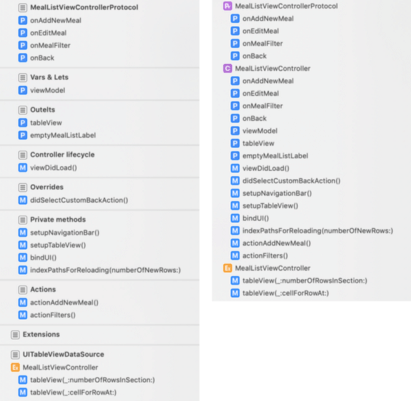
    Navigation with and without marks

    We use marks with das for creating sections, and if you want to create subgroups, we use marks without the dash.

    Again, like in the first section, this code is easier to understand, navigate, and review. Code without marks or methods placed in the wrong section, shouldn’t be approved at the review.

    4. Constants

    There shouldn’t be any strings or any other constant in your classes. Constants are pieces of information that don’t have much value so you shouldn’t pay attention to it. Moreover, they can be quite long, in another language, so it makes your code unreadable.

    What you should do is to create a file with constants, create a coding standard for naming constants, group them using marks, and then use them in the classes. One more benefit of constants is that you can reuse them, and if there is a need for change, there is only one place to do it.

    5. Class size

    Depending on the project you are working on, you should predetermine class size. Ideally, a class shouldn’t be longer than 300 lines, without comments, but there will be exceptions, of course. Small classes are much easier to understand, manage, and change.

    To have small classes first, you have to think about architecture. In standard MVC it’s tough to have controllers that are smaller than 300 lines. That’s why you should try with other types of architecture like MVVM or Viper. There, controllers aren’t so massive because they are only responsible for presentation logic. Business logic is in other files.

    However, be aware. Readability should always be the priority relative to class size. Your functions should also be small, easy to read and understand. You should have a maximum number of lines for function, and if the function has more lines than allowed, you should refactor it. Let’s see on practice:
    // MARK: - Do
    override func viewDidLoad() {
      super.viewDidLoad()
      self.setupTextFields()
      self.setupTableView()
      self.bindUI()
    }
    
    private func setupTableView() {
      self.view.backgroundColor = .red
      self.tableView.dataSource = self
      self.tableView.delegate = self
      self.tableView.register(UINib(nibName: "MealTableViewCell", bundle: nil), forCellReuseIdentifier: "MealTableViewCell")
      self.tableView.separatorStyle = .none
      self.tableView.backgroundColor = .blue
      self.tableView.contentInset = UIEdgeInsets(top: 0, left: 0, bottom: 80, right: 0)
    }
    
    private func setupTextFields() {
      self.emailTextField.delegate = self
      self.fullNameTextField.delegate = self
      self.passwordTextField.delegate = self
      self.passwordTextField.isSecureTextEntry = true
      self.confirmPasswordTextField.delegate = self
      self.confirmPasswordTextField.isSecureTextEntry = true
      self.userRoleTextField.delegate = self
    }
    
    // MARK: - Don't
    override func viewDidLoad() {
      super.viewDidLoad()
      self.emailTextField.delegate = self
      self.fullNameTextField.delegate = self
      self.passwordTextField.delegate = self
      self.passwordTextField.isSecureTextEntry = true
      self.confirmPasswordTextField.delegate = self
      self.confirmPasswordTextField.isSecureTextEntry = true
      self.userRoleTextField.delegate = self
      self.view.backgroundColor = .red
      self.tableView.dataSource = self
      self.tableView.delegate = self
      self.tableView.register(UINib(nibName: "MealTableViewCell", bundle: nil), forCellReuseIdentifier: "MealTableViewCell")
      self.tableView.separatorStyle = .none
      self.tableView.backgroundColor = .blue
      self.tableView.contentInset = UIEdgeInsets(top: 0, left: 0, bottom: 80, right: 0)
      self.bindUI()
    }
    
    Readability as a priority

    6. Create reusable components

    One more trick for having smaller, easier to understand classes is to create reusable components with the following characteristics:
    1. It handles business processes
    2. It can access another component
    3. It’s relatively independent of the software
    4. It has only one responsibility
    Import those components in other classes. I already wrote about this topic in How to implement the service-oriented architecture(https://itnext.io/service-oriented-architecture-in-swift-362dc454fc09). Look at it for more details.

    7. Design patterns

    For solving some problems, there are already excellent solutions — design patterns. Each pattern is like a blueprint that you can customize to solve a particular problem in your code, and after a little bit of practice, quite easy to understand and implement. Design patterns make communication between developers more efficient. Software professionals can immediately picture the high-level design in their heads when they refer to the name of the pattern used to solve a particular issue.

    Every app needs a different set of patterns, but there are common ones that every app should implement — delegation, observer, factory, dependency injection.

    8. Code review

    While the primary purpose of code reviews should be functionality, we also need to take care about readability and organization of the code. If the code doesn’t compile to these principles, reject a pull request.

    Some tools can help you with code reviews like SwiftLint or Tailor, so I highly recommend using one.

    Code reviews can take some time, but they are an investment for the future. New developers will learn these principles by reviewing your code, and by getting your feedback about theirs. Moreover, the clean code will save you time when you come back to change feature after a few months.

    Be strict when reviewing and expect it from others when reviewing your code. If you don’t do so, you’ll create an atmosphere that it’s ok to make mistakes. Don’t merge code if it has flaws. Chances are you are going to forget to fix them.

    Conclusion

    The functional aspect of the code is an essential part of developing an app. However, to easily maintain and upgrade an app, the code has to be clean, organized, easy to read, understand, and navigate, or as we called it here beautiful.

    These are the principles I use to make my code beautiful. It sure takes more time to write and review, but it will save you more in the future.
    下载开源日报APP:https://opensourcedaily.org/2579/
    加入我们:https://opensourcedaily.org/about/join/
    关注我们:https://opensourcedaily.org/about/love/

  • 开源日报第483期:《断手偶素 osu》

    11 7 月, 2019
    开源日报 每天推荐一个 GitHub 优质开源项目和一篇精选英文科技或编程文章原文,坚持阅读《开源日报》,保持每日学习的好习惯。
    今日推荐开源项目:《断手偶素 osu》
    今日推荐英文原文:《Why JavaScript is (not) the best first language to learn》

    今日推荐开源项目:《断手偶素 osu》传送门:GitHub链接
    推荐理由:osu 应该算是出名的音游了,曲谱多的数不胜数,而且每天都有更新。这个项目就是它在 GitHub 上的仓库,对它本身感兴趣的话可以在游玩之余参观一下代码。如果对于单纯只是喜欢音游的人也是一款不能错过的游戏,配合触摸屏食用效果更佳(鼠标的力量是有极限的,所以……)
    今日推荐英文原文:《Why JavaScript is (not) the best first language to learn》作者:Clyde Bates
    原文链接:https://medium.com/@a.bates1993/why-javascript-is-not-the-best-first-language-to-learn-8f8a99da5ec
    推荐理由:要记住,语言本身也只不过是一种工具而已,而语言背后的思想,逻辑等等才是需要重视的

    Why JavaScript is (not) the best first language to learn

    This article is going to touch on a common tech interview question — “why did you decide to learn first?” and what I think the proper response should be. My first language was JavaScript, and so I’ll be focusing from that vantage point when thinking about this question. You see, JavaScript is both the best language to learn first, and not the best language to learn first. The reason it is not is quite simple — there just isn’t a “best first language”. Doesn’t exist. Next question please.

    But really, the whole idea of one language being “better” than another is a bit erroneous. There’s certainly preferences — but those are subjective, and often just matters of preferred syntax. And there’s also best-case languages, in other words, languages that are best suited to the job/project you’re on— but that wasn’t the question. The truth is, all languages do the same thing. They translate human intentions into machine instructions. And that is the important thing. It doesn’t matter which language you learn first, what matters is that you learned a language. You learned how to talk to a machine, how to get on its level and think like it thinks. You learned a level of cognitive reasoning that makes you incredibly well suited to work in ANY language. If you can learn one language really really really well, it’ll be a piece of cake to learn another. The real skill isn’t knowing how to solve the problem, it’s what questions to ask to get to the answer. That’s what learning a language — any language — will teach you.

    All that being said — JavaScript is a great first language. Let’s delve a little bit into why that is…

    JavaScript was invented in 1995 by Brendan Eich, who worked at Netscape at the time. This was during the time that Netscape enjoyed being the world’s most popular Web Browser (imagine that). Also at this time was a company quickly picking up A LOT of steam and looking more and more like a monopoly on tech each day. That’s right, you guessed it, Microsoft. See, Netscape didn’t want to lose this battle for the world wide web. JavaScript was currently being developed as a powerful server and client side language up to this point. But when Netscape decided to wage war on Microsoft, they responded to the Internet Explorer project with a quick standardization of the JavaScript language and an unlikely partnership with Sun, the creators of Java. With all this, sights were set to have JavaScript become the companion language to Java. So that quick jump from “powerful server and client language” to “web companion to Java” is the reason for many of JavaScripts most hated quirks, like automatic type coercion. Because of this unfortunate marketing decision (which really didn’t do much for Netscape in the end, as we all know), JavaScript was merely a browser language for nearly two decades. However, during this time, JavaScript became the de-facto leader of web languages. It’s hard to find a website that doesn’t use it. Which is my point #1 of why it’s a great first language to learn.

    All of that brings us to 2009 — the release of Node.js

    With the release of Node.js, JavaScript finally realized its full, original potential and moved out of Browser Jail. Now, you can learn ONE language and be a full-stack developer. Node.js “is a highly customizable server engine that uses non-blocking event-based input/output model.” What this means, basically, is that we can now use JS to create server apps, not just client apps. This makes JavaScript incredibly well rounded, being the leader in browser development that is still able to be a fully-fledged backend language.

    So there ya have it. There’s no real best first language, but I’m glad I learned JavaScript first. It is, in my opinion, the fasted route to a full stack understanding. That being said, just keep in mind… There is no best language.
    下载开源日报APP:https://opensourcedaily.org/2579/
    加入我们:https://opensourcedaily.org/about/join/
    关注我们:https://opensourcedaily.org/about/love/
  • 开源日报第482期:《正则表达式 learn-regex》

    10 7 月, 2019
    开源日报 每天推荐一个 GitHub 优质开源项目和一篇精选英文科技或编程文章原文,坚持阅读《开源日报》,保持每日学习的好习惯。
    今日推荐开源项目:《正则表达式 learn-regex》
    今日推荐英文原文:《Don’t Bet on AI (yet)》

    今日推荐开源项目:《正则表达式 learn-regex》传送门:GitHub链接
    推荐理由:正则表达式,在处理复杂的用户输入时强大的助力,但是学习它的时候各种符号的组合能把你的思维绕到三百万年外。这个项目是一个关于正则表达式的教程,不仅收录了学习资料,还提供了一个在线的学习网站帮助巩固所学,在实操中多练习一下能够让你更快的达到不需要每次使用的时候都翻开教程的境界,熟能生巧,这种东西还是全记下来用的才方便。
    今日推荐英文原文:《Don’t Bet on AI (yet)》作者:AJ Christensen
    原文链接:https://towardsdatascience.com/dont-bet-on-ai-yet-c3c37bbcc0b6
    推荐理由:成功并非唾手可得,人工智能也是如此

    Don’t Bet on AI (yet)

    I’ve analyzed 7,000 “AI Startups”. Most underestimate the challenges that plague AI. Does yours?

    You’ve probably heard some variation of this quote from Andrew Ng: “AI is the new electricity! Electricity transformed countless industries; AI will now do the same.” I agree with this sentiment, mostly. The problem is, this statement ignores the massive obstacles that are preventing rapid AI adoption. AI will not be an overnight phenomenon. It took more than 40 years for electricity to become a ubiquitous technology! The world had already discovered the key elements of modern electricity by 1882. Many challenges, however, prevented instant mass adoption: costly infrastructure, lack of talent, opaque regulations, and more. Taken together, these obstacles kept electricity out of the average US home until 1925!
    AI is the new electricity. It will transform industries. But like electricity, it will take decades. Today is 1882 in the world of AI, not 1925.
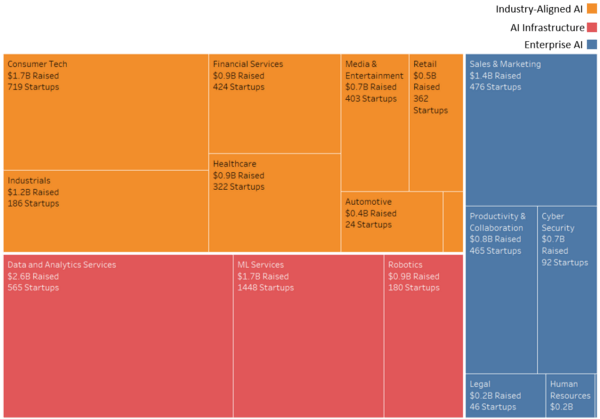
    What frictions are preventing AI adoption? Where will AI succeed first? Where will it lag? Unless we develop this conversation, many technologically viable, well-reasoned AI ventures will fail. This matters because the world, perhaps unwisely, is betting big on AI right now. I scraped the web and found 7,192 “AI Startups” — ventures that claim they are an AI company or say they’re using machine learning. These startups have raised more than $19B and employ well over 150,000 employees. AI Venture Activity by Market | Source: Analysis of 7,192 “AI Startups” from Angel List

    When Will Your AI Venture Succeed? — A Framework

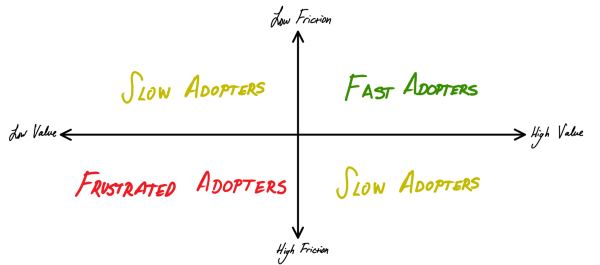
    Fortunately, you can predict whether your AI venture is more likely to succeed in the near, medium, or long term. The capabilities and challenges of AI are well understood — all you have to do is review them holistically, then think critically about your use case for AI. To do this, consider using a simple framework: the rate at which your AI solution will be adopted is a function of the value potential and unique frictions therein. There are many frictions that slow down AI adoption. But these frictions slow some ventures more than others. Why? Because some AI solutions create more value than others. When an AI solution has dramatic value potential, companies, investors, regulators, and consumers more easily align to push through friction. This simple relationship between value and friction yields a useful framework: Rate of AI Adoption = f(AI friction, AI value) So what does the road to mass adoption look like for your AI bet? This framework can be operationalized in a straightforward manner for any problem, venture, or industry. Here’s a more detailed breakdown.

    Top Frictions Preventing Rapid AI Adoption

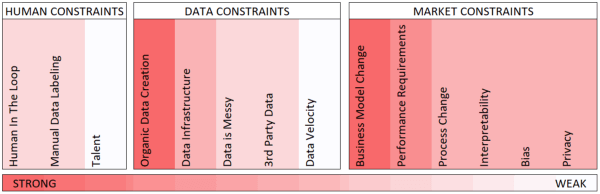
    Step one is to perform a thoughtful analysis of the AI frictions that might slow adoption for your AI venture. Human, data, and market frictions all slow the adoption of proven AI solutions. They complicate development, limit scalability and introduce use-case killing risks. And not all frictions are created equal. Some are much more dangerous than others: Estimated Magnitude of AI Frictions | Source: Interviews with AI Experts

    Human Constraints on AI

    • Human-in-the-loop requirements: Many algorithms need human supervision. For example, Facebook employs more than 15,000 people to assist their content moderation algorithms.
    • Manual data labeling requirements: Many use-cases for AI need humans to teach algorithms what to predict (or in technical terms, “label” the data). For example, Baidu had to hire thousands of translators to train its Chinese translation algorithms.
    • Lack of access to talent: There is a global shortage of data scientists, machine learning engineers, and other AI talent. This makes it challenging for companies to assemble competent AI teams. In 2018, Indeed.com had 3X more postings than searches for AI-related jobs.

    Data Constraints on AI

    • Organic data creation: Some business models don’t naturally generate the data that AI requires. For example, traditional retail businesses don’t capture rich data on customer shopping patterns. To incorporate AI retailers need to adopt new business models, such as online and ‘direct to consumer’.
    • Lacking Data Infrastructure: AI requires significant investment at every level of the technology stack. On-prem hardware and legacy software solutions are anathemas to AI. To enable AI, enterprises have to invest in cloud, data centralization, data security, and AI development tools.
    • Existing data is messy: Data is rarely organized in clean, centralized tables of rows and columns. Instead, most data lives in messy documents or legacy software systems. Companies tend to silo data across teams and organizations. They typically fail to maintain documentation for where different data exists. And they don’t enforce standards for how to capture and store their data.
    • Dependence on 3rd party data: AI is hungry for data. When your company doesn’t have enough proprietary data, it has to buy it. Licensing and maintaining APIs to access 3rd party data is costly.
    • Data velocity is low: Most AI requires thousands of examples of completed feedback loops to learn. This is challenging in areas with slow feedback loops. For example, capturing data on long-term health care outcomes for chronic illnesses is a costly process.

    Market Constraints on AI

    • Business model changes required to capture AI value: To capture AI value, many industries will have to change how they deliver products and services. For example, autonomous vehicles will force automakers to embrace transportation-as-a-service strategies.
    • Near-perfect algorithm performance requirements: Some AI use cases have a high cost of failure. Take, for example, diagnostic decisions in healthcare or self-driving cars. In these contexts, AI solutions introduce significant risks.
    • AI requires process change: AI-enabled products often introduce drastically different workflows. For example, AI-powered recruiting solutions often prefer non-traditional interviews and job applications. This scares more traditional HR teams.
    • Uninterpretable algorithms: In many instances, consumers (and even regulators) demand AI-tools that can explain themselves. Unfortunately, it’s very difficult to interpret how many AI algorithms make decisions. For example, if a bank denies a client credit they have to explain why. This makes AI in lending difficult.
    • Biased algorithms: AI algorithms often make biased decisions. This is illegal and distasteful in many areas (such as law enforcement, HR, and education).
    • Onerous privacy standards: AI is a threat to privacy. AI creates incentivizes for companies to collect vast amounts of private information. Additionally, AI is capable of inferring personal information (like an individual’s emotional state) from innocuous data (like typing patterns). AI solutions that threaten privacy are likely to face regulatory and consumer resistance.

    Sizing the Value of AI

    Once you understand the AI frictions facing your venture, perform a value analysis. Does your AI solution reduce costs? Save time? Mitigate risk? Create new consumer value? If so, how much? There is no one-size-fits-all approach for doing this. Once you’ve valued your AI solution, think critically about how well this value will motivate stakeholders to push past friction. In doing this, you should consider macro-level trends. It’s dangerous to be in a category where AI is not creating significant value more generally. If that’s the case, you’ll be a lonely advocate for AI. McKinsey Global Institute (MGI) recently valued the potential of AI and analytics at more than $9T. Importantly, this value is not distributed proportionally across various use-cases and industries.

    Use cases for AI

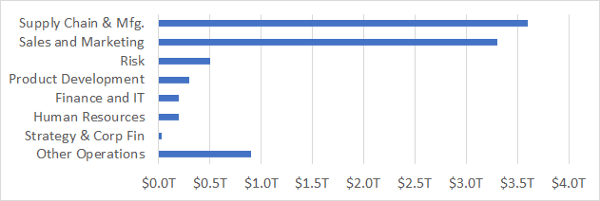
    After valuing a list of more than 400 known AI use cases, MGI found mundane business problems — supply chain, sales, and marketing — to be the most valuable use cases for AI. Value of AI by Use Case | Source: McKinsey Global Institute

    Value of AI across Industries

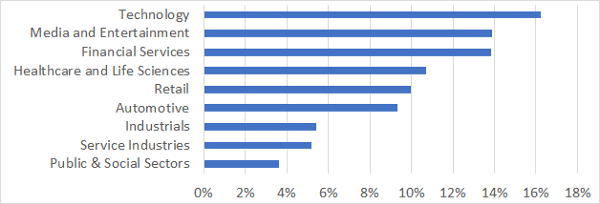
    By mapping use cases to industries, MGI valued how important AI will be for various sectors. They found that industries with complex problems in top-line functions (such as sales) stand to gain the most from AI. Value of AI as % of Industry Revenues | Source: McKinsey Global Institute

    The Future of AI— Applying the Framework

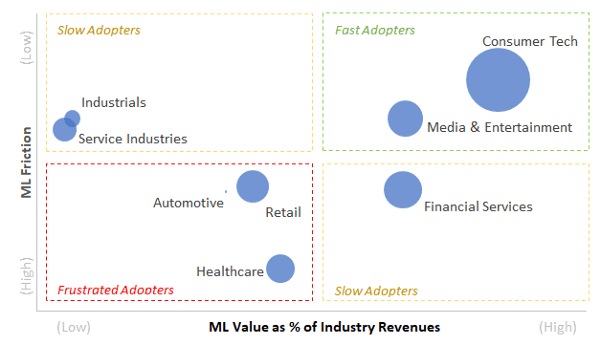
    So which industries are most vulnerable to slower-than-expected AI adoption? Who’s most likely to populate the graveyard of mistimed AI bets? This framework can be applied at the macro level to find out. I interviewed several AI experts to estimate how strong AI frictions are in each industry then aggregated and plotted this information against MGI’s AI value estimates: Based on my analysis, AI will roll out across industries in three waves:
    • 1st Wave AI — Fast Adopters: This wave, incorporating consumer tech and media, is already well underway. Advances by the likes of Google, Facebook, and Netflix are leading the charge.
    • 2nd Wave AI — Slow Adopters: This wave, too, has already begun but is likely to roll out more slowly. Some adopters (such as manufacturers and supply chain operators) are less motivated to adopt AI. Others (such as banks) see huge payoffs if they succeed, but face significant challenges in adopting AI.
    • 3rd Wave AI — Frustrated Adopters: Healthcare, automotive, and (possibly) retail are at risk of slower-than-hoped-for adoption of AI. All face huge obstacles to adopting AI. All, on a dollar-for-dollar basis, have less incentive to adopt AI. Note, however, that retail is a bit of a misfit here: traditional retailers face significant frictions in some areas (sales and marketing) but are fast adopters of AI in others (supply chain operations).
    So when will your AI venture succeed? Analyze the AI frictions you face. Size the value you aim to create. Then look at where your venture stands relative to known AI successes. More friction and less value? Might not be time to make that bet, yet. But if you have a high-value, low-friction AI solution then stop reading this post. Full speed ahead!
    下载开源日报APP:https://opensourcedaily.org/2579/
    加入我们:https://opensourcedaily.org/about/join/
    关注我们:https://opensourcedaily.org/about/love/

  • 开源日报第481期:《杂志 The-Economist》

    9 7 月, 2019
    开源日报 每天推荐一个 GitHub 优质开源项目和一篇精选英文科技或编程文章原文,坚持阅读《开源日报》,保持每日学习的好习惯。
    今日推荐开源项目:《杂志 The-Economist》
    今日推荐英文原文:《To Comment or Not to Comment ?》

    今日推荐开源项目:《杂志 The-Economist》传送门:GitHub链接
    推荐理由:收集了经济学人——由伦敦经济学人报纸有限公司出版的杂志的仓库。该杂志主要关注商业和政治新闻,最有特色的地方就在于发表的文章并不署名——当然稿费还是会给的。不过实际上文章写了什么比谁写的文章更为重要这一点是毋容置疑的,毕竟,我们看杂志可不是为了追星什么的不是吗?
    今日推荐英文原文:《To Comment or Not to Comment ?》作者:Jean-Sébastien Gonsette
    原文链接:https://medium.com/@jeansebastien.gonsette/to-comment-or-not-to-comment-72d84e6f0706
    推荐理由:写大量的注释和完全不写注释依靠代码说明都不是个好主意,中庸之道才是适合的

    To Comment or Not to Comment ?

    No, you should not stop writing code comments.

    The Internet is undeniably a tremendous technology that has literally propelled information sharing and exchange of ideas to a level never achieved before. Nevertheless, this sometimes provokes some frustrations, as when we read the words of a person whose thinking and conclusion are fundamentally at the opposite of ours. It may generate a serious sense of urgency that causes you to react in one way or another, because you are aware of a crime of lese-majesty; someone, somewhere on the Internet is wrong!

    I experienced this situation while reading an article entitled: “Stop Writing Code Comments”, in which its author develops an argumentation promoting to stop writing, or even ignore, comments in a computer program source code. Of course, this topic isn’t new, and I have already discussed this issue extensively with many colleagues. Some of them are also largely in favour of using them at a minimum, because they see comments, at best as a waste of time, at worst as a source of confusion. But to encourage the apology of the total suppression of comments, there is a line that I didn’t think that one could cross.

    Even if my heart skipped a beat and if I felt the urge to deny this pamphlet that should be a bunch of nonsense, I still took the trouble to study the argumentation of this detractor. Doesn’t the “Art of War” teach you to know your enemy as well as yourself? Then, everybody must admit that it would be slightly presumptuous to claim to hold the one and only truth. If this author has the feeling that the comments in a program are totally useless, this feeling must be based on some objective standard. So I took a deep breath before tackling this post to fully understand the ins and outs.

    I was then surprised to find out that the basic elements supporting his speech made sense, but that it was rather at the level of the recommendations he drew that it became wobbly. The author encourages indeed the thesis of self-documented code, which means every programmer must strive to write the code as clear and as expressive as feasible to avoid as much as possible to have to define what it’s doing. The names of each variable, class or function must leave no doubt about the purpose they serve. Functions must be small and serve only a single objective, explicitly indicated by its name. As soon as the logic that animates it becomes too complex, a function must be broken down into so many slight and simple pieces, each encapsulated in its own routine. All these rules of good practice aim at making as easy as possible to read the code, to ensure its testability, or to guarantee the ease with which someone can later make any changes.

    I can only emphasize here the relevance and importance of this point of view because I’m myself a strong believer that good code shouldn’t just do what it should do; it must also be extremely readable, well structured and flexible, so as to minimize as much as feasible its complexity at all levels of reading. By this I mean that when you look at a piece of the source code, it must be engineered to deeply reduce the mental workload of the reader. Given that in the life of the software, its code will be read more often than it was written, it saves a lot of time at all stages of its existence, while drastically limiting the probability of leaving all kinds of bugs in the corners.

    In fact, this principle goes much further than our debate on comments, and I will allow myself a little parenthetical comment here. The primary goal of software engineering and code writing is entirely in the management of complexity. And if it’s easy to forget this point when writing a program a few hundred lines of code long, it’s quite different for larger or more sophisticated software. Some of you may have already witnessed the organic growth of programs that, gradually, were transformed into a labyrinthine black box and that no one could understand in full any more. And the golden rule to fight against this phenomenon reposes mainly in the systematic and hierarchical modularization of the program’s constituents. That’s why the development of a system goes through the design of different modules that are themselves broken down into sub-modules, into classes, then into functions. That’s why you have to spend time refining the operations of those elements at a higher level of abstraction before coding them, or that you have to spend time creating interfaces to connect them to each other. Everywhere it’s necessary to make sure that the various parts are highly coherent with each other (they aim jointly at the same objective), but that their couplings (i.e. their interactions) remain weak. And only then it can be humanly possible to manage code whose effects can spread over several orders of magnitude of complexity, ranging from the manipulation of simple bits to the one of hundreds of MB of information.

    Among all the tools that make it possible to confine the code complexity to a humanly acceptable level, the notion of self-documented code must surely be the spearhead of the programmer’s arsenal; I don’t want to debate this point here. My problem comes from the following step, which then consists in demonizing the comments, denying not only their usefulness, but also asserting that they generate more harm than good.

    Criticisms of comments, numerous and well known, are fuelled by an eternal debate to define the quintessence of what the art of software engineering should be. For example, we can mention the fact that comments would make the code more challenging to read because the ordinary language is much less precise than any programming language. We can add that the code changes without anyone bothering to modify the comments that accompany it, making the reading even more confusing and difficult. Then, they’re like a waste of time as they require to write or read twice as much information, while one part may be completely obsolete and wrong. Moreover, the ultimate knowledge, the one that really matters and never lies, is the code itself; why should we bother with a vein and potentially harmful additional workload?

    All the pitfalls I just mentioned are indeed real, needless to deny. But these problems only arise when comments are badly used, by programmers inexperienced in the art of employing them. And it isn’t because some clumsy people have already been injured with a shovel or a pickaxe that these tools must be considered as absolute evil. Imagine the situation:

    Using tools to dig a hole? But you’re crazy, it’s a source of annoyances and endless hassles. You have to handle them with care, take care of them, not to mention the risk of getting hurt. Personally, I’ll tell you, there is no hole that I cannot dig with my fingers and a teaspoon. You don’t believe me ? look at this hole of a cubic meter, made entirely in three days with elbow grease. So put away your tools or other devil’s excavators, a real worker uses only his muscles and a teaspoon.

    If you find my story a bit caricatural, I’m going to relate another one that is true this time. Several people have already told me, totally convinced, that there is no situation that cannot be fully debugged with printf. That a true pure programmer didn’t need any IDE, just a text editor like vi and, of course, printf. One has even claimed that the mouse was a waste of time, everything can be achieved faster with keyboard shortcuts. I have always been puzzled by these kinds of statements. The unshakeable conviction with which they were uttered made me even doubt myself at first, letting me believe that I was the incompetent who didn’t understand how to debug a multitasking process manipulating complex data structures without employing break points, variable inspection tools, or even means to scrutinize memory content. But the truth is very different, these people have probably never gone head-to-head on issues other than those that I consider myself as childish. I don’t mean to say that you should never use printf, this is an option that is often relevant. What I mean is that there are also many more difficult situations and that it would be very naive to ignore them.

    The situations cited as illustrations in the article banning comments are thus of the same type, simplistic. They all implement trivial examples emphasizing the uselessness of writing a comment such “The title of the CD” next to a variable called “title”, or “This function sends an email” for a function called “SendEmail ()”. I’m not saying that I’m never confronted with such banalities, but being rather versed in writing algorithms solving complicated problems, I remain very perplexed. I’m used to always mention in comment the acceptability range or the physical units to which variables associated with a physical process relate to. This allows at a glance to understand that the variable “speed” is used in m/s and not in km/h, without having to read a hundred lines of code looking for any clue. Should I now refrain from this kind of triviality and rely only on the notion of self-documented code? Should I now change the name of my variable “speed” to something less prosaic like “speed_positive_lessthan150_meterbysecond” ?

    In the same way, I always try to put a paragraph summarizing the main lines of what each function performs, in addition to giving them an explicit name. The reason is simple, many of them are quite abstract and cannot be summarized in a triplet of words. For example, imagine that you code a procedure that searches for the root of a polynomial using Newton’s iterative method. Personally, I think it’s a good idea to recapitulate what this function does, as well as to provide a pointer to some additional information. Should I now rename my “FindPolynomialRoot ()” function to something more explicit like
    “FindPolynomialRoot_UseNewtonApproximation_MoreOnWikipedia_Newtons_method ()”
    to avoid these abject comments?

    Even if I push the point (and again), the reality is quite different. A good programmer must always find an acceptable compromise based on all the tools that can support him manage the complexity of a program. The self-documented code is one, very important, but it is frequently far from sufficient. Beware of all those who assert to have found the grail and advocate an absolutist policy, because the truth is often in the nuance, never in the extremes. Well applied, the usage of comments can and should help you better structure and document your code. Refusing them, as the author claims in his article because a programmer “is not a documentor”, is similar to stating that no any other kind of documentation than the code is necessary. Exit the software architectures, the UML diagrams, the test plans, the detailed models, the pseudocode or the descriptions of algorithmic and mathematical methods, all you need to know is in the code. And while we are at it, maybe that for a true pure programmer, all there is to know is in the code in binary form.

    More seriously, the code contains only what the compiler needs to know, but certainly not everything you, as a human, need to know. Comments should be viewed and used as a means of intermediate documentation between the code and other design documents. They should therefore not overlap, but rather shed light to a higher level of abstraction, that is to a level that not any self-documented code could reach. Comments should always describe the programmer’s intent, and definitely not rephrase what the code does. They must not be redundant and certainly not obsolete. Because yes, comments must be written with the code altogether, and altering one is like changing the other. In order to get things right, tell yourself that by reading only comments about a function, you must be able not only to learn what the function does, but further to grasp the big logical lines of how it achieves it. In this sense, comments must always describe a story it should be possible to read while ignoring the lines of code with which they intermingle. Higher-level comments can also help to comprehend how all functions or classes relate to each other, by summarizing the general operation or by punctuating certain parts of the code, just as a table of contents and chapter titles structure a book. And if you’ve never felt the need to comment your code, maybe it’s just because you’ve never written a book. There is nothing pejorative about it, but it is good to know it before pretending to have understood everything and to fight for their eradication.

    To close this little note, I would like to quote Steve McConnel’s book “Code Complete”. This one-of-a-kind reading takes a long and broad look at the often overlooked topic of managing complexity in computer programs. And if you only need to read one passage, then it’s definitely “The Commento” that you’ll find in Chapter 32.3.
    下载开源日报APP:https://opensourcedaily.org/2579/
    加入我们:https://opensourcedaily.org/about/join/
    关注我们:https://opensourcedaily.org/about/love/

←上一页
1 … 138 139 140 141 142 … 262
下一页→

Proudly powered by WordPress