• 开源镜像
  • 开源沙龙
  • 媛宝
  • 猿帅
  • 注册
  • 登录
  • 息壤开源生活方式平台
  • 加入我们

开源日报

  • 开源日报第492期:《异口同声 neural_complete》

    20 7 月, 2019
    开源日报 每天推荐一个 GitHub 优质开源项目和一篇精选英文科技或编程文章原文,坚持阅读《开源日报》,保持每日学习的好习惯。
    今日推荐开源项目:《异口同声 neural_complete》
    今日推荐英文原文:《Can you learn to code on your phone?》

    今日推荐开源项目:《异口同声 neural_complete》传送门:GitHub链接
    推荐理由:输入 #in 然后回车打出 #include 应该是相当常见的操作了,作为节省时间的手段人尽皆知。但是如果再进一步,把后面那个头文件也回车打出来兴许更能节省时间。这个项目就是自动补全更进一步的形态,通过神经网络训练让其能够预测你需要的下一行代码是什么,从而进一步节省时间。兴许以后可能每一个人的每一个项目都会有一个单独的自动补全模块,从而达到根据每个人每件事不同风格来决定他输入的下一行代码可能是什么,我们就能把更多时间花在创造新的代码上。
    今日推荐英文原文:《Can you learn to code on your phone?》作者:Simon Hargreaves
    原文链接:https://medium.com/swlh/can-you-learn-to-code-on-your-phone-95523c7c3eeb
    推荐理由:利用手机学习写代码的方式

    Can you learn to code on your phone?

    Given the limited screen size and options for programming on your phone is it even possible to get a good grounding in a programming language just from a smartphone?

    The benefits of learning to code have been pushed heavily to people of all ages as an option for upskilling or just becoming more computer literate. There are a lot of options out there, but I’ll just look at a handful and see if they are any good.

    Coding games

    Theses apps develop the ideas of building sequences, using functions, and conditionals but leave out variables and other useful constructs like while loops. These are clearly games, but a good introduction for younger kids or those not that interested in getting into the more serious side just yet.

    Lightbot

    I love the look of Lightbot, it was one of the first “programming” games I looked at for introducing kids to the principles of programming. The instructions are very clear and easy to understand. It introduces functions, or procedures as they are called in Lightbot world, quite early and does a very good job of using them in solving puzzles. It covers functions, calling functions within functions, iterative functions (a function calling itself) and conditionals. Although conditionals is a little clunky, it’s a start. It comes in two versions Code Hour (functions) and the full version (functions and conditionals). It quite quickly turns into puzzle-solving rather than learning principles, but it should keep kids engaged for a while and peak their interests for more challenging stuff. Ages 5–11 for the early levels, the challenging levels will have a lot of adults scratching their heads.
    • Verdict: An excellent puzzle game that covers some coding principles. Very polished.
    • Level: Absolute Beginner.
    • Age: 5+
    • Mood: Very enjoyable to fiendish

    Clear and helpful instructions
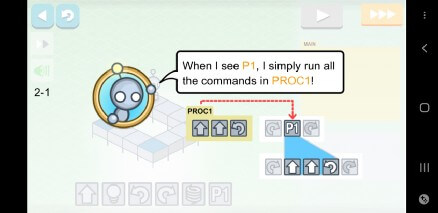
    Using procedures to solve problems

    Colour coding for conditional commands

    Algorithm City

    Algorithm city feels like a bit of a Lightbot clone. The interface and instructions aren’t as clear and it seems as they introduce iterative functions pretty early which may be confusing. It covers all the same territory as Lightbot without doing it as well. I’d look at Lightbot “hour of code” first before doing this one.
    • Verdict: A puzzle game that covers some coding principles. Feels a bit clunky.
    • Level: Absolute Beginner.
    • Age: 5+
    • Mood: Fun, short lifetime.

    Basic commands for solving puzzles

    Introducing iterative functions

    Programming Walkthroughs

    Moving onto more advanced topics you’ll move on to more focused and serious applications that start to take you through the nuts and bolts of actual programming languages. They usually take you through the syntax and practicalities of using a language. It takes a lot of effort to keep them engaging.

    Grasshopper

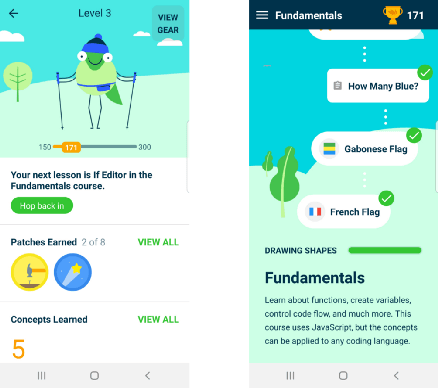
    If you’re looking for something that introduces some serious programming principles then Grasshopper is pretty good. It has been developed by Google and is completely free. It covers the javascript language and takes you from complete beginner through everything up to objects and properties. The pace at which you cover the subject matter is quite quick and it may be daunting for someone that can be intimidated by this kind of thing. But that being said if you want to learn it’s an excellent start.
    • Verdict: A great walkthrough, gets the principles across well and you get to see results quickly. Javascript only.
    • Level: Beginner. If you’ve never seen code before you’ll still do ok.
    • Age: 10+ to Adult
    • Mood: Fun

    Clean and friendly interface
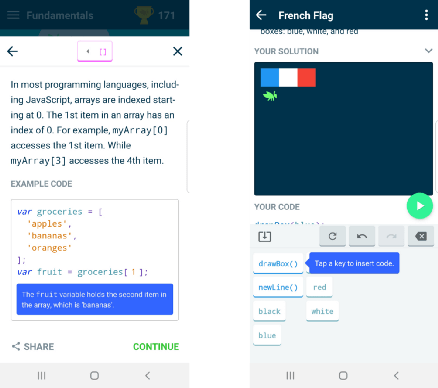
    Explanations of real code, with a simple click to code interface.

    Mimo

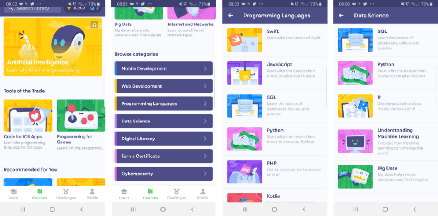
    If you want to learn a wide variety of languages and subjects then Mimo is pretty good at learning on the go. It covers everything from Javascript to R and Datascience to Cybersecurity. It all feels like the first couple of chapters on an introduction to the subject and doesn’t go into depth. It’s also far too easy to zip through the subject without having felt like anything has been absorbed. It follows the “read the text”, “do the quiz” methodology, which for a mobile learning platform is pretty par for the course. If you want to get across a whole bunch of subjects before you dive into something more complex, then it’s pretty good. You’ll have to pay for the subscription to get anything useful though.
    • Verdict: A very wide-ranging set of subjects, it covers a lot of ground. Very engaging but doesn’t go into depth.
    • Level: Absolute beginner to novice.
    • Age: 10+ to Adult
    • Mood: Whirlwind tour

    Lots of subjects to choose from.
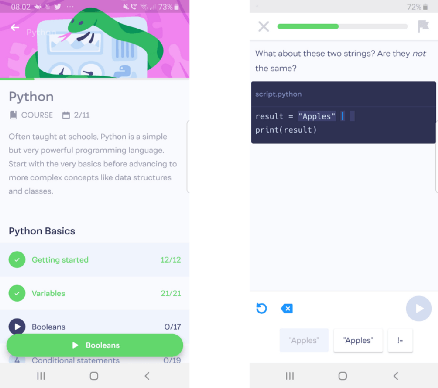
    Introduction to the subject with “click and go” quizzes.

    Khan Academy

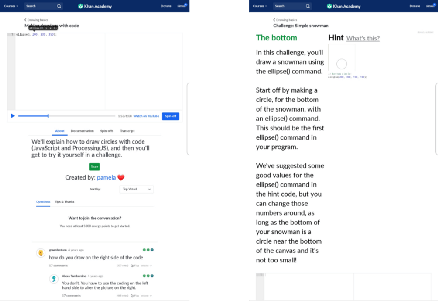
    It would be difficult to cover this subject without including Khan academy, possibly the granddaddy of online learning platforms. The usefulness of Khan has been proven in academic subjects and is essential to any home learning process. Unfortunately, their mobile delivery is terrible. It is mostly a link through to the web-based interface (on android at least) and their programming introduction is just not designed for a small screen. The interface works adequately for a tablet-sized screen but the interface just isn’t usable on a smartphone. The subject matter is introductory Javascript using the Processing JS library and covers very much the same ground as Grasshopper but in a much more “video” and voice-over type format. It’s fine on a laptop, but if you’ve got that available there are much better options to get started with.
    • Verdict: A good set of materials but not practical on a mobile device. Avoid.
    • Level: Beginner.
    • Age: 10+ to Adult
    • Mood: Frustrating

    In portrait mode, everything is too small

    Landscape mode doesn’t work either

    Encode

    Encode is another javascript tutorial. It is very basic. It walks you through language basics at a snail’s pace. It’s dry and there and are no fun challenges to break up the information. The code editor is functional and follows a similar click to code method to Mimo and Grasshopper but with more text to input. The topics go all the way up to objects and arrays, so nothing the other tools don’t cover. Ages 10+ but even adults will be looking for something else to do after 5 minutes.
    • Verdict: Comprehensive, but just really dull. Javascript only.
    • Level: Novice, you should have some idea of code before touching it.
    • Age: 15+
    • Mood: Feels like homework

    Clear overview of the subject, but very dry.
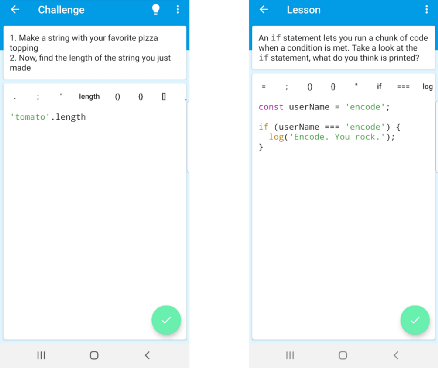
    A basic click and go code editor with a lot more typing.

    Programming Hub

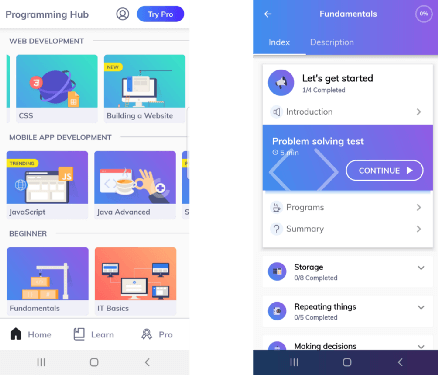
    Similar to Mimo programming hub has a wide variety of content on offer, and without going for the paid version you are limited to a small subset of the course material. The user interface is very basic and by default, there is a text to speech engine enabled. Fortunately, the mute button is front and centre on the interface otherwise I would have thrown my phone out of the window within a few minutes. The pace is slow, very slow and you have to continually hit the Tap to continue button just to move forward, a click for every paragraph is too much. The content and quiz format is interspersed with “click to code” sections, but it doesn’t seem as slick.
    • Verdict: Wide selection of courses, but presented in a frustrating way. I lost patience with it.
    • Level: Beginner, but you have to be committed to stick with it.
    • Ages: 15+
    • Mood: Feels like more homework

    Wide selection of subjects
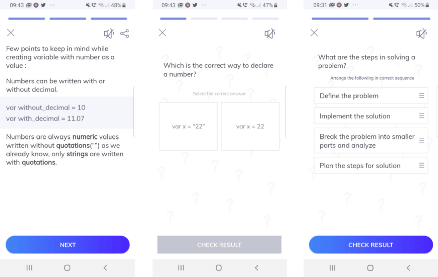
    Read the text and do the quiz format

    Sololearn

    Sololearn is similar to Mimo in the breadth of courses and the cost. The starting level is much higher, and it has a much more exhaustive and academic tone. With that, it really forces you to walk through a lot of tedious stuff before getting your hands dirty and doing anything fun or practical. The coding interface is very slow, as there is a requirement to do accurate typing of code all with the mobile keyboard, there is no click to code interface.
    • Verdict: Wide selection of courses, but the presentation and pacing are very slow, and the interface is unpleasant.
    • Level: Novice, you need to stick with it to get anywhere.
    • Age: 15+
    • Mood: Feels like homework with detention
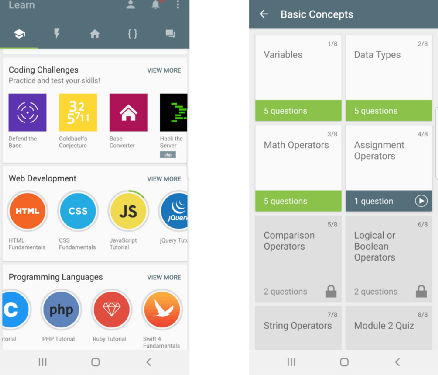
    Wide range of course materials with detail
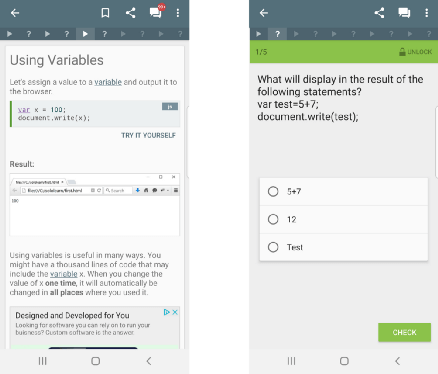
    Read the text and do quiz format

    What about Scratch?

    A lot of you will have probably come across Scratch. It is probably the best implementation of programming principles without scaring you with code available. Unfortunately, I was unable to find any apps that provide a scratch interface for mobile that isn’t tied to some other kind of product. If you find one please let me know and I’ll update the article.

    Courseware Apps

    Online courses that take a more serious approach to get you up to speed are widely available. These take the form of “Code along” lessons, with an almost exclusive focus of doing the actual work on a desktop. To get anything from it you need to be watching and working along with the videos in a local software development environment. These are great for watching videos on the move and then picking up and review at home.

    Udacity

    Udacity is a full-on courseware website, there is no app for android that allows you to do programming examples on your phone. You can watch on the move through the website, but it is not a great experience.

    Udemy

    Udemy has a similar setup to Udacity with the wide selection of courses available. They do slightly better in the mobile app department and it’s a relatively slick experience for watching videos and doing the quizzes, but for programming, a desktop is the only serious option.

    Conclusion

    If you’re a kid or trying to get a younger kid into the idea of coding, get Lightbot. It’s a great puzzle game.

    If you want to graduate to real code then get Grasshopper it’s free and will get you started in understanding the principle ideas behind any programming language. Even though it is javascript the ideas are all transferable.

    If you know how to code a little bit already and looking at ideas to explore do a few taster sessions on Mimo and see if you think it’s worth the money.

    To get in-depth or hands-on with a programming topic it seems a smartphone is just not going to cut it. Desktop and tablet options are much more varied and allow a serious exploration of a programming topic even just through a standard web browser. There just isn’t the screen space or input options for phones yet.
    下载开源日报APP:https://opensourcedaily.org/2579/
    加入我们:https://opensourcedaily.org/about/join/
    关注我们:https://opensourcedaily.org/about/love/

  • 开源日报第491期:《经典再现 ppsspp》

    19 7 月, 2019
    开源日报 每天推荐一个 GitHub 优质开源项目和一篇精选英文科技或编程文章原文,坚持阅读《开源日报》,保持每日学习的好习惯。
    今日推荐开源项目:《经典再现 ppsspp》
    今日推荐英文原文:《No Job is Safe From Automation》

    今日推荐开源项目:《经典再现 ppsspp》传送门:GitHub链接
    推荐理由:PSP 已经是很久很久以前的事情了,想当年啊……扯远了,这个项目作为 PSP 模拟器可以说在想玩 PSP 游戏但没有实机的玩家都会听说过的玩意儿了。而你现在能够在 GitHub 上看看这玩意的真实面貌,亦或是将其作为一个稳定的新版本情报来源。虽然现在 PSP 已经不再流行,PSP 上的那些诸如公主同盟之类的好作品,大概也将如同流水一般逐渐被人们忘记吧。
    今日推荐英文原文:《《No Job is Safe From Automation》》作者:Aiden Livingston
    原文链接:https://medium.com/datadriveninvestor/no-job-is-safe-from-automation-b72e4a56830b
    推荐理由:人工智能带来的自动化对各种工作都产生了影响

    No Job is Safe From Automation

    One sure sign that the age of AI is now upon us is the proliferation of articles purporting to know definitively which jobs are immune from automation and which are most susceptible. These articles are enjoyable, most likely due to the small dose of schadenfreude that comes from seeing that a profession that you felt had overcharged you in the past has its days numbered. Some even go so far as to assign a percentage of probability to the chances of automation down to the decimal point, giving the whole activity a sense of gravitas. Of course, if you read enough of these articles you quickly notice the wildly inconsistent predictions. One will have relegated financial advisors to the dustbin of history, while another declares that the only job left in 100 years will be advising robots on mutual fund decisions.

    Dig a little deeper into the “methods” of these studies, and the moniker of the researcher starts to seem pretty generous. One NPR article used the question “do you need to come up with clever solutions?” as one of the eight criteria for establishing how automatable a profession was. By way of intellectual rigor, this question has more in common with resume fluff than the scientific method. The problem is the “researchers” can’t help but let their own bias get in the way. When it comes to a competition between robots and humans, it is hard for people to not implicitly root for the home team. Ready or not, the revolution is upon us | Data Driven Investor “We must develop a comprehensive global shared view of how technology is affecting our lives and reshaping the economic…

    So much so that often the burden of proof is on the automated system to prove it is better than the human. The better question is why couldn’t a job be automated, not if it can be automated.

    The uncomfortable reality that all these studies choose to dance around is that there is no such thing as a profession that is immune to the effects of the automation.

    The truth is if you can train a person to do a job, you can train an AI to do the same job- cheaper, better, and faster.

    Furthermore, even if the whole job can’t be automated, most likely at least part of the job can be. After all, what is a job but a series of small tasks? A medical assistant might perform dozens of different tasks that each represents varying degrees of difficulty in automating, but over half their time is generally spent gathering information from patients, which is a job much better suited for AI than a person. Not only is it more cost effective, but studies show people give more accurate answers to a machine than a person, as they innately fear the judgment of others. By comparison, we don’t think twice about Googling the most embarrassing questions, provided we are in incognito mode on our browser.

    Anyone who might be feeling smug about the difficulty involved in automating certain aspects of their job would do well to consider how a housing market crash occurs. In 2008, even in the worst hit states like Nevada, only about 7% of total housing was in foreclosure. However, that small minority of total homes still managed to drag prices of all homes down by over 40%. The point is, even if only 7% of a profession is automated it has the potential to send the job market in that industry into freefall.

    Still unconvinced that your job is at any risk from automation? You feel it is so abstract and artistic that your spreadsheets are more at home in a museum than an inbox. Well unfortunately for you, your profession doesn’t exist in a bubble, so even if your hubris proves to be true and not a single percent of efficiency can be gleaned from adding AI to your job, it will still impact jobs that are lateral to your skillset.

    The bad news is that workers that are automated out of other jobs won’t simply have the decency to take a hint and fall off the face of the Earth. Rather, they will start looking for new opportunities in less automatable professions, not unlike your job.

    So much for best case scenarios.

    Ultimately, we need to stop deluding ourselves that the proliferation of AI will create as many jobs as it automates. We need more people like Andrew Yang, ringing the alarm about the impact automation will have on eliminating jobs and start making plans for what a future with a lot less full-time work looks like. Finally, we need to realize that widescale automation is not a point for despair, but celebration. After all, most jobs suck, that’s why people are paid to do them. If long-haul truck driving and order fulfillment in an Amazon warehouse were such a hoot, they would be called hobbies and not jobs. We need to focus on saving people and not jobs.
    下载开源日报APP:https://opensourcedaily.org/2579/
    加入我们:https://opensourcedaily.org/about/join/
    关注我们:https://opensourcedaily.org/about/love/

  • 开源日报第490期:《以及表情包合集 ChineseBQB》

    18 7 月, 2019
    开源日报 每天推荐一个 GitHub 优质开源项目和一篇精选英文科技或编程文章原文,坚持阅读《开源日报》,保持每日学习的好习惯。
    今日推荐开源项目:《以及表情包合集 ChineseBQB》
    今日推荐英文原文:《Your Code Really Stinks, This is How to Improve It》

    今日推荐开源项目:《以及表情包合集 ChineseBQB》传送门:GitHub链接
    推荐理由:你能在各种聊天软件中看到各式各样的表情包——老年人有老年人的请你吃苹果.jpg ,年轻人有年轻人的熊猫头佩琪狗妈等等。表情包可以说成为了快乐之源,如果你有一些有意思的表情而它们还没收录在这个仓库里,你就可以为这个仓库贡献一份力量。记住,当你传递一张表情包的时候,你不是在传递一张发绿的老梗。你传递的,是古典互联网精神最后的火炬!
    今日推荐英文原文:《Your Code Really Stinks, This is How to Improve It》作者:Eric Girouard
    原文链接:https://medium.com/better-programming/your-code-really-stinks-this-is-how-to-improve-it-3cfbb6b7785
    推荐理由:一些迹象的出现可能预示着代码中存在问题

    Your Code Really Stinks, This is How to Improve It

    How utilizing your sense of smell can improve your coding ability


    Photo by Steve Harvey on Unsplash

    We’ve all read code that smells bad. There are few things worse in life than being on-boarded to a new project, firing up your favorite editor, and getting smacked in the face by a putrid stench.

    Wading your way through unfamiliar code may snap you back to a time when your roommate never washed his socks, your Uber driver “forgot” to put on deodorant, or worse — your high-school locker room after practice.

    We know what bad code looks like, and we have a general idea of how to refactor it to be not-so-bad. What we lack is a solid way to know when and how to refactor bad code. For this, we can turn to Kent Beck’s priceless words of wisdom on the topic of child-rearing philosophy:
    “If it stinks, change it.”

    Photo by Gary Chan on Unsplash

    In Refactoring, Kent Beck and Martin Fowler famously relate the identification of Refactoring Patterns to “bad smells” in code. They found that just because we know how to refactor doesn’t mean we know when it is best to do so. So Fowler wrote a book detailing common code anti-patterns and how to best refactor them.

    I opened by stating that we’ve all read code that smells bad, to go even further, we’ve all written code that smells far worse. Through this arduous-wafting process, we can become adept at identifying these odors and work to prevent them before they start to reek. For legacy code, we can use these trends as cues to know when it is time to refactor.

    The existence of any of the following anti-patterns implies that your code has yet to reach its final form and could use a little TLC-R (tender, loving, care and refactoring) to reach perfection. Keeping this list in the back of your mind while coding will reduce the need for refactorings, as you will begin to simply get it right the first time around. Plus, you’ll learn a handful of buzz-words to use during your next code review to one-up your team-mates.
    “Just because we know how to refactor doesn’t mean we know when it is best to do so.” — Martin Fowler

    Catalog of Smells

    • Duplicated Code
    • Large Class
    • Long Method
    • Long Parameter List
    • Divergent Change/Shotgun Surgery
    • Feature Envy
    • Data Clumps
    • Switch Statements
    • Middle Man
    • Comments

    Duplicated Code

    Any time the same code exists in two separate places, a cheap smell lingers in its wake. Your code will undoubtedly be better off if you managed to find a way to join them.

    If the same expression is used in multiple places in the same class, pull it out into its own method! Do two classes need the same method? Pull it up into their parent class! No Parent? Make one!

    If the same code is used in very disjointed sections of a system, consider pulling it out into its own module or class. Your goal is to decide where each bit of code should live, and ensure it’s not hiding anywhere else.

    Large Class

    “The first rule of classes is that they should be small. The second rule of classes is that they should be shorter than that.” — Robert C. Martin, Clean Code
    Classes should do a single thing and do it well. With this smell, the first sniff you may whiff is that you struggle to find a name for your class. If you’re unable to think of one, your class is probably too long or has too many responsibilities.

    Classes including ‘weasel’ words such as Processor, Manager, or Super often bring with them smells indicating that they are aggregating too many responsibilities. In total, a class should only have a single reason to change — this is known as the Single Responsibility Principle. Follow this and your classes will be smell-free.

    Long Method

    Similar to classes, good methods are short and the best methods are even shorter than that. Newer developers tend to shove a ton of functionality into a single method, leaving a trail of comments to break their monstrosity into logical chunks. The longer a method is, the more complicated and confusing it tends to be.

    A method should do one thing and do it well and should have a definitive name that clearly indicates its purpose. Any additional functionality should be extracted into its own method.

    The key takeaway from this odor is to be aggressive about the decomposition of your methods. Do not fear a large number of methods — fear large methods.

    Long Parameter List

    Before Object-Oriented Programming, you had two options when it came to parameters: pass them all into a method or make them global. No matter how you skinned that cat the end result smelled horrendous.

    Long parameter lists lead to confusion, mostly since developers are notoriously careless in variable naming. To fix this, we have a few options:

    Objects

    Rather than passing in a bunch of relevant variables into a method, we can compose objects that store all of these variables and pass just them into our methods. These are known as Data Transfer Objects (DTOs), or Data Clumps, and vary in popularity. Properly encapsulated, objects make a great place to store relevant chunks of data.

    Utilize Query Methods for Common Data

    Consider this method header:
    public Float getChargesStatement(Float cost, Float taxRate, String itemName, long itemIDNumber);
    
    That’s a lot of parameters, none of which pop-out as easily remove-able. However, by implementing methods to fetch, or query, some of this data for us, we drastically reduce the amount of information needed to pass in:
    public String getChargeStatement(Float cost, long itemIDNumber) {
     String itemName = getItemNameFromID(itemIDNumber);
     Float taxRate = getCurrentTaxRate();
     ...
     ...
    }
    
    Following this structure results in less duplication, cleaner code, and shorter parameter lists — smells fresh.

    Divergent Change/Shotgun Surgery

    The goal of structuring software is to support easy change, it is soft after all. If updates/changes to a class prove difficult, there is often one of these pungent smells lurking in the shadows.

    For these patterns, suppose we need to make routine, common updates to our codebase, whether it be for the additions of new databases, new clients, or new products.

    If each new update brings with it changes to multiple sections of a class, it is known as Divergent Change and should be avoided. Remember, a class should only have a single reason to change. Identify the pieces of your class that belong together, and extract them to their own class.

    On the flip side of the smell, if a new change requires many small updates to many different classes, it is known as ‘Shotgun Surgery’ and is arguably worse. When many small changes are required, developers are very likely to forget one, causing bugs and slowing down development time. The fix here is to collect all the little pieces and put them into their own class. Again, classes should have at-most a single responsibility.

    Feature Envy

    A favored stench of mine is when a method seems far more interested in the features of a class other than its own. The most common violation involves the use of foreign data. We’ve all seen cases where a method invokes scores of calls on some other object to calculate a value of its own — a rancid odor.

    The fix here is easy: This problem method clearly wants to be a part of the other class, so let’s grant its wish and move it there. Keep a method in the class that it relies on the most. Extract the leftover pieces to the place that makes the most sense.

    Data Clumps

    A smaller, but still important issue, we often see sets of parameters or variables lumped together. A firstName almost always comes before lastName and email, for example. When we get a whiff of this, we should ask ourselves:

    “If I remove one of these data variables, do the rest make sense in isolation?”

    If not, they best belong together as a single data object.

    Switch Statements

    In general, switch statement stink. They tend to breed code duplication like none other, copying code from one part of a repository to the other. Often when you see a single switch statement, it also appears in several other places throughout your code, whenever that particular piece of logic is needed.

    The best solution to switch statements is to avoid using them. The second-best solution is to apply polymorphism as the result of a switch statement, so a class can take over to apply all the relevant logic — wherever it may be needed. This way you avoid large switch blocks — the foulest of odors.

    Middle Man

    As software developers, we exude abstractions and encapsulation — sometimes at our own expense.

    When the majority of the methods in a class simply delegate their work to others, you just created a middle man. Such classes are a waste and are especially difficult to read. When reading through the implementation, you find that half the time you need to hop over to other APIs to get a sense of the whole picture.

    The solution is to just cut out the middle man, who needs him anyway?

    Comments

    Saving the best for last, comments are among the most putrid smells in any codebase, however, they have the potential to smell the sweetest. Used properly, a comment can be the most delightful aroma we come across while sifting through code.

    A pleasant explanation for an odd line of business logic; A one-line comment detailing which date pattern is used in the variable date; or a break-down of what that complicated regular-expression is hunting for, are all examples of proper comments, and times when you should actually use them.

    A majority of the time, comments are used as ‘deodorant’, where they exist only to mask up other bad smells. A comment explaining what a method is doing should instead be reflected in the code. Try making several smaller methods, and naming them appropriately — the intent of the comment may now be held in the code itself!
    “When you feel the need to write a comment, first try to refactor the code so that any comment becomes superfluous.” — Martin Fowler, Refactoring

    Gotta love that fresh code smell

    Make It a Routine

    We may not always be able to refactor bad code.

    Many project teams work at such velocity that re-visiting old code, let alone changing class hierarchies and shifting module responsibilities, simply isn’t an option. Regardless of our project bandwidth, we can use these patterns to ensure the code we are in charge of doesn’t stink.

    My morning routine consists of showering, brushing my teeth, and putting on deodorant/cologne, all to ensure I’m clean and never reek. I take a similar approach to my code: by keeping these patterns in mind and sniffing for odors as I code, the end result is a clean, smell-free product. If you apply these techniques to your own work and keep an eye out for patterns as you go, your code too can come stamped with a smell-free guarantee.

    Follow this advice and at the end of the day, you’re going to like the way you code — I guarantee it.
    下载开源日报APP:https://opensourcedaily.org/2579/
    加入我们:https://opensourcedaily.org/about/join/
    关注我们:https://opensourcedaily.org/about/love/

  • 开源日报第489期:《和鹦鹉表情包 cultofthepartyparrot.com》

    17 7 月, 2019
    开源日报 每天推荐一个 GitHub 优质开源项目和一篇精选英文科技或编程文章原文,坚持阅读《开源日报》,保持每日学习的好习惯。
    今日推荐开源项目:《和鹦鹉表情包 cultofthepartyparrot.com》
    今日推荐英文原文:《Practicing Code Interview Questions is like Studying for the Exam》

    今日推荐开源项目:《和鹦鹉表情包 cultofthepartyparrot.com》传送门:GitHub链接
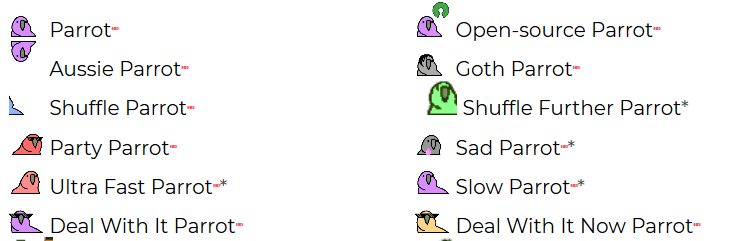
    推荐理由:看腻了群里的熊猫人决斗?亦或是想为表情包收藏里带来第三股风?这个项目里的鹦鹉表情包都能够胜任;使用它们去表达些什么,或者是什么都不,单纯只是渲染一下气氛,这些闪着五颜六色光的鹦鹉也能做到。如果想要探索新的表情包的话,这个鹦鹉表情包可以说是值得一看的。

    今日推荐英文原文:《Practicing Code Interview Questions is like Studying for the Exam》作者:Seth Corker
    原文链接:https://medium.com/front-end-field-guide/practicing-code-interviews-is-like-studying-for-the-exam-570758d20b09
    推荐理由:面试的时候,考察解决真正问题的能力可比解决那些考试一样的题目有意义的多

    Practicing Code Interview Questions is like Studying for the Exam

    Approaching code interviews as an interviewer or interviewee

    etting into tech is popular at the moment. It seems as though it’s easier than ever to start learning and get on track with breaking into the tech sector. Whether you want to be an engineer, quality assurance, product manager, CEO or anything in-between, there are countless resources available online. Books and bootcamps, podcasts and personalised courses; you name it, it probably exists. Having a wealth of quality knowledge is amazing. It’s great to see a variety of different approaches to teaching on so many interesting topics but I’ve become aware of more courses specializing on how to pass a coding interview.

    Learning how to pass a coding interview reminds me of when, in high school I studied at the last minute to pass a science exam. I passed but I couldn’t tell you anything about the course beyond the first few months. It didn’t help me gain an understanding of the subject, it gave me enough surface level knowledge to answer questions in the exam. That’s it. Services offering to teach you how to ace the interview are missing the point but are only part of the problem. Companies are responsible for setting expectations. Testing applicants in this arbitrary manner is not a good method to identify skill.

    The problem with coding interviews

    A programmer learns a broad range of topics when graduating from a traditional computer science or software engineering programme. The same topics that seem to come up in coding interviews. So, as an interviewer, if an applicant can answer questions related to O(n) notation or navigating a binary search tree comfortably, they have some idea of what they are talking about. It’s probable they have the skills to back it up. This isn’t always the case but it should be a good indication. If you’re lacking experience and looking to get a job as a developer but you’re studying to pass the interview, it seems like an attempt to cheat the system. The danger is that you get past the first hurdle only to fall flat on your face when you encounter the actual job. I don’t agree with common interview questions but, tricking an interviewer into believing you’re more capable than actuality is dangerous.
    The danger is that you get past the first hurdle only to fall flat on your face when you encounter the actual job.
    The idea of a technical interview where you have to recall obscure computer science trivia and jargon might not be a useful measure. It focuses on specialised knowledge that favours particular types of people. People who are capable of holding facts and algorithms in their head rise to the top. It’s not a great measure of skill and when used incorrectly it can be entirely meaningless. Don’t expect an applicant to have deep knowledge how to implement binary search or use Dijkstra’s algorithm if you’re hiring for a frontend engineer. If you’re going to interview someone, make it relevant to the role. It’s good for a backend engineer to have an idea of how frontend works but they shouldn’t be tested on the intricacies of positioning elements in CSS. The thought process of trying to solve a real problem might be far more valuable.

    An approach as an interviewer

    Take a look at recent tickets in your issue tracker that you or your team has worked on recently. Find one that could be a useful problem to solve in an interview context.
    1. Pick a ticket that is typical of the role you’re hiring for.
    2. Make sure it’s somewhat challenging or can be approached in different ways.
    Give some background about the project and context needed to solve the issue and ask the candidate how they might go about solving the issue.
    • How did they approach the problem?
    • Did they identify a need for more context?
    • What techniques do they use?
    • Are they able to identify possible pitfalls in their approach?
    • Tell them how the issue was solved in practice. Do they think there could be improvements or pitfalls of the approach taken?
    Interviews that value the interviewee and focus on problem solving with relevance to the day-to-day job are far more valuable for everyone involved. Make your questions relevant to the position you want to fill to really find a good fit for the role. If a candidate doesn’t know how to solve a given problem, why? Do they have the skill-set but are under pressure? Do they have strengths in other areas?

    How to actually ace the interview

    It’s important to learn about the position you want to fulfill and identify your strengths and weaknesses with regard to the role. If you have some gaps in your knowledge then work on filling them. Ask yourself:
    • How important do you think this knowledge is for the role?
    • Can you brush up on it or does it require some more thorough learning?
    If it’s a small gap then you might be able to pass the interview regardless. If it’s a deep well that you’re missing, it’s best to focus on learning or identifying this gap in the interview. Don’t study just for the interview! Make sure you have a good understanding of concepts and brush up if you need to but fumbling your way through the interview is not the answer. You’re not learning the subject, you’re learning how to pass the test.

    I hope that this has been useful in some way and if you’re deciding to take the leap into the world of tech, don’t put all your focus on the interview. Focus on learning the fundamentals so if you get pas the interview you know you’re in the right place. It helps if you have a body of work to show too. Remember that the interview is a hurdle but it circumventing it doesn’t help anyone.
    下载开源日报APP:https://opensourcedaily.org/2579/
    加入我们:https://opensourcedaily.org/about/join/
    关注我们:https://opensourcedaily.org/about/love/

←上一页
1 … 136 137 138 139 140 … 262
下一页→

Proudly powered by WordPress