• 开源镜像
  • 开源沙龙
  • 媛宝
  • 猿帅
  • 注册
  • 登录
  • 息壤开源生活方式平台
  • 加入我们

开源日报

  • 开源日报第508期:《What the fafa? wtfjs》

    5 8 月, 2019
    开源日报 每天推荐一个 GitHub 优质开源项目和一篇精选英文科技或编程文章原文,坚持阅读《开源日报》,保持每日学习的好习惯。
    今日推荐开源项目:《What the fafa? wtfjs》
    今日推荐英文原文:《How to Ensure Your Software Projects Actually Finish》

    今日推荐开源项目:《What the fafa? wtfjs》传送门:GitHub链接
    推荐理由:众所周知,编程语言有很多特性,而如果把简单的特性组合组合组合……然后写出一个这辈子都写不出的语句,它就会变得极其不可预测,而这正是考验你对这门语言了解程度的时候。这个项目就是一些千奇百怪让你会大喊 wtf 的 JS 语句合集,仅供学习练手用,请勿在真正的工作中使用这些千奇百怪的玩意儿——那会毫无作为而且完全浪费时间。
    今日推荐英文原文:《How to Ensure Your Software Projects Actually Finish》作者:SeattleDataGuy
    原文链接:https://medium.com/better-programming/how-to-ensure-your-software-projects-actually-finish-5e0dd7ea46fc
    推荐理由:脚踏实地而快速的行动能够切实的保证项目不断前进

    How to Ensure Your Software Projects Actually Finish

    And avoid them becoming zombified

    It’s Monday morning.

    You struggle to get out of bed.

    Your energy is drained.

    It’s time to head to work and tackle that death march of a project again.

    Somehow this project has been passed around to several teams and yet… it never seems to actually get finished.

    Instead, like an undead zombie, it continues to haunt the living. Every implementation team handed the unfinished monstrosity struggles to grasp the scope and complexity.

    Management has already poured millions of dollars into getting the technology implemented but it just doesn’t seem to be going anywhere.

    Instead of analyzing the root cause of the problem, they simply pour more money and time into the overall project.

    This happens at almost every large company at all times. Companies spend millions of dollars to implement technology and sometimes it never gets delivered. Just ask Hertz who is currently suing Accenture for 32 million dollars over a failed project!

    So how do you keep your next project from becoming a zombie?

    In order to avoid zombifying projects, it is important to keep the momentum moving forward. This means quickly removing roadblocks when they come up, creating manageable milestones, and constantly communicating to ensure everyone is aware of the project’s status. In turn, this keeps projects moving forward and ensures all the stakeholders are on the same page.

    Clear Roadblocks Right Away

    Roadblocks happen every day in tech projects.

    Maybe someone doesn’t have access to a data set, teams A and B don’t agree on the design, or perhaps you are awaiting approval for purchasing software from a director who has just gone on vacation.

    Roadblocks can quietly drown projects if not dealt with as soon as possible.

    In large companies, most technical teams are juggling multiple projects at once. This allows roadblocks to be used as an excuse as to why teams aren’t getting work done on your project; the roadblock relieves the pressure off the adjacent teams. If you are the technical project manager (TPM) or even the tech lead on a project, you can’t allow roadblocks to be an excuse and lose momentum.

    Once momentum dies off, it is hard to start up again.

    Teams will have to remember what they were doing for your project, they will need to review their code/requirements and they will likely make mistakes because the work is not as fresh in their minds. That is why roadblocks can be deadly to a project. Ignoring them and assuming they will take care of themselves is one way to ensure your project never finishes.

    Instead, as soon as a roadblock comes into your team’s path, it is important to act towards removing them. Assign a team to be responsible for the roadblock and make sure to follow up with the team regularly so that they know the work is important.

    Create Milestones


    Being held accountable doesn’t always feel great, but it is necessary.

    We all avoid it, and some of us convince leadership we don’t need it.

    And when you’re a TPM, it is tempting to think you don’t need to hold people accountable, you don’t want to be the bad guy/girl after all. Of course, then you have that one engineer on the team who keeps delaying finishing a module because of this or that and you realize you have to put clear milestones.

    Milestones keep us honest and help us know what we are capable of. Milestones attached to dates create pressure, which forces prioritization. There is a delicate balance of course because some managers will decide everything is a priority and run their team ragged. But great managers will take their goals and prioritize them and then communicate upwards what will actually be done in the next few months.

    It provides more information to everyone, it provides real expectations of what can actually be done. In addition, it forces only the work that needs to be done to get done. There are a lot of projects that might not be necessary and can be cut-off.

    Yes, management will always push for things to get done faster, but there is really a limit to the speed you can work. Setting milestones doesn’t just keep the technical teams accountable, it forces management to reassess their own needs.

    At the end of the day, good PMs will start to get an understanding of the working speeds of teams and individuals which in turn allows them to better assess future work.

    Milestones might be stressful, but they provide a clear understanding of what everyone is capable of.

    Communication Is Key

    This is a cliche concept, right?

    There are probably thousands of articles talking about the value of communication in every technical field.

    So why do people keep saying it?

    Because when communication is done well, it helps everyone understand what is going on.

    Communication keeps everyone in the loop.

    It helps the TPM know where there are roadblocks as well as what is actually done. Most TPMs are just looking at things from a higher level. That means they are trusting the engineers of the various teams to communicate statuses honestly.

    Without communication, it can be difficult to know what steps can go forward and what is being held back.

    Clarify Your End Point

    If you don’t know where you are going and what you want out of your finished project, then how will you know when you are there?

    Technical projects, in particular, have a nasty habit of never-ending because sometimes no end-point is undefined. Instead, new stakeholders will appear out of no-where demanding new features, and pressuring you to meet their use-cases.

    Perhaps the current stakeholder just keeps changing what they want.

    This is known as scope-creep.

    At first, it starts off small and doesn’t seem like a big deal.

    “Hey, could we just add this extra column here or this extra button there?”

    Sure, these might be small requests, but it doesn’t take long for everyone to think that they can just make new requests whenever they please.

    Hitting a moving target is hard and adding what might seem like small changes to code can be massive changes in the codebase.

    This isn’t to say projects and requirements can’t change. There is a balance between improving the end product because it makes sense and just adding features because someone thinks it’s a good idea.

    So making sure there is an agreed-upon target ensures that the first version of the product is important and necessary.

    Once you have finished the initial version, then you will figure out which features are actually needed. Spending too much time on the backend trying to predict how end-users will use the product and trying to meet every use case will only increase the likelihood of failure.

    Conclusion

    Keeping projects from becoming zombified isn’t always easy.

    It requires an engineer or TPM to take the lead and make sure everyone is working together towards a common goal. In addition, they ensure that roadblocks are quickly mitigated to keep the momentum going to avoid teams getting stale or getting caught up in another project.

    The truth is keeping projects moving forward is easy, until it’s not. This is where great TPMs come into play. Like a maestro in front of an orchestra, they control the bigger picture.
    下载开源日报APP:https://opensourcedaily.org/2579/
    加入我们:https://opensourcedaily.org/about/join/
    关注我们:https://opensourcedaily.org/about/love/
  • 开源日报第507期:《用表情说话 partyparrot》

    4 8 月, 2019
    开源日报 每天推荐一个 GitHub 优质开源项目和一篇精选英文科技或编程文章原文,坚持阅读《开源日报》,保持每日学习的好习惯。
    今日推荐开源项目:《用表情说话 partyparrot》
    今日推荐英文原文:《The Learning Funnel》

    今日推荐开源项目:《用表情说话 partyparrot》传送门:GitHub链接
    推荐理由:现在比起直接打字,有的时候一个精致的表情包更能够表达出使用者想要表达的信息。这个项目就可以让你使用鹦鹉表情包表达你心中所想的文字——因为它真的可以把文字用鹦鹉们来表达出来,文字只是一种符号,并不需要纠结于由什么组成,而是放眼全局,体会它要表达什么才是正确的(虽然这群鹦鹉早就毁掉了严肃的气氛……

    今日推荐英文原文:《The Learning Funnel》作者:Przemek Smyrdek
    原文链接:https://medium.com/better-programming/the-learning-funnel-ef982e580b4b
    推荐理由:一种新的看待技能的方法——分层

    The Learning Funnel

    Creating a strategy for career learning


    Thanks to all kinds of activities related to software development I’m involved in, from time to time I have a chance to talk to people entering this career path and I listen to their struggles.

    One of the issues that regularly arises is caused by the so-called paradox of choice — a situation where the total number of choices one has to face (in terms of technology, programming language or the next best framework) makes it impossible to stay focused on the most important topic and therefore learn efficiently.

    Additionally, considering the fact that our industry is full of strong opinions about growth and personal development, it’s pretty hard to define a list of tasks one should complete in order to become a better software developer. Some say attending conferences is a waste of time; there are those who say that there’s nothing of good in a particular book, and of course, there are people trying to convince you of the amazing value that this one tool brings to the table!

    Recently, I’ve been trying to figure out a solution for both these issues, which would make it easier for you to find your own learning path in software development. I think I’m finally ready to share my ideas with all of you.

    To be specific, it’s time to learn more about the Layered Model of Learning Programming (the name is liable to change).

    The Key Question

    Let me ask you a question. How many ways are there to start your journey as a programmer?

    It’s easy to define at least a dozen of them. There is an unlimited number of meetups, conferences, courses, books, articles, boot camps, hackathons or pet projects you could get interested in to learn a bit more about this crazy world of software development.
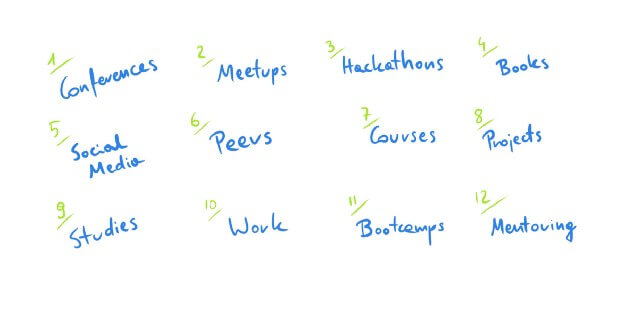
    One of the most popular ways to start such a journey is to sign up for a Computer Science class. There you discover and play with languages like Python, Java or C++ for the first time. Some of us, however, decide to skip this step and would rather participate in boot camps or other “task force groups” focused on intense courses for software developers.

    Parallel to those activities, an ambitious programmer can surround themselves with books written by industry experts, and subscribe to their social media profiles where they might absorb meaningful insights. They might attend a few conferences to learn more about ‘the next big thing’. Finally, they reach a point where they can start their first job and finally have a chance to apply the theory in a real situation.

    At this point, some of us may feel overwhelmed by the vast number of different paths one could take. It’s a common dilemma that most programmers know: we wonder what is the right order of tasks and activities we should complete to become an expert.
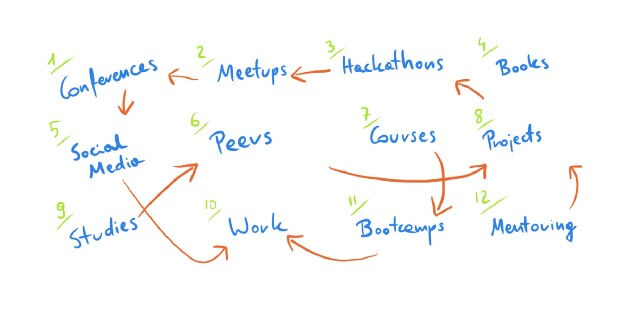
    Should I look for a job rather sooner than later? Is attending a conference a good idea, or a waste of time? Do I really need to buy this paid course, considering my current account balance is equal to zero? Is ‘Clean code’ a book worth reading for someone like me? What about this new framework that has been published recently — should I learn more about it? Based on my experience mentoring programmers at various stages of their careers I can tell you: these questions are more popular than you think.

    The biggest fallacy about learning software development is that for some of us it’s a one-dimensional path where the most important factor is the order of activities we are involved in.
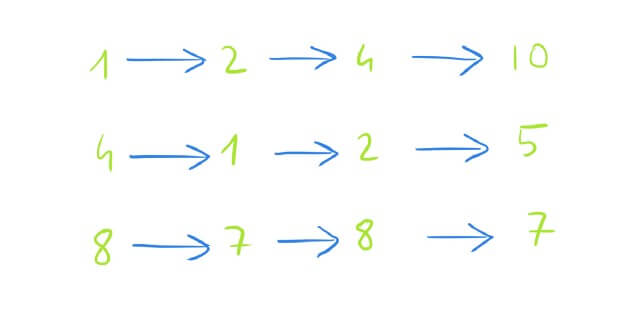
    It’s no wonder that such a model does not help us learn and grow without stress, self-doubts, or even anxiety. When the only thing that matters is the order of activities, all we think about is whether we should do this before that, or something else afterward. A book before a course? A talk before a boot camp? A conference after a book? Is XYZ a waste of time? Is XYZ a good choice? And many more…

    In general, there are these two questions worth answering to untangle the paths of learning programming:
    • What’s the right number of topics I should be interested in at this point in my career? Should I value a broad range of skills over very narrow specialization, or maybe the opposite?
    • How much time and effort I should invest in the topic I have in front of me? What’s the good balance between shallow and deep learning, and when to favor one over the other?
    Today I’d like to show you my answers to these questions.

    The Next Dimension

    There are two key goals for everyone who thinks about successful learning and developing their skills in programming:
    • build competitive advantage by being more experienced and skillful than the average in a small number of well-defined areas, to bring extra value to anyone who wants to work with you
    • stay aware of the situation on the market in terms of techniques, practices, frameworks, and languages, to extend your “expiration date” as a software developer and to enable cooperation with experts from other domains
    I believe you’ll easily agree with me on these two goals — finding a good model to cover this is a more difficult task.

    After spending many hours trying to figure out a stable learning framework based on these two points, I recalled something that all my friends from the world of marketing and sales use on a daily basis: a sales funnel.

    “A sales funnel is a visual metaphor for the path taken by a potential customer as he or she moves towards becoming a customer. Frequently used by sales and marketing organizations, the sales funnel helps companies understand and visualize their sales process and measure overall conversion success between each step of the funnel.

    A sales funnel is shaped like an inverted pyramid, similar to real-world funnels, to which the metaphor alludes. The width of each part of the funnel reflects the audience size, with the top of the funnel being the widest and the bottom being the smallest.”

    How does it relate to what we’re talking about in this article? Let me surprise you —it relates in a very direct way! The only thing we need to do is to replace ‘customers’ with ‘topics we want to learn about’ and ‘activities we want to be involved in’:
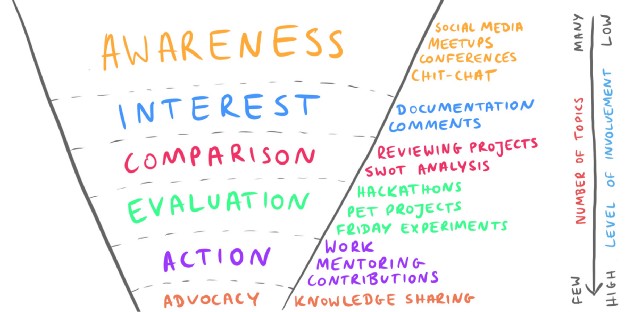
    Such a ‘layered learning funnel’ can be used by developers to manage the topics they learn about, invest time into them and interact with. The key point about this funnel is that it adds the next dimension to our thinking about learning and growing as a software developer, by introducing this concept of level of involvement.

    As it turns out, noticing the difference between the order of things to learn and the level of involvement, gives us a useful model for approaching every new concept, without the need to limit your expertise to areas you’re most familiar with.

    To see how all of this works, let me explain the rules of this model.

    It’s All About Layers

    The concept I want to show you today consists of multiple layers (buckets) for everything that is (or may be) related to your growth: books, courses, talks, conferences, studies, papers, docs, frameworks, languages, etc.

    Layers in the upper part of the learning funnel may contain multiple topics you just “collect” —in order to stay aware of how things work these days, or keep abreast the next big thing for your peers working in different areas of software development (languages you know less about, frameworks you didn’t have a chance to work with, etc.). Layers in the lower part require more effort, but they help you build your expertise and market value.

    The most important thing about all these layers is that the deeper you go, the smaller the number of topics you bring with you (because there are a limited number of hours per day), but your level of involvement has to increase (because this is the place to focus and work deeply).

    Let’s go through each layer of this funnel to see how it works.

    Awareness

    This is the bucket for all kinds of activities for people interested in the world of software development — no matter what language, technology, or framework is being mentioned. The awareness layer is about attending conferences, talking to people at meetups, following social media profiles or just briefly reading some docs only to stay aware of everything that happens around you. Relatively low level of involvement, but a wide range of topics to cover.

    Interest

    There are some topics in the previous layer that may look especially interesting for you. For example, at one conference you listen to the talk about this brand new framework you have to check or maybe someone mentions this great language that BigCo uses daily, and you decide it’s worth spending some time on it. You filter out some of the topics from the Awareness layer only to briefly check how does this new tool looks from your own perspective.

    Comparison

    The Comparison layer contains all of the topics that fight really hard for your attention and which are promising in real life. This is where you compare shiny new toys with tools you use to build stuff every day. This is the time to think about their weaknesses, bad parts, the context in which they need to work and the value that this specific framework, language or technology brings to the table. This is the layer that ends our dry analysis of a given subject, because everything that comes next is mostly about practical application.

    Evaluation

    It’s time to check how your topic of choice works in reality. For example, you can create a repository for a demo project where you test this newly discovered practice or framework. You may introduce it in one of your pet projects, or even build an MVP based on it. The key thing is that at this stage the risk of introducing this brand new tool should be relatively low — all in all, you’re only evaluating it without making any final decisions.

    Action

    Everything that lands in the Action layer can be immediately propagated to your portfolio, LinkedIn profile or your summary of expertise. The Action bucket is a place where we keep languages, techniques, and practices that help us build stable, reliable solutions in which risk is minimized. Topics we put in this bucket are never a waste of time. They’re directly related to our daily job, the projects we work on and the reasons we get paid.

    Advocacy

    The Advocacy layer is totally optional for most programmers, but the value it brings forces me to include it among others.

    So what’s inside it?

    Well, from time to time we discover something from these “actionable” buckets that makes us so excited that we can’t wait to share it with our colleagues or the community. We start promoting it on the web, we talk about it at conferences, or we record a video explaining the basics of it. In some companies, we’d be called “evangelists” of this specific topic. Activities from this layer are often very time-consuming but the return of investment from them can pay off in a meaningful way (building a personal brand, meeting experts and sharing knowledge with them, or even building a foundation for everything that comes next for you).

    Show Me How It Works

    My learning funnel, as a front-end developer working mostly with Angular projects, looks like this:
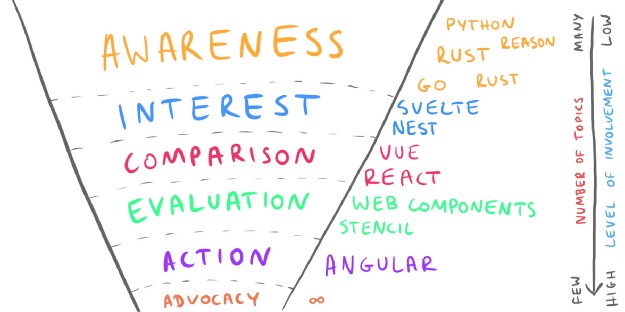
    What’s in my Awareness layer? Basically the whole world of software engineering! I’m really eager to learn about new languages, techniques or frameworks. I love to follow social media sh#tstorms about all kinds of stuff and debates. I want to stay aware of things, I want to be prepared for changes that are possibly waiting for me in the future, and I want to discover new worlds without that much involvement.

    In the Interest layer, there are mostly topics related directly to my front-end experience. As of today, I’m following the development of the Svelte framework. I’m curious how it will change the way we write our client-side solutions and I can’t wait to spend more time on this topic. The same with Nest, which seems to be a really promising replacement for raw Node.js environment.

    Comparison? Of course two out of “the big three”: Vue and React. Even though I spend most of my professional time in front of Angular, I’m passionate about new ideas released under both green-ish and blue-ish logotypes. I read about hooks, I read about single-file components, and I’m trying to borrow some of those ideas to the world I’m the most familiar with, which is Angular.

    The Evaluation layer is currently all about Stencil and Web Components. I’ve managed to release a few production-grade projects based on these two and I’m constantly looking for more knowledge in those areas. Some time ago I fell in love with the idea of building truly reusable components, which can be injected into your favorite front-end technology. I had a chance to not only build WC-based solutions but also discuss different ideas and issues with Stencil’s core team and other advocates for that wave.

    Moving to the Action layer now, where most of the time I build stuff using Angular (and JavaScript in general). This is the framework I feel most comfortable with — so far it has helped me build a few dozen projects, so it’s natural that I put a lot of attention to this part of my professional life. Additionally, as a big fan of solving things from first principles, I try to level up in raw JavaScript, which has saved my life more often than you can imagine!

    Last but not least, there’s the advocacy layer. Due to me being a big promoter of the knowledge sharing movement, today you can read this article, watch my videos on YouTube or listen to a talk at a local conference. The total amount of time I invest in these areas is pretty big, and so is the outcome I feel every day.

    In your case, all the layers I’ve described will probably include a totally different set of activities. If reading a technical book is a way you build your awareness, surely it will land in a different bucket than in my case. If your daily job gives you lots of space to experiment with different libraries and frameworks, you will also treat these “risk-related” activities differently. All in all, it’s not about finding the only way of labeling such activities, such as “reading a book” or “attending a conference”, but rather it’s about learning in this two-dimensional funnel where, next to the order of tasks, we also think about the right level of involvement.

    Does it Really Bring Any Value For You?

    Yes, it does. Thanks to modeling my own way of learning the craft of software development, everything I do is better structured and better organized. It lets me work on my skills more consciously.

    For example, thanks to splitting the different activities I’m involved in into layers, I don’t feel guilty after visiting one or two conferences (for me it’s an Awareness layer) just because some people say it’s a waste of time. On the one hand, I understand that it’s a great way of keeping my finger on the programming pulse and staying in touch with bleeding-edge ideas, techniques or frameworks. On the other hand, I’m not that sad after missing one or two events — it won’t ruin my career.

    At the same time, as we go into lower parts of the funnel, I know that there’s a need to work on a limited number of topics in a more focused and deep manner. Without clearly defined areas of expertise, I don’t feel as comfortable as I’d like to.

    Thanks to this additional dimension (level of involvement) I can approach different activities more consciously and expect different outcomes without being disappointed due to the lack of results. The more I get familiar with something (an idea, a framework, a tool) and the more promising it looks, the more attention I put on learning it and promoting it to latter layers of my funnel.

    Additionally, the model I explained here is not a tool that only beginners can include in their workflow, but it’s something that anyone who tries to navigate their career path can use on a daily basis. In the end, the process of learning is endless, so I can’t think about any reason why putting more order into it will get you into trouble.
    下载开源日报APP:https://opensourcedaily.org/2579/
    加入我们:https://opensourcedaily.org/about/join/
    关注我们:https://opensourcedaily.org/about/love/

  • 开源日报第506期:《狗言狗语 dogescript》

    3 8 月, 2019
    开源日报 每天推荐一个 GitHub 优质开源项目和一篇精选英文科技或编程文章原文,坚持阅读《开源日报》,保持每日学习的好习惯。
    今日推荐开源项目:《狗言狗语 dogescript》
    今日推荐英文原文:《The Differences Between a Junior, Mid-Level, and Senior Developer》

    今日推荐开源项目:《狗言狗语 dogescript》传送门:GitHub链接
    推荐理由:一个被编译成 JS 的奇妙编程语言——只不过需要使用者拥有充分的 Doge 适性才能很好阅读与编写 dogescript。如果要想写出自己的编程语言,以一个现有的语言为基础,改变关键字等等是个不错的好主意,毕竟你要做的只是混入自己的思想,而不是真的制造一个新的语言——虽然那样也很不错,但是有的时候好玩比好用更重要不是吗?
    今日推荐英文原文:《The Differences Between a Junior, Mid-Level, and Senior Developer》作者:Daan
    原文链接:https://medium.com/better-programming/the-differences-between-a-junior-mid-level-and-senior-developer-bb2cb2eb000d
    推荐理由:虽然等级只是个参考,保持学习还是不能落下的,不管是写代码还是其他技能

    The Differences Between a Junior, Mid-Level, and Senior Developer

    Being a junior, mid-level, or senior developer doesn’t solely have to do with the years of programming experience that you have. A junior developer can even be older than a senior developer. It all comes down to skill. This doesn’t mean that a senior developer has to be an expert in everything, but it’s safe to say that senior developers are far more skilled than junior and mid-level developers.

    But more than just coding skills differentiate the senior developer from the mid-level and junior developer. So what exactly are the differences?

    Knowledge

    Obviously the senior developer has far more knowledge than the junior and mid-level developer. Knowing design patterns, architecture, automating testing, performance, security, etc. is a good way for a junior developer to close the knowledge gap with the mid-level and senior developers.

    It’s important to know how things in software development should be done. But just knowing all this stuff doesn’t make you a senior developer. Knowledge isn’t the biggest difference between developers—it’s just one of the factors.

    Coding

    Despite what most people think, coding is not about communication with a computer. Coding is about communicating with humans and instructing computers. Eventually, code gets compiled and translated to zeroes and ones.

    Code has to make sense for other developers that have work with it in the future. A new team that has never seen the code before should be able to open the code and start working on new features or bug fixes. This is where the big difference is between junior and senior developers.

    I will leave out the mid-level developer in this comparison because the mid-level developer is kind of a gray area when it comes to coding skills. Obviously, it is somewhere in between the junior and senior. It probably leans more towards the senior side. This mainly has to do with experience, since mid-level developers have probably been through the whole development cycle at least once. They have made a lot of the most simple mistakes and learned from them.

    How to sniff out the junior developer?

    Junior developers are inexperienced. Some just graduated and are starting their first full-time job. The mindset of a junior developer often is to just make the code work. Working software and good software are considered the same.

    Programming straightforward code is hard. And it’s something that junior developers don’t do. Junior developers write fancy code. You can recognize the junior developer by quirky one-liners and overly complex abstractions. This is the junior developer’s way of showing off and letting the other developers know how good they can code. And it’s wrong.

    Junior developers focus on the computer side of the code at the expense of the human side.

    And what about the senior developer?

    When looking at the code of a senior developer, you might think: is this all there is? Where’s the rest of the code? A senior developer writes simple, straightforward, and maybe even dumb code. This is one of the biggest qualities that a developer can have when it comes to programming. A senior developer follows the KISS principle: Keep it simple, stupid.

    A senior developer thinks about their code in a different way than the junior developer. Code written by a senior developer will be made with maintainability and scalability in mind. This is a totally different mindset than the junior developer has—the senior is thinking about the people who have to work with the code, while the junior is just thinking about making it work for the computer.

    More Than Just Coding Skills

    Besides coding skills, there are some other factors that can tell you who’s what type of developer.

    Junior developers, in general, do the most simple tasks or tasks with low impact. They don’t do any design of architecture. Mid-level developers are not designing solutions either, they just perform tasks. The difference with the junior developer is that they perform those tasks with less supervision as long as they are assigned to relatively routine tasks. Senior developers can develop an application completely on their own.

    It doesn’t mean that the senior developer doesn’t have any questions along the way. Every developer has a lot of questions every day and that won’t change. That’s no different for senior developers.

    The difference is that senior developers know how to ask the right questions and how these questions get handled. Mid-level developers can ask the right questions when it comes to their relatively routine tasks, but need help on more complex tasks.

    The senior developer is never lost and knows how to follow up the question with the right action. This doesn’t mean that a senior developer can’t ask help from other developers. Sometimes the best way is to just ask other developers with experience in that area for help.

    The mid-level developer should be able to ask the right questions as well, as long as he doesn’t get assigned highly complicated tasks that require an in-depth level of knowledge.

    You shouldn’t expect a junior developer to ask the right questions straight away. Since junior developers are inexperienced, they need guidance from a more experienced developer. The junior developer needs to get provided with the necessary resources or a big push in the right direction.

    Getting to the Next Level

    We all want to improve ourselves and get better as a developer. But what are the steps that you can take to get to the next level?

    Junior to mid-level

    Since junior developers are inexperienced, it is important to go through the whole development cycle at least a couple of times. This way you will fall into a lot of traps and learn how to avoid them the next time.

    When it comes to coding, you should learn how to write simple code. Think about the next person that is going to work on that piece of code. You should also learn how to debug, since this will give you a better understanding of what’s going on in the process.

    Furthermore, you should get familiar with best practices and learn about architecture, performance, security, etc. Close the knowledge gap that is required to get to the mid-level.

    Mid-level to senior

    Getting from mid-level to senior can be quite hard. Some developers will stay mid-level for the entire length of their career.

    Senior developers know what corners can be cut and what corners should never be cut. These are hard-learned lessons by making mistakes in the past.

    If you want to get to the senior level, you have to be prepared to take the tasks that no one knows how to fix. You should know more than just how to get the job done.

    As a senior developer, your job is also to help the less experienced developers. You are the fallback for other developers when they don’t know how to do something.

    And it might not surprise you that senior developers master their tech stack. There is more than just coding skills. Get to know all the tools and applications that are being used within the company that you work for.

    Conclusion

    The difference between a junior, mid-level, and senior developer isn’t all about years of experience. Sure, it’s safe to say that senior developers are more skilled than junior and mid-level developers. But knowledge is not the most important factor.

    Senior developers write easier code and come with a different mindset than junior developers. But it’s about more than just coding skills. Knowing what questions to ask and how to follow up on those questions is essential. And it is something that only the senior developer, with their wealth of experience, knows how to do in all situations.

    To grow as a junior developer you should focus on writing simple code and going through multiple development cycles. To get from a mid-level to senior developer you should focus on learning more than just fixing routine tasks. You should be willing to take the hardest tasks and be a master of your tech stack. Another responsibility of a senior developer is to be the fallback for less experienced developers.

    I’ll leave you with a quote from Martin Fowler: “Any fool can write code that a computer can understand. Good programmers write code that humans can understand.”
    下载开源日报APP:https://opensourcedaily.org/2579/
    加入我们:https://opensourcedaily.org/about/join/
    关注我们:https://opensourcedaily.org/about/love/
  • 开源日报第505期:《猫言猫语 nyaruko_lang》

    2 8 月, 2019
    开源日报 每天推荐一个 GitHub 优质开源项目和一篇精选英文科技或编程文章原文,坚持阅读《开源日报》,保持每日学习的好习惯。
    今日推荐开源项目:《猫言猫语 nyaruko_lang》
    今日推荐英文原文:《Defining Software Project Success》

    今日推荐开源项目:《猫言猫语 nyaruko_lang》传送门:GitHub链接
    推荐理由:这个项目是一个新的编程语言——仅供娱乐,请勿拿去实际工作中使用。它允许你用极其不可思议的颜文字来编写程序,当然了实际编写出的东西会极其复杂,在试图娱乐时务必保证有充分的时间能够一次性编写完成——一旦你忘了你在写什么,就再也没人能知道了。
    一段示例:(」・ω・)」うー(/・ω・)/にゃー(」・ω・)」うー!(/・ω・)/にゃー!(」・ω・)」うー!(/・ω・)/にゃー!(」・ω・)」うー!(/・ω・)/にゃー!(」・ω・)」うー!(/・ω・)/にゃー!(」・ω・)」うー!(/・ω・)/にゃー!(」・ω・)」うー!(/・ω・)/にゃー!(」・ω・)」うー!(/・ω・)/にゃー!(」・ω・)」うー!(/・ω・)/にゃー!(」・ω・)」うー!(/・ω・)/にゃー!CHAOS☆CHAOS!(」・ω・)」うー!!(/・ω・)/にゃー!!(」・ω・)」うー!(/・ω・)/にゃー!(」・ω・)」うー!(/・ω・)/にゃー!(」・ω・)」うー!(/・ω・)/にゃー!(」・ω・)」うー!(/・ω・)/にゃー!(」・ω・)」うー!(/・ω・)/にゃー!(」・ω・)」うー!(/・ω・)/にゃー!(」・ω・)」うー!(/・ω・)/にゃー!(」・ω・)」うー!(/・ω・)/にゃー!(」・ω・)」うー(/・ω・)/にゃー(」・ω・)」うー!!!(/・ω・)/にゃー!!!I WANNA CHAOS!
    今日推荐英文原文:《Defining Software Project Success》作者:Michael Krisher
    原文链接:https://medium.com/swlh/i-want-to-share-some-thoughts-about-setting-software-projects-up-for-success-6e25ad44d55b
    推荐理由:赚钱和成功实际上是两码事

    Defining Software Project Success

    I want to share some thoughts about setting software projects up for success. Success can mean many different things, so I’ll discuss a couple of meanings in this post. Mostly solid quality and team happiness, rather than budgets and timelines.

    Photo by Austin Distel on Unsplash

    I’ve been writing software for over two decades now. I’ve been a part of both successful and failed projects across a variety of topics. Everything from writing software for a smart TV remote, marketing sites for Kodak and P&G, search functionality, and most recently streaming data platforms with nearly a billion events per day at Nike. Regardless of the domain, some common traits stick out in my mind that impact the outcome of the project on the success or fail scale. I add a note below about team turnover as an outlier for measuring success. I won’t cover obvious things like costs and budgets. Most projects are simply measured by money to be determined successful. But is money the only factor? For this post, I am focused on things that can be done for the team to consider the project a success, not the CFO.

    The first consideration is the size of the project. Not the number of lines of code, or even daily users. Size in this context means scope. Is the body of work trying to do too much from the beginning and setting the team up for failure? A report from the Standish Group in 2016 listed the size of a project as the top reason for succeeding or failing. From my experience, I completely agree.

    Photo by Alvaro Reyes on Unsplash

    Ideally, I like to see teams take the first couple of days of starting a new project to just write out user stories. I’ve been an individual contributor in these “planning” sessions, as well as lead them. The goal is to brainstorm all the little pieces that make up the project and catalog them via consistently formatted user stories. At the end of the exercise, you start your story mapping of the functionality and scope. You identify the various iterations and priorities. To me, the takeaway in all of this is the identification of functionality that is required for the first iteration. This breaks the entirety of the project down into small deliverable chunks of work. By narrowing the focus, even with knowing what comes next, you set the team up for success. They can hold the entire scope in their head and concentrate on delivering it. Not to mention the shared understanding. I’ll write a followup post on how much I value shared understanding. If each iteration is a success, it’s more than likely the entire project will be a success.

    But what do we mean by success in this context? Is it simply shipping the first iteration? That seems like a success. Not shipping seems like a failure, assuming we are shipping the correct thing, but let’s assume we are. Shipping makes the team happy. That’s a success! Establishing the foundation and setting the project up for future iteration seems like a success. There are a lot of success definitions that can and should be celebrated. Breaking projects down into small deliverable pieces is key to making a project successful.

    Let’s back up a bit though. Is simply taking the time to define the project first before you jump into it a beneficial step for success? I would say so. There have been too many times I’ve recognized where a sense of urgency meant skipping the essentially planning phase. It happens all the time. We receive a bug report, or there is some new functionality that needs to extend something as simple as the login form. A 15-minute meeting happens to describe the problem to at least one engineer and they go off to implement a solution. Without taking the proper time, maybe say an hour or two, to properly plan the “project”, meaning the scope, the result can be a failure. Maybe in the form of technical debt, maybe in the form of implementing the wrong thing.

    Right after size of the scope of the project, I would list proper planning as a quick second factor to set projects up for success. As a manager, I am constantly reminding myself to identify when we as a team are being impulsive and jumping into some work without properly planning it and treating it as a project.

    Now that we’ve covered proper planning and size of projects, let’s discuss having the right team to be successful. Teams take on many shapes and sizes. I’ve written about team roles in the past. I won’t discuss the various roles that can make teams successful, I’ll just mention the continuity of the team as being a different way to measure success. Simply shipping a project can’t be thought of as successful if the whole team quits in the months afterward. Hiring takes time and is costly and will impact the project. I’ve experienced this more than a few times. The start and stop and turnover always impacts the quality and therefore impacts the success of the project in my mind.

    It’s easy for all of us to focus on the technical bits and the functionality requirements when starting a project, but how often do we ask ourselves what would make the project successful in the end, before we get started? Given the scenario, we define a project scope that is pretty straight forward and small but the engineer has no domain knowledge and takes 2 weeks versus 2 days to complete the project, is it still a success? Impulsively, we might say it was a failure because it took too long. But, maybe one of the “success” factors going into the project is to provide a learning opportunity in addition to the completion of the functionality. Without defining that ahead of time, it would be easy to say the project took too long and was a failure.

    There are many ways beyond money and shipping that can play into the definition of success for a software project. Something I will be spending my efforts on in the near term is defining what success looks like before we even start a project. If you have a practice of defining what success looks like, I would be very interested in seeing it. As an industry, I think our definition of “success” or “failure” needs to be examined. Once we define success, we might get a little better at setting ourselves up for it.
    下载开源日报APP:https://opensourcedaily.org/2579/
    加入我们:https://opensourcedaily.org/about/join/
    关注我们:https://opensourcedaily.org/about/love/
←上一页
1 … 132 133 134 135 136 … 262
下一页→

Proudly powered by WordPress