• 开源镜像
  • 开源沙龙
  • 媛宝
  • 猿帅
  • 注册
  • 登录
  • 息壤开源生活方式平台
  • 加入我们

开源日报

  • 开源日报第527期:《GAL Librian》

    24 8 月, 2019
    开源日报 每天推荐一个 GitHub 优质开源项目和一篇精选英文科技或编程文章原文,坚持阅读《开源日报》,保持每日学习的好习惯。
    今日推荐开源项目:《GAL Librian》
    今日推荐英文原文:《No, You Won’t Get It Done Over the Weekend》

    今日推荐开源项目:《GAL Librian》传送门:GitHub链接
    推荐理由:相信绝大部分人应该都知道 galgame 是个啥玩意——简单地说,这是一个故事用最简单的方法转换成的游戏,也可以叫它视觉小说,由对话框和人物图像等组成。这个项目则是一个简单的 galgame 引擎,能够简单的制作出视觉小说来,相比起原本的文本小说来说,视觉小说能添加更多功能,当然也能玩的更花(当然这些功能大部分时候都用在了恋爱题材的游戏上),在文字世界里有女朋友,不也挺好吗.jpg。
    今日推荐英文原文:《No, You Won’t Get It Done Over the Weekend》作者:Albert Kozłowski
    原文链接:https://medium.com/better-programming/no-you-wont-get-it-done-over-the-weekend-1cbfc10eee01
    推荐理由:永远留出更充足的时间来工作,因为你永远不知道接下来会有怎样的冒险,会被怎样的非日常卷入——从而导致错过死线

    No, You Won’t Get It Done Over the Weekend

    Software developers, your free time should not be a buffer

    I can’t count how many times in my life (or even in a year) I’ve heard people say: “I will get it done in the evening…”, “I will get it done by Monday morning…”

    I think every developer (including myself) is guilty of saying something along those lines at least once in their careers. There is no doubt that estimations are hard — it might even be the hardest thing to get done within software development.

    That is why it is very important to communicate delay and manage expectations accordingly.

    In my opinion, one of the biggest problems when giving an estimate has to do with conflicting expectations between parties.

    In general, when a person asks you when the task will be completed, they are not referring to when the actual coding will be done but rather when the task will be deployed to production or when it will at least be at the UAT stage.

    There is a massive difference between coding by yourself versus working with a team, which is why this post will be focused on organizations and not necessarily on the workflow of freelancers.

    In general, when working with teams, there are extra steps that the code must go through. Including the following:
    • Coding
    • Unit/functional tests
    • Code review
    • QA sign off
    • UAT
    • Deployment to staging & secondary testing
    • Deployment to production
    Only the first two of these steps can be completed by an individual, while the remaining ones usually depend on other team players.

    From this perspective, even if the coding is in fact done over the weekend, there are plenty of extra steps to be completed before it gets to production.

    Keep in mind that your code may be rejected during the code review, and QA might even find a critical bug. It is important to remember that the task is not done until it is done, or should we say until it is in production?

    Don’t Get Locked Out

    Weekends can also be tricky times to be at work, for a variety of reasons.

    For starters, your partner, friends, or family might expect you to be available and being constantly at work may take a toll on those relationships. It may also be that you end up having to go shopping, or perhaps that your Friday night might have run longer than expected.

    But, even if that is not the case, being by yourself at the office limits the possibilities of troubleshooting technical issues effectively, which may even prevent you from moving forward until Monday.

    In the odd case where everything on the tech-side works perfectly, something completely unexpected might happen.

    For instance, there was a time when I was working on a very delayed project and one of the developers in the team decided to come to the office over the weekend to catch up on his work.

    In that particular office, there was a card access system on each floor. While my colleague was at the office that weekend, he decided to go to a different floor for a moment and ended up leaving his ID behind.

    As a result, he got locked out of the office. No flat keys, no laptop, only a phone in his hand.

    I don’t remember exactly how he managed to get out but I know that he had to call a few people while at it… I bet he didn’t account for the lost time when he initially set out to complete his tasks.

    It’s Hard to Say No

    Developers are not entirely at fault for getting trapped in these kinds of situations. Sometimes it is extremely hard to say no to a short deadline.

    I often feel like dev teams are bullied into giving short estimations by other departments and that forces them to cut back on any buffers that could account for time lost to mistakes and unexpected changes in general.

    The truth, however, is that your free time is not a buffer, and it should never be.

    Having said so, yes, there are situations when the work needs to get done during the weekend or evenings but that should be an exceptional situation and not the norm. It’s better to give a high estimation, even if it might ruffle some feathers instead of constantly having to catch up.

    By promising to work weekends (even when you succeed), you still lose some of your credibility. It ultimately sends a bad message; one that says that the task’ completion times are being underestimated.

    Furthermore, a lack of credibility hurts you and your team. It will eventually evolve into a lack of trust, and as we all know, this is something very hard to rebuild.

    If you are a junior/mid developer you might feel the pressure to work fast, but it’s better to learn how to manage your work and expectations to avoid using your free time than dealing with the long-term consequences of not doing so.

    Deadline estimations should include some buffer time because shit will hit the fan — that’s life. Even when planning thoroughly and including buffers, you might end up running behind schedule.

    Instead of committing to work over the weekend, just request extra time. Then if you really want to, you could still use your free time but you should never use it as a default option as others might take it for granted.

    In situations like this, I like to remember that time is the most valuable thing you can give to other people and it should be treated accordingly.
    下载开源日报APP:https://opensourcedaily.org/2579/
    加入我们:https://opensourcedaily.org/about/join/
    关注我们:https://opensourcedaily.org/about/love/
  • 开源日报第526期:《面试手书 tech-interview-handbook》

    23 8 月, 2019
    开源日报 每天推荐一个 GitHub 优质开源项目和一篇精选英文科技或编程文章原文,坚持阅读《开源日报》,保持每日学习的好习惯。
    今日推荐开源项目:《面试手书 tech-interview-handbook》
    今日推荐英文原文:《What are the Happiest Jobs in Tech?》

    今日推荐开源项目:《面试手书 tech-interview-handbook》传送门:GitHub链接
    推荐理由:一个关于面试的指南项目。这个项目包括了面试中的技术部分——比如随处可见的各种算法,你肯定会在技术面试里或多或少的见到它们;以及技术以外的技巧,包括自我介绍的要诀,如何表现自己等等。要想成功赢下一场面试,足够的技术力自然必不可少,但当你具备了足够的硬实力之后,如何最大化的在面试里发挥它们就同样显得十分重要。
    今日推荐英文原文:《What are the Happiest Jobs in Tech?》作者:A Samuel Pottinger
    原文链接:https://towardsdatascience.com/what-are-the-happiest-jobs-in-tech-4c4d33e065f0
    推荐理由:开心和钱在工作中往往不太好兼得呢……

    What are the Happiest Jobs in Tech?

    The technology sector sees some of the highest salaries but also some of the highest turnover rates [1][2]. When investigating this competitive but high attrition ecosystem, discussion often turns to how job satisfaction differs by company and how retention varies between employers [3][4]. However, the focus on company ignores the fact that tech houses not just a multitude of corporations but also a diversity of people with different priorities and relationships to their interconnected fields of work. Investigating how experience varies by discipline, the 2019 Stack Overflow Developer Survey can help contextualize job satisfaction through field of work, compensation, and other factors to reveal not just who is most highly compensated but also who is most satisfied and what helps them find happiness at work [5].

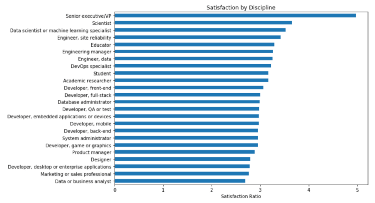
    Satisfaction ratios by “discipline” (devType from the 2019 Developer Survey). Senior executives report high satisfaction while data analysts exhibit relatively low satisfaction.

    To start, satisfaction does vary between disciplines. More specifically, the data show a statistically significant difference between fields of work given number of people indicating they are satisfied with their job versus the number indicating dissatisfaction (p < 0.05). Consider a metric which divides the number of people who report being satisfied (slightly or very satisfied) by the number dissatisfied (slightly or very unsatisfied) with their job. Using that “satisfaction ratio” metric to rank the fields of work within the Stack Overflow Developer Survey, four groups dominate the top ten most satisfied: management (executives and, to a lesser extent, engineering management), science (including data science), reliability (SRE and DevOps), and academia (educator and researcher). The data also show that most of the “developer” roles sit around the median value of 3.0 and, below that, one finds designers, PM, sales / marketing, and analysts.

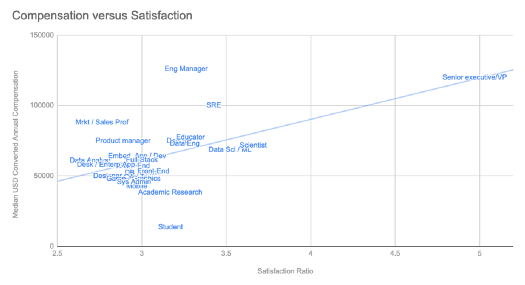
    One might suspect that compensation could account for this disparity in fields of work and, indeed, those reporting satisfaction with their jobs saw significantly higher salaries than those reporting dissatisfaction (difference of ~$21k difference, p < 0.05). Even still, consider that compensation may not be fully capturing variation in satisfaction. Though it can be a troublesome metric, linear regression on median discipline compensation only “explains” about a third of the variance in discipline satisfaction ratio (R² = 0.29) [6][7]. Looking closer at the data, one can begin to see the fields of work that challenge that important but complicated relationship. For example, academic researcher yields low compensation compared to an engineering manger but both still report fairly similar high satisfaction ratios. Likewise, engineering managers, data scientists, and SREs may see a notable difference in pay but not necessarily a huge difference in satisfaction. Of course, if one is looking to optimize satisfaction and pay, one may consider senior executive / VP, SRE, or engineering manager. Still, while money might help, it doesn’t always seem to buy added happiness.

    Median compensation and satisfaction ratios for different devTypes.

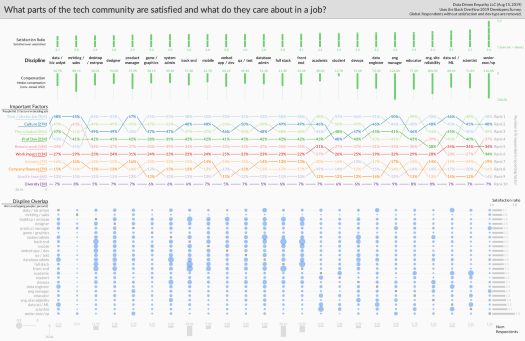
    If compensation may not fully explain satisfaction in this sample, what else might be important within the tech landscape? The Developer Survey asks respondents about factors that might influence their decision to take a job (“… deciding between two job offers with the same compensation, benefits, and location … which 3 are [most] important to you?”) and, interestingly, there is a statistically significant difference in the frequency with which factors are selected by different disciplines (p < 0.05). Notably, developers of various kinds (front end, back end, etc) rank “[l]anguages, frameworks, and other technologies [they would] be working with” at the top of their list whereas culture tops the lists of PM, engineering managers, sales / marketing, and data scientists / analysts. Interestingly, looking at high satisfaction disciplines, impact of one’s work for both scientists (including data science) and senior executives may matter more than usual. Regardless, like with compensation, this variable ranking of factors may imply that different types of people in tech are searching for different things from their jobs and many factors may be acting holistically to support satisfaction.

    Visualization of satisfaction and job factors by discipline while also showing how those disciplines are inter-related. Full resolution image available here .

    Finally, respondents to the Developer Survey often identify with more than one discipline and, by leveraging those “overlaps” in fields, one can begin to see “clusters” within the landscape of tech with different experiences. Specifically, using the Jaccard Index over shared respondents, there’s quite a bit of overlap between engineering management and senior executives (both of which see high pay and satisfaction ratios) [8]. Likewise, many “developer” fields are closely related (front-end, back-end, full stack, etc) while also seeing similar satisfaction ratios. That said, some disciplines highlight that a small shift within a cluster can yield a very different outcome. Most notably, data scientists and data analysts report profoundly different satisfaction ratios even though they share a large number of practitioners. Also consider that some reliability (DevOps and SRE) disciplines report higher satisfaction and pay than system administrators even though, in terms of people self-reporting, there may be a relatively large overlap between those fields. It may be that some in tech can serve in more than one role but which role they fall into can greatly influence their experience of their work.

    Relationships between different disciplines in tech using a Jaccard Index over respondents shared between different fields. Line width proportional to index with values under 0.05 filtered out.

    While the technology sector is often discussed as one community, there are large variations in the experiences within tech and difference in what matters to its diverse members. Discipline is one important dimension that interacts with job satisfaction and not only can other factors beyond compensation count but the importance of those factors may vary depending on field of work. That said, while a student selecting a discipline or a practitioner looking to make a change may well consider the financial and emotional experiences of different fields, this essay also highlights lessons for someone else: managers and leaders. When building positions for different types of practitioners, it is worth emphasizing that different things matter to different types of people and, in an ever tightening tech labor market, a deeper understanding of those disciplines’ current reality may help one build better professional homes [9].

    Code at https://github.com/sampottinger/dev_satisfaction.

    Works cited

    1. Berger, Guy. “LinkedIn’s 2017 State of Salary Report (U.S.) Introduction.” LinkedIn Jobs Blog, LinkedIn Corp, 2017, www.linkedin.com/jobs/blog/linkedin-2017-us-state-of-salary-report.
    2. Booz, Michael. “These 3 Industries Have the Highest Talent Turnover Rates.” LinkedIn Talent Blog, LinkedIn Corp, 15 Mar. 2018, business.linkedin.com/talent-solutions/blog/trends-and-research/2018/the-3-industries-with-the-highest-turnover-rates.
    3. Dickey, Megan Rose. “These Are the 15 Best US Tech Companies to Work for in 2019, According to Glassdoor.” TechCrunch, Verizon Media, 5 Dec. 2018, techcrunch.com/2018/12/04/these-are-the-15-best-u-s-tech-companies-to-work-for-in-2019-according-to-glassdoor/.
    4. Peterson, Becky. “Travis Kalanick Lasted in His Role for 6.5 Years – Five Times Longer than the Average Uber Employee.” Business Insider, Insider Inc, 20 Aug. 2017, www.businessinsider.com/employee-retention-rate-top-tech-companies-2017-8.
    5. “Stack Overflow Developer Survey 2019.” Stack Overflow Insights, Stack Exchange Inc, 2019, insights.stackoverflow.com/survey/2019.
    6. Ford, Clay. “Is R-Squared Useless?” Research Data Services + Sciences, University of Virginia Library, 17 Oct. 2015, data.library.virginia.edu/is-r-squared-useless/.
    7. Nau, Bob. “What’s a Good Value for R-Squared?” Statistical Forecasting, Duke University, people.duke.edu/~rnau/rsquared.htm.
    8. “Finding Similar Items.” Mining of Massive Datasets, by Jurij Leskovec et al., Cambridge University Press, 2016, pp. 73–74.
    9. McLaren, Samantha. “These Industries Will Face the Biggest Talent Shortages by 2030.” LinkedIn Talent Blog, LinkedIn Corp, 24 July 2018, business.linkedin.com/talent-solutions/blog/trends-and-research/2018/industries-biggest-talent-shortages-2030.

    Code and other notes

    The source code behind this essay and its visualization is made available at https://github.com/sampottinger/dev_satisfaction. Note that this uses a global sample from the 2019 Stack Overflow Developers Survey. Its numbers may differ from some metrics reported by Stack Overflow because it removes those that did not provide answers to all relevant questions. Specifically, consider the following that were removed:
    • Around 20% did not have satisfaction raiting available
    • Around 8% did not have a developer type available
    • Around 37% did not have compensation available

    Other thanks

    Some colors selected using http://colorbrewer2.org.
    下载开源日报APP:https://opensourcedaily.org/2579/
    加入我们:https://opensourcedaily.org/about/join/
    关注我们:https://opensourcedaily.org/about/love/
  • 开源日报第525期:《反其道而行之 QtScrcpy》

    22 8 月, 2019
    开源日报 每天推荐一个 GitHub 优质开源项目和一篇精选英文科技或编程文章原文,坚持阅读《开源日报》,保持每日学习的好习惯。
    今日推荐开源项目:《反其道而行之 QtScrcpy》
    今日推荐英文原文:《How To Give a Great Code Review》

    今日推荐开源项目:《反其道而行之 QtScrcpy》传送门:GitHub链接
    推荐理由:有的时候需要把手机作为电脑的第二屏幕来用,有的时候则是反过来——把手机画面加入电脑屏幕一起操作。这个项目可以将连接的安卓设备在电脑上直接进行操作,免去低头操作手机的额外一步,你甚至可以在这里操作手机来玩吃鸡游戏(虽然比直接操作手机还要麻烦些)。当然了,如果在工作空闲的时候,也可以用来稍微摸一个鱼什么的……
    今日推荐英文原文:《How To Give a Great Code Review》作者:Steven Griffith
    原文链接:https://medium.com/better-programming/how-to-give-a-great-code-review-7e32e5ba0771
    推荐理由:审查别人代码时的注意事项

    How To Give a Great Code Review

    Giving and receiving feedback is hard but we all have the same goal: getting better

    Code reviews are tricky. They can be hard to give and can take a lot of energy.

    What is it that makes code reviews great? I’m glad you asked. I’m about to give you the steps I take to give a code review. This is for async reviews like you’d do on GitHub. I think in-person reviews are much more fun, but that’s not always the approach you get to take.

    Hopefully, you have tools in place to prevent most of the style and preference comments in code reviews. It’s simply a waste of everyone’s time to have to comment about a missing semicolon, preferred white space rules, camel case or snake case, or other things that linters, prettiers, and common tools can take care of. Don’t waste your time on this. If your project doesn’t have any tools, then suggest some.

    Also, consider how your comments stack. Don’t make comments on a method that will possibly get changed from an architecture suggestion. This guide should give some tiers to keep that from happening. Just let comments from one tier be addressed before moving to the next until you get a better feel for it. Multiple rounds of code review are okay, but overwhelming someone with a massive set of suggestions is hard to deal with. Each of these steps is meant to be taken in order. I don’t see a reason to continue with the next step if the previous one hasn’t been completed.

    It’s important to remember that code reviews aren’t just looking for errors in your teammates’ code. These are opportunities to learn, catch possible oversights, screen bugs, ask questions, share domain knowledge, etc. Everyone on the team should want the same thing: quality software. The more eyes and minds on a set of code, the better. I’ve learned quite a bit just from reviewing code. It should be a thoughtful and rewarding process.

    Also, don’t be scared to ask questions or have some conversation in code review comments. I’ve learned coding tricks and good architecture from code review questions I asked and had conversations about. It’s also okay to give an encouraging comment like “good catch!” or “I’m glad to see that get refactored.” This is another part of the programming process, not a rigid process to find errors and look super-smart.

    High-Level Overview

    You first need to read the pull request thoroughly. You should be able to see from this what has changed, why there was a need for a change, and how to prove that the change works or is happening. There are some cases where the changes will have no visible impact, so there is nothing to test. The request should, hopefully, state that. If not, you’ll need to converse with the author to make sure you understand. That’s a good time to ask them to clarify the description.

    From this description, you should have at least enough of an understanding to test this changeset and prove that it works, that the bug has been removed, etc. For changes that have little to no impact on other code, you should have enough of an idea to test some paths to verify that. In some cases, it will simply be “ensure the tests pass.” If this is your specific work domain, you may have an idea of what it might impact, so you’ll be able to prove it.

    Run the Code

    Now you’ve got a proper understanding of the changeset, you need to pull the branch down. This step shouldn’t be skipped because it’s your job to verify that the change does what it’s supposed to. Your job as a programming team is to make sure QA finds nothing. If you don’t have a QA team, it’s even more important that you test as completely as you can.

    Besides, if the code doesn’t work, you may not even need/want to go review the changes. It’s worth taking a look afterward to see if you can identify why it might be broken. You’ve already pulled it down and have your focus on the issue, so it’s worth suggesting where you see an issue if you can. I suggest at least a quick attempt at locating the error(s) before commenting, so you can make the comment more productive.

    Get Your Head Around the Scope of the Changes

    Now you have the branch pulled down, and you can verify nothing is broken, and the code works as expected. You’ll want to go through the diff and figure out where the meat of the changes are. A lot of the time, there are single lines with little to no impact, and sometimes there are only a few chunks of changes for the most part. If the diff is large, you may have better luck looking at one commit at a time. The idea is to get your head around the actual code changes at a level similar to the diff description. You’re not looking for coding errors specifically, though if something jumps out, you can take a note. Don’t comment on that right now.

    What you want to do is find the architecture of the code. Not just of the changes, so you’ll need to look at more than just the red and green. That’s why it’s helpful to have the code pulled down for this step. You want to find out how the code is changed and how it relates to the code around it and, where applicable, the code that calls it.

    Make Architecture Comments

    You want to do this partly because you’re trying to get a sense for how you might do it. It doesn’t take nearly as long as new code because it’s easy to make guesswork like this from already-written code. You don’t need a 100% roadmap of how you would implement it; the author has already done that. You want an abstract look at a possible architecture choice, which will not only allow you to suggest something if you see it but understand better why the author might have made the choices they made.

    If you have a suggestion on a new approach, go ahead and make it. Pseudocode, examples, links, etc. will help greatly in this. If you don’t have any suggestions, you should have an idea of why they might have chosen to implement it that way. If not, you should ask.

    Make Comments About Surrounding Code

    It’s important to get an idea of the context of the code around what has changed. I’ve seen some code that was in the diff that looked fine, but there was a helper method that did a similar thing that could have been used. The author took my comment and refactored the helper method a bit for an overall better solution. Had I not been looking at other code, we would have both missed that opportunity.

    I’ve also seen code that looked fine in the diff. Imagine a total output that was total + tax and some defensive code to have tax be 0 when it wasn’t defined. That seems reasonable, but this was in a summary component. There were a subtotal method and output already, so I looked at the getTotal method and found that tax was already being added, even though none of this was in the code that changed. I found this by investigating why that particular change needed to be made. It turned out there a pre-existing bug that affected this. The solution was refactored to fix that bug and remove the code that caused me to look.

    I could mention many cases just like this. If you see a change you’re not sure about, go investigate. If you wonder if changing XYZ to ABC in a test case was necessary, change it back and test it out. Look around at the code. Snoop. Don’t just view the stuff in the green.

    Regarding These Past Two Steps

    Getting a high-level understanding of the changes as well as poking around in the code to figure out scope and related code is important. Obviously, it’s important so you can give a good review, but it’s also important for knowledge sharing. This step can help you learn about the code and understand what is going on. If it’s code you work in, you’re being kept up to speed, and these steps will be quicker because you’re familiar with it. If it’s code you don’t usually work in, you’re getting knowledge of the system or systems via code review.

    Many companies and teams struggle with knowledge sharing. I think giving good code reviews helps. Not only does it share knowledge by actually seeing and understanding code incrementally in changes, but it gives you the specific Rolodex of who to ask which questions. It also helps having seen something that you may remember in other work. That’ll help with overlapping tasks. It could prevent you from doing extra work, or it could just give you someone to consult before a task is implemented.

    The last note here is about helpful comments. Just keep in mind it is much more helpful to point something out if you have examples, links, best practices to reference, etc. Just bringing something up without suggestions, pseudocode, or code examples is comparable to saying “I would have done that differently.” That in itself isn’t a great help to the reader. I’ll have more to say about comments later.

    Reviewing the Code

    Now that the code has a stable architecture and doesn’t need to change from anything around it, we are ready to actually review the code. I go back to the GitHub diff for viewing the changes and additions. I like to make two passes.

    First pass, I make comments on general coding things I might see. I check whether anything can change to help the clarity, which I find just by reading the code. If I lose track of what a variable is during the code, maybe the scope of that code is too big, or the variable could have a better name. If I see lots of indentation, I might focus more on that chunk for a moment to see if something might simplify it. I write a lot of JavaScript, so if I see loops, it catches my eye because I favor the higher-level collection methods. If I see a variable get declared and then built in a loop to be returned, I might see if a map or reduce could work.

    In this step, it is even more important to include example code. You already have the branch pulled down, so it’s easy to test out refactor stuff. You can be sure you’re always clear in your comments and looking at the same thing if you put in an example. Sometimes I put in more than one. I may have a few different ideas, and either I want the author to be able to decide which they like best, or perhaps my examples will spark an idea or inspire some good conversation that leads to a group consensus on the best improvement. If you leave multiple suggestions, examples, and are open to conversation, it’s extremely hard for your comment to be taken the wrong way. Besides, you’ve shown you are invested in the codebase by spending time and care on examples. Sometimes when you start writing an example, you figure out that you were mistaken, or you learn the answer to your question, so there’s no need for a comment at all.

    The final pass is for errors and also stuff tools may have missed. Look for subtle logic errors, branches that may never be hit, and things like extra semicolons or whatever jumps out at you. Sometimes there’s formatting stuff the linter misses. This is a good time to double-check variable names and scopes too. Just read through and make sure everything is smooth, logical, and easy to read. This is also when I look at the tests in more depth.

    Tests Are Real Code

    It’s hard for me to want to review tests. It’s one of the things I just have to do as part of my job. If tests are hard to maintain or read, they won’t be maintained or read. Look for things you can do to refactor tests and setups. You actually have to read the tests to make sure the code is readable and that they make sense. The more complicated the tests are, the harder they are to review.

    Things to Keep in Mind

    Scope

    Sometimes changes may be outside a given task’s scope. It should be up to the author if these changes should be done then or later. You can certainly suggest changes that need to be made, and you should. Just be aware that those changes may be put off for another time.

    Boy Scout Rule

    Incremental refactoring is necessary. Some people follow the Boy Scout Rule when coding, which means that they will always leave the code cleaner than when they found it. That means they may refactor something with the goal of improving the codebase a little. You must resist the urge to see another refactor as a result and insist they do that. This can take you down a road that seriously inflates the scope of the review. It’s fine to ask about these things and suggest a ticket be created for future work. But it’s not okay to insist the new refactor be made as a result of the incremental refactor unless the author is open to that.

    Specifically call out what is optional

    Don’t leave it for the reader to interpret what does and doesn’t need change. If something is optional or just a comment, call that out.

    Don’t be vague

    Be specific with comments. Leave suggestions, examples, and resources. If something is a best practice, it’s helpful to link some resources for the person to learn this. If something has performance impacts, you should be able to find a source for that.

    Don’t swoop and poop

    Swoop and poop is something I learned from a design team. It’s when someone comes in, shoots a bunch of negativity at your design, and leaves. Don’t make comments unless you have suggestions or solutions, or you want to talk about it.

    Always give examples

    There is nothing more helpful for the thought process than examples. It guarantees that you have a shared understanding, it can help teach someone, it’ll reduce the questions asked on a comment, it will ensure you’re not swoop and pooping, and it’ll be a more positive review.

    Try the suggested changes for simple stuff

    Sometimes an inline change can be easily made by the suggested changes feature on GitHub. The author will see this and have an option to just accept changes, and it’ll go right in as a commit. Try it out sometime.

    Don’t hold up a review for no reason

    If you’re blocking a review, make sure there’s a good reason. If you prefer something but don’t have any provable reasons, that is just a preference. If you feel very strongly about something, you need to make sure that it’s worth everyone’s time and the feature or fix being held up over it.

    If there’s pushback, the author wins

    Sometimes we get caught up on what is right or what is the best way. Sometimes the author doesn’t agree with us. If there’s a discussion where you disagree, and you don’t have empirical evidence or some demonstrable reason why you’re right, then it should be the author’s preference. Links or examples that are purely preference do not count. It’s okay to give a little.

    Don’t go round and round reviews

    If you’ve done a couple of rounds of code review, and the code is getting better, then leave it at that. Don’t keep dropping in new comments over new stuff you’ve seen or trying to make the code 100% perfect.

    Be nice

    For a lot of people, code reviews induce anxiety. You’re talking about something someone spent a good amount of energy on. It’s always easy to be critical of something already written. Be sure you consider the other person when reviewing. It’s much more beneficial to have a positive experience every time than to dread code reviews.

    Proofread

    Be careful before you hit the submit button on a comment. Read it again before you submit. Look for anything that can be taken wrong. Look for how often you say “I” and “you” instead of “we.” Look for any comments that could include a solution or more suggestions. Read this to make sure it’s something you’d want someone to comment on your review.

    More Info

    I was exposed to a great two-part article regarding code reviews. It was later in my career after I had already been through a hard uphill learning curve. I had learned a lot of those same steps the hard way.

    I started out getting reviews from pretty much the worst person you could have give you a review. I’m not kidding at all to say you could declare a true statement and the guy would argue with you for the sake of arguing. We said “The sky is most definitely blue” one day to prove this. It made me very anxious about code reviews. I dreaded them, and I argued during them.

    After he was dismissed, I was ready to argue with the next people. To my surprise, they were very positive and helpful. I started being excited to see what I would learn in code reviews. It was a great experience.

    This transitioned to me being a gatekeeper at a new company. We’d bought another company, and I was supposed to review any integration code to make sure it matched our guidelines. I spent every review saying things like “Prefer not to use single-character variable names” and “a try-catch block inside a for loop that is five indentions deep seems very complicated.” I was met with “will not fix” and “I spent so long getting this to work that I don’t want to mess with it.” I wasn’t sure what to do.

    This experience has led me to try and learn from code reviews. It reminds me to consider how the other end might feel. Both because I was on the hard end and because I gave reviews to people who just hated the thought of it.

    There’s lots of information out there about how to do this, which goes to show you it’s harder than it seems. I try to make sure all the reviews I’m involved in are fun and rewarding. This should be your goal as well.
    下载开源日报APP:https://opensourcedaily.org/2579/
    加入我们:https://opensourcedaily.org/about/join/
    关注我们:https://opensourcedaily.org/about/love/

  • Pray for Kyoto

    21 8 月, 2019

    2019 年 7 月 18 日上午 10 点 35 分,日本京都府京都市伏见区桃山町京都动画第一工作室发生纵火事件……

    截至 2019 年 8 月 5 日,该纵火事件已造成 35 名京都动画的员工不幸罹难……

    如今,距离事件发生已经过去将近 30 天,相信全世界范围内的粉丝也和我们一样,希望能表达对这次事件的惋惜。

    面对这一令人心痛的事件,我们(开源工场)组合起了 PrayForKyto 小队,制作了《一封给京阿尼的信》专题网页,来提供一个哀悼和留念的平台,也来表达我们对这次事件损失惋惜和对受害者们真诚的祝愿。

    默哀通道:PrayForTokyo


    ?希望大家能在拆开这封信件后

    ?能随着《紫罗兰永恒花园》中的插曲《Nerver Coming Back》

    ?一起为那些,在这次事件之后将会“Never Coming Back”的人事物,默哀几分钟

    ?并在信件展示完之后,点击按钮,献上花束


    感谢京阿尼曾给我们带来共同的感动,也希望我们这份小小心意也能为京阿尼的重振旗鼓带去魔力!

    最后,希望这份共同“Pray For Kyoto”的记忆能永远留存,希望我们的期盼能得到上天的回应,希望一切都能好起来!挺住啊!京阿尼!

    心得体会

    魔法魔王少女零酱(JinX):

    京阿尼在我的成长中真的是一道彩虹,有两个人物,一直是供给着我这个至今中二病没毕业的女大学生。

    其一是七宫智音,我用了 5 年的头像就是她。

    看着她,在人前总“Ni↗Ha~ha~ha~ha~”的奇怪笑声,从不把那些在阳台上肆意流下的眼泪和别人诉说;越是无法面对、越是难以前进,就越是要不断给自己打气,迈出“最后的决斗”那一步……

    Cherub(智天使) 咏唱★Seraph(炽天使) 降临★Physical Linkage(世间万物为我所用)★!

    其二是薇尔丽特。

    印象最深的片段是高三的时候,看完我忍不住感慨了一句:

    “唉,为什么薇尔丽特到最后也没有找到少佐哇”

    我的同桌(一个很奇怪的熊姓/雄性少女):

    “你都看完了,还没明白吗?她要找的不是少佐,是自己啊”

    我渐渐明白了,并且现在,我想我也找到了自己了。


    零姬·咪喵:

    因为比起什么都不做,做点什么总是没错的吧。


    作者 魔法魔王少女零酱(JinX)

    From “PrayForKyoto”

    2019 年 08 月 06 日

←上一页
1 … 127 128 129 130 131 … 262
下一页→

Proudly powered by WordPress