• 开源镜像
  • 开源沙龙
  • 媛宝
  • 猿帅
  • 注册
  • 登录
  • 息壤开源生活方式平台
  • 加入我们

开源日报

  • 开源日报第539期:《常用模版 RegexHub》

    5 9 月, 2019
    开源日报 每天推荐一个 GitHub 优质开源项目和一篇精选英文科技或编程文章原文,坚持阅读《开源日报》,保持每日学习的好习惯。
    今日推荐开源项目:《常用模版 RegexHub》
    今日推荐英文原文:《Three Techniques for Time Management and Prioritization》

    今日推荐开源项目:《常用模版 RegexHub》传送门:GitHub链接
    推荐理由:常用的正则表达式合集。有的时候我们需要从规定格式的字符串中截取所需要的信息,而正则表达式就是一个不错的选择,这个项目提供了常见的需要使用正则表达式的场景——包括解析日期时间和油管视频 id 等等,在编写自己的正则表达式时可以作为参考和借鉴。尽管这玩意看起来复杂,学起来也不算很容易,但是在解析一定格式的字符串时它能比平时的方法更加方便。
    今日推荐英文原文:《Three Techniques for Time Management and Prioritization》作者:Costas Andreou
    原文链接:https://medium.com/better-programming/three-techniques-for-time-management-and-prioritization-9df6dffe2ff1
    推荐理由:正确规划时间——一天只有 24 小时,而你总不可能只睡 3 小时

    Three Techniques for Time Management and Prioritization

    Learn how to manage your time effectively for career success

    “My favorite things in life don’t cost any money. It’s really clear that the most precious resource we all have is time.” — Steve Jobs
    When was the last time you thought about time management or prioritization? It generally isn’t something that people actively think about; and yet it is something we all do every day. From the moment we wake up to the moment we go to bed, we are constantly making decisions and prioritizing what we’ll do next.

    In a professional setting, you’ll find yourself constantly prioritizing tasks. There’ll be a stream of incoming emails, meeting invites, chat windows, deadlines, and to-do list items, all competing for your time and attention. If you can prioritize things and allocate your time correctly, sooner or later you’ll find yourself moving up the corporate ladder. It’s often a key skill for management.

    Getting Started

    Often, the hardest part is to take the first step; to get started. It’s easy to get caught in the busy-ness of everyday life and chaotic work cultures with no structure.
    “Tomorrow is often the busiest day of the week.” — Spanish Proverb
    In this blog, rather than simply present three different time management techniques, you’ll see how to implement each one and to combine them. This will give you a set of tools that you can use immediately.

    Make a List

    The first task of getting organized and honing your time management skills is to know and track all your outstanding tasks. When the list is small, it’s easy to remember it without writing it down. However, when you or your team have a big list of tasks, you need a way of tracking them without forgetting anything.

    That’s why it’s imperative that you create a list of all outstanding items and simply write them down. Just by doing this task, you’ll be making sure you’re aware of all your tasks and their associated deadlines.

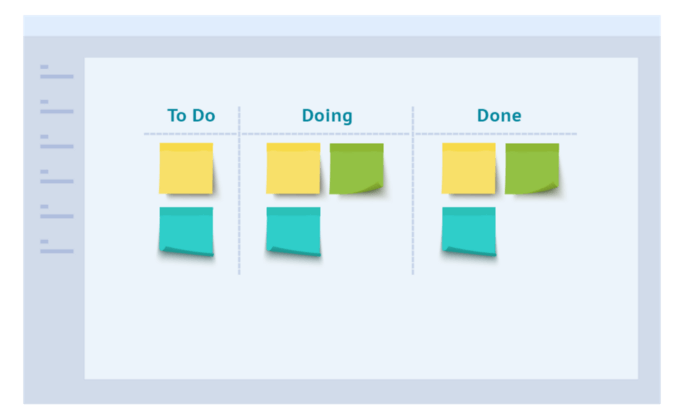
    This can be a paper or a digital list of items. Personally, I have a number of different lists. I have a personal to-do list, a work to-do list, and my team’s to-do list. Generally, when a number of people are affected or are tracking progress on tasks, then it makes sense to use an online list. I recommend setting up a Kanban board that everybody has access to. Trello offers a simple and yet powerful digital Kanban softwarehttps://trello.com

    Kanban allows you to define different lanes representing the status of work, and you can drag your items across, giving everyone a real-time view. Here’s an example of a Kanban board below:

    Compliments of digite.com

    Eisenhower Matrix

    If you’ve carried out the previous exercise, you now know the whole universe of items you need to address. We will call this universe — all the different lists — your work backlog.

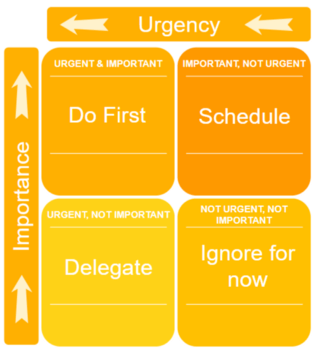
    We can now work through this backlog to categorize and appropriately prioritize all of the items of work. One of the ways to do this is to use an Eisenhower Matrix.
    “You can have it all. Just not all at once.” — Oprah Winfrey
    For each item, you need to go through and make two choices. You need to decide whether they’re urgent, and/or whether they’re important.

    If an item is:
    • Important and Urgent, then it should be placed in the top left quadrant.
    • Important but not Urgent, top right quadrant.
    • Urgent but not Important, bottom left quadrant.
    • Not Important and not Urgent, bottom right quadrant.
    Depending on the quadrant for each task, you can decide the action you need to take.

    For those of you who are sole practitioners and don’t have anyone working for you, you might not be able to delegate. In that case, you start by addressing the Do-First items and afterward address the Delegate items. Another option is to consider hiring an online assistant to help you. See, for instance, platforms like Upwork.

    Prioritize Your Urgent and Important Items

    The Eisenhower Matrix allows grouping tasks in terms of priority and determines the high-level actions that should be assigned to them. The next task is to address the individual items within each quadrant.

    Take, for instance, looking at the Urgent & Important quadrant. Every single item needs to be addressed, fast. How to determine which one to tackle? First, try to understand what each item is all about, and figure out the work involved in completing each item. This should give you a sense of how much time each task will take.

    Photo by Jiyeon Park on Unsplash

    To begin with, attempt to see whether there are any quick wins. This must be considered on a task level, but also regarding the breakdown of a task. Imagine you have two tasks. One task would probably take all day, and the other one, two hours. It’s best to begin with the two-hour task to get it out of the way and delivered before moving on to the bigger task. The quick win gives good momentum and boosts confidence.

    However, you may need some outside input to the big task requiring that you first send an email or make a phone call. Those actions are quicker than the smaller two-hour task, and if completed upfront, someone else will be working to send you the information you require while you’re on to a different task. That also means that you’ll be ready to start the bigger task as soon as you finish the other one, rather than sitting around waiting for information.

    The Pareto Principle

    The last thing to cover is the Pareto Principle, and how it can be used to your advantage. The Pareto Principle is known by many names, such as the 80/20 rule or the law of the vital few. This principle essentially states that for a given situation, 80% of the effects come from 20% of the causes.

    An example could be something like 20% of Medium writers produce 80% of the [good] content.

    Knowing this principle, it’s time to learn to apply it. Let’s examine a few use cases.

    Photo by Han Chau on Unsplash

    Use case #1: 20% of the work delivers 80% of the value

    Following from the Eisenhower Matrix and the quick wins, the Pareto Principle essentially advises that we could do 1/5th of the work and get 4/5th of the value. That could either be by only addressing a subset of the backlog, or by solving each item partially. Maybe you deliver the work in a draft state, rather than 100% completed.

    Use case #2: 20% of the root causes create 80% of the problems

    Sometimes you may have some tasks which seem to be repeating themselves. It might be the type of problems you keep addressing, or the same group of clients causing most of the trouble.

    Whatever it is, it’s worth identifying the trend and solving the issue once and for all. To identify the root cause of a problem, it’s worth asking why five times in a row. The final answer tends to be the root cause of the problem.

    Having used the Pareto Principle, you can then identify the best way to proceed with your workload to achieve the most out of your day, week, month or year!

    I hope that you’ve found some or all of the above useful. Hopefully, you’ll put these tips into practice and they work for you. Remember to persevere for a while whenever you’re trying out a new technique. It takes a bit of time to get the hang of it.
    下载开源日报APP:https://opensourcedaily.org/2579/
    加入我们:https://opensourcedaily.org/about/join/
    关注我们:https://opensourcedaily.org/about/love/
  • 开源日报第538期:《世界披萨 pizza》

    4 9 月, 2019
    开源日报 每天推荐一个 GitHub 优质开源项目和一篇精选英文科技或编程文章原文,坚持阅读《开源日报》,保持每日学习的好习惯。
    今日推荐开源项目:《世界披萨 pizza》
    今日推荐英文原文:《Here is how to debug everything》

    今日推荐开源项目:《世界披萨 pizza》传送门:GitHub链接
    推荐理由:世界上有无数国家,无数城市,自然也有无数美食。这个项目收录了地球上某个城市里值得一去的披萨店,在出国旅游的时候可以作为参考使用。在别的国家有着和祖国不同的风景,人物和美食,有机会的话应该去为自己涨一涨见识,工作可不是生活的全部,毕竟工作的最终目的也是为了获得更好的生活不是吗?
    今日推荐英文原文:《Here is how to debug everything》作者:Borislav Grigorov
    原文链接:https://medium.com/@Brslv/how-do-you-debug-code-6e54c7701a85
    推荐理由:调试的基本步骤和技巧

    Here is how to debug everything

    Originally published on my blog borislav.xyz.

    How do you debug code?

    Do you have a process? Do you use debuggers or you do it the old-school-print-statements-everywhere way? Or you just rewrite it from scratch, because you “ain’t got time fo’ dat”?

    In this article I’m going to give you some proven techniques and steps for debugging everything in general, plus some code-related specifics. These are the tools and processes in my tool belt that I use on a day to day basis.

    It’s going to be an exhaustive list, so fasten your seatbelts and prepare to soak some battle tested wisdom.

    The process to debug everything – meta-level tactics

    It doesn’t matter if you debug a frontend issue, a backend issue, your car or your productivity. There are some universal approaches, which are valid in every life-situation.

    I call these meta-level tactics or steps.

    Here are the four meta-level steps, which everyone can apply to their specific problem.
    1. Problem clarification
    2. Research and exploration
    3. Experimentation and application
    4. Iteration

    Problem clarification

    the deeper the level of awareness about the problem, the better chance to solve it the right way.

    That’s the first meta-level step in my four step model.

    If you want to fix something, you should first know what’s broken.

    In practice, it means that you have to fully, deeply engage with the problem “in front of you”. You must understand it.

    I’ll give you an example.

    If your car gets broken on the middle of a trip and it suddenly stops, you know there’s a problem right away. You open the hood and see smoke. You know that this smoke is a sign, but do you really know where it’s coming from. Do you know why there is a smoke at all?

    Knowing that the smoke is a problem is the first level of awareness. Understanding the reason why there is a smoke is a second, deeper level of awareness – one that you should always strive for.

    The general rule is this: the deeper the level of awareness about the problem, the better chance to solve it the right way.

    And I’m bolding ” the right way” for a reason. Because everybody can center a div on the page with margins and paddings, but the right way is to center it without absolute values, using a flexbox, CSS grid or whatever, except margin and padding.

    So, you should make absolutely sure that you get the problem and the reasons behind it as deeper as you can.

    Research and exploration

    Now that you know the roots of your problem, you can proceed to the exploration phase.

    Most of the times you’ll have to deal with issues that you haven’t dealt with before. But it’s almost 100% possible that somebody has solved most of those problem before. You just have to do the research.

    How?

    It’s a matter of proper googling most of the times, but other strategies, such as posting on specialized forums, asking colleagues and friends and exploring by yourself (more on this on the third step) are also good to be considered.

    Another important thing regarding the research and exploration phase, is that you have to constrain your efforts particularly on collecting and gaining knowledge about the subject of your problem and not get distracted by anything else.

    Don’t start working. Just collect ideas and think about possible approaches.

    What I usually do is I set a 30 minutes timer. While I’m exploring the topic around my issue I take notes and collect ideas (often on a piece of paper or a new file in my code editor).

    When I feel that I’m ready and have enough knowledge about the “thing”, I move to the next, third step of the process.

    Experimentation and application

    This step is the most creative, but most difficult one to execute. You have to apply the knowledge from the previous two steps and find a working solution for your specific case.

    One of the things that I usually do to achieve this, is to isolate the problem as much as I can.

    If, for example, I’m solving a problem with some module of the software I’m developing, I do as much as I can to isolate that module from the external dependencies and reproduce the issue just with this single entity.

    Isolation is the way to make sure you have control over the “moving parts”.

    It’s the same whether you’re fixing your oven, the TV, your computer or even you relationship. It’s just different “modules”, which you have to define and be conscious about.

    Another good thing to know at this step of the process is that you have to make sure your solution takes care of other possible variations of the problem at hand. This means that you have to ” expand ” it in your head and think a bit more about other “problem-mutations” and whether your solution is solid enough to handle them.

    Of course, there’s possibility that you couldn’t solve the problem. In that case, go straight to step four.

    Iteration

    Just keep grinding!

    Everything that you did up to this point is a valuable experience. If you haven’t solved the problem yet, it’s time to iterate.

    That means that you should start from step one and dig deeper into the theory behind your problem. After that explore possible solutions and apply those to your particular case until the problem gets solved.

    Remember that with every iteration you’re closer to the happy outcome. Just keep grinding!

    Now, having this knowledge, let’s apply it specifically to the field of software development and see what we can learn.

    But first, some…

    Precautions

    Don’t be clever

    Code is like humour. When you have to explain it, it’s bad. Cory House

    It’s funny how we keep forgetting the most important rule of debugging – debugging is inevitable.

    I’m intentionally stressing this, because being conscious about the fact that the code you’re writing right now is going to break sooner or later, definitely will influence the way you do write it.

    That’s why the first and most important thing, before even starting to debug, is to make sure that you’re writing clean, simple and understandable code.

    Remember, your code editor is not the right place to be clever.

    Use tools

    In order to prevent all kind of bugs, use the proper tools for your language. In the JavaScript land, for example, there are linters, various code style checkers and formatters, etc.

    If you’re developing in JavaScript I strongly suggest you to use strongly-typed “language extension” like flow or TypeScript. It gives you a huge advantage as the confidence that you’re going to get out of using those types is enormous. Refactoring turns into a much more pleasant experience, the code becomes the documentation and you get all the benefits of the compile type error checking, which, once you try, you’ll love.

    For the guys that already develop in such an environment or their language enforces it – you got that point covered.

    Do code reviews

    If you work in a team, the number one thing you should do in order to avoid future problems with your codebase, is to enforce a practice of regular code reviews.

    This ensures three things:
    • That the developer who wrote the code didn’t miss a thing or did a thing that’s not needed at all (system coherence, enforced by the team)
    • That other developers understand the code and feel confident to maintain/extend it.
    • That all the team members are on the same page regarding the system and it’s features.
    There’s one more benefit, though. It’s more of a side effect, a thing that you don’t explicitly realise when you do the code review itself. And that’s that you and your team constantly look after the codebase, which prevents possible bugs.

    So, do your code reviews to save you some hard times down the road.

    Be a Boy Scout – The DSC formula

    Have you heard of the “Boy Scout” rule?

    It’s a simple rule, coined by the great Martin Folwer. It says that we should always strive to leave the code we’re touching a little bit better than it has been before us touching it.

    Rename a variable, extract a method, simplify an if statement, remove duplication. Those are all quick wins, which make your code one step closer to perfection.

    The benefits from doing these are not immediately measurable. The key thing here is the compound effect. If you do this consistently, you’ll start to see positive results – more maintainable, readable and clear code.

    Follow the DSC formula, when you’re in the mode of refactoring.
    • Remove Duplications
    • Simplify what’s overly complicated
    • Clarify what’s not clear
    Ok, we have covered some basic preventative tips.

    Let’s take a quick look at what we can do, when in “debug mode”, in order to be productive and quickly resolve the issues.

    Debugging consciously – the mindset

    The time to debug has come and you probably feel a bit anxious. A little bit of uncertainty and nervousness are arising and you don’t know where to start from.

    This is the time to stop, take a deep breath and switch your mental model.

    The crucial thing about debugging is to stay calm and positive. The moment you start to doubt and to let anxiousness and negativity enter the scene is the moment you have lost half the battle.

    Try to view the problem in front of you as a learning experience.

    One thing that helped me is to approach the bug with an eye of a scientist. Think about how a scientist approaches a problem. Think empirically. Collect data. Analyse it and try things. Take notes on the results and adjust accordingly until the desired outcome.

    Turn it into a game, if you wish.

    It’s all about the mental foundation and the words you say to yourself.

    The process of debugging code – the practical guide

    Now that we have covered the meta-level steps to debugging every problem and some specific precautions for developers to prevent bugs popping, let’s get into the details of debugging programming problems (bugs).

    Problem clarification – how developers should do it

    Since we have covered the generic part of this step above, it’s time to see what we can do as developers to improve our understanding of the problem at hand.

    There are three main advices that I can give you here.

    RTE – Read The Error

    I’m really convinced that around 80% of the difference between a junior and a senior developer is in how they read the error and the error stack trace. Most juniors refuse to dig deeper into the error itself. They just see it and start complaining or directly search google etc.

    It’s more of a game for the more seniors. Debugging is a game of understanding what went wrong and what the computer is trying to tell you. Read the error again. Track the traces. Don’t be afraid to look inside of the more nested layers of the error stack. There hides a treasure. Be an explorer and you’ll learn more.

    RTM – Read The Manual

    If you’re working with a third party API or service and you have problems with it, make sure the first thing you do is to read their documentation.

    Almost all problems that arise from a third party layer, are problems of inaccurate usage of it.

    So, save yourself some time and read everything. You can even find a much better, cleaner and wiser way to do the thing you’re doing.

    One bonus tip is to dig into the source of the third party. It never lies.

    Use a debugger

    Put a breakpoint and investigate the state at that point of the execution lifecycle of your program. Debuggers are sometimes being underrated, which is not fair. It’s the best way to “become” the computer and see the internals of the execution.

    Research and exploration

    Great creators always reuse knowledge

    Here comes the time to explore the different possibilities, the broad range of approaches towards the problem that you have.

    Again, what I usually do is I set aside some time (30 minutes or more, if the problem is bigger) and dedicate my entire focus to just collecting different solutions. This is a key thing. You should have a pool of those in order to be able to mix and match and come up with the best for your specific case.

    There are countless possibilities for explorations.

    One of those is the well known and loved by developers — the StackOverflow forums.

    I usually also research medium articles, various blog articles and the entire google in general.

    Often there are times that I’d look directly at other people’s code on GitHub.

    Asking a colleague is one of the most under appreciated options, but one of the most powerful. It has the amazing “side effect” of building a strong connection with your teammates.

    The last suggestion is maybe unexpected one, but one that I usually pick as the “weapon of choice” when it comes to creating/solving something that I know I have solved before. And it’s digging into my old source code. I have tons of it, so there’s a lot of hidden treasure there.

    And remember — great creators always reuse knowledge. Don’t be afraid to copy-paste, even from yourself.

    Experimentation and application

    We know the problem, why it’s happening, when it’s happening and we have a fuzzy idea how to approach it. We might even have a pool of viable ideas and solutions found on the internet or through some other source. Or we have came up with our own original solution. Now it’s time to get our hands dirty.

    As I said in the generic section of this step above, the key thing here is isolation. You have to find a way to decouple the problematic area of the system from the things that it depends on.

    Here’s what I do.

    Let’s say I have a function somewhere in my code, that calculates discount from a price. For some reason this function is broken and it doesn’t calculate the thing properly.

    This “module” of our software depends on two things — the base price and the discount percentage. Those are passed into the function as arguments. How to isolate them in order to constrain only on what’s the “core” of this module?

    Usually I handle such kind of situations by using some kind of code prototyping/scratchpad tool. For JavaScript there are many — codesandbox, jsbin, stackblitz, even the console of your browser of choice. The most generic tool, which works for almost any language is repl.it.

    Anyways. So, I copy the function directly over there (let’s say repl.it) and literally replace the dependencies with hardcoded values. I just isolate the function entirely and mock each of it’s dependencies so I have control over it.

    Now, this “isolation” is usually being taken care by automation tests, if you have any (which is more or less a must). But, for a quick and dirty experimentation it does the job. Remember, the thing is not how, but whether you do isolate the moving parts.

    Having your problem solved in isolation, you have the wisdom to integrate the solution back to your system. Congratulations.

    If you don’t have it yet, though, go back to step one. You know the process now, so just keep pushing it and you’ll get it solved, sooner or later.

    Conclusion

    Solving problems is a strict process. It starts with gathering enough information and gaining knowledge about the nature of our problem. Understanding it deeply being able to articulate it.

    Once we have this, we start looking for solutions and approaches we can reuse, mix and shape to fit our needs. Remember, your problem is one that’s most probably already being solved, so just dig for inspiration.

    Now, having a pool of ideas, you have to apply those to your specific case. You do it by isolating your problem and trying a bunch of things in a sandbox-like environment, where each moving part is being captured and controlled by us.

    And the most important thing is to not get demotivated. Take a break, go outside for a walk, drink some water. After that iterate. With each iteration you get closer and closer to the solution, whether you see it clearly or not. Just keep pushing.

    Good luck and be inspired!
    下载开源日报APP:https://opensourcedaily.org/2579/
    加入我们:https://opensourcedaily.org/about/join/
    关注我们:https://opensourcedaily.org/about/love/

  • 开源日报第537期:《反向操作 python-anti-patterns》

    3 9 月, 2019
    开源日报 每天推荐一个 GitHub 优质开源项目和一篇精选英文科技或编程文章原文,坚持阅读《开源日报》,保持每日学习的好习惯。
    今日推荐开源项目:《反向操作 python-anti-patterns》
    今日推荐英文原文:《Great Developers Never Stop Learning》

    今日推荐开源项目:《反向操作 python-anti-patterns》传送门:GitHub链接
    推荐理由:有好的操作方法,自然也就有坏的。这个项目就是讲在 Python 开发中的一些反向操作,希望开发者能够引以为戒,不要重蹈覆辙。学习好代码的长处,看得到坏代码的缺点,不是只看到为什么好代码是好的,多想一步,看看自己为什么是不好的,要如何改成好的代码,而不是直接套用好的代码,将好的想法装进脑子里才是最终需要达到的目的。
    今日推荐英文原文:《Great Developers Never Stop Learning》作者:Semi Koen
    原文链接:https://towardsdatascience.com/great-developers-never-stop-learning-77b9ce867eac
    推荐理由:保持学习的好习惯

    Great Developers Never Stop Learning

    7 ways I.T. Professionals can foster a Continuous Learning mindset

    Technology moves forward — so should you!

    As software engineers, developers or architects, it is pivotal to stay current and relevant within the technologies and the domains we work. Some of the skills we studied a few years ago at uni have become outdated, so unless we get in charge of our learning we will lose our competitiveness. Also, we quite often sacrifice learning and development in favour of project deadlines.

    This short-term thinking carries a long-term price!

    Although it is impossible to stay up to speed with everything in this rapidly changing world of I.T., we need to choose a few areas that interest us (whether these areas are related to our current job, or the one we want in the future) and carve time out to up-skill.
    Step #1 towards continuous learning is to set time aside!
    In this article I will share the ways I use to sharpen my skills and a couple of others that are next in my list!

    ❶ — The Art of Reading

    Books

    I read a lot! Irrespective of the methodology (conventional or digital), having a broad library of books is essential, as they provide a deep understanding of the subject in question. I avoid buying any technology specific books as they have an expiration date: when a new version of the technology they cover is released, or a different way of doing things becomes more popular, they become obsolete. I instead favour:
    • conceptual books, i.e. those that cover new (or old) concepts, paradigms or practices e.g. Behaviour Driven Development, object oriented design patterns, modelling, etc,
    • behavioural books, for topics like project management, SDLC, soft skills, leadership etc,
    • influential books, which are a must-read for every developer as they are constantly mentioned in technical conversations. Some examples are: The Mythical Man-Month, Clean Code, Design Patterns: Elements of Reusable Object-Oriented Software, Domain-Driven Design, The Pragmatic Programmer.
    My O’Reilly subscription is worth every penny, as it provides on demand access to a plethora of technical books (and other media, like videos, conferences, tutorials, etc). Although I prefer paper books, the ability to quickly browse a book is really handy.

    Blogs

    Reading blogs is one of my favourite methods to keep up to date: I totally respect other fellow-developers who take time to share their personal experiences, opinions, successes and failures using specific technologies. Some of the best tutorials out there are written by amateur technical authors, hidden deep down Google’s search! I use bookmarking apps (like Pocket and OneNote) to save them into my personal stack and then read them when I am commuting or between meetings at work.
    The currency of blogging is authenticity and trust — Jason Calacanis
    As long as we use our critical thinking to distinguish good quality blogs to those written in haste (frequently with half-cooked ideas or even misleading), then blogs are great to help us evolve and gain insights in new territories.

    Medium is a terrific home for technical know-how articles and my preferred publication is, by far, Towards Data Science (cc: TDS Team). Other blogs include Coding Horror, The Seattle Data Guy (cc: SeattleDataGuy), DZone etc.

    Twitter

    Following technical influencers in social media is another popular means of keeping up to date with technology. Reaching out to them with questions is essential to enhance our learning. One reason they maintain their ‘industry leader’ status is because they are generous with sharing resources and experiences, and they all welcome the engagement from people who want to learn from them.

    Who is reshaping our industry is the million-dollar question. I will refrain from giving any recommendations on here, as we all have different interests and there are literally so many inspirational leaders out there, but you can always see who I follow as an example.

    Photo by Anna Demianenko on Unsplash

    ❷ — From Avid Reader to Avid Writer

    For the last 9 months I have started my own blog. Initially it was daunting: I was erroneously thinking that only experts with original ideas should write blogs, or that my views might not be good enough (imposter syndrome, you say?), but I quickly realised that I am writing for myself first — it is a means of recording my own learning but also adding my personal stamp to popular subjects.
    To teach is to learn twice — Joseph Joubert
    Not to mention that it is a great way to have an online presence, establish my experience and passion in a certain area, and most importantly get live feedback from those who kindly read and engage with my content!
    ? Did you know? Based on the learning pyramid, the top 3 ways to retain information, are:
    1. Teaching others   : 90%
    2. Practice by doing : 75%
    3. Group discussions : 50%
    

    ❸ — Listen Up!

    Podcasts are one of my major life hacks: they are tailored for multitasking (while cooking dinner, ironing, running errands etc) and their bite-size format is perfect for my daily routine. This is a selection of the ones I listen to, which cover my chosen tech stack (.Net) as well as generic I.T. updates: Herding Code, .NET Rocks!, Hanselminutes, Software Engineering Radio, Coding Blocks, This Week in Tech, Developer Tea, Software Engineering Daily.

    ❹ — Take Online Courses

    Don’t get me wrong: I prefer to be hands-on and I do learn deeply by doing! This is my first choice — Always! But I now have a young family so my personal time is scarce. In order to kick-start learning a new technology I watch videos: they provide the perfect balance between theory and practice and being a visual learner I find them really effective. I watch them in an increased playback speed to maximise the amount of material I get through. Some of them offer industry certifications too.

    There are endless online courses to dive in, but these are the resources/platforms I use more often: PluralSight, Coursera, Khan Academy, edX.

    Photo by Christin Hume on Unsplash

    ❺ — Practice Makes Perfect

    Proof of Concepts (POC)

    As an architect I need to justify technical project decisions so I resort to developing POCs. They help me experience the challenges or benefits of the technology in question in order to provide forward looking research, as well as I get better at estimating (and not trivialise how long ‘easy’ tasks take to develop). Depending on my other commitments, I try to focus on one item at a time (e.g. data science, ReactJs, big data etc) and produce a prototype in that area. Looking at my velocity I get through 6 – 8 POCs per year. Not too shabby!

    Pet Projects

    Pet projects allow us to play, experiment and learn in a safe environment, so we can then apply what we have learnt to real projects. In fact, they are real projects without the pressure: no deadlines, no restrictions on technologies, no control on the requirements (that are mostly cut due to budgetary reasons), no shortcuts on patterns. We are the bosses — we set the rules!

    Open Source

    Contributing to open source projects is an excellent way to raise our public profiles and practise: we just locate the project we are interested in, download the source code, inspect the codebase, make sure we can run it end to end, debug through and we are ready to get stuck in.

    Although it is an area I have not actively engaged with (i.e. have not checked-in any changes), the main benefit I have experienced is that I get to see the best-of-the-best developers out there, coding in action — this by itself is a fantastic learning experience!
    ? Double Whammy: You can make your Pet Projects Open Source and double up on the benefits described above!
    

    Online Community

    Becoming an active member of an online community by asking and answering questions on sites like Stack Overflow is also a fantastic opportunity not only to learn but help others learn too. Promoting code and knowledge sharing offers a great sense of accomplishment.

    Katas

    Katas are simple coding exercises, i.e. they can be understood in a few minutes but are complex enough not to be solved too quickly — the term was coined by Dave Thomas, co-author of the book The Pragmatic Programmer, embracing the Japanese concept of Kata in the martial arts. I tried this technique once as an experiment but lost interest very quickly. I prefer looking at real problems and the big picture, rather than individual puzzle-like exercises. For experienced programmers, I think the other approaches mentioned in this article are more powerful. Nevertheless, a resource for Katas is kata.softwarecraftsmanship.org. ❗️ If this sort of thing tickles your fancy, check these platforms out too: Code Chef, Coder Byte and Hacker Rank.

    Hackathons

    Hackathons are sprint-like marathons that allow developers and I.T. professionals to collaborate on software projects and create a working prototype, an application feature or an integration (API). The benefits are listed nicely in Quora, so no more for me to say here! I have never participated in one but it is in my list of things to try!
    What was new and hot yesterday is old and junky today!

    ❻ — Tap Into Your Colleagues Network

    While learning from textbooks and online resources has plenty of advantages, there is little that can top the day to day interactions we share with our colleagues. I am lucky to be working with some of the best C# developers, they are a source of inspiration and learning for me — Thanks guys ?!

    What I have come to realise is that there is no such thing as a dumb question: we all know this old saying, and yet we still take it for granted! Questions are actually the foundation of most learning as they become the basic starting points for conversation.

    There are several compelling reasons why pair programming enhances our learning too, but the best advantage I have found is that we are forced to structure our thoughts, making us thoroughly understand our own ideas before we try to explain them to others. Finally, code reviews are the best way to improve our knowledge by getting direct feedback on our code. They are not about exposing our own limitations, but validating our ideas or have them challenged.
    ? Pro Tip: If there is someone at work whose coding wisdom and skills you admire, consider asking them if they might mentor you.
    

    ❼ — Socialise

    Attend Industry Events

    Attending a conference or a presentation is a brilliant way to get a sense of where the industry is heading, what other companies are doing, which technologies are being adopted, what the best practices are when bringing the technologies in-house etc. Networking with other developers is an added bonus too — swapping ideas with fellow developers is a guaranteed pattern to become sharper and expand your professional connections!

    This sort of events can be pricey so it is best if your company sponsors you. Otherwise you can opt for watching the recorded sessions online, once they are published. Here are the ones I watch on their respective YouTube channels: GOTO Conferences, O’Reilly, Thought Works.

    LinkedIn

    LinkedIn groups are an excellent way to find like-minded professionals, as well as get stay informed in the software development realm.

    Join Professional Organisations

    Professional organisations (such as the British Computer Society), periodically run training sessions and offer a comprehensive access to industry news, surveys, career information, jobs and details of events (often at discounted rate).

    The catch here is that we get what we put in: to fully reap the intrinsic benefits offered to us as members, we need to invest our time to actively participate.

    Join Local User Group

    The idea that developers are introverted geeks is totally outdated!

    Joining local user groups and technical communities is an easy way to interact with other developers. The diversity of backgrounds, domains and experiences is what makes these special. There is one thing in common though: everyone is passionate about programming! And as such everyone is happy to learn and share what they know!

    Build Own Network

    Would you like to take networking a step further? Here are some hands-on ideas:
    • Start a technical community within your organisation
    • Create a local user group
    • Give a presentation or become a keynote speaker at a conference
    • Hold brown bag sessions or round-tables for group technical discussions
    There has never been a better time to be a developer!

    Photo by Tim Mossholder on Unsplash

    Skill up to keep up!

    We often fail to understand that our career is no longer the end product of our education, but itself is an education for us! If we keep the learning habit, we are likely to extend our longevity and improve our employability. Another common pitfall is using time as an excuse for not adopting continuous learning. We all have time! In fact, we all have exactly the same amount of time. The difference is how we choose to spend it! (← this is a friendly reminder to myself)

    I have listed here a few resources that I tap into in order to develop my know-how excellence! I hope it helps you too!

    Thanks for reading!
    下载开源日报APP:https://opensourcedaily.org/2579/
    加入我们:https://opensourcedaily.org/about/join/
    关注我们:https://opensourcedaily.org/about/love/
  • 开源日报第536期:《读万卷书 free-books》

    2 9 月, 2019
    开源日报 每天推荐一个 GitHub 优质开源项目和一篇精选英文科技或编程文章原文,坚持阅读《开源日报》,保持每日学习的好习惯。
    今日推荐开源项目:《读万卷书 free-books》
    今日推荐英文原文:《How to Choose A Programming Language for a Project》

    今日推荐开源项目:《读万卷书 free-books》传送门:GitHub链接
    推荐理由:新的一个月自然要学点新的技能,这个项目就收集了学习新技能用得上的免费书籍。列表里包括了 Web,数据库和各种编程语言等等,从中学习一些技能相当适合;再往上的话还有一些包括密码学和数学在内的理论书籍,可以作为了解概念的好机会,保持学习新的技能,了解新的知识,才不会在逆流中缓缓后退。
    今日推荐英文原文:《How to Choose A Programming Language for a Project》作者:
    原文链接:https://medium.com/better-programming/how-to-choose-a-programming-language-for-a-project-7c7a3e5a4de6
    推荐理由:为纠结于选择工具的人提供的一些建议

    How to Choose A Programming Language for a Project

    Questions to ask when you’re choosing which language to use for your project

    Choosing a programming language for a project is different than choosing one to learn. Often, people will tell you that there’s no choice. Certain languages are chosen as the industry standard, and you just have to adapt. With as little freedom as you have, there are still some considerations to be made when choosing a programming language. After all, it will impact the main constraints on your project, such as time, budget, resources, and maintainability, and etc.

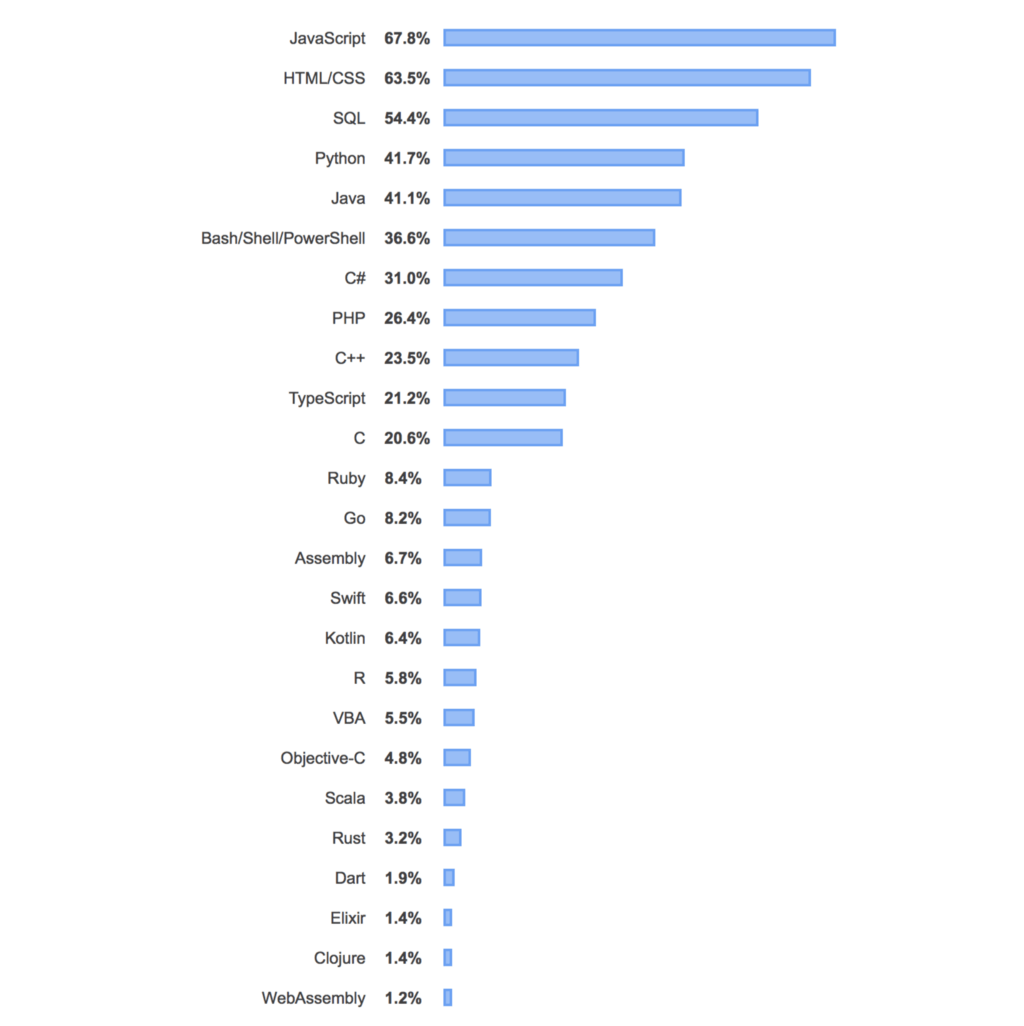
    Image from https://insights.stackoverflow.com/survey/2019#technology

    In Corporate IT departments, this is often one of the issues technology managers struggle with at the beginning of many in-house software projects. Sometimes, the decision will stare you in the face when you’re trying to scale up legacy systems and bring them up-to-date.

    When I was working in Corporate IT, our developers had to maintain high-performance applications that were time-critical. These applications were mostly written in Java and C++. However, as projects progressed, the need to scale up for performance was increasingly apparent.

    Java’s handling of concurrency became such a problem that the team ultimately decided to try a different programming language, even when no one on the development team knew how to program in that language. The investment in time and budget ultimately meant the team had to take a huge risk. But, in the end, just rewriting one component allowed huge improvements in performance. It also allowed for more stability within a critical part of the application.

    The lesson here is that often, the problems that we encounter in our IT projects will propel us to re-examine our programming language choices. This is an accepted part of the evolution of any IT project.

    As a product manager, program manager, and technical manager, knowing all the moving pieces in a project is important. This is why it’s important to know how all the components of your project might lead you to choose specific programming languages. Knowing this will allow for a better view of the future of the project.

    Any time you choose a new language, it’s a game-changing amount of overhead (resources, time, and effort) added onto your project. Having a good view at the beginning of the project and making a sensible programming language choice will lead to less time spent in maintaining the project, scaling up the project, and securing the project later on.

    Ultimately, you want your software project to stay for the long haul, serving the business needs of your customers even through the business changes that may occur.

    What Are the Questions to Ask When Choosing a Programming Language?

    This is by no means a comprehensive list of questions. But it’s a list that can serve as a starting point to choose the programming language that you’ll need.
    • Does the language have proper ecosystem support? Will the language survive for the long haul? Is there vendor support provided for the language?
    • What’s the environment that the project will run on — web, mobile, etc.?
    • Are there infrastructure considerations to using the programming language, such as new hardware required? What are the deployment considerations?
    • Does the client prefer a certain programming language to be used?
    • Are there specific libraries, features, and tools for a programming language that are the industry standard for this type of project?
    • Can our developer program in this language? Do we need to hire new developers? Can our developers learn the new programming language quickly?
    • What are the constraints of your project that are non-negotiable — time, budget, resources?
    • What are the performance considerations of the project? Will the language accommodate the benchmarks and the performance?
    • Are there any legacy codebase considerations for the project?
    • Are there any interface issues with upstream and downstream systems or external systems?
    • Does it need to integrate with third-party tools?
    • Are there any security considerations?

    How Are Programming Languages Being Used Today?

    • Web Applications : JavaScript, PHP, Ruby, HTML/CSS, TypeScript
    • Mobile Applications: Swift, Java, JavaScript, Object-C
    • Operating Systems: C, C++
    • Distributed Systems: Go
    • Enterprise Applications: Java, C#, C+, ErLang
    • Analytics & Machine Learning: Python, R, Clojure, Julia
    • Math & Scientific Computing: Matlab, FORTRAN, ALGOL, APL, Julia, R
    • Data Visualization: Python, R, Java, C#
    • Big Data: Java, Python, R, Scala, Clojure
    • Data Storage: SQL, C#, Java, Python

    Final Thoughts

    With a list of questions to ask and a list of programming language conventions, no matter what type of project you’re working on, you can make a sensible decision regarding the language that you use.

    Asking the right questions will allow you to back up the usage with evidence supported by industry standards and conventions. In the end, making the right programming language choice will enable you to develop systems that will weather the changes in business needs.

    What are you waiting for?
    下载开源日报APP:https://opensourcedaily.org/2579/
    加入我们:https://opensourcedaily.org/about/join/
    关注我们:https://opensourcedaily.org/about/love/
←上一页
1 … 124 125 126 127 128 … 262
下一页→

Proudly powered by WordPress