• 开源镜像
  • 开源沙龙
  • 媛宝
  • 猿帅
  • 注册
  • 登录
  • 息壤开源生活方式平台
  • 加入我们

开源日报

  • 开源日报第543期:《刷钱 awesome-indie》

    9 9 月, 2019
    开源日报 每天推荐一个 GitHub 优质开源项目和一篇精选英文科技或编程文章原文,坚持阅读《开源日报》,保持每日学习的好习惯。
    今日推荐开源项目:《刷钱 awesome-indie》
    今日推荐英文原文:《How Much Do Software Engineers Make?》

    今日推荐开源项目:《刷钱 awesome-indie》传送门:GitHub链接
    推荐理由:这个项目是能够帮助独立开发者挣钱的资源合集,其中大部分是情报和经验,比如新闻和经验者的演讲等等。作为独立开发者,不一定要追求利益,在这个过程中增长的技能经验以及眼界不管是在团队还是个人中都会起到重要的作用,而要积累经验最重要的就是动手而不是只停留于思考,毕竟世界上的任何问题都能用不管怎么说先试试看和还是放弃吧这两种方法去解决。
    今日推荐英文原文:《How Much Do Software Engineers Make?》作者:Tony Yiu
    原文链接:https://towardsdatascience.com/how-much-do-software-engineers-make-60565f50f579
    推荐理由:软件工程师的工资趋势——不得不说他们真的很挣钱

    How Much Do Software Engineers Make?

    Writing Code is the Hottest Game in Town These Days — Let’s Find Out Whether the Salary Matches the Hype

    In 2012 when I moved back to Silicon Valley, I remember hearing anecdotally that good software engineers were getting harder and harder to hire. And that Big Tech firms were fighting tooth and nail for the privilege to write huge checks to the best engineers.

    Back then I was just two years removed from getting my MBA from Rice University. I haven’t checked the stats lately but back then, as an MBA grad from a decently ranked program (of course if you went to Harvard or Stanford, you would expect more), you were pretty happy with a $100,000 to $110,000 base salary plus a modest bonus. So when I moved back to the Bay Area, I was shocked to hear that fresh graduates of top computer science undergrad programs were getting that much and more on top of generous grants of company stock or options.

    In the years since, the compensation of software engineers has only risen driven by the massive profits earned by Big Tech (Facebook, Google, Apple, etc.), the massive influx of capital into startups from non-traditional venture firms like SoftBank, and the willingness of Wall Street (in most cases) to focus on the mission and the opportunity instead of the income statement.

    Today, we will explore just how high Silicon Valley software engineer base salaries are and what the trend has been over the past few years using H1B salary data. I will borrow much of the methodology and code from my previous 2 compensation related posts, which you can find here:

    How Much Do Data Scientists Make?https://towardsdatascience.com/how-much-do-data-scientists-make-cbd7ec2b458

    How Much Do Data Scientists Make Part 2https://towardsdatascience.com/how-much-do-data-scientists-make-part-2-cb959a0d05f

    Hope you enjoy! And if you would like to use my code for your own analyses, you can find it here on my GitHub.

    How Much Do They Make?

    Before we dive into the numbers, let’s get some details out of the way:
    • All data was scraped from the H1B Salary Database.
    • I gathered data only for cities and towns in Silicon Valley (the San Francisco Bay Area).
    • My data includes only the following 2 job titles — software engineer and senior software engineer.
    • Finally, the numbers I present are base salaries only and do not include annual bonuses, RSUs (Restricted Stock Units), or stock options.
    Let’s get the basic numbers out of the way first. In 2019, I found that software engineers made a median base salary of $130,000. And those with the senior software engineer title made $148,000.

    Here are the 2019 base salary quartiles for those in the H1B data with the software engineer title:
    • 25th Percentile — $120,000
    • 50th Percentile — $130,000
    • 75th Percentile — $150,000
    And here are the same values for the senior software engineer title:
    • 25th Percentile — $132,000
    • 50th Percentile — $148,000
    • 75th Percentile — $164,000
    Those are some hefty numbers and I just want to remind you again that these numbers are before annual bonuses (if applicable) and equity (definitely applicable).

    Which Companies Pay the Most?

    Last time there was a fair amount of interest on which firms pay the highest salaries to data scientists, so let’s take a look at a similar chart for software engineers. To remind everyone what we’re looking at, the values on the following chart capture median H1B salaries by company for software and senior software engineers (I lump them all together) in Silicon Valley for the years 2018 and 2019. I only plotted the companies that hired at least 30 H1B software engineers during the period.
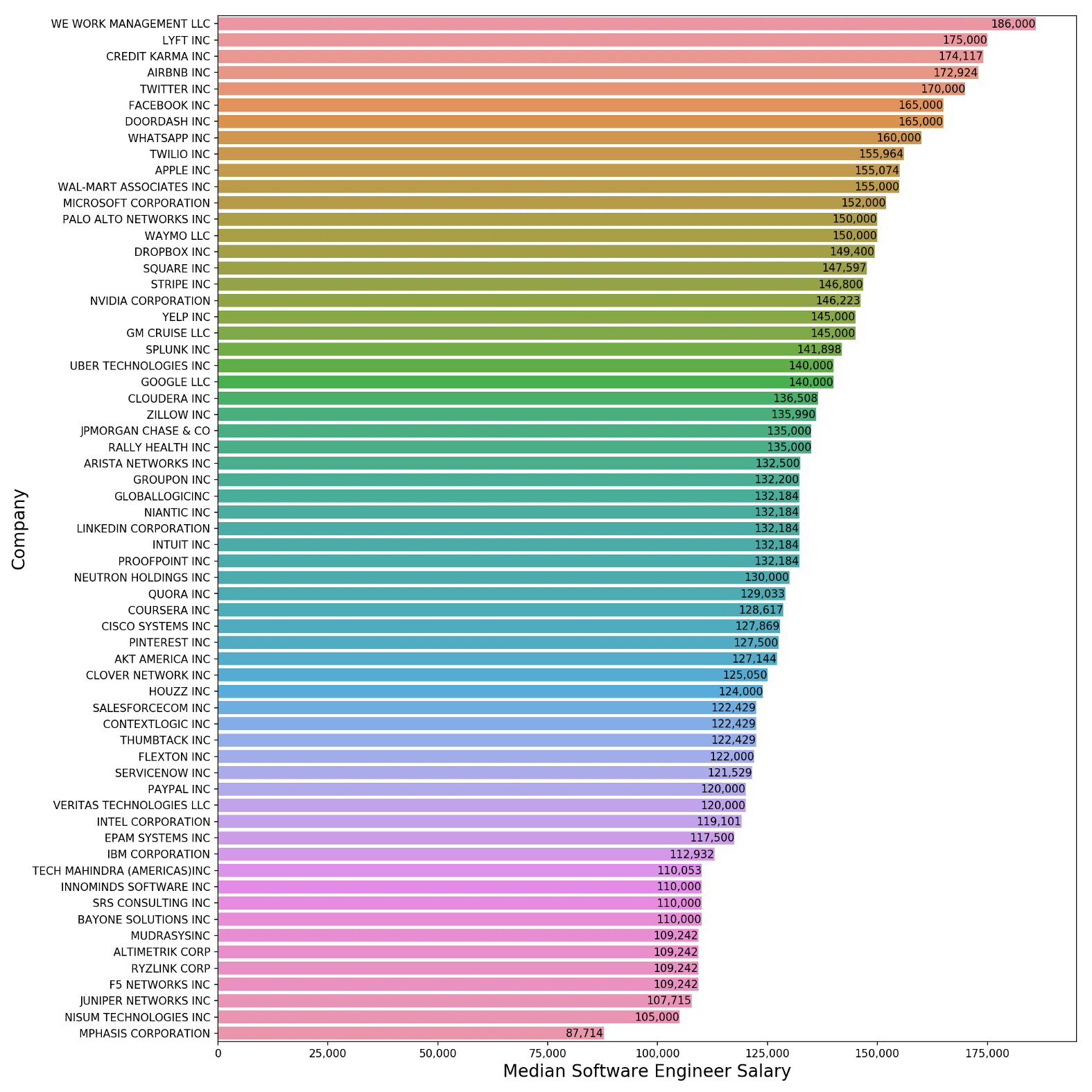
    Median Software Engineer Salary by Company (2018–19)

    A few things jump out to me:
    • Of all the companies in my plot, only one pays a median salary below $100,000.
    • There are 14 companies (all ones that you should recognize) on this list that pay a median base salary of $150,000 or more to their software engineers.
    • Google as we will see later is one of the biggest hirers of H1B software engineers. They pay a handsome median base salary of $140,000, but that places them only number 23 on our list. Then again, they probably make up for it in other ways like bigger bonuses, lots of equity, larger than average raises, and all you can drink boba (the one perk that rules them all).
    • Number 1 is … WeWork! I didn’t expect that. Then again, they have received a ton of funding from venture capitalists and are trying extremely hard to frame themselves as a tech company rather than a real estate company. Also, they are currently valued at $47 Billion. No matter how optimistic you are, it would be hard to expect much upside from the equity at these frothy levels (especially as it continues to burn massive amounts of cash) — so recent hires are probably demanding higher cash compensation to make up for the risk.
    But the bigger picture is no matter where you choose to code, it looks like you will earn a pretty sweet paycheck,

    Who Hired the Most Over the Past Few Years?

    Now let’s take a look at who hired the most H1B software engineers over the past 6 years (from 2014-19):
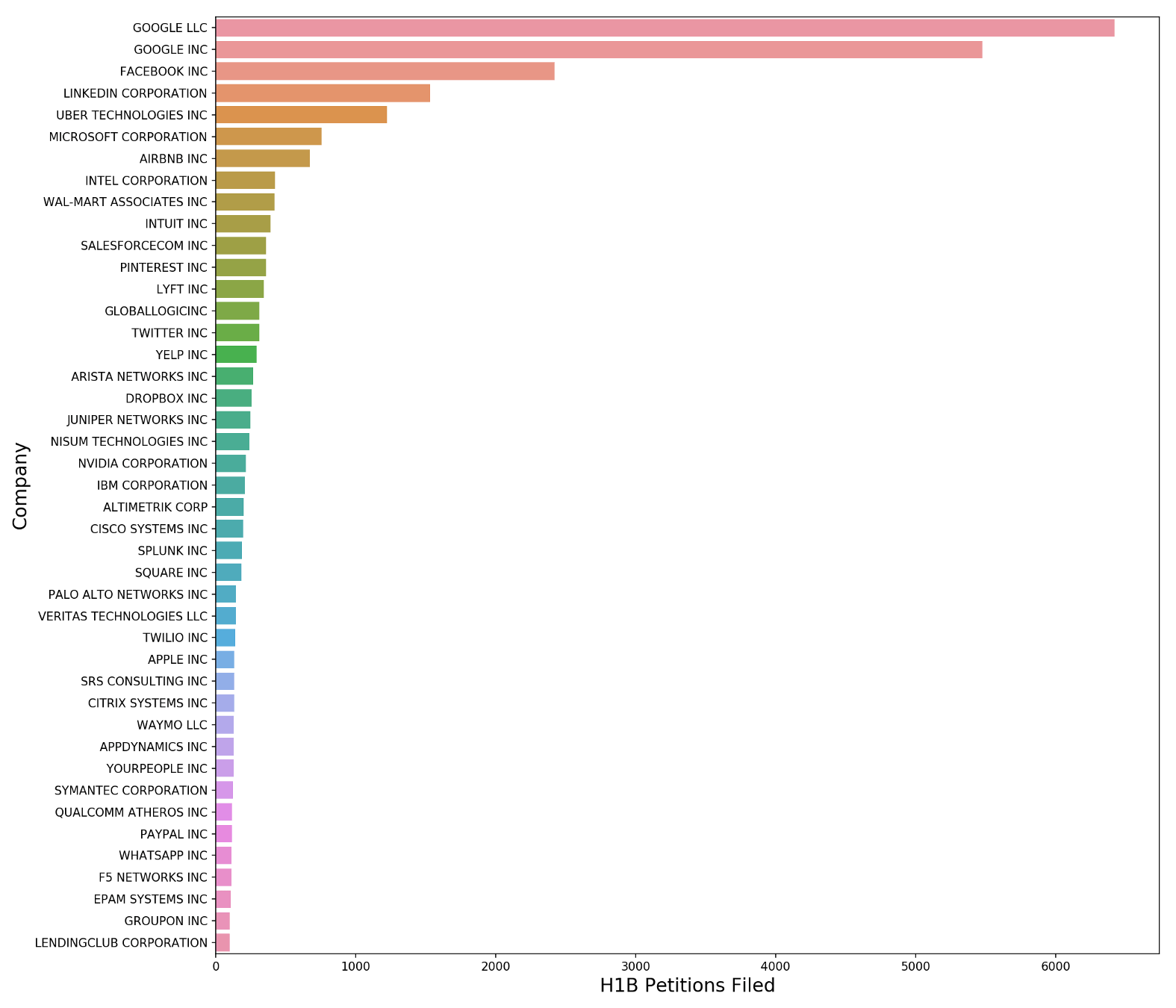
    Who Hired the Most H1B Software Engineers (2014–19)

    Wow look at Google — they hired orders of magnitudes more than everyone else. Facebook and LinkedIn are a distant second and third place — they still hired a few thousand software engineers over the time period I studied.

    So it looks like Google dominates my dataset and software engineer hiring in general. That doesn’t necessarily skew my data though. Remember that all of these companies are competing against each other to hire quality engineers — nobody hires in a vacuum. So Google’s appetite for coders becomes the tide that lifts all boats (salaries) and its compensation package becomes the standard benchmark used in many a salary negotiation. Anecdotally this checks out, as I often hear engineers tell their fellows, “if you don’t think you are getting paid enough, go get a competing offer from Google.” Easier said than done of course.

    Software Engineer Salary Trends Over the Past Few Years

    Now let’s take a look at how the median salary of software engineers (both software engineers and senior software engineers) has trended over the past few years. From 2014 to 2019 (a 5 year a period), salaries increased by 14.8% which works out to an annualized growth rate of 2.8%. That’s not that much more than inflation (and a lot less than Silicon Valley inflation). As a benchmark for comparison, the median salary upon graduation for Stanford MBAs was $125,000 in 2014 and $142,000 in 2018 (that’s a 13.6% growth rate over 4 years, or a 3.2% annual growth rate).

    So while the level is high, the growth rate over the past few years was less than I thought it would be. Then again, this is just the growth in base salaries — much of the growth in compensation could have occurred on the equity side both in terms of getting more equity and an increase in the valuation of the shares already received.
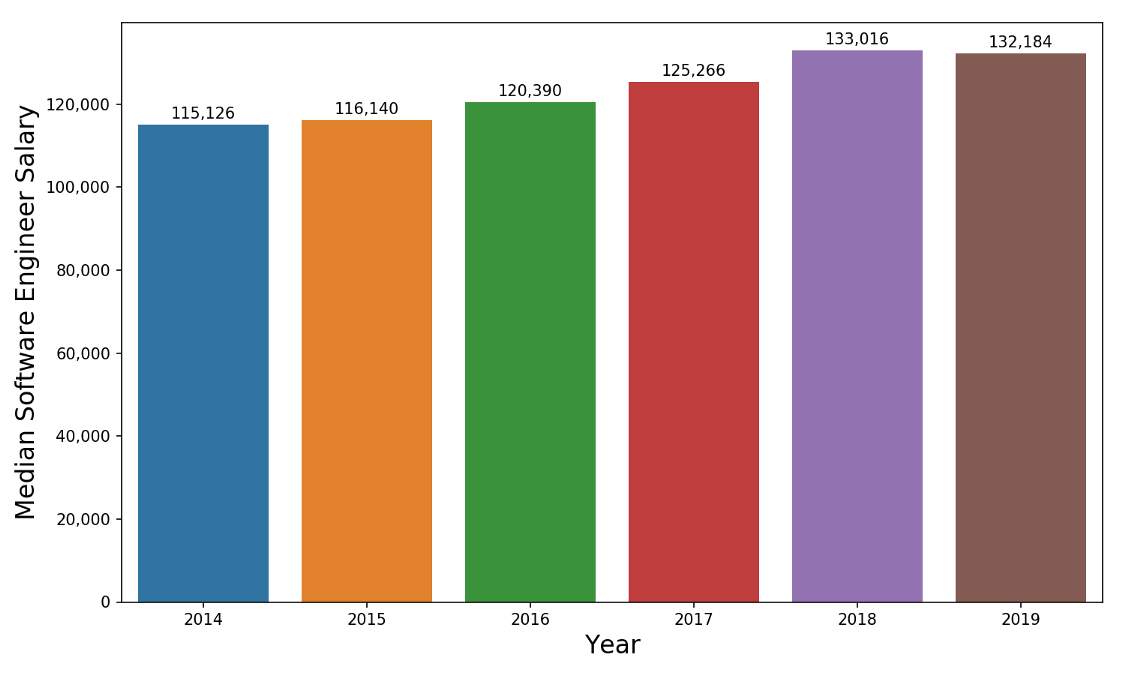
    Software Engineer Median Salary by Year

    In case you are curious about how the distribution of H1B software engineer salaries has trended, below is the box plot. Nothing too shocking here — the variance in salaries has remained relatively constant over time.
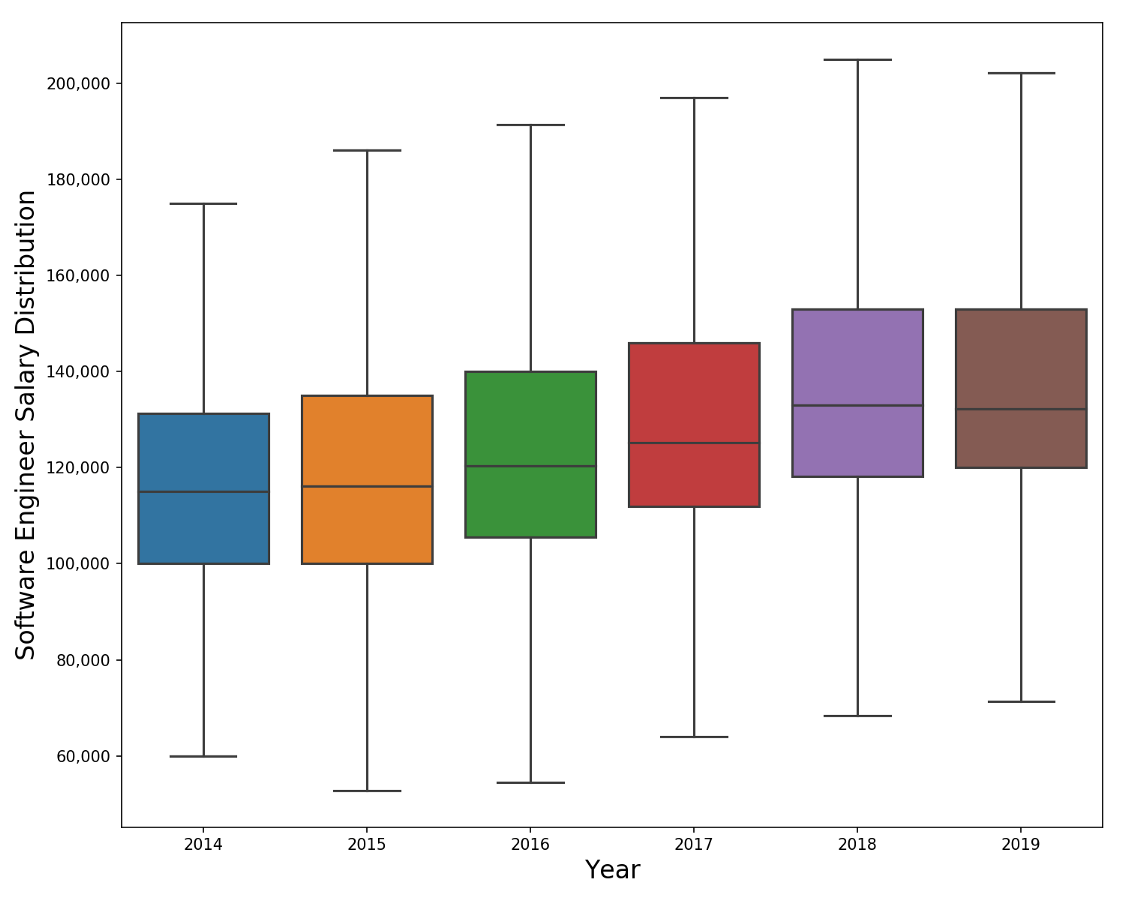
    Distribution of Software Engineer Median Salary by Year

    Other Trends in the Data

    Since Big Tech, especially Google and Facebook, are so dominant in the data, let’s also examine the salaries of software engineers who don’t work for those companies. The following chart shows Big Tech median software engineer salaries in orange (is_tech=True) and everyone else in blue (is_tech=False). I define Big Tech as engineers working for the following firms — Google, Facebook, Microsoft, Uber, AirBnB, Lyft, Apple, Netflix, and LinkedIn.

    Big Tech firms definitely pay significantly more (probably a function of not only their higher profitability but also less perceived upside in their stock). However, the growth rate of the two groups is roughly equal (both around 14% for the 5 year period).
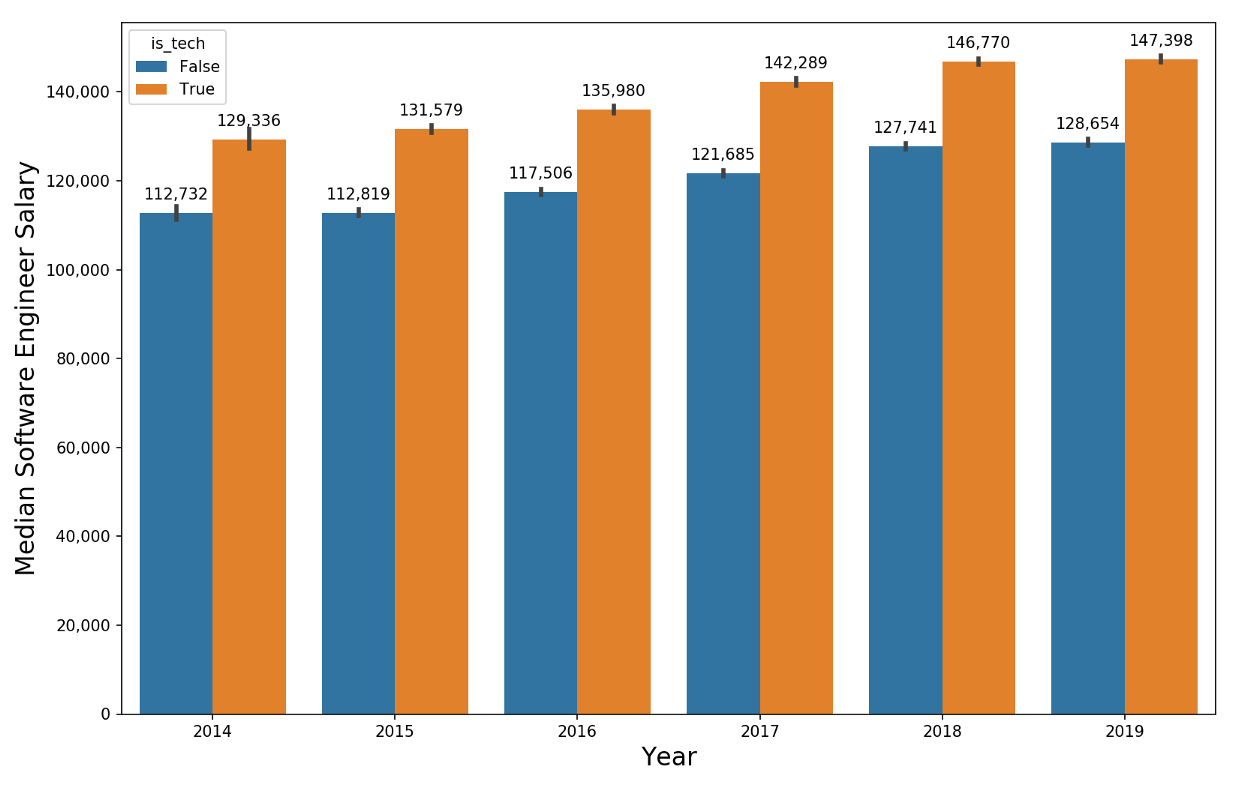
    Median Software Engineer Salaries for Big Tech (in Orange) and Everyone Else (in Blue)

    Finally, while I am not an expert on this, it seems like the software engineer title is used a lot more broadly at Big Tech firms — someone who would be considered a senior software engineer at a smaller, less well-known company would be a software engineer at Google or Facebook. This might explain some of the disparity between Big Tech software engineer salaries (which capture a wider range of experience levels) and everyone else.

    There are some senior software engineer salaries in the Big Tech category so we can check my hypothesis by comparing software engineer and senior software engineer salaries across the “everyone else” (False on the X axis) and Big Tech (True on the X axis) categories:
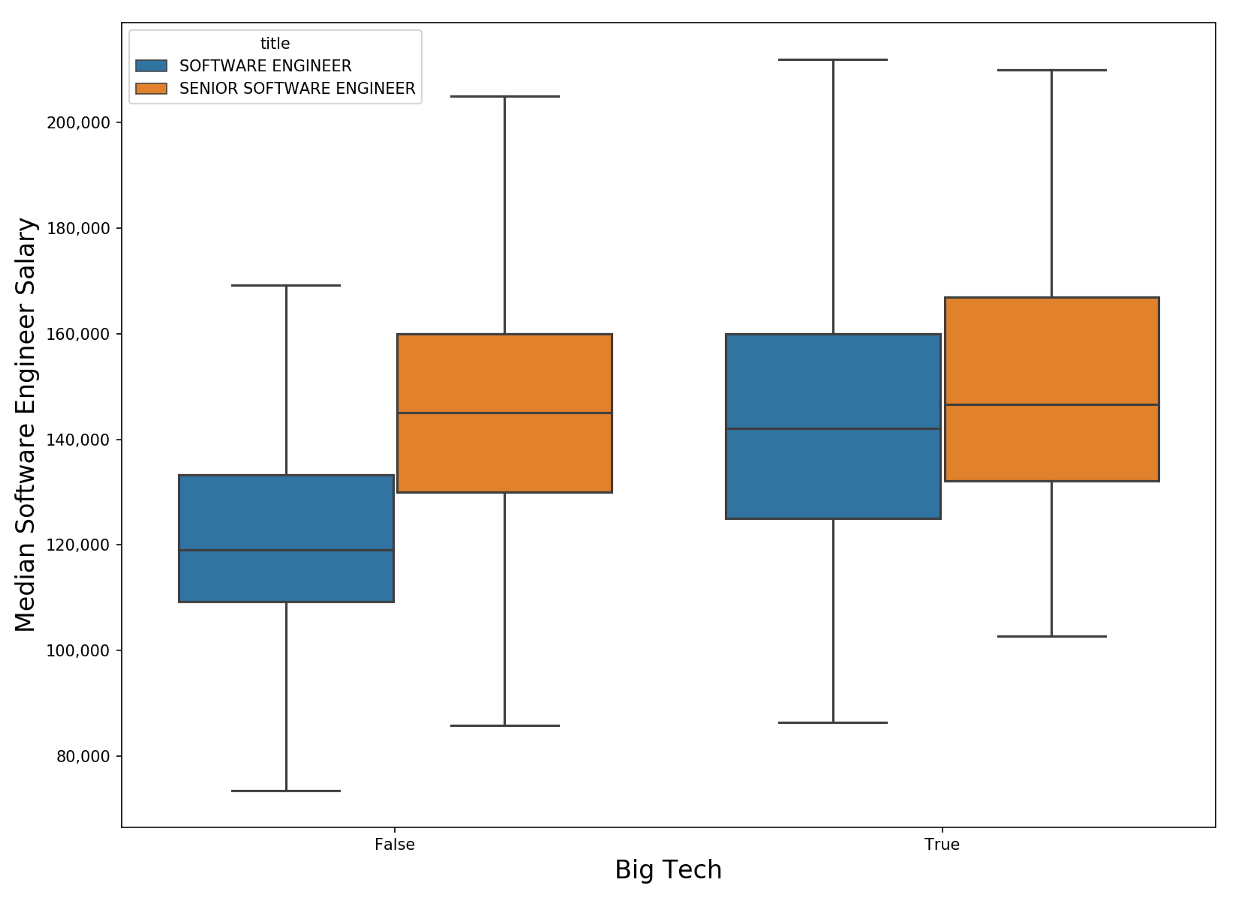
    This seems to confirms my hypothesis — the distributions have much less overlap for the “everyone else” category (the blue and orange box plots on the left) than it does for Big Tech (the blue and orange box plots on the right). So it does seem like “software engineer” is more or less a catch-all title for a wide range of experience levels and ## salary bands at the Big Tech firms.

    Conclusion

    As software continues to “eat the world”, disrupting and transforming traditional industries, the skills of software engineers continue to be critical for any company that wants to compete on this playing field.

    The numbers back it up — while the growth rate is less than I thought, the level of the base salaries that coders are getting are very impressive (and don’t even tell the whole story of just how much money software engineers are making year in and year out).

    Whether this is sustainable is a story for another time (yes for the Googles of the world, maybe not so much for the WeWorks and Ubers of the world). I hope this was helpful and insightful to you. Cheers!
    下载开源日报APP:https://opensourcedaily.org/2579/
    加入我们:https://opensourcedaily.org/about/join/
    关注我们:https://opensourcedaily.org/about/love/

  • 开源日报第542期:《伐木 DevMoneySharing》

    8 9 月, 2019
    开源日报 每天推荐一个 GitHub 优质开源项目和一篇精选英文科技或编程文章原文,坚持阅读《开源日报》,保持每日学习的好习惯。
    今日推荐开源项目:《伐木 DevMoneySharing》
    今日推荐英文原文:《How To Have an Awful Daily Scrum》

    今日推荐开源项目:《伐木 DevMoneySharing》传送门:GitHub链接
    推荐理由:如何用学到的技术为自己带来利益?这个项目是作者总结的关于独立开发者创造收入和增长技能的一些经验。独立开发者,顾名思义当然队伍里的人数相当少(大部分时候只有自己……),一个人的技术力和时间也自然有限,这就意味着团队里很多工序到了你手上可能需要舍弃一些相对不重要的,在这时如何合理利用有限的资源创造利益就成为了一门学问。
    今日推荐英文原文:《How To Have an Awful Daily Scrum》作者:Chris Cooney
    原文链接:https://medium.com/better-programming/how-to-have-an-awful-daily-scrum-506e187a6a6b
    推荐理由:如何正常有效的开个会

    How To Have an Awful Daily Scrum

    A story of Skype, punctuality and… Quentin.

    Monday. You’re standing in a misshapen semi-circle, taking it in turns to yawn and drink coffee while someone plays with a laptop. “Bloody Skype”, mutters one of the engineers, as she hovers over her laptop, logging back into Skype for the third time.

    “Since Microsoft took over this damn thing it’s…” she continues speaking, but it crumbles into the angry sounds developers make when faced with a product following a Microsoft acquisition.

    Skype Begins to Behave Itself…

    After some time, the connection is made and the sound of background chatter from an office 250 miles away confirms that the guest of honour has arrived. At this point, you and the team have been stood there making idle, awkward chatter for five minutes.

    Speaking of the team, you’re one member short. Harry is late almost every day because he lives somewhere on the set of The Lord of the Rings. His commute involves three trains, a donkey and silver coin to cross the River of Styx. While Harry makes his voyage, the team waits.

    After another minute, Harry rushes in. He discards his bag on someone else’s desk with a dismissive sling and stands at the periphery of the not-so-semi-circle. He holds a bright green apple in his right hand and leans against the board, a thin sheen of sweat glistening just beneath his hairline. The team stares at the apple, then at Harry. Surely not.

    He makes his first, 100 decibel assault of the apple. “So we’re just thinking about how to refactor CRUNCH the class, it’s a little CHOMP complex…”.

    Each bite is punctuated by sharp, satisfied crunches and while Harry has the decency to chew with his mouth closed, he doesn’t have the decency to go and do it somewhere else. Harry smiles. Everyone bristles.

    Harry you son of a…

    Okay, You’ve Got a Full Team. Let’s Get Going

    You each answer the big three questions. Robotically, without so much as a fleck of enthusiasm, your test engineer begins to speak.
    • “Yesterday I worked on selenium tests for the UI. Today I am working on selenium tests for the UI. No blockers.”
    There is a palpable sense of relief. Not because he informed the team of some critical piece of information, but because he was brief in his delivery. If everyone is that quick, we can escape the sound of Harry massacring an apple.

    The cycle repeats, with each person taking their turn in a counter clockwise fashion (for some reason). Everyone answers the dreaded three questions. You’re 12 minutes in. Your patience is on a diet.

    Suddenly, Some Rogue Nonsense Appears!

    • “Okay, so there’s a lot of odd stuff going on across the business. I’m not sure if this is really the place for this but since you’re here, next sprint I’m thinking about how we’re going to solve… and there’s another team with concerns about… and my hair just isn’t quite as smooth as usual today…”
    Our VIP guest begins throwing out chunks of irrelevant information like Stephen Fry on LSD. He made everyone wait for him to dial in. now he’s going to hit you with a summary of his life, plans he has for his day, meetings that have nothing to do with you, a rant about his colleagues and a dazed thought about how maybe we should all go for drinks or something.

    The 15 minute timebox is a distant memory. This… is Quentin.

    By the time Quentin has finished going on, a silent pact has formed between the developers. First, murder. Then, beers. At 19 minutes and 38 seconds, everyone signs off and returns to whatever they were doing before. The closest thing they’ve formed to a plan is an alcohol-fuelled homicide.

    So Whose Fault Is It?

    I could blame Quentin and play to a bunch of engineers and their god complexes (including my own), but the truth is that the whole team is to blame. Let’s go back to the Scrum guide to review what the point of a stand up is:
    The Daily Scrum is held every day of the Sprint. At it, the Development Team plans work for the next 24 hours.
    What coherent plan was formed in that story? What joined up move on the sprint goal was communicated? All they did was stand there and say words at each other until they were permitted to sit down. Their segment of the daily scrum became an incantation. A magic spell to speed up time toward their inevitable return to headphones and anti-social coding.

    And How Would We Fix It?

    I’m so glad you asked.
    • If everyone is there who can form a plan, begin talking. If Skype isn’t working for the benefit of someone else, someone can always catch them up after. Standing around and waiting to start drains all of the energy out of the meeting.
    • Keep it punchy. Ask questions when needed but encourage engineers to be succinct in their points. 15 minutes is the absolute maximum. It’s a guard rail, not a goal.
    • Form a plan. That means ask each other questions and constantly refer to the sprint goal. At the end of the stand-up, every team member should be acutely aware of how to tackle the next 24 hours.
    • Walk the board, not the team. People might be pairing up and you don’t wanna force random waffle. Focusing on the work means you only talk about the work.
    This one is just a personal grudge of mine (and anyone else that isn’t an awful person)
    • STOP BRINGING FOOD TO STAND-UPS YOU ANIMALS!

    下载开源日报APP:https://opensourcedaily.org/2579/
    加入我们:https://opensourcedaily.org/about/join/
    关注我们:https://opensourcedaily.org/about/love/

  • 开源日报第541期:《魔法 magic》

    7 9 月, 2019
    开源日报 每天推荐一个 GitHub 优质开源项目和一篇精选英文科技或编程文章原文,坚持阅读《开源日报》,保持每日学习的好习惯。
    今日推荐开源项目:《魔法 magic》
    今日推荐英文原文:《Why Rewriting Is Essential for Keeping Software Alive》

    今日推荐开源项目:《魔法 magic》传送门:GitHub链接
    推荐理由:使用 CSS3 实现的一些特效合集。如果你正好想要学习制作新的特效,或者是寻找为页面上添加特效的灵感的话,这个项目刚好可以满足你的需求。自己写特效不仅可以自给自足的装扮自己的页面,作为对自己学习成果的检验也是一个好选择,毕竟这是直接通过视觉表现出的,兴许也是曾经见过但是完全无法理解的东西,通过自己的学习来实现它能够获得相当的成就感。
    今日推荐英文原文:《Why Rewriting Is Essential for Keeping Software Alive》作者:Yoav Kadosh
    原文链接:https://medium.com/better-programming/why-code-rewriting-is-essential-for-keeping-software-alive-81c7307e7f6
    推荐理由:如果需要,把旧代码彻底铲平而不是加以改造,因为有时改造后会变得更加混乱

    Why Rewriting Is Essential for Keeping Software Alive

    No matter what management says, you should take time now to save time later


    The software industry has changed tremendously over the past decade. One of the things that’s changed the most is the software development process.

    That change was triggered by an ongoing increase in the rate at which new user requirements have to be implemented, packaged, and shipped. Instead of waiting a year or more for the next software release, software manufacturers today have monthly, weekly, and even daily (or nightly) releases.

    In the past, waterfall was the prevalent software development life cycle (SDLC) model. This process had only one cycle of design and development, after which the software entered a long maintenance stage until it died, making “death” an inherent stage in the process.

    TLC understood the problem with that model early on

    As the software industry matured, software companies moved towards the incremental/prototyping model, in which the software is designed and developed incrementally, adding more features each time.

    This process evolved further with the practice of continuous integration and delivery (CI/CD), to the point where the line between development and maintenance has completely blurred. Software moved from being inanimate to being dynamic.

    The software of today is like a living organism. It requires proper nurturing in order to sustain life, and for that, it must maintain a healthy diet. That diet, in my opinion, should be based on one important nutrient: rewrites.

    Rewrite

    Think of software development as drawing in pencil. If you need to change something you’ve previously drawn, you erase it and draw over it. However, doing so never completely removes the previous pencil marks. There are always some leftovers.

    In the art world, this phenomenon is referred to as hesitation marks. These marks are visual evidence of the artist’s thought process and are considered by some to be aesthetically pleasing. However, even the most eager proponents of this phenomenon would agree that there’s a limit to what the paper can suffer. There comes a point when you have to start over.

    Code refactoring is like pencil erasing

    While hesitation marks may be considered an aesthetic pro in the art world, the software development world strives for a more polished appearance.

    The equivalent of hesitation marks in the software world is messy, unreadable code (aka spaghetti code), which is often the result of a change in the requirements, just like erasure marks are the result of the artist changing their mind.

    The descent into spaghetti-code chaos begins when the customer decides that they want a new feature or a change to an existing one. The customer’s demands are translated into new requirements, and after going through review and design, the developers receive them and it’s time to dig into the code. This occurs very often, and just like in pencil drawing, soon enough the code stops being aesthetically pleasing and becomes one big mess.

    Look familiar?

    Why Rewrite?

    Working with messy code is not much fun. You have to spend a lot of time trying to read and understand it, but you never really do. When you finally decide to touch the code and change something, things tend to break unexpectedly and terribly. The code is no longer maintainable. So where did we go wrong?

    When developers receive new requirements that diverge from the original set of requirements and cannot be easily supported by the current code, they have two options:
    1. Refactor the component. Force the code to work with the new requirements by applying a workaround. This is the “quick and dirty” solution.
    2. Rewrite the component. Write the code from the ground up based on the new requirements and the lessons learned from the old code. This is the “slow and clean” solution.
    Both developers and management will often lean towards the first option. Management sees it as the cheaper and faster option, while developers see it as the easier option (and I don’t blame them). While the first option may be quicker and cheaper in the short term, it is far more expensive, more time consuming, and more complex in the long term. If we expect our software to live long, short-term benefits should rarely be favored over long-term ones. If you’re in it for the long game — you should go for the second option. Here’s why:
    1. Code is a reflection of its requirements. If the set of requirements is rewritten, the code must be rewritten to reflect that.
    2. Workarounds and partial solutions only delay the problem, they don’t solve it. Eventually, you’ll end up spending time and money on both the workaround and the rewrite.
    3. Delayed problems tend to grow the more they’re delayed. When you finally realize that you have to rewrite, the effort is much greater than it would have been had you done it before.
    4. Workarounds make the code harder to read and modify. Unreadable code leads to fragility and increases the chance of introducing new defects.
    5. Unreadable code also hurts the productivity and motivation of the developers who have to work with it. In extreme cases, it may cause developers to leave a project.
    The fastest way to write code is slowly, according to “Clean Code: A Handbook of Agile Software Craftsmanship” by Robert C. Martin. Therefore, “fast” refactors are slow, and “slow” rewrites are actually fast.

    When to Rewrite

    There’s a balance to maintain between refactors and rewrites due to their trade-offs in terms of duration and price. You should be prudent when choosing one over the other. The following traits are a good indication that your component is due for a rewrite:
    1. When the code becomes unreadable. This happens after going through several refactors, or perhaps it was poorly written to begin with. Another refactor will only make things worse.
    2. When the new requirements are diverging too far. The code has been written based on certain assumptions, and now with the new requirements, these assumptions are no longer true. A refactor is not enough in this case.
    3. When new information opens the path to a better design. Sometimes new requirements give a clearer picture than was available before. This, combined with the lessons learned from the previous implementation, may bring forth an improved solution.
    4. When new technologies become available. It’s important to stay updated with the latest technologies. This includes using the latest features of your programming language, keeping your third-party packages up to date, and keeping up with the latest trends. It’s important to keep your code fresh, otherwise, it will slowly decay into an unusable state.
    Rewrite software components regularly to avoid rewriting all of it eventually.

    How to Rewrite

    There are two types of rewrites: internal and external.

    An internal rewrite changes the internal structure of the component without affecting the component’s exposed API, leaving its dependents unaware of the change.

    An external rewrite may or may not change the internal structure of the component, but it will change the component’s exposed API. Such a rewrite affects the component’s dependents, and there are two ways to handle it.

    Deprecation and Adoption

    This is the method of choice when you have no control over the dependents of your component, or if they are too many to update at once.

    In this approach, new component and old component coexist until all the dependents using the old component adopt the new component.

    The old component receives a deprecation status that can be indicated by its name (i.e. MyComponent will be renamed to DeprecatedMyComponent or DEPRECATED_MyComponent, whatever your convention is) or in the documentation (for example, JSDoc supports the @deprecated keyword).

    Dependency/Dependent Modification

    This is the method of choice when you have full control over your component’s dependents and there aren’t too many of them to update at once.

    In this approach, the new component replaces the old component and all the dependents are refactored to use the new one without a deprecation process.

    Conclusion

    I tried to focus on the case for rewrites since, in my experience, they’re underrated and feared when compared to refactors. Even worse, rewriting is often viewed as an admission of failure by the development team, making them guilty for being unable to write flexible code and predict future requirements.

    But just as it is impossible for product owners/managers to predict every possible future requirement, it is impossible (and even damaging) for the developers to write their code that way.

    That doesn’t mean that there’s no case for refactoring. But the delicate balance between refactoring and rewrites is better maintained when rewrites are equally considered.
    下载开源日报APP:https://opensourcedaily.org/2579/
    加入我们:https://opensourcedaily.org/about/join/
    关注我们:https://opensourcedaily.org/about/love/

  • 开源日报第540期:《转职 new-grads-2020》

    6 9 月, 2019
    开源日报 每天推荐一个 GitHub 优质开源项目和一篇精选英文科技或编程文章原文,坚持阅读《开源日报》,保持每日学习的好习惯。
    今日推荐开源项目:《转职 new-grads-2020》
    今日推荐英文原文:《How JavaScript Grew Up and Became a Real Language》

    今日推荐开源项目:《转职 new-grads-2020》传送门:GitHub链接
    推荐理由:不选择读研的毕业了应该下一步都是找工作吧,这个项目就是为 2020 年毕业生准备的职业列表——在毕业之前好好想想自己的技能适合什么职业还是很重要的,而且即使职业相同,具体的要求也可能存在差异,语言的使用,框架等等都可能成为不同公司相同职业里的差异点。在毕业之前了解一下自己可能遇上的职业要求来调整自己的技能树是个不错的选择。
    今日推荐英文原文:《How JavaScript Grew Up and Became a Real Language》作者:Matthew MacDonald
    原文链接:https://medium.com/young-coder/how-javascript-grew-up-and-became-a-real-language-17a0b948b77f
    推荐理由:JS 的发展历程

    How JavaScript Grew Up and Became a Real Language

    Few imagined that the one-time toy language would become a professional platform

    If you predicted in 1999 that, 20 years later, JavaScript would become one of the world’s most popular languages, you were either enjoying a psychic vision or you were slightly insane.

    Not only was turn-of-the-century JavaScript unable to do what a professional language could do, it wasn’t even designed to be a serious coding tool. After all, developers who needed to create web applications already had a mature tool they preferred to use. That was Java, by way of the applet embedding system.

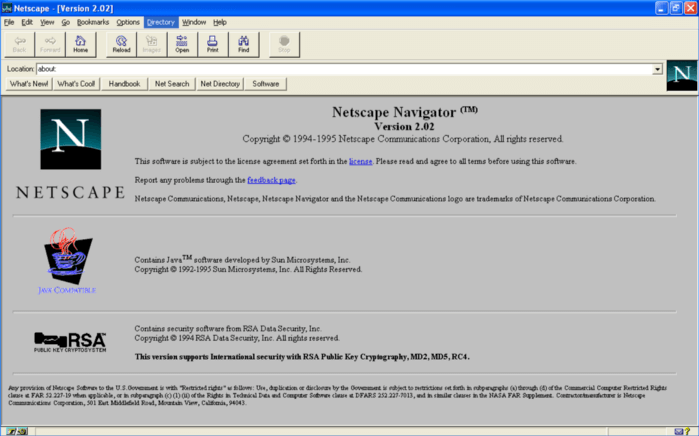
    But in 1995, the pioneering web browser company Netscape realized they needed a simpler option for everyone else. They were in a difficult position — at war with Microsoft in the market, on the brink of closing a major strategic partnership with Sun Microsystems, and seriously pressed for time. They hired Brendan Eich to create the new language under an impossibly strict timeline. He polished off the first version of JavaScript in 10 days, just in time to be included in this handsome browser:

    Netscape 2: The stage debut for JavaScript

    What Eich really wanted to do was to build a browser-hosted version of an academic programming language like Scheme. But Netscape had a different vision. They wanted a language that looked like Java, even if it behaved differently. The similar names — Java and JavaScript — led to years of confusion.
    “I was under marketing orders to make it look like Java but not make it too big for its britches. It’s just this sort of silly little brother language, right? The sidekick to Java.” — Brendan Eich

    The era of rollover buttons

    For the first five years of its life, JavaScript was a fill-the-gaps tool for people who weren’t up to programming in Java. This audience included amateurs, hobbyists, and people doing simple things in a big hurry. It also included web designers — a new class of tech workers who had the job of making web page user interface look sleek and graphical. They wanted something more polished than the tag and more modern than a spinning globe GIF.

    In the professional world, this was JavaScript’s prime job — to create the UI glue that held over-designed web pages together. Every time you needed an interactive button, a pop-up menu, a fly-over image effect, you needed JavaScript.

    Who wanted a rollover button? Everyone.

    A rollover button circa 2000

    Before long, JavaScript was in heavy use doing the least important job in the world — swapping one image for another every time the mouse came by.

    Although it seems like madness to think that developers would use code to automate glowy buttons, and then distribute that code with their web pages, that’s what everyone did — over and over again. (Today, CSS provides this sort of frill, and it does so in a much more maintainable way, using style settings and animations rather than pre-generated image files.) Few people expected JavaScript would go much farther. And many coders were happier using a server-side programming language that could churn out the right JavaScript on command. The idea that JavaScript could power the business logic in an application was as ludicrous as imagining you’d replace your database stored procedures with Excel macros.

    Prisoner of the sandbox

    When people criticize JavaScript today, it’s usually because of limitations in the language itself — patched-on OOP features, weak type safety, the clunky DOM model, the confusion of == versus ===, and so on. But these are not the reasons that JavaScript seemed like such poor a programming tool in its early years. After all, there are plenty of ugly programming languages that became essential by being in the right place at the right time. (Candidates include BASIC, COBOL, SQL, and PHP.) JavaScript, being the only language that was natively supported in every web browser, just as websites were taking over the world, was definitely in the right place at the right time.

    The real limitation with JavaScript was the sandbox — the tightly controlled environment that pinned your code in place. The sandbox cut JavaScript off from the desktop world. For example, JavaScript code couldn’t directly access the file system, the display, or any hardware. More severely, it cut JavaScript off from everything on the web server, like the databases that stored customers lists and product catalogs, and the server-side code that ran the business logic. Forced to live life on its own, it’s no surprise that JavaScript was left with little to do but twiddle buttons on a page.

    Opening a pipeline with XMLHttpRequest

    Oddly enough, there’s a solid case that Microsoft saved JavaScript. And it wasn’t today’s Microsoft, the company that celebrates open source development on every operating system. Instead, it was the bare-knuckled, anti-open-source warrior that consumed competitors with the philosophy “embrace, extend, and extinguish.”

    Here’s how it happened. Around the same time that the world was going wild for rollover buttons, a team at Microsoft was investigating a way to make a more responsive web front-end for Outlook. They were building a product called Outlook Web Access, which looked like this:

    Outlook Web Access in the year 2000

    The goal of the Microsoft team was relatively modest. They wanted to make an efficient email reader that ran in the browser. Most of all, they didn’t want to refresh the whole page every few seconds. Instead, they were after a technique that would let the web page quietly check for new mail messages in the background. This goal might not seem earth-shattering, but — remember — Gmail hadn’t been invented yet. In fact, the entire Google company was only a few years old.

    The Microsoft team created a small bit of plumbing with an ActiveX component they called XMLHttpRequest. The basic idea of XMLHttpRequest was simple — it gave JavaScript code a way to make web requests. Just like a web browser can contact a web server and make a request (for example, “hey, please give me that page!”), JavaScript code can use the XMLHttpRequest object to make its own requests (for example, “hey, please send me some more mail messages”).

    All of a sudden, a web page could tap into the all the resources of the web server. Need some data from a database? Call the server and ask for it. Need the server to perform a calculation, a security test, a super-secret validation check? Call the server for that, too. And best of all, the page remains undisturbed while the call takes place in the background.

    The XMLHttpRequest wasn’t without some oddities. First of all, it’s strangely named, with inconsistent capitalization that causes headaches in a case-sensitive language like JavaScript. Second, the name suggests that your code will send and receive XML messages. The reality is that messages can be almost anything — ordinary text, blocks of HTML, or JavaScript objects serialized to JSON. But perhaps the biggest problem was that XMLHttpRequest was built using ActiveX, which meant it could only work on Windows computers and only in Internet Explorer.

    None of these quirks held it back. Within a few short years, other browsers were offering their own implementations of XMLHttpRequest — the same object in code, but with none of the ActiveX headaches.

    Despite creating XMLHttpRequest, Microsoft was slow to take advantage of it in their own web development. They hesitated to use it in their public web-based email system, Hotmail. Instead, they waited until Google used XMLHttpRequest to stun the web development world, first with Gmail in 2004, and then with Google Maps in 2005. Here was a true glimpse of the Holy Grail: web-based programs that ran with the responsiveness of desktop applications.

    Google Maps in 2005

    The path to modernity

    XMLHttpRequest was the crucial ingredient that changed the course of JavaScript. However, there were several more inflection points after that.

    For years the JavaScript language was frozen in time. The problem was that the market-leading web browser, Internet Explorer, was upgraded on operating system timescales — which is to say, very slowly. Developers were forced to write code that checked browser versions and tried to adapt on the fly.

    In 2006, developers got a solution in the form of jQuery. Although jQuery is more than a little dated today, 10 years ago it was an essential tool if you wanted to spend your time building functionality instead of troubleshooting browser compatibility issues.

    In 2008, Google released a new JavaScript engine called V8. Much as jQuery gave developers broad compatibility for the first time, V8 gave them blistering performance. And because the V8 engine was a separate, open-source component, other projects could use it. Much later, this would open the door for innovations like Node.js and Electron.

    Later in 2008, the first working draft of HTML5 appeared. HTML5 itself wasn’t about JavaScript, but it was paired with a new wave of JavaScript APIs. All of a sudden, developers had tools for storing local data, managing browser history, using audio, and running background tasks. And once again, the gap between web features and desktop capabilities narrowed.

    JavaScript in modern times

    Was JavaScript’s success an inevitable consequence of its privileged place in the browser? Or was it a fluke that needed luck and perfect timing?

    One thing is certain — JavaScript was forced to earn its way. Through most of its life, JavaScript was no one’s favorite. Other people championed Java applets, then Flash, and even Silverlight. JavaScript faced these challengers and vanquished them all.

    Perhaps the fairest assessment is that JavaScript proved something that — deep down — every developer knows. Namely, the most important factor for a new technology is its reach. If your technology has superior reach, it doesn’t need to start out being the best. All you need is good enough.

    The future of JavaScript stretches down a rapidly branching road. We now have JavaScript running on web servers (thanks to Node.js) and powering desktop applications (thanks to Node.js and Electron). We have one-step-away languages like TypeScript that compile into JavaScript, giving developers a way to write for web pages without compromising their morals. And in the future, WebAssembly just might blow the doors off language limitations altogether, giving developers a way to use whatever higher-level language they want by piggy-backing on the JavaScript engine.

    It’s time to admit it. JavaScript, for all its hacks and inconsistencies, is one of the greats. Brendan Eich put JavaScript inside Netscape Navigator. We stuffed the entire world into the the browser. The result was the modern web.
    “Always bet on JavaScript.” — Brendan Eich

    下载开源日报APP:https://opensourcedaily.org/2579/
    加入我们:https://opensourcedaily.org/about/join/
    关注我们:https://opensourcedaily.org/about/love/

←上一页
1 … 123 124 125 126 127 … 262
下一页→

Proudly powered by WordPress