• 开源镜像
  • 开源沙龙
  • 媛宝
  • 猿帅
  • 注册
  • 登录
  • 息壤开源生活方式平台
  • 加入我们

开源日报

  • 开源日报第547期:《陷阱卡 daytripper》

    13 9 月, 2019
    开源日报 每天推荐一个 GitHub 优质开源项目和一篇精选英文科技或编程文章原文,坚持阅读《开源日报》,保持每日学习的好习惯。
    今日推荐开源项目:《陷阱卡 daytripper》
    今日推荐英文原文:《If You Can Write Code, You Can Write Blogs》

    今日推荐开源项目:《陷阱卡 daytripper》传送门:GitHub链接
    推荐理由:总有些时候你需要自己监控周围的区域来保证没有人发现你在做什么,但是这样你就无法集中于手头上的事情,兴许你需要一些代替你去监控的玩意儿了。这个项目是一个迷你小装置,可以作为绊线来使用——把它放在附近的入口,如果有人经过这个小家伙的面前,你的电脑就会马上执行一个操作——回到桌面或者是别的什么来马上隐藏你的所作所为,最起码摸鱼的安全性得到了保证。
    今日推荐英文原文:《If You Can Write Code, You Can Write Blogs》作者:Piotr Gaczkowski
    原文链接:https://medium.com/better-programming/if-you-can-write-code-you-can-write-blogs-28726560334b
    推荐理由:写代码和写博客需要的技能在种类上是相近的,所以写博客并非极其困难,作者推荐了一些在写博客方面值得尝试的工具

    If You Can Write Code, You Can Write Blogs

    How to build an IDE for both code and prose?

    Writing articles and blog posts is a lot like writing code.

    First, you nurture an idea in your mind. Perhaps the idea came to you in the shower, or maybe it was the result of long and focused consideration. Either way, you’re now ready to share it with the world.

    Your intended audience may be a fellow coder, an IT manager, or a beginner developer. Or, it may be a compiler, an interpreter, or a parser. Whoever it is, your responsibility is to make yourself fully understood and to connect with the reader.

    So where to start? When writing both prose and code, I find myself first jotting down ideas in a bunch of places: on a napkin in a cafe, in a notebook, or in a plain text editor. When inspiration strikes, even lipstick and a mirror can be a good way to write down what’s on your mind! But when it comes to developing that idea into a blog post, you quickly discover that some tools are better than others. Being both a writer of code and prose, I want to share with you my ideal environment for most of the writing I do.

    The Text Editor

    It wouldn’t be entirely accurate to describe myself as “old school.” After all, I do love new and shiny things and always rush to try the latest technology. But when it comes to writing and editing tools, I usually prefer command-line ones if they provide similar functionality to the GUI ones. (This may be the result of spending too much time playing Rogue when I was younger!)

    You may have heard of the two major programmable editors available: Emacs and Vim. I’m all for Vim, and more specifically, I’m in the camp that chooses and uses Neovim. That said, it’s really a matter of personal preference. What I write below about Vim is probably also true with Emacs.

    One of the features of a good programming text editor is that it’s, well, programmable. The other is that it’s flexible. When you need to open several different editors in order to edit in Python, HTML, JavaScript, and YAML, it means your tools are getting in your way more than they’re supporting you. By getting in your way, I mean you need to recall the appropriate key shortcuts in each editor, or you need to be mindful of which window to open for which part of code, and the cognitive load becomes noticeable.

    Vim in itself is just a text editor, and it doesn’t make many assumptions about the type of content you’re editing. But thanks to scripting and plugins, it can take any shape you like, making use of external tools to help you with your job. It can edit C++ code and format it with clang-format while offering auto-completion based on LLVM. It can edit Python code, providing you with an interactive REPL. It can even offer an interactive debugger based on LLDB. Depending on the type of file you’re editing, it will present you with the most suitable aids available.

    It’s just as good with prose as it is with code, no matter if you write in LaTex, in plain-text, or in Markdown. For most of my writing, I prefer Markdown. Let me tell you why.

    Markdown

    For most of the text I write, I don’t need fancy formatting, like changing font style or background color. The formatting options I really do need are a structure (different levels of headers for sections, subsections, and so on), hyperlinks (for obvious reasons), emphasis (bold and italics), ordered and unordered lists, and usually code formatting (which requires monospace font). Markdown offers it all and in a natural fashion. (Well, at least natural for me, a guy who remembers Usenet.)

    Headers are distinguished by one or more leading #. So # Heading 1 is a section of which ## Heading a is a subsection. Bold and italics are achieved with hey and ho pretty much the same way we did it on IRC. Lists look just as they should with either +,- or * as an indicator for an unordered list and numbers followed with a dot as an indicator for ordered lists. Links and footnotes are presented as posts on Usenet would:Text, and code formatting can be achieved in a few ways. Pictures can be embedded similarly to links. Rarely do I see the need for more than that.

    The other great thing about Markdown is that it’s ubiquitous. GitHub uses Markdown for documents, wiki pages, and comments. Various blog engines treat Markdown as a first-class passenger: Jekyll, Ghost, Tumblr. With GitBook, you can turn your Markdown pages into entire books published in PDF or ePub formats. Slack offers a subset of syntax, as well. It’s a bit of a snowball effect: Every tool aimed at coders seem to support Markdown to some degree because it’s expected to do so due to Markdown’s popularity. And Markdown is popular because so many tools use it.

    Since I’m an active user of GitHub, I chat on Slack, and I write books, posts, and articles for a variety of platforms, Markdown is common ground that I always choose to step on when preparing prose.

    Distraction-Free and Focused Writing

    Focus is essential when writing, no matter whether it’s code or prose. If you can’t enter the state of “flow,” every word and every command will come with some difficulty. But once you enter this desired state, each sentence simply follows the previous one. Your fingers start to instinctively touch the keyboard, transforming your ideas into sequences of bytes. For example, most of my previous post about Serverspec was written when I was waiting for my partner at the shopping mall. I simply sat down, put on my headphones, and words started flowing into sequences that turned into paragraphs.

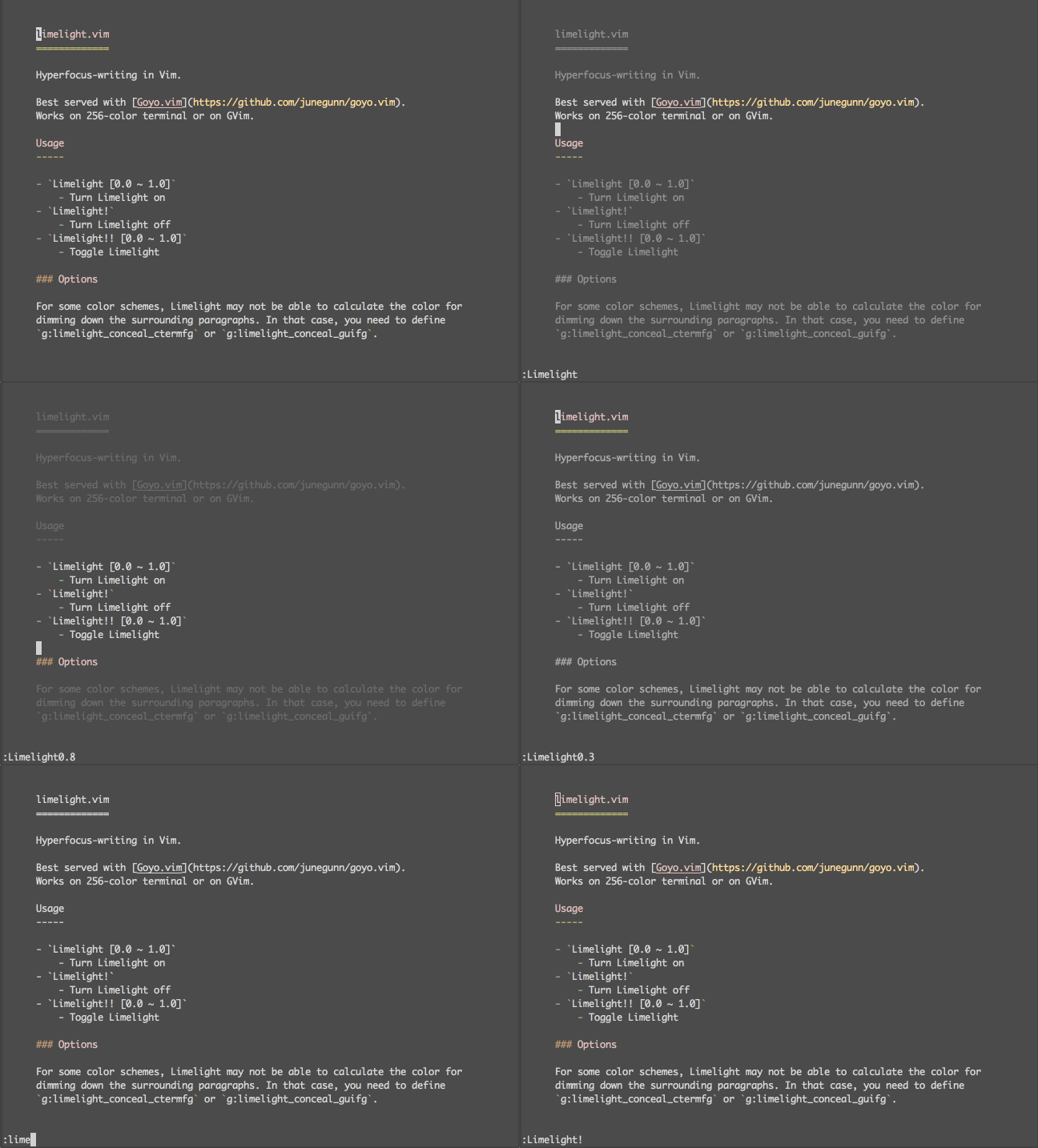
    Since clutter can hinder this process, there’s a whole category of distraction-free editors. They present you with a minimal interface so all you can see and think about is your text. I use a combination of two Vim plugins for this: Goyo and Limelight. My own setup features some customization turning off additional pieces of the interface that come from other software I use. No need to write too much about them since a (moving) picture is worth a thousand words.
    Refining Your Draft

    ASpell and the like

    When I write, I don’t like to look at what I am typing. The first draft is more of a stream of consciousness; its aim is to empty the ideas from my mind. This may result in teh misspeled worsd or bad grammar. I don’t care. I’ll have to read it anyway after some time to check which parts still make sense to me and to correct those errors.

    What’s pretty convenient is the fact that I can do so without leaving Vim. And in more than one way. First, there’s a built-in spell checker that underlines incorrect words. It doesn’t know “GitHub,” for example, so if I use it often in my writings I can add it to the spell file. Another possibility is to open Aspell with its interactive suggestions and resolve the errors one by one. Scott J Roberts provides a nice illustration for it.

    Thesaurus

    During the second round of writing (which consists mostly of reading), I often find myself staring at the repetitions. It’s easier to use a smaller corpus of words when the ideas flow, but to make the text readable, I need to clean it up a bit. When I have a working Internet connection, I can use Vim Online Thesaurus, which looks up the word under the cursor in http://thesaurus.com. For offline work, Thesaurus Query offers a local lookup with OpenOffice.org/LibreOffice database — provided you have it installed.

    Style and grammar

    For offline proofreading, there’s LanguageTool, which is also available as an online service. It works with more than 20 languages, and like the previously mentioned tools, it can be integrated with Vim.

    If you don’t mind giving your data to the cloud, another interesting service is Grammarly. It requires you to set up an account, but in exchange, it offers AI-powered proofreading. Interestingly, it’s offered as a Chrome extension that’s able to check all your text inputs, like email, forum comments, or even entire blog posts. MS Office support is available as well, but I haven’t heard about any Vim integration as of yet.

    The Translators

    Markdown rendering

    Finally, when the text is ready to be shown to other people (that means editors or customers), I upload it to GDocs for easy sharing and collaboration. To make my Markdown document compatible with GDocs, I need to render it. This basically means converting all the formatting hints I left (the Markdown syntax mentioned previously) into proper formatting. There are many tools to choose from, but for me, the most convenient one is an online Markdown Editor. I’ve modified it slightly so its style matches the one in GDocs.

    Converting GDocs/webpages to Markdown

    Sometimes, I want to work the other way. For example, when I need to work on somebody else’s article, I first save it as a Markdown document locally and edit it in Vim. A good converter for formatted text is appropriately named clipboard2markdown, and it works just the way you’d expect it to. You paste the formatted text in the window, and you get the Markdown equivalent from it.

    I Wanna Be Just Like You

    When I was beginning my adventure with Vim, I used to look at other people’s .vimrc files (that’s where all the custom configuration resides) and steal the best ideas for me. Well, I still like to read various configurations, searching for some inspiration, but I stopped blindly following somebody else’s way. After reading this article, you may be tempted to copy my configuration and see how it works for you. I advise against it. Tools are a very personal choice, and my setup will not necessarily make you write any better. It’s the same as how getting drunk each day won’t make you write like Hemingway.

    You’re encouraged to try Vim for yourself, and you can experiment with different plugins, but to actually benefit from using it you should develop your own workflow and configure the editor to your needs. Don’t design your habits around the tool, but make the tool do your bidding. And have some fun on the way!
    下载开源日报APP:https://opensourcedaily.org/2579/
    加入我们:https://opensourcedaily.org/about/join/
    关注我们:https://opensourcedaily.org/about/love/
  • 开源日报第546期:《代码审查 eng-practices》

    12 9 月, 2019
    开源日报 每天推荐一个 GitHub 优质开源项目和一篇精选英文科技或编程文章原文,坚持阅读《开源日报》,保持每日学习的好习惯。
    今日推荐开源项目:《代码审查 eng-practices》
    今日推荐英文原文:《Are You Writing Too Much Code?》

    今日推荐开源项目:《代码审查 eng-practices》传送门:GitHub链接
    推荐理由:谷歌的工程实践文档合集,现在加入了代码审查方面的文档。一个人的时候代码审查可能不被重视,但是在一个团队中大家有无数种思想,代码审查能够更好的发现一个思想难以发现的问题——这也是你为什么之后看自己的代码容易发现问题的原因,没有先入为主的想法能够看的更透彻。扯远了,代码审查在开发团队中是不可或缺的一环,如果希望为这一步找一些值得参考的资料的话,这个项目会是个好选择。
    今日推荐英文原文:《Are You Writing Too Much Code?》作者:Aphinya Dechalert
    原文链接:https://medium.com/better-programming/are-you-writing-too-much-code-fb4a9605375
    推荐理由:保持代码的可读性,精简代码而不至于过度的程度才是刚刚好

    Are You Writing Too Much Code?

    Ask yourself these six questions and find out

    For many beginners, code is the act of writing if else statements and trying to figure out how to make things work. During this process, the code produced becomes a convoluted mammoth with unexpected plot twists that rival the Red Wedding from “Game of Thrones.”

    More code isn’t always better code. Sure, it made sense at the time you were writing it — until you look back and try to unravel the mystery novel you unintentionally created, with no sense of clear direction, structure, and major plot holes that trip up linear processes.

    Bugs occur when there’s a gap in the developer’s knowledge, mostly born out of being unaware of efficient and effective patterns in code. The bliss of structural oblivion often does last long, even after the code produced is working. Over time, however, it contributes to the frustrations that arise out of things being too jumbled.

    Here are some questions to help you structure your logic and bring awareness to important patterns in software development.

    How Functional Is It?

    As much as we love the idea of object-oriented patterns, functional ideologies can also exist within classes and methods. Functional programming deals with how data is processed based on the given situation and has a strong aversion to dependencies.

    Dependencies aren’t bad, but too many can result in an unwanted spiderweb.

    The chaining effect caused by dependency injections reduces the modularity of the code. You’re depending on the previous item to work correctly, creating a series-circuit effect.

    Functional patterns transform the way you code into sets of parallel states that can exist on their own, thus increasing modularity — which is the act of isolating and creating clear domains of logic. When code is modular, it won’t break as much or as often.

    Dependancies can also exist within the function itself, creating redundancies, despite the logical ring-fencing created. This often comes in the form of repeated values under different names, loops within loops, or nested logic. If this occurs, the best quick fix is to flatten your logic and abstract it out.

    Does It Need to Be Public?

    Not everything has to be a global state or exist as a public function. Sometimes, code privacy is a good thing; it can prevent scope creep and create security for your variables.

    It’s easy to make everything public but that’s not the point of accessibility scoping.

    When you make everything public, the code inside your services and factories becomes prone to external mutability. This increases the scope of change and takes it beyond your potential and expected cases.

    In JavaScript, everything is technically accessible and global. But with the advent of TypeScript and its growing, widespread usage, creating clear distinctions in public and private variables and functions gives your code robustness against unwanted access and change.

    Are You Over- or Under-Abstracting?

    Sometimes, we get carried away in the act of codifying business requirements. We become obsessed with the idea of modularity, or simply become too engrossed in trying to capture a complex idea.

    Over-abstracting occurs when we try to make our code too modular because we’ve been told that it’s the way to do things. Under-abstracting is when we are faced with a complicated set of rules that we haven’t quite figured out how to simplify yet. By the end of the exercise, abstraction is simply too mentally taxing to refactor out or we’ve just run out of time.

    So what exactly is the right amount of abstraction?

    The purpose of abstraction is to extract out clear boundaries of repeatable code. The right amount of abstraction occurs when we don’t over-plan potential usage, nor write the same logic again but in a different scope space.

    Nesting is usually the first sign of under-abstraction. Multiple injections and calling of numerous external functions is a key marker for over-abstraction.

    Are Your Names Actually Useful?

    When it comes to code, complex code is not sexy code. You’re not trying to peacock your way into the favors of future developers reading what you’ve written.

    Long names with redundant descriptions often contribute to the noise of unnecessary code. Short acronyms that make no sense to the uninitiated bode future disasters, because meaning is no longer explicit and rests with humans who may leave the company, never to be seen or heard of again.

    It only takes one generation for knowledge to be lost to any civilization. It only takes the departure of one developer from a company to lose whatever implicit information the function tracusboo is supposed to represent.

    So write useful names. Tell it like it is. If the name gets too long, it means you are trying to capture too much information and things may need to be abstracted out. Your code is not a Hollywood “Matrix” screen, so don’t write it like one.

    Have You Written This Before?

    Some things repeat themselves over and over again. Sometimes, we recognize the patterns in our code and realize that we’ve already written something before, but in another function, class or method.

    Or perhaps someone else wrote it in another place. This is where abstraction and refactoring become necessary for maintaining the cohesion of your code and preventing repetition.

    If it looks familiar, chances are, it’s because you’ve already written the same patterns somewhere else. Refactoring is the act and process of restructuring code to meet the growth of the codebase and maintain the long term stability of cohesive executions.

    Refactoring itself doesn’t have to be on a grand scale. Micro-refactoring often occurs on the fly when we’re writing our own code and taking time to make efficient the inefficiencies that arise from the process of capturing business logic.

    What, Exactly, Are You Trying to Capture?

    Code always has a purpose. It exists to represent something. The question becomes, what, exactly, does your code represent?

    What is the expected output? How do we get to that expected output? Being vague in our names and functional processes will result in flaky code that has no clear boundaries or purpose for existing.

    When business requires new elements to be added, that’s a change caused by growth. Will this growth break the original component? Or is it isolated enough, with clear boundaries, to receive minimal impact?

    Flexible code isn’t about how much ground it can cover. Rather, it’s about how resilient it is to change. When you know what the expected outputs are, it’s easier to ring-fence and protect it through a single-responsibility methodology.

    Final Thoughts

    Creating consistent, clean code is a process that takes practice. The more we clean up after ourselves, the easier it becomes to recognize our personal flawed patterns and habits.

    Sometimes, it takes learning something new and overcoming your resistance to writing easier, but potentially flaky, code. We tend to fall back on what we know best, but that doesn’t always mean it actually is the best pattern or method.

    In fact, there is no such thing as “best” in code. Rather, it’s what is most efficient and effective for your project’s requirements based on time constraints and resources available.

    Thank you for reading.
    下载开源日报APP:https://opensourcedaily.org/2579/
    加入我们:https://opensourcedaily.org/about/join/
    关注我们:https://opensourcedaily.org/about/love/

  • 开源日报第545期:《竟无语凝噎 dumb-password-rules》

    11 9 月, 2019
    开源日报 每天推荐一个 GitHub 优质开源项目和一篇精选英文科技或编程文章原文,坚持阅读《开源日报》,保持每日学习的好习惯。
    今日推荐开源项目:《竟无语凝噎 dumb-password-rules》
    今日推荐英文原文:《New Project? Just Hardcode It》

    今日推荐开源项目:《竟无语凝噎 dumb-password-rules》传送门:GitHub链接
    推荐理由:众所周知,设置密码的时候总是有些规则来帮助你提高安全性——从基本的不能纯数字到必须加入一个特殊符号等等,但是有些规则实在是有点让人无语……这个项目收集了拥有让人无语的密码规则的网站,有些前车之鉴还是不要再犯比较好,当作茶余饭后的趣闻一读也不错,毕竟限制密码为六个字符什么的实在是有点太让人无语凝噎了……
    今日推荐英文原文:《New Project? Just Hardcode It》作者:Allen Helton
    原文链接:https://medium.com/better-programming/new-project-just-hardcode-it-bac72e1a231e
    推荐理由:在速度至上的时候,选择不去想太多也是一种选择

    New Project? Just Hardcode It

    Spending too much time building configuration nobody asked for? What about writing an extension point you’ll never use? Just hardcode it

    If you follow my writing, you know I have two strong beliefs:
    • Time to market is the key to success
    • Value iteration above all else
    However, companies still get spun around the axle future-proofing their software before release. I don’t know about you, but to me, that sounds like waterfall development. I thought we were past that?

    Have you ever been in a situation where your team committed to getting a project done in a certain amount of hours, but you went over because a piece of configuration was a bit more complicated than expected? And come to find out your clients don’t even use that configuration?

    It’s frustrating to you because you spent all that time coming up with a robust set of configuration that nobody uses. It’s frustrating to your clients because you delayed getting their software because of configuration they don’t want.

    So How Do We Change?

    Hardcode it. Unless you specifically committed to building a piece of configuration, just hardcode it. Place value on iteration. Quickly get the product to your consumer. Let them see what they like and don’t like.

    You’ll be amazed how many people are happy without configuration they think they need.

    Let’s take a look at an example. Your team is responsible for building a sandwich ordering app. The app presents users with a list of ingredients they can select before they hit submit. After they submit their order, it goes to the cooks who then process the order and deliver it to you via bicycle. Very 2019.

    Image by Kai Pilger from Pixabay

    But someone on your team has the idea to introduce a “the usual” concept. The user logs in, sets their ingredients for the sandwich they order all the time, and hits save. Now they have a one-click order option.

    Somebody else suggests adding configuration for the cooks to mark when an ingredient is out of stock. Seems necessary so you don’t have orders missing ingredients, so you add that into the mix.

    Another person brings up that you need a priority membership. People can pay to become pro members so their sandwich orders bump up to the top of the queue automatically. Pay more, wait less.

    Before long, you have a list of features and configurations that have easily doubled or tripled your time to market if you build them all. What do you do now? Delay the release?

    No.

    Hardcode what you can. Omit the unnecessary features. Get some user testing in before building out all your features.

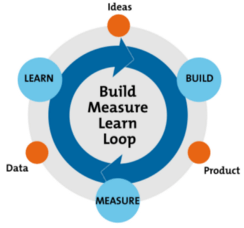
    Build, measure, learn

    In the book Lean Startup, the author talks about the principle of build, measure, learn. In short, it is a feedback loop that helps you iterate and improve your product.

    Diagram adapted from Ries, E. (2011) ‘The Lean Startup,’ New York: Crown Business.

    Build something small. Measure feedback from customers. Learn from their needs. Then start the cycle over again. Build one of the needs you just learned about. Measure if you met the need. Learn how it can be improved.

    In our sandwich app, all we need to do is display a list of ingredients and take payment. It displays the order on a screen to the cooks. The cooks mark the order complete. The bicyclist delivers the order. Iteration 1 complete.

    Show it to your customers. Get their feedback. Turns out they really need the ability to mark ingredients out of stock. Learn where the priorities are. Go build it.

    Maybe they never bring up the idea of “the usual.” You saved yourself time that you could have been innovating. By omitting or hardcoding features that could have been configurable, we allow ourselves to spend our time building what the customer truly wants.

    Do People Really Do This?

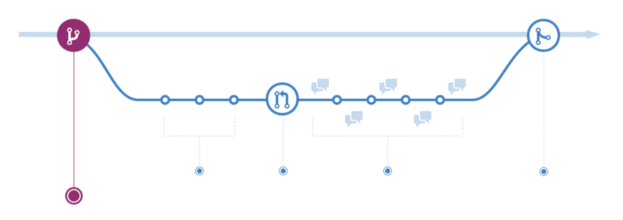
    Yes! Many companies are out there right now changing the world by building products and services that we actually need. In fact, if you take a look at the GitHub flow, you can see this is the model they follow.

    GitHub Flow from GitHub

    The GitHub flow proposes that you deploy a new feature to production before merging it to master. So getting the feature out in front of your customer base before considering it gold or even feature complete is the main idea. Doing so enables you to verify the feature is something your customers will use.

    What do you call software your customers are happy to use? A market success.

    This is a strategy that many startups follow. You won’t be alone or trodding new ground if you go down this route. You will be joining the thousands of other companies in the happy customer club because you will be getting software they want to them quickly.

    Call to Action

    Don’t overthink it. Software doesn’t have to be hard. The best architects make simple solutions of complex problems. How do they do that? Hardcoding it. They don’t dirty up the water with unnecessary configuration.

    They get the problem solved the fastest they can to get exposure. They measure their success from the feedback of their customers. They learn about the needs and new features that are necessary.

    I’m not saying you need to throw everything away you’re currently doing, but consider being more agile and getting your customers exposed to ideas earlier in the process. Don’t let you hold you back. Value iteration. Value simplicity. Value a market success.
    下载开源日报APP:https://opensourcedaily.org/2579/
    加入我们:https://opensourcedaily.org/about/join/
    关注我们:https://opensourcedaily.org/about/love/

  • 开源日报第544期:《新人欢迎会 railsgirls.github.io》

    10 9 月, 2019
    开源日报 每天推荐一个 GitHub 优质开源项目和一篇精选英文科技或编程文章原文,坚持阅读《开源日报》,保持每日学习的好习惯。
    今日推荐开源项目:《新人欢迎会 railsgirls.github.io》
    今日推荐英文原文:《Don’t Buy Into the Ludicrous Idea That Programming is Hard》

    今日推荐开源项目:《新人欢迎会 railsgirls.github.io》传送门:GitHub链接
    推荐理由:组织一个技术交流会来聚集那些对技术感兴趣的人来交流——并不仅限于女性或是什么人,在技术面前大家应该都是平等的。这个项目介绍了 Rail 相关的学习教程,以及组织一场技术交流会的方法。与兴趣相投的人一起交流技术可以交换灵感,是稳赚不赔的买卖,而组织一场交流会正好可以提供这个平台,不管是新人还是老手都能够从中获利,何乐而不为呢。
    今日推荐英文原文:《Don’t Buy Into the Ludicrous Idea That Programming is Hard》作者:David J. Meyer
    原文链接:https://medium.com/better-programming/dont-buy-into-the-lunatic-idea-that-programming-is-hard-eef404de6164
    推荐理由:事实上,编程语言没有想象中的难学

    Don’t Buy Into the Ludicrous Idea That Programming is Hard

    It is easier to learn a programming language than you think!

    Learning a programming language can be a daunting task. I’m here to tell you it’s not as bad as you might think. Growing up I always thought it was silly that Java, Python, and C were considered “languages.” But now that I’m older, I realize there are quite a few similarities between learning a programming language and a real language. If you struggle with learning languages, then this might sound even more daunting now. However, there is still hope for you because learning a new programming language is 100 times easier than learning a new spoken language!

    If you don’t believe me, take a look at my credentials. First, I have learned around seven programming languages over the past five years. My experience with spoken language is not impressive at all. Over my entire 23 years of life, I have learned English, beginner level Spanish, and at one time I knew how to say “Hi” in Italian. Learning a new programming language may be similar to learning a spoken language, but it is shocking how much easier it is to do.

    Photo by Ben White on Unsplash

    The Similarities Between Programming and Speaking

    Whenever I meet people that are tri-lingual they always tell me that it is easier to learn a new language after learning a secondary language. They tell me that to learn a new language you first need to learn how to learn. This is the exact same in programming.

    Every programming language consists of two parts: grammar and syntax. Grammar is the most important part here because it crosses over into multiple languages. If you learn Spanish, it is easier to pick up any of the other romantic languages because they all share similar grammar. All you have to learn are the specific vocab words to match a certain grammar rule. This is the exact same in code.

    Photo by Jessica To’oto’o on Unsplash

    If you learn how to program in Python, then you will need to learn some basic programming grammar principles. You will learn things like functions, variables, branching, classes, and sync/async. Once you learn those, it is super easy to translate those same concepts in Java or C. All you need to do is look up the specific syntax. I still do this today!

    I have programmed for years in Java, C, and Python, but there are still times I forget the specific syntax for functions in Python. I know what a function is and how it works, but I might forget the keyword to use.

    So why is learning a programming language this much easier?

    Photo by Kasya Shahovskaya on Unsplash

    There are 3 main reasons why programming languages are easier to learn than spoken language.
    • When you forget the syntax, you can always look it up on the spot. If you are programming, then you are on a computer. If you are on a computer you most likely have internet access. Therefore, you can always look up the syntax.
    • There are fewer grammar and syntax rules than in a spoken language. Some programming languages have maybe 50 keywords you need to know. No one would suggest fluency of a language after learning a mere 50 vocabulary words!
    • Programming languages are NOT spoken. For me, the hardest part of learning Spanish is speaking it. I can read and write, but listening and communicating is a different beast. Luckily, with coding, we don’t deal with this issue. Code is always written.
    If you are scared to learn a programming language, don’t be. Coding is actually super easy to learn and there are so many resources out there to do so. You do NOT need a college degree to learn this stuff. From my own personal experience, college only helped me with motivation.
    If you have any self-motivation at all, then you can easily learn how to code.
    If you want to learn how to program but don’t know where to start, don’t worry about it. I was the exact same way before college and because of my fears, I didn’t learn anything.

    The joy of programming is that once you learn the basics from one language, then you can easily pick up other languages!

    Photo by Peter Conlan on Unsplash

    There are easier languages that help learn those skills quicker, though. Python only has 33 keywords versus Java’s 50. Python is pretty simple to pick up and start making things happen instantly. It is also one of the most versatile languages you can use for almost anything. BUT…you can totally learn Java for your first language and learn those same skills too.

    Programming is really not as daunting or difficult as it seems. It is a ton of fun too! Especially if you like solving puzzles. I honestly don’t know why this industry pays us so much!
    下载开源日报APP:https://opensourcedaily.org/2579/
    加入我们:https://opensourcedaily.org/about/join/
    关注我们:https://opensourcedaily.org/about/love/
←上一页
1 … 122 123 124 125 126 … 262
下一页→

Proudly powered by WordPress