• 开源镜像
  • 开源沙龙
  • 媛宝
  • 猿帅
  • 注册
  • 登录
  • 息壤开源生活方式平台
  • 加入我们

开源日报

  • 开源日报第551期:《那你很棒棒哦 emoji》

    17 9 月, 2019
    开源日报 每天推荐一个 GitHub 优质开源项目和一篇精选英文科技或编程文章原文,坚持阅读《开源日报》,保持每日学习的好习惯。
    今日推荐开源项目:《那你很棒棒哦 emoji》
    今日推荐英文原文:《Why Every Junior Developer Needs A Senior Developer》

    今日推荐开源项目:《那你很棒棒哦 emoji》传送门:GitHub链接
    推荐理由:推荐闲得无聊时尝试的项目,允许 Python 在命令行界面输出表情。即使是用于和其他项目一起食用,多加这么一个依赖项换一个表情包功能似乎有些华而不实……不过在娱乐的时候就不要想着这些了,只要不是用在比较正式的地方,娱乐性强的项目就是应该怎么开心怎么有新意怎么玩的。
    今日推荐英文原文:《Why Every Junior Developer Needs A Senior Developer》作者:SeattleDataGuy
    原文链接:https://medium.com/better-programming/why-every-junior-developer-needs-a-senior-developer-2cd989058e06
    推荐理由:实践经验在软件工程中很重要,从熟练工身上吸收这些经验能够减少初心者踩坑的机会

    Why Every Junior Developer Needs A Senior Developer

    Avoiding unmaintainable code, bad projects, and bad expectations

    The concept of mentorship of a senior developer to a junior developer is often looked at as beneficial to the junior developer. However, pairing a senior developer with a junior developer is not only beneficial for the junior. It is actually quite beneficial for the company who intentionally pairs both engineers together.

    Senior developers who have worked on multiple projects have a much deeper understanding of how to develop maintainable systems and code. They have a good sense of which projects are worth doing and can help manage stakeholder expectations. All of this boils down to them being able to see around corners and keep junior engineers from building software that is overly complicated and doing work that might have little to no impact for the company.

    This all impacts the company’s bottom line. Yet, it doesn’t seem like every company does this. I recall my first job, where I was the only technical person on my team and had to support five analysts. Honestly, I doubt anything I built is still maintained today because I often built only to meet some functional requirement, and there was no one there who could provide input into design, maintainability, etc. (Luckily this changed at my next job.)

    That said, I want to lay out three reasons it’s very important to pair junior developers with senior developers. Again, this isn’t just so the junior developers can grow; this is to ensure the software being built is sustainable and has the right features that will benefit the company.

    To Know What Is Maintainable
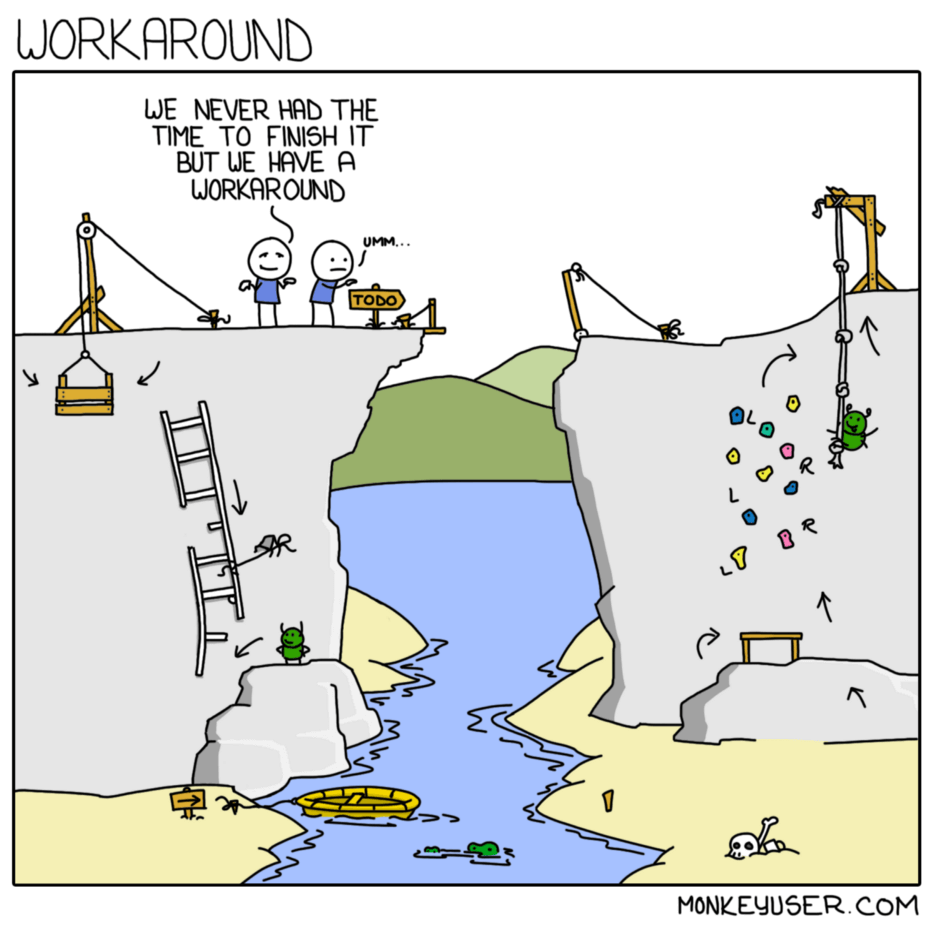

    https://www.monkeyuser.com/2018/workaround/

    Have you ever built an automated process, website, or framework on your computer? Now, have you ever taken that same new system and implemented it into a larger system where there might be thousands, maybe millions of users. Then … have you had to maintain it for multiple years?

    If you have, you know it is several magnitudes more difficult to develop a system that is sustainable. You have to constantly make design decisions that have pros and cons. Sometimes, due to time or technical constraints, you might need to circumvent certain limitations. This can lead to technical shortcuts and some tech debt being taken on. All those small shortcuts you might take and bad design decisions you don’t think through can quickly come back to bite you (like it did at Chernobyl).

    Even doing something small like changing an integer column to a float could be a weeklong endeavor between finding all the fields references, updating them, and then running tests.

    Creating maintainable and sustainable code all starts with good design. However, many junior developers will either start coding or forget to think of important aspects about a design. This is where senior developers can step in and help guide junior developers in design reviews and pair programming.

    Having a senior developer provides insights into the possible pitfalls a junior developer’s design might have. They won’t see every problem, but they can help think through edge cases that the junior missed. In turn, this teaches the junior developer what they need to think through in the future.

    To Help Manage Expectations

    Many of us who built our first programs in college often built websites, applications, and side projects in a few weeks. However, once we started working in the industry, it felt like what used to take a few days or weeks suddenly started taking months. Suddenly, the concept of project management is very important.

    Simple requests for changes or updates required a lot more than just updating code. An entire analysis often needs to be done to see how a change might impact modules downstream. Suddenly, a code change that would have been quick and simple can take a much longer time because it could have multiple downstream dependencies.

    Being able to manage these expectations helps ensure that the development teams aren’t overpromising timelines. I recall promising timelines that took weeks for projects that would have taken several months.

    The problem is you run into issues like people going on vacation, operational tasks that get in the way, meetings, and other normal daily functions that take tasks that might seem quick and extend them greatly over time.

    Senior developers are more accustomed to these distractions and can come up with more realistic expectations. Don’t get us wrong, management will probably still cut the timeline in half. But at least you tried!

    To Know What A Bad Project Is
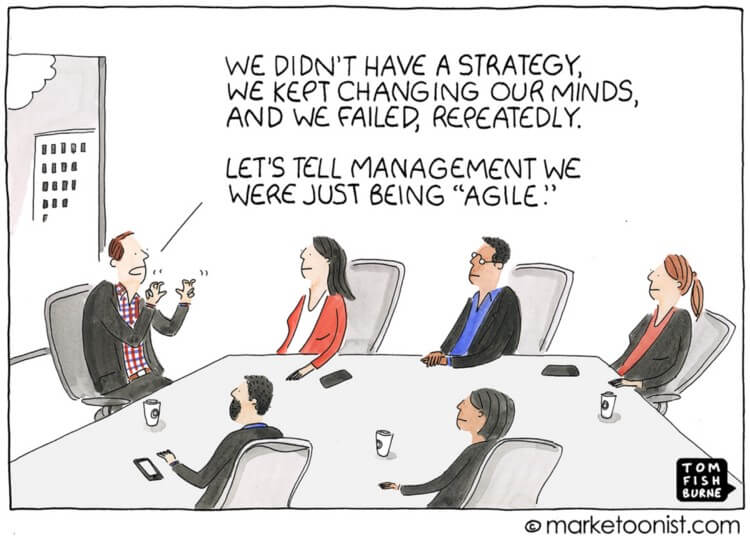

    https://marketoonist.com/2018/05/being-agile.html

    Knowing what might be a bad project is a difficult skill to acquire. This is why a junior developer won’t know when they’re asked to work on something that might have little to no impact for the company or prove too large to take on by themselves.

    Bad projects aren’t often obvious. They can start as one-off initiatives that a new director feels will improve the company even though it doesn’t line up with current goals. It could be a hype project where some salesperson went to a conference, heard about some new AI feature, and is now demanding the engineering team add it to their products.

    Wherever the source, these projects lead to unnecessary stress and often features that don’t provide value to the end user. Having a senior developer who can spot some of the characteristics of bad projects and show them why the project isn’t an effective use of time will help improve the company’s bottom line.

    Conclusion

    Overall, there are a lot of other great reasons to pair junior and senior developers together. But, as someone who has been a junior developer and was provided no senior developer to act as a guide, it was not only detrimental to my growth but also to the impact I had on the company. It’s really hard to tell when you’re making a bad decision because you have never been there before. There are so many assumptions and decisions that engineers need to work through, and without the experience to guide you, you can quickly find yourself in a bad situation. Again, this doesn’t just cost the junior developer; it costs the company.
    下载开源日报APP:https://opensourcedaily.org/2579/
    加入我们:https://opensourcedaily.org/about/join/
    关注我们:https://opensourcedaily.org/about/love/

  • 开源日报第550期:《悬浮 Hover》

    16 9 月, 2019
    开源日报 每天推荐一个 GitHub 优质开源项目和一篇精选英文科技或编程文章原文,坚持阅读《开源日报》,保持每日学习的好习惯。
    今日推荐开源项目:《悬浮 Hover》
    今日推荐英文原文:《What is Component-Oriented Programming (COP)?》

    今日推荐开源项目:《悬浮 Hover》传送门:GitHub链接
    推荐理由:用 CSS 实现各种鼠标悬浮时效果的项目。这类的项目不仅可以作为自己项目代码的参考,也可以作为练习的对象——自己写一个相同的效果,然后对比一下代码寻找提高点。虽然说不推荐在实际工作中重复造轮子,但是在学习的过程中试着自己造轮子也是一种方法,在同样的题目中,兴许你可以从别人的想法中找到能够提升自己的地方。
    今日推荐英文原文:《What is Component-Oriented Programming (COP)?》作者:
    原文链接:https://medium.com/better-programming/what-is-component-oriented-programming-cop-10b32ae1fa1c
    推荐理由:和面向对象编程有异曲同工之妙的面向组件编程

    What is Component-Oriented Programming (COP)?

    Component-oriented programming is the new object-oriented programming

    With all the latest front-end frameworks — such as React, Angular, and Vue — we’re seeing a cool new paradigm rise. It’s known as component-oriented programming, and it’s all about stitching reusable components together like Lego blocks.

    At its core, component-oriented architecture embraces the Don’t Repeat Yourself (DRY) dogma. Repeating code is time and efficiency wasted. The less time we spend repeating ourselves, the faster we can build our applications. As software engineers, with the deadlines we’re sometimes set, taking any advantage can be crucial in satisfying our overlords.

    What Component-Oriented Programming Looks Like

    If you know any modern front-end frameworks, such as React, Angular, or Vue, you might know already what component-based architecture looks like. Here’s a basic example of a Header component:
    import React from 'react';
    import { Logo, ProfileImage, BurgerMenu, HeaderWrapper } from 'components';
    
    const Header = () => (
      <HeaderWrapper>
        <Logo></Logo>
        <ProfileImage></ProfileImage>
        <BurgerMenu></BurgerMenu>
      </HeaderWrapper>
    )
    
    export default Header;
    
    As you can see, we’re importing components and compositing and laying them like bricks to modify one piece of the application — the header in this case.

    The Problems Component-Oriented Programming Solves

    COP is a powerful concept since it lets us isolate and encapsulate logic. The smaller our files are, the more maintainable they are — it’s easy as that. There’s a good reason Facebook had to innovate and fix their famous notification bug.

    Back in around ‘2014–15, the notification would keep indicating you had new notifications, yet when you clicked on the red notification bell, it didn’t show any new notifications. It sparked rage all over the internet. The cause of that bug was unmaintainable, huge slobs of files and spaghetti PHP code. I’m not trying to bash PHP. I think it’s practical and a great way of getting things off the ground. It’s possible to write spaghetti code in any language — the poor culprit just happened to be PHP in this case.

    React was invented to solve that particular notification issue, and the birth of that library marked the dawn of a new era. That era is called component-oriented programming (COP).

    My prediction for the future is native web components all the way. As of now, each framework has its own ecosystem of tooling, components, libraries, etc. While it’s handy to reuse open-source code, what’s not cool is that each ecosystem has locked itself in a bubble. If you know React, you’re locked into using only React versions of code. You can’t use Angular tooling with Vue or Svelte. The native Web Components API will change all of that.

    Think of the possibilities if we could share between all libraries.

    Exhibit A: Someone wrote an awesome animation library that’s compatible with all frameworks as libraries as long as it’s written in JavaScript or transpiled or compiled to JavaScript. That’s exactly what the native Web-Components API aims to achieve: a unified way for all libraries to share code. If you’re curious to learn more about the Web Components API, head over to this article(https://medium.com/better-programming/web-components-api-in-a-nutshell-c409127d563a).

    Web Components API

    Soon, we will have a unified API for all JavaScript libraries and frameworks to share code. You code it once and reuse it everywhere. The Web Components API lets us do all of that. This is what a simple button looks like using the Web Components API:
    class WebComponentButton extends HTMLElement {
    
      constructor() {
        super()
        this.addEventListener('click', () => {
          console.log('click')
        })
      }
    
    }
    
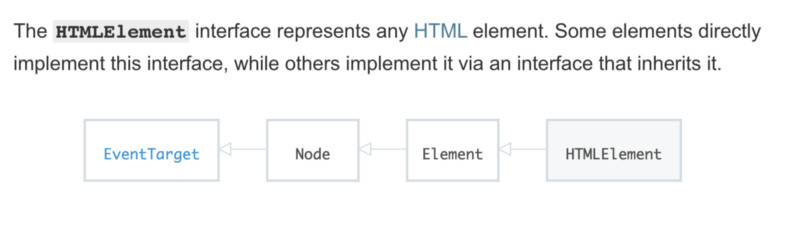
    A web component is a simple class-based inheritance piece of code. Notice how we extend our button to inherit the HTMLElement class.

    HTMLElement — https://developer.mozilla.org/en-US/docs/Web/API/HTMLElement

    If you’re curious and want to learn more about web components, head to the Mozilla documentation. Mozilla has a well-written bit about web components.(https://developer.mozilla.org/en-US/docs/Web/Web_Components)

    Next time you’re thinking about solving a problem, try to approach it with a component-based architecture mindset and solution. The component-based architecture really shines as you’re growing in complexity. The larger the challenge, the more you should break it up into smaller pieces.

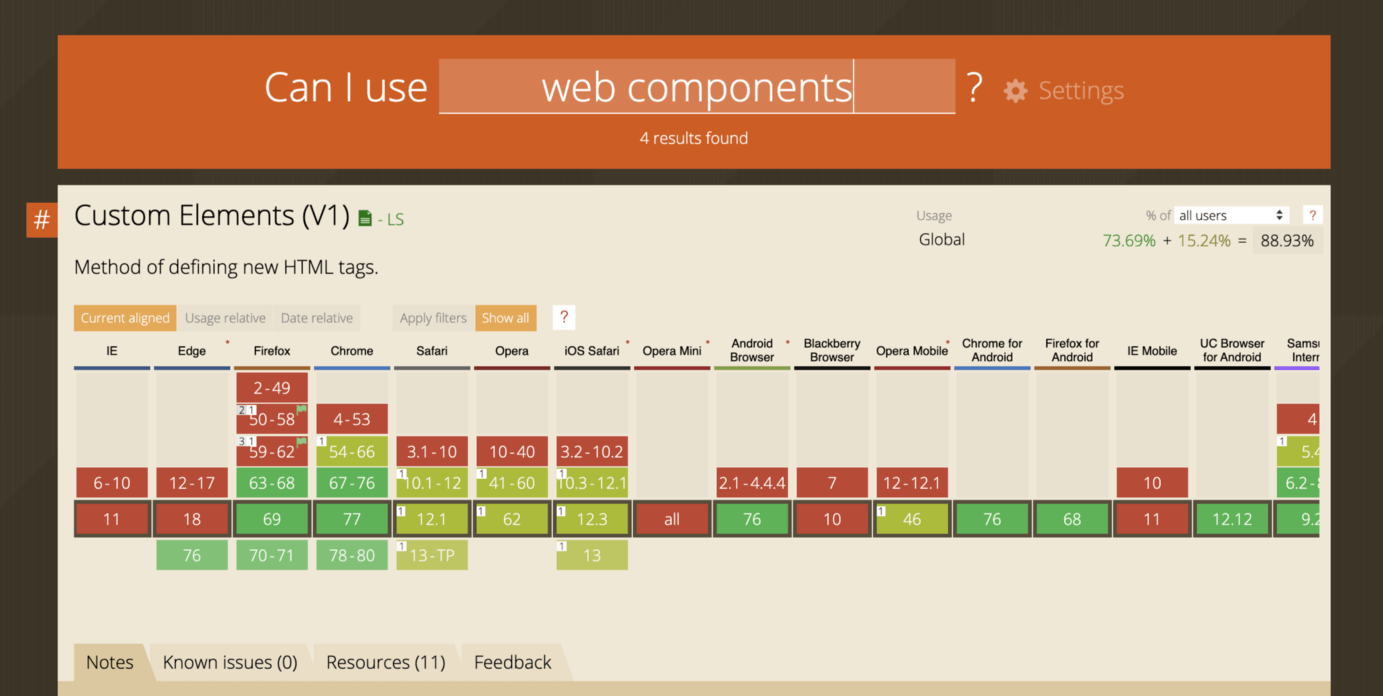
    Browser Support for the Web Components API

    The API is gaining traction and support. Keep in mind it’s a relatively experimental technology, and no one knows when and how it will be standardized, but it’s always good to be in the loop and keep your eyes open for new and cool programming-related technologies.

    https://caniuse.com/#search=web%20components

    Don’t worry, you don’t have to learn yet another API or technology just yet. The landscape changes quickly in the JavaScript demographics, but it doesn’t hurt to expand your toolbox with more handy tools.

    Thanks for reading, stay awesome. Happy coding,
    下载开源日报APP:https://opensourcedaily.org/2579/
    加入我们:https://opensourcedaily.org/about/join/
    关注我们:https://opensourcedaily.org/about/love/
  • 开源日报第549期:《如影随形 SVGImageHover》

    15 9 月, 2019
    开源日报 每天推荐一个 GitHub 优质开源项目和一篇精选英文科技或编程文章原文,坚持阅读《开源日报》,保持每日学习的好习惯。
    今日推荐开源项目:《如影随形 SVGImageHover》
    今日推荐英文原文:《From the new dev to a code owner》

    今日推荐开源项目:《如影随形 SVGImageHover》传送门:GitHub链接
    推荐理由:这个项目提供了一个新的灵感思路——在鼠标指向一个链接时,它将会让一张图片跟随鼠标来达到更强大的表达效果。鼠标指向一个链接自然是一个事件,而要用这个事件改变什么则是看各人的思想了,链接、弹出框、亦或是整个页面,在需要创意的时候将已有的事物和可以产生的新事物像这样一一列出也不失为一种用排列组合产生新创意的想法。

    今日推荐英文原文:《From the new dev to a code owner》作者:Gabriela Moreira Mafra
    原文链接:https://blog.magrathealabs.com/from-the-new-dev-to-a-code-owner-97b84564b63e
    推荐理由:如何更好的融入一个新项目团队

    From the new dev to a code owner

    I believe switching between ongoing projects is a common experience developers have. I had some of them, and my biggest problem with it is the ownership drop. When we are working on the same project for awhile, we know the code, we know the problem, and we are used to make choices involving its priorities. When we are dropped off on a different project, we know nothing. However, if this project is in progress and we have access to the (willing to cooperate) devs that know what we want to know, it’s only a matter of asking the right questions.

    A new dev is someone who is afraid of touching things and doesn’t feel able to propose changes because, well, “I must be missing something, right? I’ll understand it better and then tell the idea!”. And that makes total sense, since there probably are some unknown factors that will discard the idea. Here are some of my thoughts on how to get to the point where your entries on the project are insightful and aware — which represents, for me, the concept of a code owner.

    Communication

    So, I want to talk about communication. And I’m sure you have heard a lot about its importance, but I’ll still try to bring some new points here. As I see, the perfect communication is about finding the balance between focus on what matters and not leaving important things unsaid. I’ve recently figured an underrated tool for feedback on this balance: cooperative puzzle games. I’ve played a bunch of those, but only last month had the opportunity to sit back and watch two of my friends play it together.

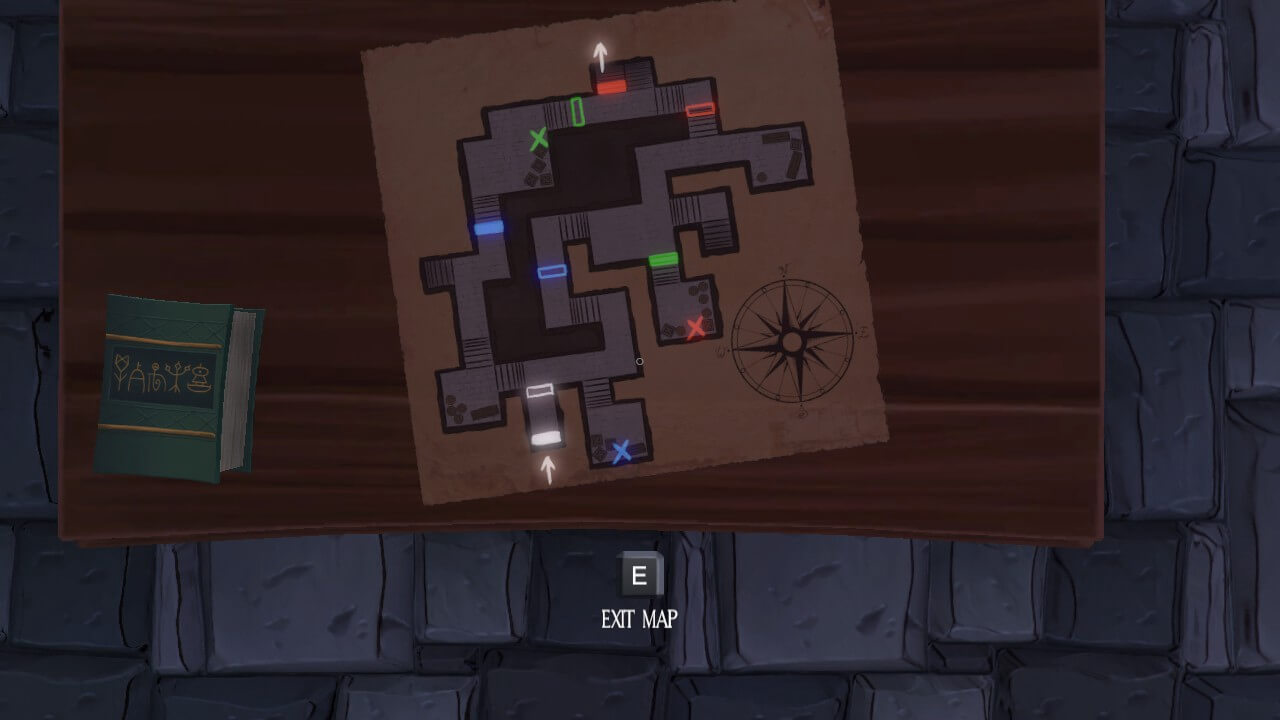
    A puzzle from one player perspective

    These games are completely communication based, and while seeing the screens of both players, it’s very easy to tell what one player has to say to the other in order to complete the puzzles. But the games are hard, and there are a lot of points where the puzzle key object is ignored and unimportant things are described with detail. But how is some player supposed to know what to say?

    They don’t. Just like the dev working on the ongoing project you just got in doesn’t know what to explain to you first. They understand the project, but they don’t know you, your knowledge or way of thinking. Well, we value so much the feedback cycle in customer communication and deliveries, but we fail to embrace the smallest feedback cycle we have: the dev that is one call/poke away from you.

    When I’m talking to a dev, and they start to explain something that is not what I’m looking for, I interrupt them — as nicely as possible. We have the same objectives, so that is the best for both of us. Just like in the game, when the other player starts describing something that clearly doesn’t have anything to do with what I’m seeing. What I try to do is to explain what I’m looking for and don’t let the conversation go out of our control.

    Of course, this requires transparency. Cooperative games are much better when played with friends. You have to be able to say what is needed. But this is a very basic communication concept, and a whole other discussion.

    Establishment

    Landing on a new project, there is a lot of stuff to see. And as much as communication helps getting places, sometimes you have to explore and conquer on your own. You should find your paste and figure out when is time to explore different elements. The aim is to be able to participate in all steps of the development cycle.

    Focus on what’s newer. Understand the concepts involved in the new demands so you can own new features. If some part of the code base is ready and there are no plans to touch it soon, it’s ok if you don’t get it. After you start to get the minimum comfort required to do some tasks with productivity, is time to understand what everyone else is doing. This is an important thing to know because the project is evolving, and learning what is being changed means learning what the project is.

    When I’m confident about something and other dev argues against it, I’m stubborn — I don’t give up on my thought until the reason it is wrong is completely explained and understood by me. Sometimes I think this can be perceived as annoying, but it is really important that I completely understand the reason why I’m wrong or something has to be the way it is. If I let it go, these knowledge holes will only snowball and I’ll whether think “this project should be completely different” or “I don’t know a thing about this project”.

    Learning more elements and clearing your doubts, you can aim for harder and harder tasks, which require more and more context. For every task you complete, you own another piece of code. When you try a complex task, you learn a lot about the structure problems and how your ideas may fit. And these great ideas are a sign that you are a code owner.

    Owning it

    Being a code owner doesn’t mean you are some kind of code boss. It means you are able to collaborate independently to the project — and this comes with responsibilities. If you can develop and deploy a whole new component, you should be regardful to documentation and ready to explain anything other devs may need.

    So hey, be a good code owner and remember that the relationship between the devs shows up on the code. I wish you can all have a team as lovely and awesome as mine. We join forces to own new projects together, helping each other to communicate with other devs and understand all the new concepts. I hope this little piece of my understanding of what we do can help you love your teams and projects as much as I do.
    下载开源日报APP:https://opensourcedaily.org/2579/
    加入我们:https://opensourcedaily.org/about/join/
    关注我们:https://opensourcedaily.org/about/love/
  • 开源日报第548期:《要用图片制造图片 tiler》

    14 9 月, 2019
    开源日报 每天推荐一个 GitHub 优质开源项目和一篇精选英文科技或编程文章原文,坚持阅读《开源日报》,保持每日学习的好习惯。
    今日推荐开源项目:《要用图片制造图片 tiler》
    今日推荐英文原文:《How To Learn a New Programming Language Fast》

    今日推荐开源项目:《要用图片制造图片 tiler》传送门:GitHub链接
    推荐理由:最简单的用图片画图的方法就是像素画了,把一块块的像素块作为图片来作画。而这个项目则不只是像素,还使用了一些万万没想到的画法——比如大小不同的圆圈,回形针等图案,甚至是 at 的符号 @ 也能用来画出一个 GitHub 的吉祥物来,而且画的还有模有样的。

    今日推荐英文原文:《How To Learn a New Programming Language Fast》作者:Jun Wu
    原文链接:https://medium.com/better-programming/how-to-learn-a-new-programming-language-fast-5fe269370210
    推荐理由:通过内化概念来进行编程语言学习的方法

    How To Learn a New Programming Language Fast

    The first step is figuring out your unique learning style

    People often marvel at a star programmer’s ability to pick up any language extremely fast. “This person must be gifted,” they’ll say. This person must be good at science and math.

    The truth is that becoming a master learner is a practice. The more you practice learning any skill, the more you will understand how to learn any programming language with the speed and agility of a star programmer.

    Each person is different. People think that there must be some shortest route to this learning problem. But the learning problem is tailored toward the type of thinker you are. Are you a bottom-up thinker, a top-down thinker, a visual learner, or an auditory learner? You are the architect who can design your learning solution. I am here to simply help you get there faster.

    Qualifications

    When I started programming 15+ years ago, I had to pick up four programming languages in six months for a project that was due at the end of the year. My career was riding on it. Before that year finished, I not only learned these four programming languages, but I also completed that project.

    When I started my career, I went on a graduate training program where for six weeks we had to pick up the entire undergraduate course work of various parts of finance: corporate finance, interest-rate products, equity products, etc. I barely passed that training program because up until that point, I had no prior finance education. But I passed the program.

    Am I gifted? No. Am I a master learner? No. Because I grew up in a household where I received no love unless I performed, the pressure enabled me to learn this one trick that I applied over and over again.

    The # 1 Trick in Learning

    I have found a trick that works for me through practice and pressure. I didn’t realize I found my trick until someone asked me one day, “Do you remember the books that you read from childhood?” I replied, “No, I don’t. But, I’ve internalized these books.” These were fiction books that this person was talking about.

    But I realized I’ve internalized the struggles from the characters and learned from the struggles of the characters. Even though I didn’t remember the details of the book, I didn’t have to go back to re-reading the book because I’ve internalized the most important parts of the book.

    How Do You Go About Internalizing the Most Important Concepts?

    If you study so-called gifted education, you will realize that gifted people are people who are more sensitive than the average person. The way they pick up knowledge fast is mainly due to their sensitivity. Because they are sensitive to anything presented, they can internalize the knowledge faster than anyone.

    All of us who are not gifted can pretend that we are gifted and implement a method to internalize concepts. This method will enable us to learn as a gifted person learns. We may take longer than the gifted person. But we will nevertheless get there faster than we did before.

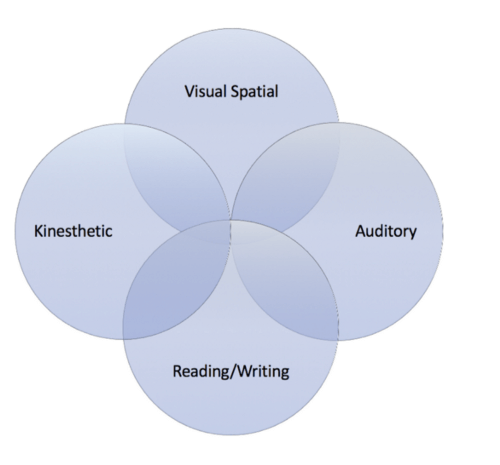
    The method has to be tailored to the type of learner you are: visual learner, auditory learner, reading/writing learner, or kinesthetic learner.

    You can straddle a few different types and be in the middle of the quadrants. For instance, I am a visual learner who has learned to be a reading/writing learner at school. At work, due to my programming profession, I became a kinesthetic learner.

    By figuring out which type of learner you are, you can immerse yourself in the type of mediums that will enable you to learn the best. By immersing yourself in the medium, you will heighten your sensitivity to the subject. This way it is much easier to internalize the concepts.

    Types of learners (illustration by Jun Wu)

    Visual learner

    If you are a visual learner, you love visualizing ideas and concepts. You can create mind maps of the concepts. I am a visual learner. I often use a whiteboard to diagram all the components of the concepts in my programming books. I also diagram all of the components of the systems I am building. Once I do it once, it’s easier for me to imprint the image into memory.

    Tools for learning: YouTube videos, lists-oriented training, diagrams, mind maps Exercises for remembering: create mind maps, make modules, create Visio diagrams

    Auditory learner

    If you are an auditory learner, then you are likely to learn by listening to someone talk about the subject.

    Tools for learning: audiobooks, podcasts, TED videos, classroom instruction Exercises for remembering: teaching the concepts to someone else, coding with a buddy and teaching each other.

    Reading/writing learner

    If you are a reading/writing learner, then you are likely to learn from reading programming books and taking notes.

    Tools for learning: programming books, making list, taking notes Exercises for remembering: writing a blog about concepts learned, creating question/answer lists

    Kinesthetic learner

    If you are a Kinesthetic learner, then you learn best by doing. You like to engage in learning that involves physically acting out what you have learned.

    Tools for learning: programming projects, study groups, coding competitions Exercises for remembering: tracing through mind maps, coding with Visio block diagrams, engaging in different coding projects with a buddy

    How Do You Practice the Concepts You’ve Internalized?

    Practicing the concepts you’ve just learned is just as important as internalizing the concepts. From my experience, the first time you internalize something, it’s in your short-term memory. For you to remember it for the long haul, you must practice these concepts over and over again.

    Here are resources where you can practice concepts that you have learned:

    CodeChef — This is a website that contains practice modules and holds competitions for programming. Particularly for algorithms coders, this is the website to be to practice what you have learned.

    Coderbyte — This is a website where you can solve coding challenges and view other people’s coding solutions.

    HackerRank — This is a website where you can practice with coding challenges and learn from tutorials.

    CodinGame — This is a website where you can solve coding challenges tied to online games.

    Practice working on projects

    Once you’ve had the practice you need to master concepts, then you are ready to work on projects.

    1.Create one project per language that showcases all the important concepts of the language.

    For instance, if you use Ruby/Rails, you should try to build a website; if you are learning SQL, you should install and put together a database; if you are learning data science, you should analyze a dataset trying different algorithms with it.

    2.Code interviews are the best practice around.

    Technical interviews can be grueling. The way to master these interviews is really to look at it as practice for the big leagues. You can prepare for it by using some interview-preparation sources, such as Cracking the Coding Interview, LeetCode (practice coding with an online judge, Gainlo (mock interviews with professionals), Glassdoor (practice past interview questions), and GeeksforGeeks (look at the solved questions).

    Conclusion

    Now you know becoming a master learner is a practice. By internalizing concepts, anyone can become a master learner of programming languages fast. Like a gifted person, if you heighten your sensitivity around the subjects you learn by immersing yourself in a learning medium (e.g., audio, visual, words, etc.), you will learn faster than ever before.

    After you’ve learned the concepts, you can practice the concepts through projects, code interviews, and coding competitions. In no time, you will be hired as a programmer.

    What are you waiting for?
    下载开源日报APP:https://opensourcedaily.org/2579/
    加入我们:https://opensourcedaily.org/about/join/
    关注我们:https://opensourcedaily.org/about/love/

←上一页
1 … 121 122 123 124 125 … 262
下一页→

Proudly powered by WordPress