• 开源镜像
  • 开源沙龙
  • 媛宝
  • 猿帅
  • 注册
  • 登录
  • 息壤开源生活方式平台
  • 加入我们

开源日报

  • 开源日报第614期:《路易斯之日 MariOCaml》

    19 11 月, 2019
    开源日报 每天推荐一个 GitHub 优质开源项目和一篇精选英文科技或编程文章原文,坚持阅读《开源日报》,保持每日学习的好习惯。
    今日推荐开源项目:《路易斯之日 MariOCaml》
    今日推荐英文原文:《The Attitude Changes I’ll Need for Returning to Tech》

    今日推荐开源项目:《路易斯之日 MariOCaml》传送门:GitHub链接
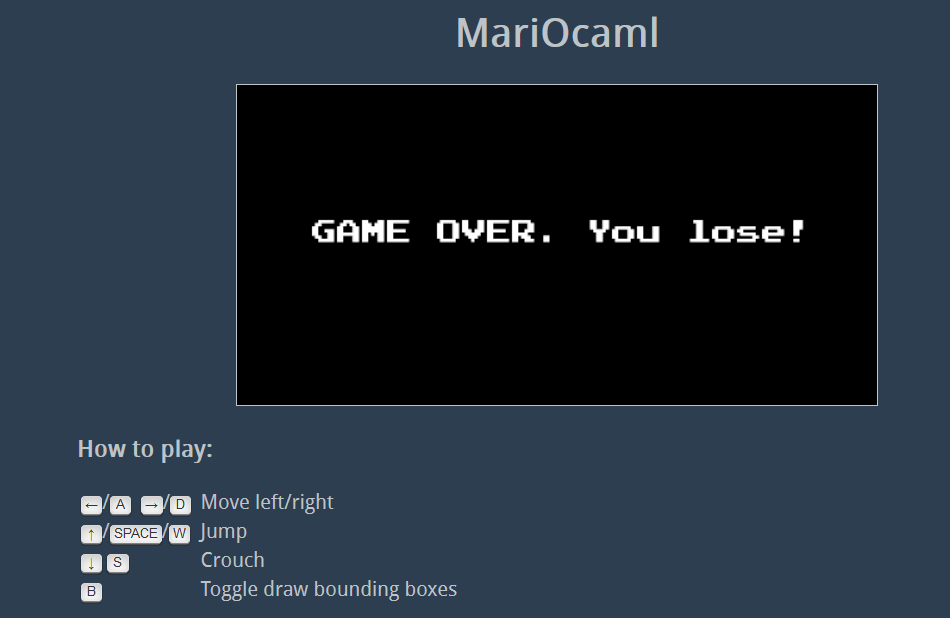
    推荐理由:超级马里奥这个游戏想必在小的时候有游戏机的同学都略知一二,看起来简单但是总是一不留神就翻车。这个项目是用 OCaml 实现的马里奥游戏,最终的游戏画面则通过 HTML 的画布标签 canvas 来展现,不仅实现了基本的操作,还包括随机地图和简单的粒子效果(以及那令人翻车的移动惯性)等,某种意义上的可以说是很还原了……

    今日推荐英文原文:《The Attitude Changes I’ll Need for Returning to Tech》作者:Ceyla Ponders
    原文链接:https://medium.com/better-programming/the-attitude-changes-ill-need-for-returning-to-tech-551207d31433
    推荐理由:作者分享的在科技领域工作中一些错误的想法

    The Attitude Changes I’ll Need for Returning to Tech

    If I return with the attitude I have now, I won’t be able to survive

    When I quit my last job as a software engineer, I was very clear about one thing.

    If I ever return to tech, I need an attitude change. I don’t know exactly what it consists of, but if I return with the same attitude I have now, I will continue to be miserable. I won’t be able to survive.

    Apart from lots of reading, lots of journaling, and lots of day-dreaming, I had no particular plan for how to discover the nature of that change. I don’t know of anybody else who has come to a similar conclusion about their career — including other women in tech. So I had nobody to turn to for help.

    I’ve had several “aha” moments while being unemployed. At least two of those are pointing to the necessary attitude changes.

    You Can Learn From Books, Not Just On-the-Job

    For reasons I can’t explain to anyone anymore, I was a firm believer that the only worthwhile learning happens on the job. I felt that most other sources of information weren’t reliable or useful.

    As a result of these beliefs:
    • Many learning opportunities were locked behind unattainable jobs and projects people might not give me. I was at the mercy of other people.
    • When problems arose at work, I frequently deferred to other people’s opinions because I wanted to learn from them. I wasn’t contributing information from external sources that might help solve the issues we were facing.
    My eyes were finally opened when I was studying for a job interview. I was answering the hypothetical question “So you want to learn how to scale backend services… How have you worked towards that goal?” I was shocked to discover that I came up fairly empty. I realized that I hadn’t pulled out all the stops to work towards my goals. I had simply waited for the right opportunities to come along. That answer seemed very weak. So I set out to change it.

    What I discovered on the Internet surprised me. There are loads of relevant books, blogs, YouTube videos, interview study guides. There’s a ton of (almost) free information out there that I was just unaware of. Software companies are giving talks on the engineering challenges they’ve faced, and how they’ve solved them. It’s all right there, at my fingertips.

    So, the learning has begun. On occasion, I’ve found myself learning entirely new things. But I’m also reading books that put my haphazard on-the-job experiences into a structured context. I’m building a stronger foundation for my own career.

    You Have to Speak Up

    I don’t mean this just in the sense of “I need to speak up to be heard.” What I mean is “I have to speak up, or I’ll be miserable.”

    I came to this realization while I was writing about the importance of freely sharing one’s ideas.

    My clue: the eczema on my hands was flaring up as I was typing. Clearly, I had hit a nerve.

    My eczema first showed up years ago, when I was beginning to become unhappy at work. It was during those days that I first uttered the words “I don’t feel heard at my job.” Until very recently, I never realized that the two phenomena were tightly linked. I’d attributed my eczema to a generic “sexism” and “toxic workplace” that I had no control over.

    After years of getting worse and worse, my eczema effectively healed after I quit my job. Over the past couple of months, it has flared up as a warning sign whenever I get close to getting a software engineering job. So I know for sure that the eczema is tightly linked with my mental health.

    Now I know that for the sake of my own happiness and mental health, I need to speak up. I need to share my ideas. I need to have an opinion. I need to be honest. I shouldn’t let myself be intimidated into silence.

    I’m Optimistic Again

    Many things had to come together for me to have these major brainwaves. I’m happy that I’ve finally found the necessary attitude changes for me to survive in the world of tech.

    I have onsite interviews coming up next week. I hope I do well and get hired. It sounds like an amazing job opportunity — the job I’ve been holding out for. If I get hired, I can put the “aha” moments above to the test.

    For months, I dreaded the prospect of returning to work. Now I can walk into that job with my head held high, optimistic that I can be happy. With the right attitudes, I can make it work.

    It’s possible that I’m still missing a piece of the puzzle. I’ll likely encounter new problems. But at least the ideas above should get me off to a good start. Every single time I have one of these brainwaves, I become more confident in my ability to survive in the tech world.
    下载开源日报APP:https://opensourcedaily.org/2579/
    加入我们:https://opensourcedaily.org/about/join/
    关注我们:https://opensourcedaily.org/about/love/
  • 开源日报第613期:《提示气泡 balloon.css》

    18 11 月, 2019
    开源日报 每天推荐一个 GitHub 优质开源项目和一篇精选英文科技或编程文章原文,坚持阅读《开源日报》,保持每日学习的好习惯。
    今日推荐开源项目:《提示气泡 balloon.css》
    今日推荐英文原文:《Foldable Devices: Should We Care?》

    今日推荐开源项目:《提示气泡 balloon.css》传送门:GitHub链接
    推荐理由:在页面上采用鼠标悬浮后显示提示栏来节省页面空间并引导用户使用的方法早已屡见不鲜,这个项目正是一个采用纯 CSS 实现的鼠标悬浮窗口,只需要在 HTML 标签中写入文本并选择相应的设置,或者是通过 CSS 自定义需要的样式,就可以在元素悬浮时弹出悬浮窗口而不需要 JS 的介入,不失为一个使用鼠标悬浮提示时的选择。

    今日推荐英文原文:《Foldable Devices: Should We Care?》作者:Omar Rabbolini
    原文链接:https://medium.com/swlh/foldable-devices-should-we-care-a847f37126f8
    推荐理由:介绍可折叠设备对软件方面的影响

    Foldable Devices: Should We Care?

    Analyzing the foldable smartphone trend from a software maker’s perspective

    Foldable devices are all over the news these days. Some are based on actual foldable displays (Samsung, Huawei), others are more economic and use two separate panels rotating around a 360⁰ hinge (LG, Motorola, Microsoft).

    Regardless of the underlying implementation, the purported use cases are similar:
    • Run two apps side-by-side
    • Let an app use extra screen real estate when available
    Their makers tout them as the future of mobile productivity, the must-have upgrade for your aging smartphone. The main question for us software makers is a bit different, though:
    Are foldables the future, or just a passing fad?
    This is an important question to consider, as we need to decide whether to invest any resource on the investigation of this form factor and its effect on our products.

    In order to answer it, we need to digress a bit and see how we got to the current state of affairs in mobile development.

    Photo by Stanislav Kondratiev on Unsplash

    Getting here

    The physical design of mobile devices hasn’t changed much for the past 10 years. Mostly all manufacturers have settled on the form factor introduced by Apple with the iPhone in 2007 (and the iPad in 2010 on the tablet side) with little variation on the theme. Granted, there has been a certain degree of differentiation in details such as the placement of cameras and biometric sensors, and of course the deliberate selection of materials and components to justify different price points, but in the end all modern mobile devices look pretty much the same: a rectangular slate largely dominated by a touchscreen, running either of the two dominating OSs (iOS and Android).

    In terms of software, ecosystem-specifics aside, there isn’t really much difference for the end user to choose one platform over the other. Most apps (and games) are available on both, with pretty much the same functionality. The operating systems themselves have been converging in user experience too, with the once unique benefits of widgets (Android) and coherent notification handling (iOS) now working in a similar way on both platforms.

    The effect of this convergence for us software makers has been that we have no choice but to write software for both OSs if we want to stand a chance to see our app being widely used.

    Luckily, the uniformity in the space has made this easier. Nowadays there are frameworks such as React Native and Flutter which allow us to write cross-platform code in record time while maintaining good performance and a native user experience across both systems.

    Photo by Jens Johnsson on Unsplash

    Living in a uniform market

    Uniformity and conformity are nice, but they stifle innovation. In a market where everybody is the same, there are only three possible outcomes when you’re trying to be different:

    Outcome A : Nobody cares

    Outcome B : You carve out a niche

    Outcome C : Your solution is so much better than everybody else that it disrupts the market

    These are in order of likelihood, from most likely to least likely. Most challenges to the status quo end up in the Outcome A bucket.

    Products that solve a real problem are more likely to end up in either Outcome B or Outcome C, depending on the size of the problem (i.e. how many users are affected) and the fitness-for-purpose of the solution.

    Let’s look at some examples of products falling into these different outcomes:

    Outcome A : The Blackberry Playbook, a tablet that tried to challenge the iPad and nascent Android tablet market by riding on the Blackberry platform’s coattails but was ultimately let down by app unavailability (even after introducing Android apps support.)

    Outcome B : The Samsung Galaxy Note, a smartphone now in its 10th iteration with a killer feature in its S-Pen. Not everyone’s device of choice, but the only one you need if you are traditionally a fan of jotting down handwritten notes.

    Outcome C : The Apple iPhone itself. We had smartphones before the iPhone came along, but they were a completely different beast. The iPhone threw away the physical keyboard in favor of a variable screen real estate that enables better content consumption on the go without much drawback when user input is needed.

    The question for the foldable is then the same age-old one:
    What is the problem you are trying to solve?
    At the beginning of this article, we saw the two common use cases we are presented when looking at foldables. These are valid, and more use cases might transpire as the foldables make their way to consumers. However, they are use cases for the device itself, not necessarily for a third-party app.

    As software makers, we need to understand what’s the benefit of using two screens for our own app, and how to behave accordingly.

    I am specifically considering the foldable as two screens joined together in this case, as it’s easier to illustrate my point, but the same applies when looking at the screen as a resizable work area which expands and shrinks according to the user’s preference.

    Let’s consider the case of an e-Book reader. Assuming a device is foldable along its Y-Axis (i.e. like a real book), the easy answer is to present two pages side-by-side to the user when the device is open. This is nice and skeuomorphic, but does it really buy much to the user aside for a less frequent page flip?

    Depending on the specialization of the app, there are more interesting alternatives. For instance, if our e-Book reader was targeted at students or researchers, we could use the extra screen real estate to allow our user to annotate and read footnotes. For language learning, we could have content in two different languages side-by-side.

    Another example is that of an agenda / organizer app like Microsoft Outlook. You could use one side of the fold to display your daily overview, while the other side would show details of your next appointment and a map of its location.

    These are UX consideration based on the availability of both screens for our app. There’s also the use case of our app being on one side while another app is presented on the other, at the user’s choice. In this case, our app could behave differently depending on the context, e.g. by making it easier to send and receive information to / from another app while in this mode.

    This brings me to the next point:
    How good is the API?
    This is a question mainly directed at the device manufacturers and OS developers. We can only support foldables if good APIs are provided.

    On iOS, we often saw Apple keeping their APIs private in the past, especially when introducing new technology. This does not help with adoption as it limits the use case investigation we talked about earlier.

    On Android, there’s a risk that different manufacturers come up with different APIs for their own implementation of a foldable device. We have seen this before with Samsung and their S-Pen SDK and multi-window support. This was resolved in Android 6 and 7 respectively, with the OS catching up and offering more support for exotic (for lack of a better word) devices.

    As Apple hasn’t entered the foldable race yet, we don’t know what’s in store on that front. On the Android side, Samsung is seemingly relying on existing Android support for the concurrent display of multiple apps (good), while LG relies on their own Dual Screen SDK (bad). This is less than ideal.

    So, should you investigate foldables support for your app?
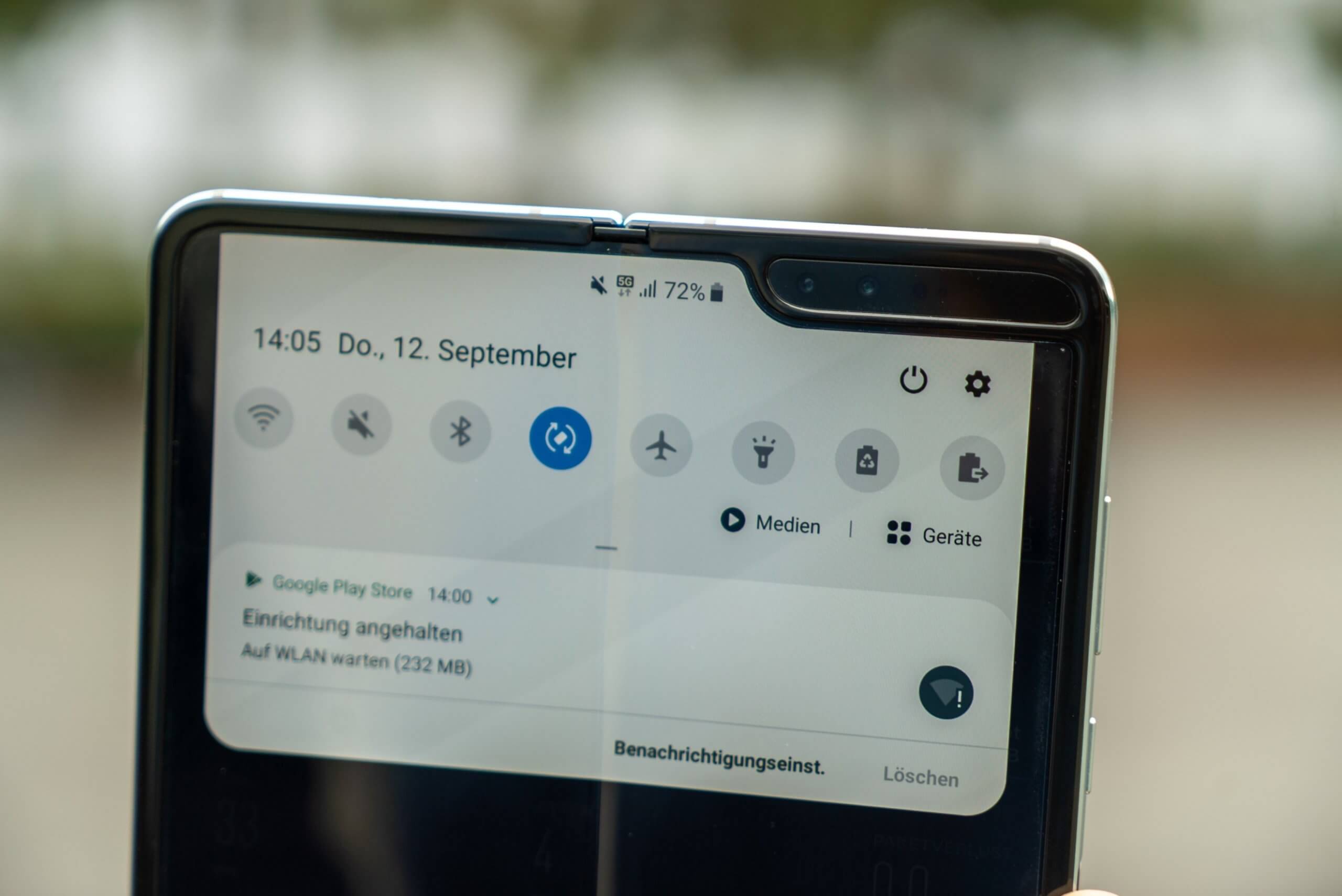
    Photo by Mika Baumeister on Unsplash

    Foldables and you

    Thanks for sticking around thus far. Hopefully you have a better idea now of whether it’s worth investing any time on foldables at this point, but here are the main considerations once again:

    What benefit does a foldable bring to your user?

    Depending on your app, the user’s benefit in using a foldable may vary. Generally, anybody can benefit from more screen real estate, but specific apps might use this extra space to boost productivity or provide a different user experience.

    If you think your app falls in the latter camp, then it might be worth spending some time to do further research.

    Can you get by with the current API?

    The APIs will evolve alongside the foldables. More functionality might be coming later as the use cases become clearer and uniformity once again is applied to this new technology. Can you wait until then, or is there any benefit in jumping on the foldable bandwagon sooner?

    Will there by widespread user adoption?

    This is another important point to take into account. Foldables are an example of manufacturers trying to be different. Looking at the three outcomes we saw earlier in this article for such cases, chances of success in this differentiation are dependent on the solution solving a real problem for the user.

    At the moment, foldables seem more like an answer in search of a question. They don’t justify the added bulk and price with a convincing argument and therefore seem more like a passing fad. However, it’s still early days. Apple hasn’t made a move in the space yet, while Microsoft showed a couple of interesting takes on the concept slated for release towards the end of 2020 (Surface Duo and Neo).

    In conclusion, I wouldn’t discard the trend as a fad yet, but I want to see more. I want to see the Galaxy Fold in the wild, I want to play with the LG G8X and its dual screen. I want to see how Microsoft and Google are collaborating on the Surface Neo to supercharge productivity.

    On the user experience side, I want to see experiments with this form factor involving the average consumer. Do they find it confusing? How would they use the extra screen? What’s the main mode they’d use the device in (folded, open, in portrait mode, in landscape, etc.)?

    All in all, this trend is a breath of fresh air after years of me-too slate designs, but it’s still in its infancy. Business viability and market adoption will most likely be determined by the evolution of this form factor in the next year or so, alongside the consolidation of APIs and SDKs to enable third party development.
    下载开源日报APP:https://opensourcedaily.org/2579/
    加入我们:https://opensourcedaily.org/about/join/
    关注我们:https://opensourcedaily.org/about/love/
  • 智能合约形式化验证的灵光乍现

    17 11 月, 2019

    双十一喧嚣未散,王校长 ig 刚夺冠…

    作为中奖绝缘体的小编自以为没那福分成为锦鲤…

    于是乎,默默地逛起论坛,顺手把喜欢的文章翻译整理出来供各位看官把玩…

    希望各位看得愉快,各有收获…


    智能合约形式化验证主要是基于形式化验证来确认目标合约是否安全并且满足 SN[T]ARKs 的某些规范,相应的功能类似于传统互联网中的 “https”。

    1.1 背景

    现状是智能合约的形式化验证是在每个计算机上执行的,如果某人已经对合约进行形式化验证,那么当前用户是无法在不执行形式化验证程序的前提下验证合约。而对智能合约来说,它是无法判定其他合约是否经过形式化验证的。

    LayerX Inc. R& D 团队( R & D: Research  and  Development) 针对上述问题提出了链上的解决方案,并且计算成本要低得多。

    该解决方案带来的主要有2个好处:

    1)智能合约可以自行判断即将调用的其他合约是否经过形式化验证并满足某些规范要求。

    2)移动应用程序等轻量级客户端可以查看某个合约是否符合某些规格。

    换句话说,该协议在区块链中相当于 “https” ,虽然这不能杜绝黑客攻击,但会给予某种程度的安全保证。

    1.2 协议摘要

    在协议中,验证者合约(verifier contract )  验证  SN[T]ARKS  证明,即证明给定的 EVM 字节码满足某些规范。SN[T]ARKS 证明 即 SNARKS 证明及 STARKS  证明,从 zk-SNARKs  到 zk-STARKs  是空间换时间的取舍,虽然都不完美,但在持续进化中。用户合约或是其他合约可以通过询问相应的验证者合约来获取目标合约是否经过形式化验证或满足某些规范。

    1.3 案例

    以下是 1.1 中所描述的相应示例:

    (1) 无代币的加密抵押系统

    在稳定币或衍生物的一些金融协议中,不仅包括以太币,还包括其他的基于  ERC20 协议的代币所涉及的加密资产被用作抵押品,即便这些协议能够处理代币价格下跌的情况,但是如果抵押资产所依据的合约有漏洞,比如著名的整数溢出或是重放攻击,可能会造成“黑天鹅”事件,以及整个系统都将被破坏。

    如果基于这些协议的系统合约禁止使用未经形式化验证的代币作为抵押品,在一定程度上将减少 “黑天鹅” 事件的发生。

    (2)安全钱包应用或  dapp 浏览器

    钱包应用或 dapp 浏览器基于验证者合约来避免使用不安全的智能合约。这不仅限于检查溢出漏洞 (overflow)。

    Layer2 协议,如 plasma 以及状态通道在未来会发布相应的标准。L4 以及 Celer 团队证致力于状态通道的相关协议研发,这些标准将被编写为适用于形式化验证的正式规范。

    基于这些协议,钱包应用或是 dapp 浏览器可以警告用户所使用的合约是否符合这些标准。

    好了 ,以上都是一些虚的客套话,接下来小编给大家上正菜。People feasting on healthy salad buffet


    emmmm……祖国的花骨朵表示只想学习,不想吃,端走!

    2.方法

    2.1  SNARKs 形式化验证

    鉴于证明体量足够小并且适合区块链,本文使用 SNARK 作为非交互式证明系统。

    SNARKs 的证明体量只有 288 字节,其中 128 字节用于安全性证明。

    STARKs 较 SNARKs 的优势在于需要可信设置以及证明成本,但加密证明的容量也会大得多 。

    下面讨论  SNARKs:

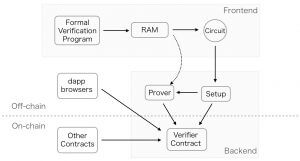
    copyright @  LayerX Inc. R&D 团队


    验证者智能合约需要在设置阶段预先部署。

    图示中的前端 (Frontend)部分,形式验证程序在 RAM 中被执行,RAM 是一个通用计算模型,该节点生成 SNARKs 的电路。

    而在后端(Backend) 中,生成的电路和 RAM 用于 SNARKs。

    设置(Setup)阶段主要是作为生成证明密钥和验证密钥的预处理阶段。

    只有当证明人通过形式化验证的字节码时,从证明人传递给验证者的证明才会被接受

    并且通过验证者合约返回 true ,并通知 dapp 浏览器或被其他合约调用。

    基于 SNARKs 的验证过程公式化如下 :

    Pprove(w = bytecode, x = hash(bytecode)) {return proof}

    Pverify(proofkey, hash(bytecode)) = True/False

    x 是传递给链上计算的主要输入,w 是辅助输入

    bytecode 是需要验证的合约字节码

    proof_key:形式化验证结果的证明密钥

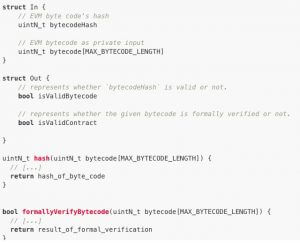
    鉴于智能合约字节码的体量过于庞大,以致于无法放于链上,因此将它作为辅助输入(也可以称为私有输入),只把它的哈希值作为主要输入(即公有输入)。

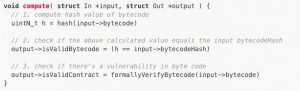
    以下是 P_prove 的伪代码片段:

    为了将程序转换成布尔电路,因此引入了 TinyRAM 等计算模型,并基于这些计算模型实现形式验证器。

    私有输入变量包含证明,以及除了对字节码进行哈希处理之外,如何对其应用推理规则的对象。

    当 P_verify 返回值为 true , 验证后的合约在部署者合约中注册或是发出事件以将结果通知给链下客户端。

    2.3 设置

    上述的协议中,验证者合约需要在合约的可信任列表中事先注册或是基于该协议的移动应用程序。

    这些协议皆是基于 verifier 合约的正确性,即

    1)形式化验证的算法

    2)需验证的形式化格式

    3)表示形式化验证算法的电路

    4)SN[T]ARKs 验证程序

    3 挑战&解决方案

    3.1 面临的主要挑战

    实现这一目标的主要困难在于将形式化验证程序转换为电路。大多数形式验证方法采用 Z3 作为 SMT 求解器或是使用 Coq ,Isabelle 等交互式定理证明器。

    具体来说,主要存在两个挑战:

    (1)实现方面的困难

    已有的几个库,如 Z0Krates ,xJsnark ,以及 Pequin 来帮助将程序编译为 SNARKs 电路。但是该领域专属语言(DSL) 无法与 JAVA,PYTHON ,C++等匹敌,因此实现形式验证器非常困难,没有足够的文档支撑,并且其中的大部分都不是为了生产用途。

    (2)电路复杂性

    SNARK 的验证时间和证明体量是恒定的,但随着程序复杂性的增加,约束的数目也会随之增加。即生成密钥的时间和成本。

    因此形式化验证的计算成本是巨大的,如 DIZK 等库则用于降低电路的复杂性,节约计算成本。

    gnosis 团队预估基于 AWS 和 DIZK ,他们的去中心化交易所的成本为 1200 美元。因此优化工作不仅应在后端进行,前端也应该进行优化。

    3.2 解决方案

    (1)通用计算

    LayerX 团队计划基于 LLVM 实现形式化验证并将其编译到 RAM 以转换成电路。TinyRAM 能够生成复杂度较小的电路,

    但因为基于 LLVM 后端实现 TinyRAM 过于困难,因此转而使用与 TinyRAM 较为类似的后端,其中一个是 RISC-V,它的指令集较为简单并且数量有限。于是 LayerX 团队将其作为生成电路的计算机器。

    但是因为 RISC-V 的指令集较 TinyRAM 更为庞大,因此在生成电路的效率方面有所不及,并且在计算形式化验证算法方面面临着更大的困难。

    (2)计算量更少的形式化验证算法

    其中一个非常有前景的方法是移除证明搜索部分,因为证明搜索需要大量的计算,以便专注于 给定证明的验证。

    形式化证明软件在人类的帮助下半自动地找到证明,推理相应的代码规则。因为由链下形式验证器生成的证明可以作为私有输入进行传递,并且所有的程序都专注于对验证证明,所以协议中转换成电路的程序不一定要找到证明。

    另一种方法是针对某些漏洞的启发式方法。

    比如 Securify 在表达其 DSL 的目标字节码语义中使用模式检测,通俗来说,违反智能合约的属性设置其实也违反了更简单的属性设置,而这更容易进行审查。与 KEVM 以及交互式定理证明器相比,该算法更容易转换为电路。但如果没有 Z3 等自动定理证明器,证明“无溢出”将是非常困难的。

    4.展望未来

    针对形式验证器的电路复杂性研究至关重要,以及包括 STARK 在内的零知识证明系统研究。

    LayerX 未来的长期目标包括:

    1)通过通用性计算进行 SN[T]ARKs 证明的基础性开发工作。

    2)更加友好的 SN[T]ARKs 形式化验证开发。


  • 开源日报第612期:《可爱的小东西 secretpuppies》

    17 11 月, 2019
    开源日报 每天推荐一个 GitHub 优质开源项目和一篇精选英文科技或编程文章原文,坚持阅读《开源日报》,保持每日学习的好习惯。
    今日推荐开源项目:《可爱的小东西 secretpuppies》
    今日推荐英文原文:《Learn From Source Code (an Effective Way to Grow for Beginners)》

    今日推荐开源项目:《可爱的小东西 secretpuppies》传送门:GitHub链接
    推荐理由:这个世界上只有两种人——喜欢狗狗的和不喜欢狗狗的。这个项目是一个关于可爱狗狗的 GIF 合集,虽然已经很久没有更新,但是依然有非常多可爱的狗狗 GIF 存放在这里。即使因为种种原因不能自己养小猫小狗,也可以通过各种网络渠道补充猫猫狗狗的可爱元素,网络对于猫狗爱好者的好处就在于此了。
    今日推荐英文原文:《Learn From Source Code (an Effective Way to Grow for Beginners)》作者:CodersCat
    原文链接:https://medium.com/better-programming/learn-from-source-code-an-effective-way-to-grow-for-beginners-e0979e9b5a84
    推荐理由:尽管有难度,但是阅读前人留下的经验不失为一种学习方法

    Learn From Source Code (an Effective Way to Grow for Beginners)

    Foreword

    I was talking to a younger programmer last week, when he asked me:

    “How do I read code?”

    We discussed it for some time, I described a few ways to read source code more efficiently.

    “You should do an article about this,” he suggested then.

    “It’ll be helpful to beginners. This isn’t the kind of thing you pick up from books or tutorials.”

    So here we go. These are my tips for learning from source code.

    Why We Need to Read Code

    As programmers, we deal with source code every day. After years of study, most programmers can write code — or at least copy and modify it.

    Still, the way we teach programming emphasizes the art of writing code, not how to read it. When I say read code, I refer to the practice of reading source code on purpose.

    As we know, programming and writing have much in common. Donald Knuth even introduced the programming paradigm of literate programming. Coding and writing both have the same common ideal: to express our ideas.

    Remember how you learned to write at school? Our ability to write comes from having read large volumes of text, starting from primary school and on. Over the years, we then read the works of great writers at differing levels of difficulty and practice various writing techniques.
    “If you don’t have time to read, you don’t have the time (or the tools) to write. Simple as that.” — Stephen King in his memoir, “On Writing”
    As Stephen King observed, a writer must read widely and frequently to develop their own voice and learn how to pen sentences and structure stories in ways that compel readers to pick up their work and read it.

    Same as reading books, reading code on purpose will help programmers grow much more quickly, especially for intermediate programmers.

    There are three benefits to reading code intentionally.

    To stand on the shoulders of giants

    We learn from others. Great source code is like a literary masterpiece. It offers enlightenment, not just information and knowledge.

    By browsing the source code of the Linux Kernel, Redis, Nginx, Rails, or any other famous projects, you draw on the wisdom of thousands of top-level programmers all over the world.

    There are countless examples of good programming, paradigm choices, designs, and architecture to find in these projects. An added benefit of learning from others is the ability to avoid common pitfalls. Most mistakes have already been made by others.

    To solve hard problems

    Throughout your programming career, you’ll eventually encounter problems you can’t solve by Googling. If you haven’t met this kind of problem, it just means you haven’t programmed for long enough.

    Reading source code is a good way to investigate this kind of problem — and a very good opportunity to learn something new.

    To expand your limitations

    Most programmers only code in a few specific domains. Generally speaking, if you don’t push yourself constantly, your programming skills will be the average of your colleagues.

    Don’t be satisfied with the job of fixing some bugs or adding some trivial features to an existing system. Instead, try to expand to a new area. Always try to find a new domain you haven’t touched in your day-to-day work — one that interests you. This will broaden your understanding of coding as a whole.

    What Kind of Source Code to Read

    OK, so there are benefits to reading source code. The next problem is: With so many great works to choose from, what kind of source code should we read?

    You have to start out by choosing a target. Without that focus, your attempts at understanding the source will be less effective.

    Here are a few typical scenarios:
    1. When you want to learn a new programming language: Learning a new programming language doesn’t just mean learning the syntax. However, when taking on a new language, reading source code is a very efficient learning method. I learned a lot about Rust from the project rust-rosetta. Rosetta Code is a project that collects solutions to common tasks in various programming languages. It’s a useful resource for picking up a new programming language.
    2. When you want to understand a specific algorithm or implementation: For instance, we’ve all used the sort function from the standard library. Have you ever wondered how it’s implemented? Or say you needed to use the set data structure in Redis, which data structures are used in its implementation? For this purpose, you only need to look through the part of a project related to the implementation, which typically is a few files or functions.
    3. When you code in a specific framework: Since this means you have some experience with the framework in question, it’s a good time to read some parts of the source code of the framework itself. Obviously, knowing its source code will improve your understanding.
    4. When you want to branch out into a new field, read the classic and famous project of this field. For instance, since you are doing web development, do distributed systems intrigue you? If so, maybe etcd is a good choice if you know Golang. Do you want to delve into the internals of an operation system? Then maybe xv6 would be a good start. We are in a great time with many great open-source projects on GitHub. Try to find a few.
    Remember, choose projects according to your current programming skills and knowledge level. If you choose a project too far above your current skill level, you’ll end up feeling dejected. Read some smaller projects, then move on to larger ones.

    If you can’t understand some specific piece of code at a given time, this means you have a knowledge gap. Put the code away, and try reading some books, papers, or other related documents. Then come back when you have more confidence.

    We always make progress in a pattern: reading (code, books, papers), writing, reading more, and writing more.

    How To Read Source Code

    “How to Read a Book” is a guide to intelligent reading.

    As a beginner, how we read code is a lesson worth investing time and effort into. Reading code is not easy. It’s not enough to simply read source code. You’re trying to understand the design and thoughts of others.

    Preconditions

    To read code efficiently, you need to have a few things prepared and on hand:
    • An editor you can use effectively. You will need the ability to quickly search for keywords or variables. Sometimes you need to find the references or the definition of a function. Get comfortable with your editor. To become more effective, learn to use it with just the keyboard. This will let you focus on the code without interruptions.
    • Basic skills in Git or similar version-control tools so you can compare diffs between versions.
    • Documents related to the source. These will serve as references for your reading — especially the design documents, the code conventions, and so on.
    • Some knowledge and experience with the programming languages and design patterns in use. This is mandatory for large projects. If you know a programming language well, you’ll know how the source code is organized and what the paradigms and best practices are. Of course, this needs time to accumulate. Be patient.

    Process and tips

    The reading process is not linear. You can’t just read source files one by one. Instead, most of the time we read code from top to bottom. Here are some tips for reading code more efficiently:

    When you start to read code, always try to throw out questions.

    For instance, if an application has a cache strategy, one good question is what happens if a key is invalidated — how are values in the cache updated?

    With this kind of question, you are reading code in context, or with a goal in mind, which makes the reading process enjoyable. You can even make some assumptions to yourself. Then, with the code in hand, we need to confirm our assumptions.

    It becomes a bit like spying: You want to discover the truth about the code, the logic of the code, and how it flows like a story.

    Source code is like a Lego kid, only already assembled. If you want to understand how it’s put together, you need to interact with it — even sometimes picking it apart.

    With code, it’s helpful to read older versions of the same source. Read the diffs from Git, and try to figure out how a specific feature is implemented (changelogs are useful for this). For example, I found the first version of Lua much simpler, which helped me understand the original design ideas of its author.

    Photo by Daniel Cheung on Unsplash

    Debugging is another way to play with code. Try adding some breakpoints (or print points) to the code, and try to understand any output printed to the console.

    If you understood enough of the code, try to make some modifications. Then rebuild, and run it. The simplest technique is to try to adjust the configuration in order to see the results of different configurations. After that, you can try adding some trivial features. If the result is useful for others, you should contribute to the upstream.
    “Bad programmers worry about the code. Good programmers worry about data structures and their relationships.” — Linus Torvalds
    Data structures are the most important elements of a program. Draw the relationship between data structures with a pen or any tool you prefer. The result is a map of the source code. You’ll need to refer to this map frequently in the reading process. Some tools like scitools can be used to generate a UML-class diagram.

    Big projects contain multiple modules — typically one module has a single responsibility. This helps us to reduce the code complicity and to do the abstraction with a proper level. The interface of a module is the abstraction boundary. We can read one module and move onto another one. If you’re reading a C/C++ projects which build with Make, the Makefile will be a good entry for understanding how the module is organized.

    The boundary itself is also useful. Great code is well organized — its variables and functions named in a style meant to be readable. You don’t need to read all the source files. You can ignore the unimportant or familiar parts. If you’ve confirmed a module is just designed for parsing, you roughly know the functionality of it already; you can then skip reading the module. This will, of course, greatly save time.

    The test cases are also a very good supplement for understanding code. Test cases are documentation. If you read a class, try to read the related test code. That lets you figure out the interface of a class and what the typical usage of it is. An integrated test case is also useful for debugging code with some specific input, which lets you follow the overall flow of the program.

    After spending a long time reading a project, why not write a review of the code? It’s like reviewing a book. You can write down the good or bad parts of this source code and what you’ve learned from reading it. Writing this kind of article will clarify your understanding and also help others with source code reading.

    Some Good Books


    Photo by Thought Catalog on Unsplash

    I find code reading is a far more extensive topic than I thought. There’s no real systematic way to train this skill. In one word, keep practicing to find your own way. These are some good books for improving your reading-code ability:

    “Design Patterns: Elements of Reusable Object-Oriented Software”

    “Architecture: A Craftsman’s Guide to Software Structure and Design”

    “How to Read a Book: The Classic Guide to Intelligent Reading”(This book is also useful for a programmer.)
    下载开源日报APP:https://opensourcedaily.org/2579/
    加入我们:https://opensourcedaily.org/about/join/
    关注我们:https://opensourcedaily.org/about/love/
←上一页
1 … 105 106 107 108 109 … 262
下一页→

Proudly powered by WordPress