• 开源镜像
  • 开源沙龙
  • 媛宝
  • 猿帅
  • 注册
  • 登录
  • 息壤开源生活方式平台
  • 加入我们

开源日报

  • 开源日报第626期:《流程图 flowy》

    1 12 月, 2019
    开源日报 每天推荐一个 GitHub 优质开源项目和一篇精选英文科技或编程文章原文,坚持阅读《开源日报》,保持每日学习的好习惯。
    今日推荐开源项目:《流程图 flowy》
    今日推荐英文原文:《How To Hide Data in Images Using Python》

    今日推荐开源项目:《流程图 flowy》传送门:GitHub链接
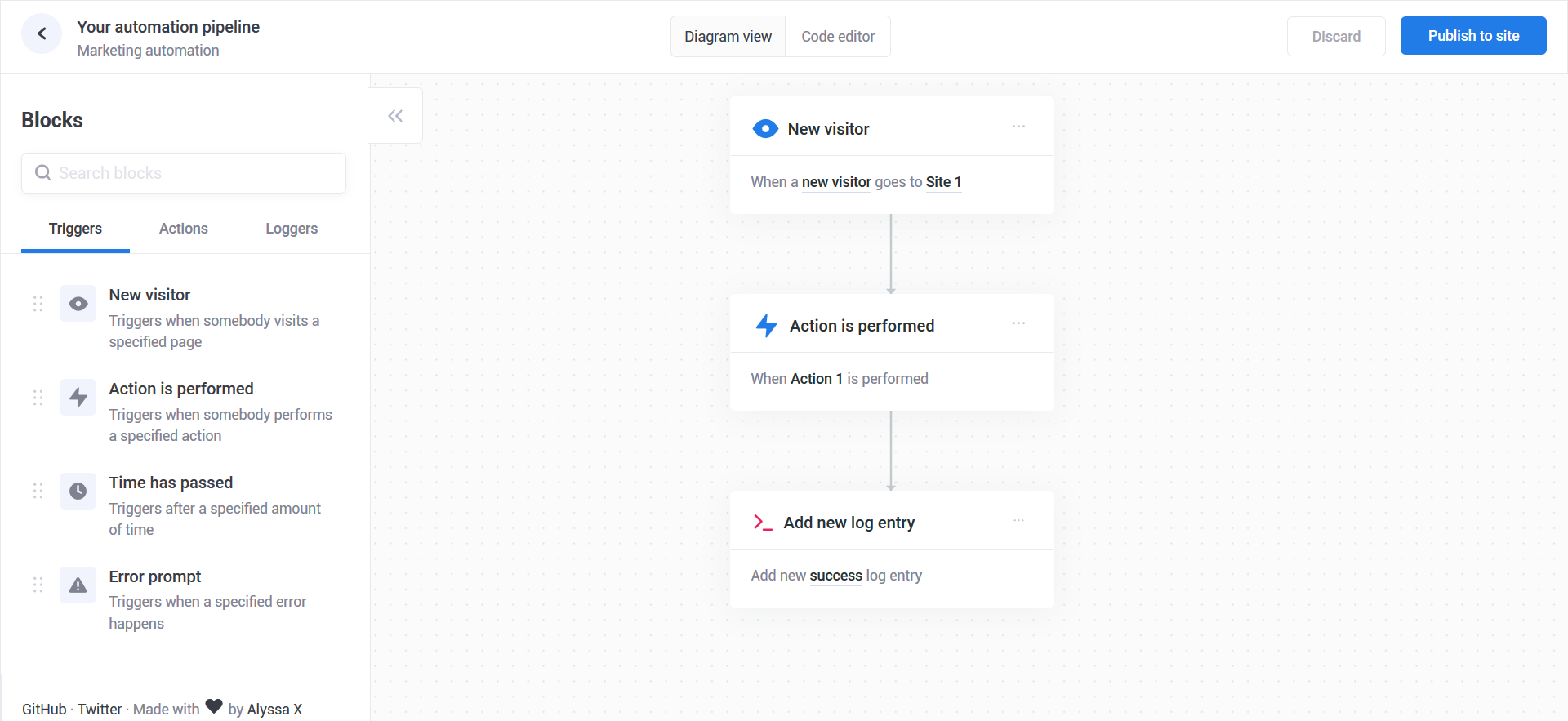
    推荐理由:众所周知,流程图一般来说内容来来去去都是那几类,而要想画的美观也需要在细节上下不少功夫。这个项目是一个画流程图的 JS 库,将流程图中的各个步骤用卡片的形式来表现,而你只需要关心卡片内容,不用费心于如何整顿诸如连接箭头等等琐碎的细节,尽管现在作为流程图来说功能还不够完善,但是这个想法会让流程图的创建变得更为简单也更为美观。
    今日推荐英文原文:《How To Hide Data in Images Using Python》作者:Ashwin Goel
    原文链接:https://medium.com/better-programming/image-steganography-using-python-2250896e48b9
    推荐理由:传说中百闻不如一见的图片藏数据大法

    How To Hide Data in Images Using Python

    An introduction to image steganography

    Steganography is the art of hiding secret data in any file.

    The secret data can be data of any format like text or even a file. In a nutshell, the main motive of steganography is to hide the intended information within any file, usually an image, audio, or video, without actually changing the external appearance of the file, i.e. it should look the same as before.

    In this blog, we will be focussing on learning image-based steganography, i.e. hiding secret data in an image.

    But before diving a little deeper into it, let’s look at what an image comprises of.
    1. Pixels are the building blocks of an image.
    2. Every pixel contains three values: (red, green, blue) also known as RGB values.
    3. Every RGB value ranges from 0 to 255.
    This much information is enough to get started.

    Now, let’s look at how we can encode and decode data into our image.

    Encoding

    There are a lot of algorithms that can be used to encode data into the image, and in fact, you can also make one yourself. The one being used in this blog is easy to understand and implement, as well.

    The algorithm is as follows:
    1. For each character in the data, its ASCII value is taken and converted into 8-bit binary [1].
    2. Three pixels are read at a time having a total of 3×3=9 RGB values. The first eight RGB values are used to store one character that is converted into an 8-bit binary.
    3. The corresponding RGB value and binary data are compared. If the binary digit is 1 then the RGB value is converted to odd and, otherwise, even.
    4. The ninth value determines if more pixels should be read or not. If there is more data to be read, i.e. encoded or decoded, then the ninth pixel changes to even. Otherwise, if we want to stop reading pixels further, then make it odd.
    Repeat this process until all the data is encoded into the image.

    Example

    Suppose the message to be hidden is ‘Hii’.

    The message is of three bytes, therefore, the pixels required to encode the data are 3 x 3 = 9. Consider a 4 x 3 image with a total of 12 pixels, which are sufficient to encode the given data.
    [(27, 64, 164), (248, 244, 194), (174, 246, 250), (149, 95, 232),
    (188, 156, 169), (71, 167, 127), (132, 173, 97), (113, 69, 206),
    (255, 29, 213), (53, 153, 220), (246, 225, 229), (142, 82, 175)]
    

    Step 1

    The ASCII value of H is 72, whose binary equivalent is 01001000.

    Step 2

    Read the first three pixels.
    (27, 64, 164), (248, 244, 194), (174, 246, 250)
    

    Step 3

    Now, change the pixel value to odd for 1 and even for 0 as in the binary equivalent of data.

    For example, the first binary digit is 0 and the first RGB value is 27, it needs to be converted to odd, which implies 26.

    Similarly, 64gets converted to 63because the next binary digit is 1so the RGB value should be made odd.

    So, the modified pixels are:
    (26, 63, 164), (248, 243, 194), (174, 246, 250)
    

    Step 4

    Since we have to encode more data, the last value should be even. Similarly, i can be encoded in this image.

    While making the pixel values odd/even by doing +1 or -1, you should take care of binary conditions. I.e., the pixel value should be more than or equal to 0 and less than or equal to 255.

    The new image will look like:
    [(26, 63, 164), (248, 243, 194), (174, 246, 250), (148, 95, 231),
    (188, 155, 168), (70, 167, 126), (132, 173, 97), (112, 69, 206),
    (254, 29, 213), (53, 153, 220), (246, 225, 229), (142, 82, 175)]
    

    Decoding

    For decoding, we shall try to find how to reverse the previous algorithm that we used to encode data.
    1. Again, three pixels are read at a time. The first 8 RGB values give us information about the secret data, and the ninth value tells us whether to move forward or not.
    2. For the first eight values, if the value is odd, then the binary bit is 1, otherwise it is 0.
    3. The bits are concatenated to a string, and with every three pixels, we get a byte of secret data, which means one character.
    4. Now, if the ninth value is even then we keep reading pixels three at a time, or otherwise, we stop.

    For example

    Let’s start reading three pixels at a time.

    Consider our previously encoded image.
    [(26, 63, 164), (248, 243, 194), (174, 246, 250), (148, 95, 231),
    (188, 155, 168), (70, 167, 126), (132, 173, 97), (112, 69, 206),
    (254, 29, 213), (53, 153, 220), (246, 225, 229), (142, 82, 175)]
    

    Step 1

    We first read the three pixels:
    [(26, 63, 164), (248, 243, 194), (174, 246, 250)
    

    Step 2

    Reading the first value: 26, which is even, therefore the binary bit is 0. Similarly, for 63, the binary bit is 1and for 164it is 0. This process continues until the eight RGB value.

    Step 3

    We finally get the binary value: 01001000 after concatenating all individual binary values. The final binary data corresponds to decimal value 72, and in ASCII, it represents the character H.

    Step 4

    Since the ninth value is even, we repeat the above steps. We stop when the ninth value encountered is odd.

    As a result, we get our original message back which was Hii.

    The Python program for the above algorithm is as follows:

    The module used in the program is PIL which stands for Python Imaging Library. It gives us the capability to perform operations on images in Python.

    Program Execution
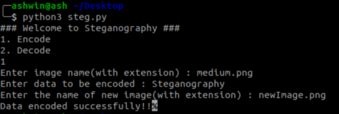


    Input image

    Output image

    Limitations

    This program might not work as expected with JPEG images because JPEG uses lossy compression which means that the pixels are modified to compress the image and reduce the quality, therefore data loss happens.
    下载开源日报APP:https://opensourcedaily.org/2579/
    加入我们:https://opensourcedaily.org/about/join/
    关注我们:https://opensourcedaily.org/about/love/

  • 开源日报第625期:《放烟花 hanabi》

    30 11 月, 2019
    开源日报 每天推荐一个 GitHub 优质开源项目和一篇精选英文科技或编程文章原文,坚持阅读《开源日报》,保持每日学习的好习惯。
    今日推荐开源项目:《放烟花 hanabi》
    今日推荐英文原文:《Is Code Coverage a Useless Metric?》

    今日推荐开源项目:《放烟花 hanabi》传送门:GitHub链接
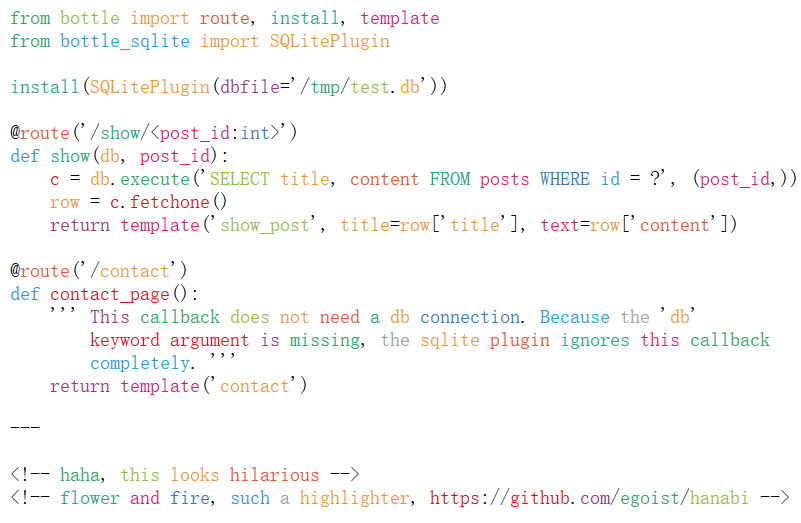
    推荐理由:众所周知,烟花是五颜六色的,又众所周知,现在没有人放烟花。不过把这兴头拿来放在别的地方的话,就有了这个项目。这个项目用一种极其五颜六色的方法高亮你的代码,让它们看起来就像没有规律的彩色烟花一样(你不会想整天对着五颜六色的工作用代码的),尽管就实用性来说很emmmmm……但是娱乐性可以说是拉的很满了。

    今日推荐英文原文:《Is Code Coverage a Useless Metric?》作者:Jamie Morris
    原文链接:https://medium.com/better-programming/is-code-coverage-a-useless-metric-bc76e0fde9e
    推荐理由:测试是要确保没有问题或者找出问题才叫做测试

    Is Code Coverage a Useless Metric?

    Should you really be going for 100% test coverage?

    Many are the smug developers who laud their high coverage over their peers. And many are the cynics who sneer at the mention of any such metric.

    I’d like to think that most of us sit somewhere between those two positions, recognizing the value of metrics without becoming a slave to them.

    I recently mentioned “100% test coverage” in a sentence. I forget the exact context, but I believe I was pointing out that if you follow TDD to the letter, it should be impossible not to get 100%.

    A colleague stood up to peer over his monitor at me, something primal in his brain, angered by the mention of “100% test coverage”. We had a friendly debate on the subject, and I resolved to write down what we discussed.

    Metrics

    Test coverage is a by-product of good practice, and as such, your development team probably shouldn’t focus on it.

    As a developer, you probably know already if you are testing enough, so having a metric that confirms or refutes that belief is unnecessary. If the metric says that you aren’t testing enough, but you believe you are, should you write more tests? Probably not.

    Your boss, on the other hand, or their boss, shouldn’t have to get into the weeds to understand if your code is robust.

    Like it or not, your boss wants to know that you are doing a good job. This probably includes testing your code, which I say on the assumption that your boss values automated testing.

    Let’s not dwell on the possibility that your boss does not value tests, since coverage isn’t going to help in that case.

    If anyone (your boss included) wants to know how well you test your code, they have three options:
    1. Talk to you about it.
    2. Check your code for themselves.
    3. Look at some kind of high-level metric that gives them a rough idea.
    Option one is viable, but relies on both trust and shared understanding. I’ve worked with some teams who claimed to be writing enough tests, yet every pull request came with implementation but no tests.

    I challenge any developer to convince me that they don’t need tests for new functionality.

    I’ve also worked with people who were so desperate to not deliver bad news that they outright lied about the quality of their tests. It turns out there were no tests.

    Option two is unrealistic for many people. Stakeholders are allowed to care about testing, since it represents a huge safety net if done properly. But most stakeholders probably lack the technical expertise, time, and experience to read through a suite of tests and assess their quality.

    This is where metrics come into play. Test coverage does not assure high-quality code any more than the quality of a movie is assured by how much money it makes. In both cases, the given metrics are indicators only, and used by the powers that be to make decisions.

    The true value of code coverage is as an indicator. Just like high profits indicate a good movie, high code coverage indicates a well-tested codebase.

    There are exceptions, of course.

    Transfomers and its many (many) sequels are huge box office successes, yet many films in the series are heavily panned by viewers. At the same time, there are countless movies for whom financial success was elusive, yet have received universally critical acclaim. Fight Club, for example, is regarded as a classic, yet had an underwhelming run at the box office.

    But we’re talking about code quality, not movies. When I see code coverage of 90%, I might reasonably assume that the project is well-tested. When I see coverage of 10% I might reasonably assume it is not.

    If I am a senior leader, low coverage might tell me that my teams don’t feel they have the time to write tests. It might indicate that teams are chasing deadlines or that they don’t know how to test their code.

    This might allow me to make adjustments for the good of the team and the project — the metric becomes a starting point for a conversation.

    The harder problem to spot is when high code coverage masks poor quality. I don’t often see this, but it does happen. Usually it happens when inexperienced developers work alone without peer review.

    The best cure for this kind of behavior is pair programming, though most teams settle for code reviews.

    What Does High Coverage, Low Quality Look Like?

    Poor quality tests might take many forms, but most commonly, they have very few assertions. Such tests still have some value as smoke tests, but can often mask problems that are harder to spot.

    On one occasion, I was reviewing a pull request in which the tests were all passing and the coverage was above the arbitrary threshold set in the build pipeline.

    One test had a mock created during test setup, and the only assertion was against the output of the mock. That highlighted to me that the developer didn’t understand the purpose of mocks, and when I talked to him, he was fairly critical of his own code, but even more critical of the process.

    To him, the crappy tests were pointless because they only asserted on the outcome of the mock, but were necessary to pass the coverage tollgate.

    Given how many pull requests don’t get properly reviewed (especially the tests), I suspect there are more examples I could find, and wonder how much of the cynicism around testing rests on poor assumptions.

    In the example above, I worked with the developer in question to rewrite his tests to understand the purpose of unit tests. I’m sure this is old news to many, but it doesn’t hurt to remind ourselves once in a while.
    • A unit test should test a single class/function (the unit).
    • The unit should be small enough that it is easy to test — if you find yourself testing dozens of different permutations of the same unit, this might indicate that your unit is doing too much and should be broken into smaller units (the single responsibility principle).
    • You should mock dependencies outside of the unit, such as API calls or other units that interact with this one (for instance, when writing a component that contains several sub-components, you probably ought to mock the sub-components and test them elsewhere).
    • You should not mock anything inside the unit — this is a smell that usually means you should refactor something out of the class.
    • Your assertions should not care about private properties or methods — only test the outputs of your unit, not the internals.
    The last part is especially important, since it’s one of the most common ways to end up with brittle tests. Here’s an example of bad testing vs. good testing:
    it('should get the customers from the service', () => {
      const testData = CUSTOMER_FACTORY.getArray(10);
      const mockService = {
        getCustomers: () => testData
      };
      const unit = new CustomerListComponent(mockService);
    
      expect(unit.customers).toBe(testData);
    });
    
    it('should display the customers from the service', () => {
      const testData = CUSTOMER_FACTORY.getArray(10);
      const mockService = {
        getCustomers: () => testData
      };
      const unit = new CustomerListComponent(mockService);
    
      const html = unit.render();
    
      const listItems = html.querySelectorAll('li.cusomer');
      expect(listItems.length).toBe(testData.length);
      testData.forEach((customer, i) => {
        expect(listItems[i].textContent).toContain(customer.name);
      });
    });
    
    In the first example, our assertion doesn’t really test anything valuable to the end-user. The user doesn’t care if a property is set — they care if the data is visible on screen. The second example shows a better way to make the assertion.

    The exception is when you are writing an API for others to consume. At that point, your user is another developer and you might care about properties being set, since the user/developer will need those properties.

    But again, you ought to only test the public properties, since they form your contract with the user. Don’t go testing the internals of your unit.

    There are, of course, many ways to write “bad” tests, but most of the time even a “bad” test is better than none at all.

    There are exceptions, I’m sure, but for the most part, the fact that you are writing tests at all is a huge win for your customer and future-you.

    Metrics = Suspicion

    I see many developers who become suspicious when anyone outside the team asks about code coverage. “Why do you need to know?” is often the knee-jerk response.

    In some respects, this is justified, but it very much depends on the motives of the external party. Developers don’t want to feel their metrics will be used as a cudgel to punish them, nor do they want to feel that they have to “play the game” to appear competent.

    This speaks of a distrust between teams and the rest of the world. “They” want to rank every team and punish those at the bottom. “Other teams” will game the system by writing poor quality tests to increase coverage and appear competent.

    “We” will appear less competent than we actually are in comparison because “we” have too much integrity to chase a metric.

    I haven’t had the displeasure of working under anyone who actually viewed coverage as a ranking system or an absolute measure of quality.

    I’ve no doubt that such people exist, but I’m sure that many of those could be talked around. If you know anyone in that category, point them at this article, for starters.

    The Best Kind of Test Is a Failing Test

    Remember that the purpose of your test is to tell you when stuff is going wrong. In that respect, a test that always passes is nice to have, but ultimately useless.

    That same test becomes useful as soon as it fails. Assuming that it didn’t fail because you changed the test itself, the test failure indicates a problem with your implementation.

    It’s much better to have your test alert you to the problem than for a customer to discover it (or worse, for the problem to go unnoticed, subtly undermining your application in small ways).

    If my test was a person, I would take it out for a celebratory drink once the problem it flagged up is fixed.

    Get to the Point!

    Oh yeah, code coverage. Well, I look at it like this: I can pretty easily hit 100% coverage and still not have enough tests. All 100% means is that every line of my code was run at least once. It could still be gibberish.

    A more pessimistic developer might use this as an argument for why 100% is a stupid target. I guess that’s right in a way, but what makes 80% any better? What is in the extra 20% that you aren’t testing?

    I prefer to exclude code that I don’t want to test, and then aim for 100% on everything that’s left. That way, I’m being explicit about the bits I do and don’t want tested.

    My Java developer friends, of course, point to getters and setters as examples of code that doesn’t need to be tested, because they are auto-generated, and testing them just to hit a metric is a waste of time.

    To that, I say: “Come and write JavaScript instead — it’s what all the cool kids are doing.”
    下载开源日报APP:https://opensourcedaily.org/2579/
    加入我们:https://opensourcedaily.org/about/join/
    关注我们:https://opensourcedaily.org/about/love/
  • 开源日报第624期:《你的名字 MyDiary》

    29 11 月, 2019
    开源日报 每天推荐一个 GitHub 优质开源项目和一篇精选英文科技或编程文章原文,坚持阅读《开源日报》,保持每日学习的好习惯。
    今日推荐开源项目:《你的名字 MyDiary》
    今日推荐英文原文:《Why Hackathons Make You a Better Developer》

    今日推荐开源项目:《你的名字 MyDiary》传送门:GitHub链接
    推荐理由:几年之前你的名字电影里那个传说的日记 APP 估计有不少人都记忆犹新,既然如此自己把它创造出来就好了。这个项目是根据那个电影中出现的 APP 实现的安卓版日记应用,目标自然就是为了和电影里的应用一毛一样了,尽管 Google Play 上的链接已经撤掉,但是时至今日实现这个想法的成果也有不少,运用所学实现自己曾经喜欢但是做不到的事情的感受真的很好(预感到下一个被实现的应该就是天气之子的项目网站了)。
    今日推荐英文原文:《Why Hackathons Make You a Better Developer》作者:Ilya Lyamkin
    原文链接:https://medium.com/better-programming/why-hackathons-make-you-a-better-developer-81ef8f4a9385
    推荐理由:Hachathons 应该算是随处可见的词语了,那么这是一个会带来什么样影响的活动呢

    Why Hackathons Make You a Better Developer

    Pressure makes better programmers, faster

    Over the course of my life, I’ve participated in more than 20 hackathons, so I might be a little biased on them, but on the other hand, I know a lot about how they can be useful.

    Let me start by explaining what a hackathon means to me. In general, it’s an event of short duration (usually one or two days) where people come together to creatively solve problems. Hackathons can be themed, where the projects are confined to a particular problem such as food sustainability or returning citizens.

    Reasons to Participate in Hackathons

    Now that we have covered the definition, we can start with the reasons why you’ll become a better developer by participating in hackathons.

    Extreme programming

    It’s very easy to forget about speed while working with Scrum processes, so let’s bring the former back. With short deadlines and ambitious ideas, hackathons teach you how to code fast and, more importantly, think fast.

    If you’re wondering why it’s that important, the reason is that you’ll know your limits much better and will be able to push them even further after the hackathon. You’ll not only be surprised by how much you have achieved but also understand your areas of growth.

    Learning how to estimate your efforts better

    Due to the limited time, proper estimation is essential for your success. If your estimation is incorrect, you won’t be able to achieve what you planned in time. The truth is, at a hackathon, you’ll notice that your estimations are far from perfect. Use this fact to your advantage and adjust your estimations so that it doesn’t happen at work.

    Creative thinking

    Hackathons teach you how to solve a known problem creatively. In the first stage, ideation, you have to come up with a unique and fresh idea. If you think that’s all, actually, this is just the beginning. Now it’s time for execution, and you have to be creative at every step of the way because you’ll never have enough time or well-defined processes. Something will always break most unexpectedly, and you’ll need to find a viable solution to be able to ship the product in time.

    Learning new technology

    Hackathons are perfect places to learn something new. If you use React.js at work, try Svelte. Writing back-end with Java? Learn Kotlin! Or completely switch your stack from front end to back end, and the other way around. Maybe you want to get into VR. This is your chance.

    Networking

    Hackathon is an excellent chance to talk to fellow developers and like-minded people. You can get a big picture of what they’re working on and which tools they’re currently using. Think of it as a conference where you also have to code.

    Iteration-based approach

    At hackathons, you should focus on building a minimum viable product, which means you should be able to drop parts that are not required and then iterate over it. That’d allow you to ship a product where you can show something to people even if you can’t finish this cool new feature in time.

    Learning how to split tasks in the best way

    If your team consists of four or five people, you have to make sure your team works as one organism and utilizes the abilities of each team member. Be ready to communicate with your team actively and split the product into several independent pieces. Without proper separation of concerns, four people would work as two with clearly divided tasks.

    Shifting focus to bring business value

    In our work, you can easily forget why you’re writing code and what value it brings to the end user. On the other hand, at hackathons, you’re solving real-world challenges — and thinking about them in the first place. It shifts your vision from just code to a big picture of what you’re trying to archive.

    Workshops

    It’s popular to have workshops that you can attend at the time of the event. They could be about new technology or about soft skills like improving your resume. They can be highly beneficial if you have just started your career or want to learn something new.

    Getting feedback

    Hackathons are one of the best places for validating your ideas. In your normal life, it’s hard to find someone who will be both honest and willing to spend time reviewing your ideas. Other options include using your personal network or paying for ads. At hackathons, you get all of that for free, and from people like you.

    Giving feedback

    I know a lot of people who find joy in helping and teaching others. By doing so, you can learn what others are doing and, if you have expertise in that area, help them. The best way to grow your network is to be helpful, so actively seek out these opportunities.

    Having fun

    Ultimately, this is what hackathons are all about. Don’t worry if you’re not going to be able to present a perfect product, just have fun. If your hackathon takes place in a different city or country, take advantage. Get to know the local culture and engage in unique experiences.

    How To Get Started

    If you decide to give hackathons a chance, there are several resources to check out.

    The first is Major League Hacking (MLH). It’s the official student hackathon league that runs over 200 weekend-long invention competitions.

    Second, make sure to go over Junction Hackathon and TechCrunch Disrupt Hackathon. They’re one of the biggest independent hackathons in the world.

    Last but not least, check Meetup to find local hackathons in your city.

    Conclusion

    I hope I convinced you to take a look at hackathons. It would definitely not be easy to code for two days non-stop, but the results will pay off. You’ll learn a lot about yourself and your limits, find out how to estimate and split tasks, and understand how to apply your skills to solve real-world challenges. And don’t forget to have fun.
    下载开源日报APP:https://opensourcedaily.org/2579/
    加入我们:https://opensourcedaily.org/about/join/
    关注我们:https://opensourcedaily.org/about/love/

  • 开源日报第623期:《基础表情图标 twemoji》

    28 11 月, 2019
    开源日报 每天推荐一个 GitHub 优质开源项目和一篇精选英文科技或编程文章原文,坚持阅读《开源日报》,保持每日学习的好习惯。
    今日推荐开源项目:《基础表情图标 twemoji》
    今日推荐英文原文:《Stop Putting So Many If Statements in Your JavaScript》

    今日推荐开源项目:《基础表情图标 twemoji》传送门:GitHub链接
    推荐理由:就如同那些叫做 xxxIcon 的图标库一样,表情图标一样可以装点页面,而且其拥有各种颜色的特点比起大部分时候都是纯色的普通图标来说更适合于需要花哨装扮的页面。这个项目是推特的基础 Unicode 表情符号库,可以通过使用 API 或者直接插入 PNG、SVG 等方式来加入页面,在使用前别忘了加上 UTF-8 的字符集限定。
    今日推荐英文原文:《Stop Putting So Many If Statements in Your JavaScript》作者:Chris Geelhoed
    原文链接:https://medium.com/better-programming/stop-putting-so-many-if-statements-in-your-javascript-3b65aaa4b86b
    推荐理由:if 的另外四种写法,有些时候能够保持易读性的同时让代码更简洁

    Stop Putting So Many If Statements in Your JavaScript

    4 other ways of handling conditional logic in your code

    “To a man with a hammer, everything looks like a nail” — Mark Twain
    I like to think of conditional logic as the bread and butter of software. It gives developers the power to build things that are interesting, useful, and fun.

    The most popular way of handling conditional logic is the if statement. The if statement is universal, flexible, and easy to understand, so its popularity comes as no surprise.

    There are, however, other ways of handling conditional logic that are often overlooked by developers. It’s easy to reach for the trusty if statement for every job, but learning about other techniques will make you a more skillful and efficient programmer.

    A master carpenter wouldn’t use the same tool for every job, and a master developer shouldn’t either.

    This article explores four alternatives to the classic if statement.
    • Ternary Operators
    • Switch Statements
    • Logical Operators (&& and ||)
    • Lookup Maps

    Ternary Operators

    Ternary operators are a great way to handle basic if-else conditions. In the example below the value assigned to message changes depending on whether hasError is truthy or falsy.

    With a classic if statement:
    let message = "Thanks for contacting us! We'll be in touch shortly!"
    if (hasError) {
      message = "Oops, that's an error. Please try again later!"
    }
    
    This solution first sets the message to be the error-free version and then overwrites it if necessary.

    Now with a ternary operator instead:
    const message = hasError
      ? "Oops, that's an error. Please try again later!"
      : "Thanks for contacting us! We'll be in touch!"
    
    The ternary option has some notable advantages here:
    • It’s more compact because message only needs to be assigned once.
    • Since the message no longer needs to be overwritten when an error is present, we can use const instead of let.
    The ternary operator is the clear winner in this situation, but don’t get carried away with it. Only apply it in cases that require relatively simple logic and don’t combine multiple ternaries on a single line. Your co-workers will thank you!

    Switch Statements

    Switch statements are the most obvious substitute for if statements. Instead of determining whether a condition is truthy or falsy, it looks at one specific value and executes it’s matching case block.

    This makes switch statements a little less flexible than if statements, but it also makes them a little more concise. Let’s look at an example:

    First, with an if statement:
    if (status === 200) {
      handleSuccess()
    } else if (status === 401) {
      handleUnauthorized()
    } else if (status === 404) {
      handleNotFound()
    } else {
      handleUnknownError()
    }
    
    Next, with a switch:
    switch (status) {
      case 200:
        handleSuccess()
        break
      case 401:
        handleUnauthorized()
        break
      case 404:
        handleNotFound()
        break
      default:
        handleUnknownError()
        break
    }
    
    The switch uses more lines of code, but avoids repeating the equality check again and again, and has a more streamlined appearance overall.

    One important detail to consider when writing switch statements is your use of breaks. Unlike an if-else chain, switch statements can “fall through” to the next case. This can be confusing, so it’s usually recommended that you add a break to the end of every case.

    Logical Operators (&& and ||)

    The && and || (“and” and “or”) operators behave differently in JavaScript then they do in other programming languages. This special behavior gives these operators a unique ability to handle conditional logic.

    Here’s how the && operator works in JavaScript:
    • First, it looks at the left side of the operator. If its value is falsy then it returns that value without even looking at the right side of the operator.
    • If the value on the left side is found to be truthy then the value on the right of the operator is returned.
    Similarly, this is how the || operator works:
    • First, it looks at the left side of the operator. If its value is truthy then it returns that value without even looking at the right side of the operator.
    • If the value on the left side is found to be falsy then the value on the right of the operator is returned.
    The key takeaway from this is that the && and || operators do not necessarily need to return a boolean (true or false). This can be confusing, but it can also be useful.

    Putting the && Operator into Action

    Often you want to access a property inside an object, but can’t be sure whether that object exists beforehand.

    For example, maybe you want to use a user’s name property to construct a welcome message:
    const message = `Welcome, ${user.name}!`
    
    But what if user is set to null, false, or undefined instead?
    const message = `Welcome, ${user.name}!`
    // TypeError: Cannot read property 'name' of null
    
    If user is not an object and we attempt to access the name property on it, JavaScript will throw an error.

    This can be avoided by adding an if statement to your code:
    let message = null
    if (user && user.name) {
      message = `Welcome, ${user.name}!`
    }
    
    This does the trick, but && operators can make this a bit more concise:
    const message = user && user.name && `Welcome, ${user.name}!`
    
    This approach allows for message to be set with const rather than let and gets the job done in a single line of code. Much better!

    Using the || Operator

    The || operator is great for assigning fallback values.

    As an example, let’s say that you want to create a handle variable for your current user. If that user has a valid username then that should be used, but if the username is set to null then a fallback value of “Guest” should be used instead.

    First, with a plain if statement:
    let handle = 'Guest'
    if (username) {
      handle = username
    }
    
    Now, by using the || operator:
    const handle = username || 'Guest'
    
    Again — much cleaner and only one line of code. A great improvement!

    Lookup Maps

    Lookup maps are perfect for getting one value that’s associated with another.

    As an example, imagine that we want to get the color associated with the status of a message box. A typical setup might look something like this:
    • Success is green
    • Warning is yellow
    • Info is blue
    • Error is red
    Let’s write a function that does this. First, with an if statement:
    function getStatusColor (status) {
      if (status === 'success') {
        return 'green'
      }
      if (status === 'warning') {
        return 'yellow'
      }
      if (status === 'info') {
        return 'blue'
      }
      if (status === 'error') {
        return 'red'
      }
    }
    
    This is fine, but a lookup map might be more suitable. Object literals are one way to implement a lookup map in JavaScript:
    function getStatusColor (status) {
      return {
        success: 'green',
        warning: 'yellow',
        info: 'blue',
        error: 'red'
      }[status]
    }
    
    This is slimmer and less repetitive. As an added benefit, lookup maps don’t necessarily need to be hardcoded — the relationship between status’ and colors could be dynamic and this pattern would still work.

    Summary

    If statements are a powerful tool that all JavaScript developers should keep close at hand, but there are other methods of handling conditional logic that are sometimes more appropriate.

    Ternary operators are perfect for handling if-else logic in a single line of code, but they should only be used for fairly simple use cases.

    Switch statements are ideal when you are interested in a specific variable that could take on multiple distinct values. They are less powerful than if statements but are often nicer to look at.

    Unlike other programming languages, the && and || operators don’t always return a boolean value in JavaScript, and this behavior can be useful. The && operator is often used to avoid errors when attempting to access an object’s properties, and the || operator is often used to assign a fallback value to a variable when a first choice is not available.

    Lookup maps are a great way to get one value that is associated with another, for example getting the color associated with a message’s status (a status of success might map to a color of green).

    Mastering these four conditional logic patterns will give you more flexibility in how you structure your JavaScript and will make you a better programmer overall. By selecting the right tool for the job, your code will become more elegant, concise, and maintainable.
    下载开源日报APP:https://opensourcedaily.org/2579/
    加入我们:https://opensourcedaily.org/about/join/
    关注我们:https://opensourcedaily.org/about/love/
←上一页
1 … 102 103 104 105 106 … 262
下一页→

Proudly powered by WordPress