开源日报 每天推荐一个 GitHub 优质开源项目和一篇精选英文科技或编程文章原文,坚持阅读《开源日报》,保持每日学习的好习惯。
今日推荐开源项目:《模糊测试 Web-Fuzzing-Box》
今日推荐英文原文:《Time Zones for Software Developers》

今日推荐开源项目:《模糊测试 Web-Fuzzing-Box》传送门:
项目链接
推荐理由:这个项目介绍了一些 web 应用的模糊测试案例,所谓模糊测试就是通过人为制造一些正常逻辑中不会出现的输入来测试系统的稳定性,在 web 应用中主要体现在各种人工修改后的请求上,设计考虑不周的话很容易会被抓住空隙入侵。
今日推荐英文原文:《Time Zones for Software Developers》作者:Bikash Paneru
原文链接:
https://medium.com/better-programming/time-zones-for-software-developers-7f21d5a407aa
推荐理由:如果你开发的项目面向更多人,那么时区可能就会成为一个问题
Time Zones for Software Developers
Working with time zones can be hard. Let’s clear things up
Working with time zones can be rough! In fact, this article was inspired by the problems that I had with them. I finally decided to bite the bullet and do some extensive research to properly understand them. I found that they get much easier to work with when you understand the basics. This is my attempt, by putting all the basics in one place, to help anyone else who is struggling with time zones. There are also solutions to some common problems at the end.
Coordinated Universal Time (UTC): The Bread and Butter
This is the first thing we need to understand before looking at time zones. UTC is the world’s time standard. This means that the time in every other part of the world is determined using UTC. In fact, the local time anywhere in the world can be obtained by adding or subtracting an offset from UTC.
For example, the time in Nepal, where I live, can always be obtained by adding five hours and 45 minutes to the current time in UTC. So the time here can be expressed as UTC+05:45.
UTC itself is the time in the region of the Earth where the longitude is 0 degrees. This region is known as the prime meridian. People often confuse UTC for a time zone, but UTC itself is not a time zone.
What Is a Time Zone?
The Earth rotates approximately 15 degrees per hour, so the world was divided into 360/15 = 24 time zones. The idea was that time in each 15-degree interval would always be the same.
The time in the time zones to the left of the prime meridian can be obtained by subtracting the offset from UTC. Similarly, the time in the time zones to the right can be obtained by adding the offset to UTC. The offset in each of the regions differs from the adjacent region by exactly one hour.
These regions can also be referred to by a name. For example, the time zone which observes no offset from UTC is called GMT (Greenwich Mean Time). Another example is EST (Eastern Standard Time) which is the time zone with an offset of -5.
All of this is more clearly illustrated in the picture below.
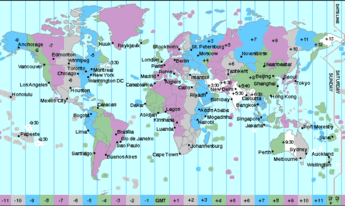
However, it’s not that simple. These regions fall in different countries and territories or sometimes only intersect part of a country’s territory, so the time zones that we actually use are only loosely based on these regions. Instead, they are influenced by the boundaries of countries and territories. Thus there are way more than just 24 time zones. As a result, there are many time zones that don’t have an exact hour offset. For example, St. John’s, NFLD, in Canada has an offset of -03:30.
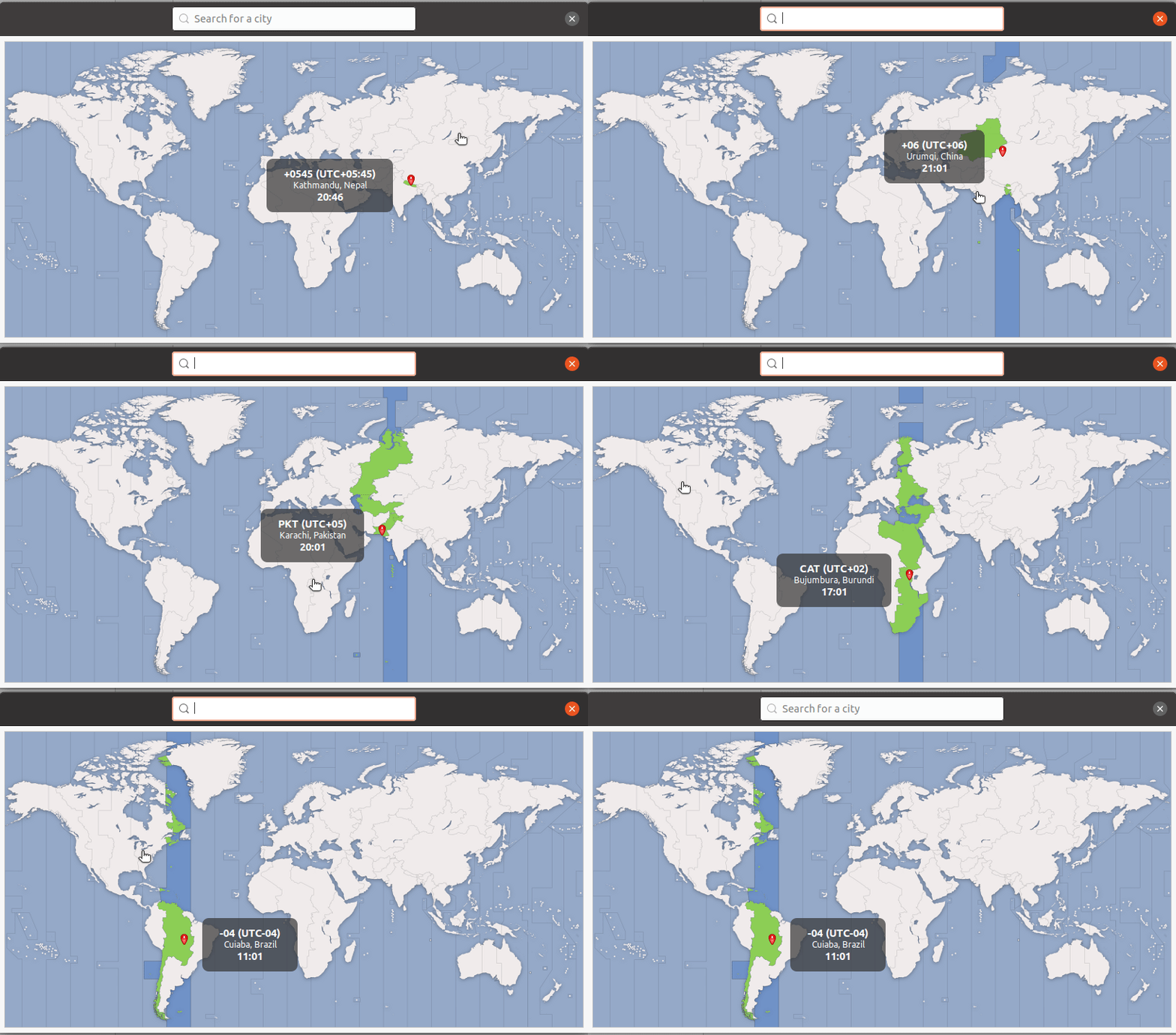
Time zones affected by boundaries (Time zone selection interface in Ubuntu)
The important things to take away from this are:
- Just because two pieces of land lie in the same 15-degree region of longitude, this does not mean that they have the same time zone or the same offset from UTC.
- Two different time zones can have the same offset from UTC.
- Two different countries or their regions can be in the same time zone.
- Two regions in the same country can be in different time zones.
The Types of Time in the World
I know that “types” of time sounds strange. This is just because of the lack of a better name. There are two types of time used throughout the world. They are daylight saving time and standard time.
Daylight saving time
“Daylight saving time (DST) is the practice of setting the clocks forward one hour from standard time during the summer months and back again in the fall, in order to make better use of natural daylight.” — timeanddate.com
Whenever a region starts daylight saving, it changes its time zone to reflect this. For example, regions in Central Standard Time (CST) that also practice daylight saving will change to CDT (Central Daylight Time).
Standard time
This is the time used in a region when daylight saving time is not in use. This is the time that we used to define time zones.
One thing to note is that not all regions that use the same standard time or are in the same time zone will practice daylight saving. So regions that have the same local time during the fall (when daylight saving is not practiced) may have different local times during the summer (when daylight saving is practiced).
Time Zones in Computers
We saw some examples of time zones earlier: EST, CST, CDT, and GMT. These time zones are based on the 15-degree division of longitude and do not account for daylight saving. We also saw that determining the time in a given region gets complicated because of daylight saving. For this reason, these longitude-based time zones can’t be used directly for time conversions.
The solution to this problem is a database of time zones called the time zone database. This database treats time zones as national regions instead of using longitude-based time zones. The time zones in this database come coupled with information about daylight saving time along with standard time. This database is the key to performing time conversions.
For example, America/New_York is a time zone from this database. The database contains the following crucial information about this time zone:
- The offset during standard time (which is -05:00). This is equivalent to EST (Eastern Standard Time).
- The offset during daylight saving time (which is -04:00). This is equivalent to EDT (Eastern Daylight Time).
- Rules on when to transition to daylight saving time and back
We can now easily imagine combining this information with the UTC time to calculate and display time in any time zone that we want. Nevertheless, you should always use a library specifically created for working with time zones, like Moment Timezone, because coding this yourself can be a daunting task.
The time zone database is constantly updated, so it’s crucial to keep this database up to date in any application that makes use of it.
The UNIX Time Stamp: How Computers Store Time Information
“The UNIX time stamp is a way to track time as a running total of seconds. This count starts at the Unix Epoch on January 1st, 1970 at UTC. Therefore, the UNIX time stamp is merely the number of seconds between a particular date and the Unix Epoch.” — Unix Time Stamp
UNIX time stamps are independent of time zones. This means that a UNIX time stamp always corresponds to a point of time in UTC. To express time in any other time zone, you need to add the offset of that time zone to the UNIX time stamp. So, as a rule of thumb, if you need to store time in a specific time zone, then you need to store the time zone that you wish to represent alongside the UNIX time stamp.
For example, in JavaScript, whenever we run Date.now() or (new Date()).valueOf(), then we will get back a UNIX time stamp. However, if we run (new Date()).toString(), we will get back a date string that is offset to the time zone that our system is set to. This string will also contain the time zone information.
Some Common Problems Involving Time Zones
Below we will look at some common problems involving time zones and how to solve them. Feel free to skip this section if you think you have a good grasp on how to solve these problems.
Displaying time in the user’s time zone
This is a pretty common task in a lot of applications. Let’s say that we have the following requirements:
- We are building a social network for dogs where users can post pictures of their dogs. Each post is tagged with the time stamp of when it was posted. Let’s call this the post time.
- When some other user views the post, they must be able to see the post time of the dog pic. This post time must be displayed in the viewer’s time zone.
For example, if I post a picture of my non-existent dog at 10:00 p.m. Nepal time, then someone viewing the picture in New York must see 11:15 a.m. as the post time when daylight saving is not observed and 12:15 p.m. as the post time when daylight saving is observed (conversion source: TimeIs)
Solution
When the user creates the post:
- Get the UTC date from the back end. Most back-end servers are set to GMT as the time zone by default, so this should not be a problem. You could also send the time stamp from the front end, but it’s not a good idea to rely on the client if you don’t have to.
- If your database supports a date type, then store the obtained GMT date directly. If not, then convert it to a UNIX time stamp and store that in the database.
/**
 * If your database supports a date object
 */
const dateString = new Date.toISOString(); // JavaScript
execute_query(
  `INSERT INTO posts (post_time) VALUES ('${dateString}')`
);
/*
 * OR use the database's date function (NOW works in MySQL and PSQL)
 * Other databases have equivalent functions
 */
execute_query(`INSERT INTO posts (post_time) VALUES (NOW())`);
/**
 * If your database does not support a date object
 */
const timestamp = Date.now(); // JavaScript
execute_query(
  `INSERT INTO posts (post_time) VALUES (${timestamp})`
);
When the viewer requests a post:
- If your database supports a date type, then convert it to a UNIX time stamp. If not, then you have already stored the raw time stamp and can just use that. Send this time stamp to the front end.
- Your front end’s date library (standard or third party) will most definitely be set to the system’s time zone by default and have methods to get date strings relative to the system’s time zone. If you just use the date library to convert the time stamp to a string, then it will already be in the viewer’s time zone.
// Vanilla JS Example
// formatPostTime(1608827825568) returns 12/24/2020 10:22:05 PM
function formatPostTime (postTimestamp) {
  // No need to perform any conversions
  const postTime = new Date(postTimestamp);
  return postTime.toLocaleString();
}
Displaying time in another time zone
Let’s say that we change the requirements for our earlier dog social network a bit. We now want to display the post time in the creator’s time zone.
For example, if I post a picture of my non-existent dog at 10:00 p.m. Nepal time, then someone viewing the picture in New York must see 10:00 p.m. from Asia/Kathmandu as the post time. Here, Asia/Kathmandu is the time zone of Nepal.
Note that this example is also applicable in cases where we want to display date and time information in any time zone other than the time zone of the viewer’s system.
Solution
When the user creates the post:
This one is not as straightforward as the previous one. We now need a way of knowing what time zone the user is in.
- Most date libraries will have a method to give us the UTC offset. But not all of them will have a method that gives us the exact time zone name. However, some date libraries will have a method to guess what the time zone is. This guess might be incorrect in some cases, but sometimes that is the best you can do.
- Anyhow, after we have determined the time zone on the front end, we need to send it to the back end and store the time zone along with the UTC date and time stamp, as in the previous step.
- If our application does not need to display the name of the time zone, then we can just store the offset.
- It is not a good idea to parse the time as a string and store the string because that would make it difficult to search the database by post time.
For example:
- In JavaScript, new Date().getTimezoneOffset() will give us the difference between the local time and UTC in minutes, which we can use to determine the offset. However, this information alone will not tell us what the time zone is. This is because multiple time zones can have the same offset and the user could even be in a region under daylight saving.
- JavaScript also supports Intl.DateTimeFormat().resolvedOptions().timeZone which will give us the name of the time zone. However, this won’t work in older browsers.
- Moment Timezone, a popular date library for JavaScript, has a method moment.tz.guess() which will take a guess at what time zone the user is in. The good news is that it will use the Intl.DateTimeFormat method that we discussed earlier if the browser supports it.
When the viewer requests a post:
- If our database supports date type or if we are storing raw time stamps, then we can use a date library that supports time zones, like Moment timezone, to convert it to the poster’s time zone. Recall that we stored the poster’s time zone in the previous step.
- This time we will send the actual date converted to a string to the front end and directly display that. We could use a time zone library to do the conversion in the front end, but these libraries are usually large because of the time zone information that they carry and will increase our application’s load time.
import moment from 'moment-tz';
function formatPostTime (postTimestamp, posterTimezone) {
  // Conversion to target timezone
  const postMoment = moment(postTimestamp).tz(posterTimezone);
  const timeString = postMoment.format('dddd, MMMM Do, h:mm:ss a');
  return `${timeString} from ${posterTimezone}`;
}
- Note that we could also do this without using a third-party library by just adding the offset of the poster’s time zone to our original time stamp and then converting that to a UTC date string. However, we would have to get the offset from the front end and store it with each post. This is because we would need to account for daylight saving time if we didn’t store the offset for when each post was made. This is not a problem in the previous example because Moment Timezone would handle that for us.
function formatPostTime (postTimestamp, posterTimezone, offsetInMs) {
  // Conversion to target timezone
  const targetTzTimestamp = postTimestamp + offsetInMs;
  const dateTimeString = new Date(targetTzTimestamp).toUTCString();
  // Removing the GMT tz suffix at the end added by toUTCString
  return (
    dateTimeString.replace(' GMT', '') +
    ' from ' +
    posterTimezone
  );
}
Converting time from one time zone to another
The title of this example is a bit misleading. Actually, there is no real “converting” of time from one time zone to another. As we learnt earlier, time can be expressed by using UNIX time stamps, which are always in UTC. So we can only display time relative to different time zones rather than “converting” time from one time zone to another. If we always store the UNIX time stamp, then there should be no need to do any conversion at all. We only need to be able to display the time in the target time zone.
However, if we do not have the UNIX time stamp but instead have a date string in a standard date format (E.g., MM/DD/YYYY HH:MM:SS) which we know is relative to some time zone, then we can easily extract the UNIX time stamp from it. We can then use this time stamp to create a date string in any other time zone.
This might seem easy to do if we think about it in terms of UTC offsets. All we need to do is subtract the offset of the source time zone from UTC and add the offset of the target time zone to the result. However, the problem here is that we need to account for daylight saving time. To get around this problem, we need to make use of the time zone database. This task entails a lot of complicated stuff, so we should always use a library when displaying a UNIX time stamp as a date string relative to some time zone. The library will perform the above steps for you while accounting for daylight saving.
Here’s an example of this Moment Timezone(based on the documentation
https://momentjs.com/timezone/):
import moment from 'moment-tz';
function convertTime (dateString, sourceTimezone, targetTimezone) {
  const sourceMoment = moment.tz(dateString, sourceTimezone);
  const targetMoment = sourceMoment.clone().tz(targetTimezone);
  return targetMoment.format("dddd, MMMM Do, h:mm:ss a");
}
// Returns Friday, December 25th, 1:05:00 am
convertTime('2020-12-25 11:50','Asia/Kathmandu','America/New_York')
下载开源日报APP:
https://opensourcedaily.org/2579/
加入我们:
https://opensourcedaily.org/about/join/
关注我们:
https://opensourcedaily.org/about/love/